
Pioowirk 4+64G
Pioowirk Dual Screen Radio User Manual
Model: 4+64G for Porsche Macan 2018-2024
1. Introduction
This manual provides detailed instructions for the installation, operation, maintenance, and troubleshooting of your new Pioowirk Dual Screen Radio system. Designed specifically for Porsche Macan models from the second half of 2018 to 2024, this system enhances your vehicle's infotainment capabilities while retaining the original factory unit and controls.
The system features a 12.3-inch capacitive digital HD IPS screen, an Octa Core CPU with 4GB RAM and 64GB ROM, and supports a wide range of modern functionalities including Wireless CarPlay, Android Auto, GPS navigation, and advanced sound processing.

2. Compatible Models & Years
This dual screen radio stereo is compatible with Porsche Macan models manufactured from the second half of 2018 through 2024, specifically those equipped with the 5.0 system. For 2018 car owners, it is important to confirm your vehicle's system (4.0 or 5.0) to ensure compatibility.
3. Key Features
- Dual Screen Dual System: Operates with both Android and the original car radio system.
- Retains OEM Functionality: Preserves factory stereo sound, AC vents, sensors, and warranty. Integrates with Porsche's CANBUS.
- High-Performance OS: Latest and fastest Android responsive OS with Octa Core CPU, 4GB RAM, and 64GB ROM.
- Display: 12.3-inch capacitive digital HD IPS multi-touch screen with 1920*720 resolution, no reflection.
- Connectivity: Supports Wireless CarPlay, Android Auto, Bluetooth, WiFi, USB.
- Navigation: Built-in GPS with support for online maps like Apple Maps, Google Maps, and Waze.
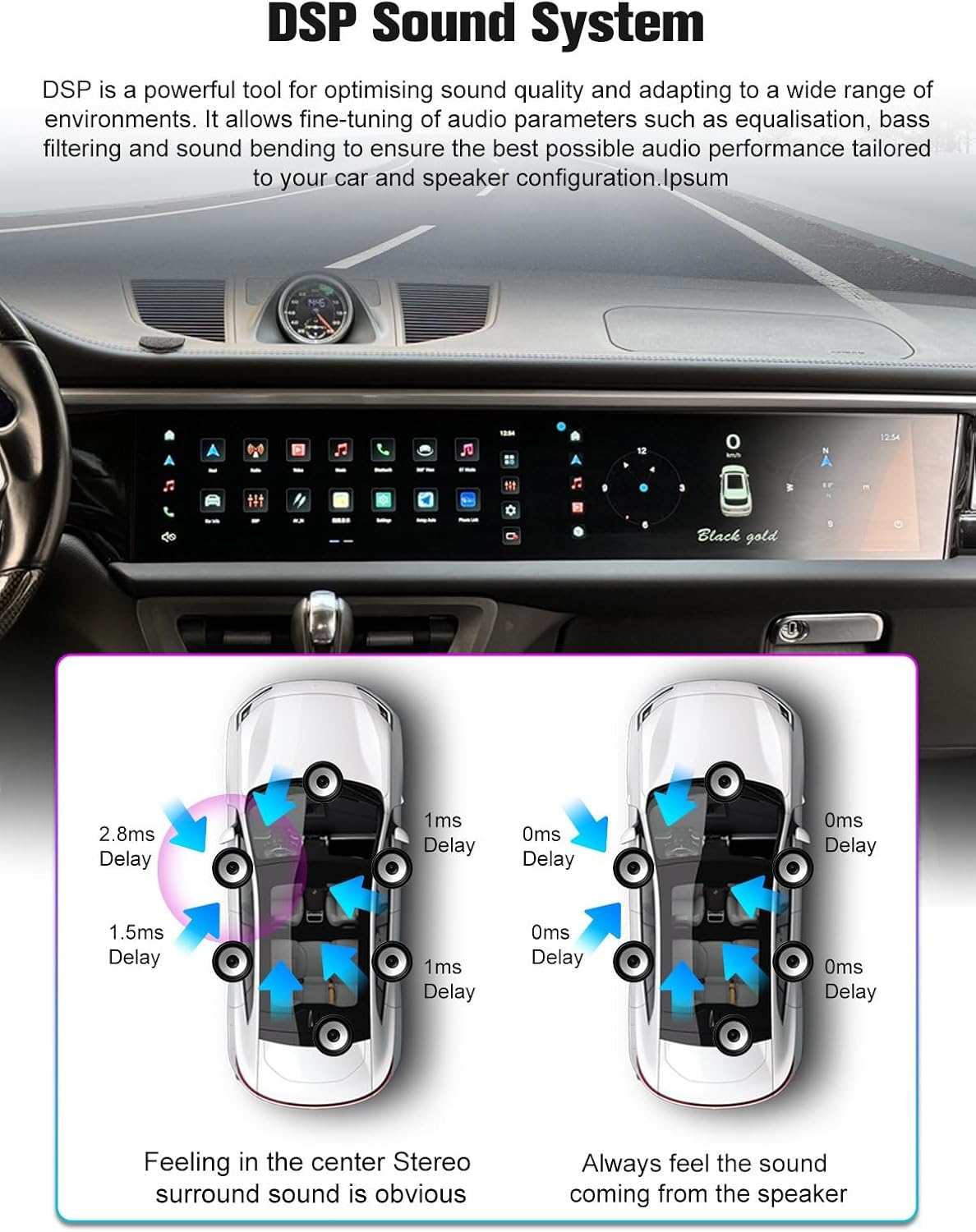
- Audio: DSP Sound System for optimized audio quality, equalization, bass filtering, and sound bending.
- Additional Features: 360-degree Camera support, 4K Video playback, Screen Mirroring, Backup Camera, DVR, OBD, TPMS, DAB, Steering Wheel Control, Microphone, Phone book search, Split-Screen Mode.
4. What's in the Box
The package includes the following components:
- Pioowirk Dual Screen Car Radio Unit
- All necessary wiring harnesses and connectors for installation
- Installation tools (pry tools)

5. Setup and Installation
Professional installation is highly recommended for this product to ensure proper functionality and to avoid damage to your vehicle's electrical system. The installation process involves removing existing dashboard components and connecting the new unit with the provided wiring harnesses.
5.1. Installation Overview
The system is designed for a seamless fit, appearing factory-made once installed. It integrates with your Porsche's CANBUS system to maintain original features.

5.2. Wiring Connections
Carefully connect all wiring harnesses according to the provided diagram. Ensure all connections are secure to prevent intermittent issues. The system is designed to connect directly without extra cables, protocol boxes, or fiber optics.
5.3. Initial Power-On
After installation, turn on your vehicle's ignition. The system should power on automatically. Follow any on-screen prompts for initial setup.
6. Operating Instructions
6.1. User Interface Navigation
The system features an intuitive multi-touch interface. Swipe left or right to navigate between application pages. Tap icons to launch applications.

6.2. Wireless CarPlay & Android Auto
Connect your smartphone wirelessly to access features like navigation, music, calls, and messaging directly on the car's display. Ensure your phone's Bluetooth and Wi-Fi are enabled.

6.3. Bluetooth Function
Pair your phone via Bluetooth for hands-free calling, music streaming, and phone book access. Navigate to the Bluetooth application on the main screen to manage connections.

6.4. DSP Sound System
Utilize the Digital Sound Processor (DSP) to fine-tune your audio experience. Access equalizer settings, adjust surround sound, enhance bass, and apply bass filters for optimal sound performance tailored to your vehicle's speaker configuration.
6.5. GPS Navigation
The built-in GPS supports various online mapping applications. Select your preferred navigation app (e.g., Apple Maps, Google Maps, Waze) to get real-time directions and traffic information.
6.6. Retaining Original OEM System
The system allows you to switch back to the original car's OEM interface, ensuring all factory functions, such as climate control, vehicle settings, and other original features, remain accessible.
7. Maintenance
- Screen Cleaning: Use a soft, lint-free cloth to gently wipe the screen. For stubborn smudges, slightly dampen the cloth with water or a screen-safe cleaner. Avoid harsh chemicals.
- Software Updates: Periodically check for software updates to ensure optimal performance and access to new features. Updates can typically be found in the system settings or through the manufacturer's website.
- General Care: Avoid exposing the unit to extreme temperatures or direct sunlight for prolonged periods. Do not place heavy objects on the screen.
8. Troubleshooting
8.1. No Power
- Check all power connections to ensure they are securely plugged in.
- Verify the vehicle's fuse box for any blown fuses related to the radio or infotainment system.
- Ensure the vehicle's ignition is on.
8.2. No Sound
- Check the volume settings on both the new unit and the original car system.
- Ensure audio cables are correctly connected.
- Verify that the correct audio input source is selected.
8.3. CarPlay/Android Auto Not Connecting
- Ensure Bluetooth and Wi-Fi are enabled on your smartphone.
- Forget the device from your phone's Bluetooth settings and re-pair.
- Restart both your phone and the car's infotainment system.
8.4. Touchscreen Unresponsive
- Restart the system by turning off the vehicle and restarting it.
- Ensure the screen is clean and free of debris.
9. Specifications
| Feature | Detail |
|---|---|
| Brand | Pioowirk |
| Screen Size | 12.3 Inches |
| Operating System | Android, Original Radio System |
| Memory Storage Capacity | 64 GB |
| Connectivity Technology | Bluetooth |
| Special Features | Bluetooth, Lane Assist, Radar Warning, Touchscreen, Wireless CarPlay, Android Auto, GPS |
| Map Type | North America |
| Display Type | LED |
| Human-Interface Input | Touchscreen |
| Compatible Devices | Android Phone, Smartphone, Apple Phone |
| Item Weight | 1 Kilogram |
| UPC | 732249989296 |
10. Warranty
The Pioowirk Dual Screen Radio comes with a 1-year manufacturer warranty for the screen. Please retain your proof of purchase for warranty claims.
11. Support
For technical assistance, troubleshooting not covered in this manual, or warranty inquiries, please contact Pioowirk customer support through the retailer where the product was purchased. You may also visit the official Pioowirk store on Amazon for additional resources and contact options.
Ask a question about this manual
Ask about setup, troubleshooting, compatibility, parts, safety, or missing instructions. Manuals+ will review the question and use this page’s manual context to help answer it.