
1. Introduction
Thank you for choosing the STUDIOFINIX 4-Inch Bluetooth Ceiling Speakers. This manual provides essential information for the safe installation, operation, and maintenance of your new audio system. Please read it thoroughly before use and retain it for future reference.
2. Package Contents
Verify that all components listed below are included in your package:
- 2 x 4-Inch Ceiling Speakers
- 1 x 2-Channel Bluetooth Amplifier (AMP-BTX01)
- 2 x 5-Meter Speaker Cables
- 1 x 12V3A Power Adapter
- 1 x User Manual (this document)

Figure 2.1: Package Contents
3. Safety Information
- Electrical Safety: Always disconnect power before installation or maintenance. Ensure wiring is performed by a qualified professional if you are unsure.
- Placement: Install speakers in structurally sound areas of the ceiling or wall. Avoid placing the amplifier in areas with excessive heat, moisture, or direct sunlight.
- Ventilation: Ensure the amplifier has adequate ventilation to prevent overheating.
- Water Resistance: While the speakers are designed for indoor/outdoor use and are noted as waterproof in specifications, avoid direct exposure to heavy rain or submersion.
- Children and Pets: Keep packaging materials and small components out of reach of children and pets.
4. Setup and Installation
4.1 Planning the Installation
Determine the optimal placement for your speakers. The speakers are designed for flush mounting in ceilings or walls. Consider the listening area and speaker spacing for balanced sound distribution.
4.2 Speaker Dimensions and Cutout
Before cutting, ensure the chosen location has sufficient depth and clearance. The speakers require a specific cutout diameter.
- Total Speaker Diameter: 6.4 inches (16.2 cm)
- Cutout Diameter: 5.7 inches (14.5 cm)
- Mounting Depth: 2.6 inches (6.5 cm)
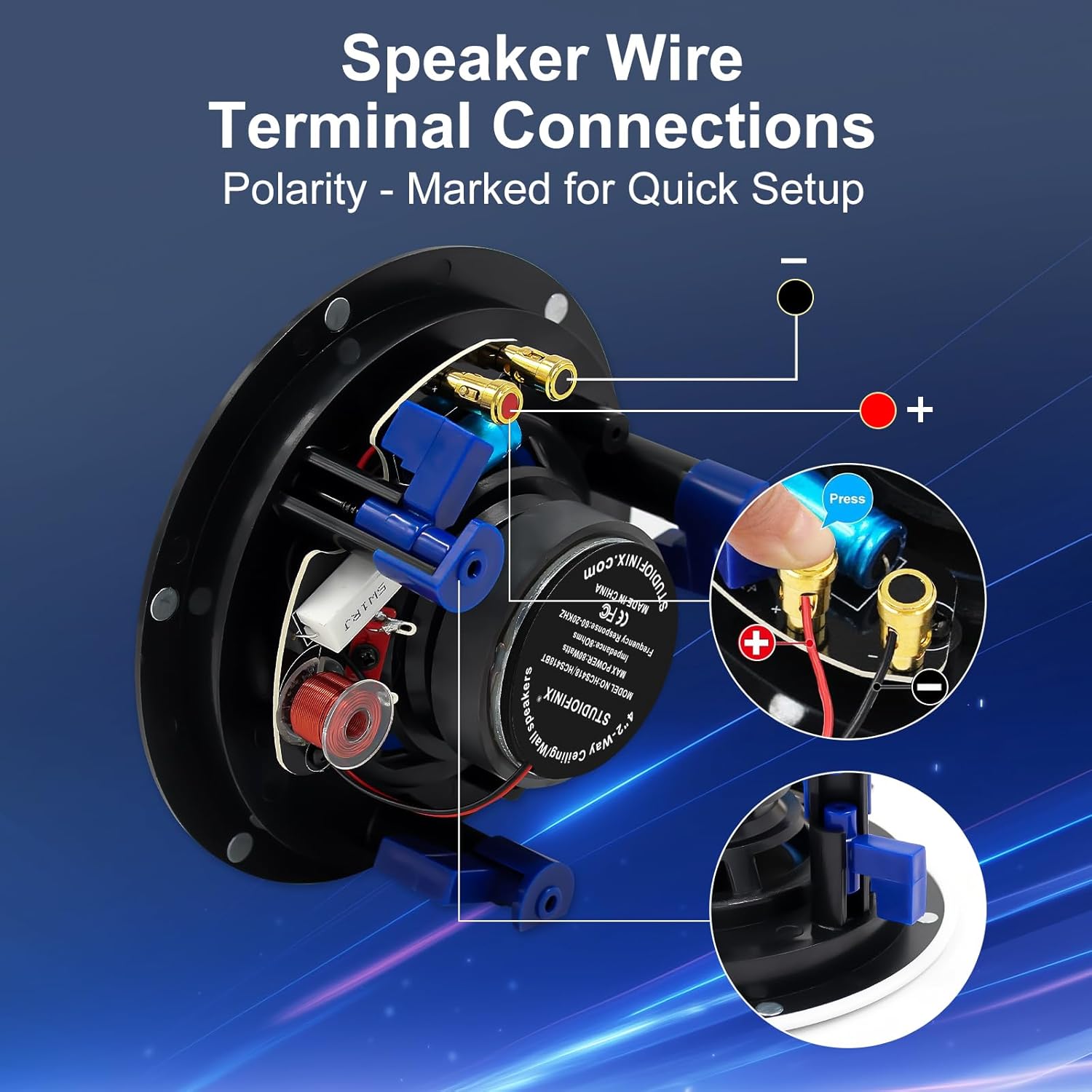
Figure 4.1: Product Installation Dimensions
4.3 Physical Installation Steps
- Using the provided template (if available) or the specified cutout diameter, carefully mark and cut the opening in your ceiling or wall.
- Ensure all wiring is accessible through the cutout.
- Insert the speaker into the cutout. The non-slip mounting clamps will secure the speaker in place.
- Attach the magnetic grill to the speaker frame.

Figure 4.2: Inserting the Speaker

Figure 4.3: Attaching the Magnetic Grill
4.4 Wiring the Speakers to the Amplifier
Connect the speaker cables to the amplifier and speakers, observing correct polarity. The speaker terminals are marked for easy identification.
- Connect the red (+) wire from the speaker to the red (+) terminal on the amplifier.
- Connect the black (-) wire from the speaker to the black (-) terminal on the amplifier.
- Repeat for the second speaker.

Figure 4.4: Speaker Wire Terminal Connections
4.5 Power Connection
Connect the 12V3A power adapter to the amplifier's 'Power Jack' input, then plug the adapter into a standard electrical outlet.

Figure 4.5: Amplifier Connections (Power and AUX IN)
5. Operating Instructions
5.1 Bluetooth Pairing
The amplifier features Bluetooth connectivity for wireless audio streaming.
- Ensure the amplifier is powered on.
- On your mobile device (smartphone, tablet, etc.), navigate to the Bluetooth settings.
- Search for available devices. The amplifier should appear as a discoverable device (e.g., "STUDIOFINIX AMP").
- Select the amplifier to pair. Once paired, your device will confirm a successful connection.
- You can now stream audio wirelessly to your ceiling speakers. The Bluetooth range is approximately 15 meters (49 feet).

Figure 5.1: Bluetooth Connection Diagram
5.2 AUX Input
For wired audio sources, use the AUX IN port on the amplifier.
- Connect your audio source (e.g., MP3 player, TV, computer) to the 'AUX IN' port on the amplifier using a 3.5mm audio cable (not included).
- Ensure the amplifier is powered on.
- The amplifier will automatically switch to AUX input when a signal is detected, or you may need to manually select the input mode if available.
6. Maintenance
- Cleaning: Use a soft, dry cloth to clean the speaker grills and amplifier. Do not use abrasive cleaners or solvents.
- Grills: The magnetic grills are paintable. If painting, ensure the paint does not clog the perforations, which could affect sound quality.
- Connections: Periodically check all cable connections to ensure they are secure.
7. Troubleshooting
| Problem | Possible Cause | Solution |
|---|---|---|
| No sound from speakers | Power adapter not connected; Amplifier not powered on; Speaker wires incorrectly connected; Bluetooth not paired; AUX cable not connected or source not playing. | Ensure power adapter is securely plugged in and amplifier is on. Check speaker wire polarity and connections. Re-pair Bluetooth device. Verify AUX cable connection and audio source playback. |
| Bluetooth device cannot pair | Amplifier not in pairing mode; Device too far from amplifier; Another device is already connected. | Ensure amplifier is powered on. Move device closer to the amplifier (within 15m). Disconnect any previously paired devices from the amplifier. |
| Poor sound quality | Incorrect wiring polarity; Low quality audio source; Bluetooth interference. | Verify speaker wire polarity (+ to + and - to -). Try a different audio source. Reduce distance between Bluetooth device and amplifier, or remove obstacles. |
8. Specifications
| Feature | Detail |
|---|---|
| Model Name | ST-HCS418BT-US |
| Speaker Type | In-Ceiling |
| Speaker Size | 4 inches (10.2 cm) |
| Audio Driver Size | 4 inches (10.2 cm) |
| Speaker Maximum Output Power | 160 Watts |
| Connectivity Technology | Bluetooth |
| Maximum Bluetooth Range | 15 Meters (49 feet) |
| Mounting Type | Flush Mount (In-Ceiling/In-Wall) |
| Product Dimensions (D x W x H) | 3"D x 6.3"W x 6.3"H (7.6cm D x 16cm W x 16cm H) |
| Cutout Diameter | 5.7 inches (14.5 cm) |
| Mounting Depth | 2.6 inches (6.5 cm) |
| Item Weight | 1.8 Kilograms (3.96 pounds) |
| Recommended Uses | Indoor/Outdoor |
| Special Feature | Waterproof |
9. Warranty and Support
9.1 Warranty Information
For detailed warranty information, please refer to the documentation included with your product packaging or visit the official STUDIOFINIX website. Keep your proof of purchase for warranty claims.
9.2 Customer Support
If you encounter any issues or have questions not covered in this manual, please contact STUDIOFINIX customer support through their official website or the contact information provided on your product packaging.