
POSEIDON TK035S
POSEIDON Wireless Rotary Tattoo Machine Kit TK035S Instruction Manual
Comprehensive Guide for Setup, Operation, and Maintenance
1. Introduction
Thank you for choosing the POSEIDON Wireless Rotary Tattoo Machine Kit TK035S. This professional-grade kit is designed for precision and reliability, suitable for various tattooing techniques including lining, shading, and permanent makeup. This manual provides essential information for the safe and effective use of your new tattoo machine.
2. Safety Guidelines
Adherence to safety protocols is paramount when operating tattoo equipment. Please read and understand all instructions before use.
- Always ensure all components are clean and sterilized before each use.
- Use only sterile, individually packaged needle cartridges.
- Wear appropriate personal protective equipment, including gloves.
- Keep the machine and power supply away from water or other liquids. The machine is not waterproof.
- Do not attempt to disassemble or repair the machine or batteries yourself. Contact support for assistance.
- Store the kit in a clean, dry, and safe place, out of reach of children.
- Dispose of used needles and other contaminated materials according to local regulations for biohazardous waste.
3. Package Contents
Verify that all items listed below are included in your POSEIDON Wireless Rotary Tattoo Machine Kit TK035S:

Image 3.1: Overview of the complete POSEIDON Wireless Rotary Tattoo Machine Kit TK035S, showing all included components.
- 1 x POSEIDON Wireless Rotary Tattoo Pen (Model HM122)
- 2 x Rechargeable Wireless Batteries (1500mAh each)
- 1 x Type-C Charging Cable
- 20 x Sterile Needle Cartridges (5x1205RL, 5x1207RL, 5x1209RS, 5x1207CM)
- 1 x 30ml Black Tattoo Ink
- 10 x 5ml Colored Tattoo Inks
- 40 x Ink Cups
- 1 x Marker Pen
- 1 x Set of Tattoo Stencils (or practice stickers)
- 1 x Pair of Gloves
- 1 x Set of Grip Tips
- 1 x Practice Skin
- 2 x Transfer Papers
- 4 x Table Mats

Image 3.2: A detailed visual breakdown of the kit's components, highlighting the tattoo pen, wireless batteries, various needle cartridges, and ink bottles.

Image 3.3: Illustration of the 20 mixed needle cartridges, including 1205RL, 1207RL, 1209RS, and 1207CM types.

Image 3.4: The included tattoo ink bottles, featuring one large black ink and ten smaller colored inks, along with ink cups.
4. Product Components Overview
4.1. Rotary Tattoo Pen (Model HM122)
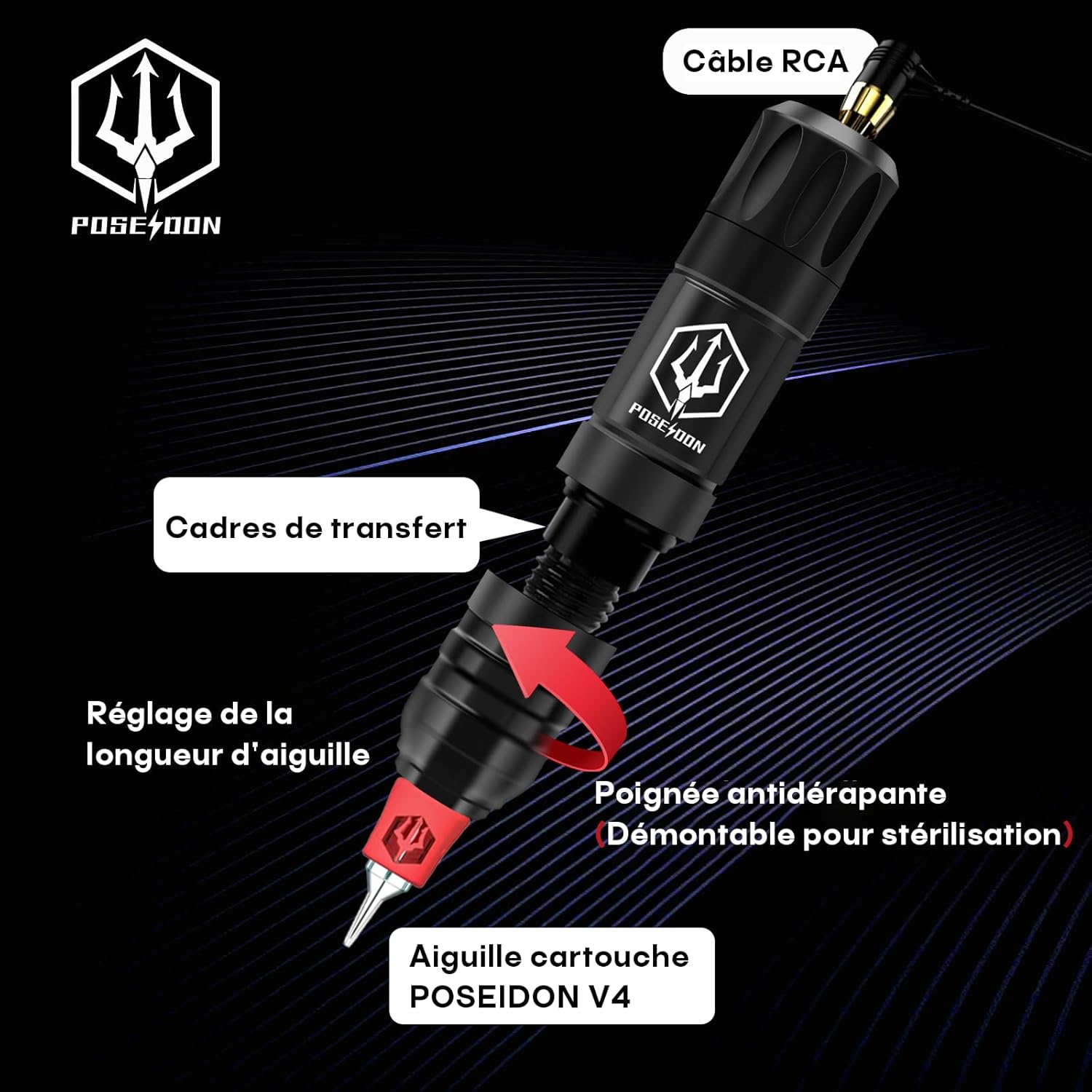
Image 4.1: Labeled diagram of the rotary tattoo machine, showing the RCA cable connection point, transfer frames, needle length adjustment mechanism, and the anti-slip grip which is detachable for sterilization. It also indicates the POSEIDON V4 cartridge needle.
The POSEIDON rotary tattoo pen features a 3.5mm stroke for precise control. Key components include:
- Needle Length Adjustment: Rotate the grip to adjust the needle protrusion.
- Anti-slip Grip: Ergonomically designed for comfort and control, detachable for sterilization.
- Cartridge Slot: Compatible with standard tattoo needle cartridges.
- RCA Connection: For wired operation with a traditional power supply (cable not included in this wireless kit, but the port is present).
4.2. Wireless Batteries
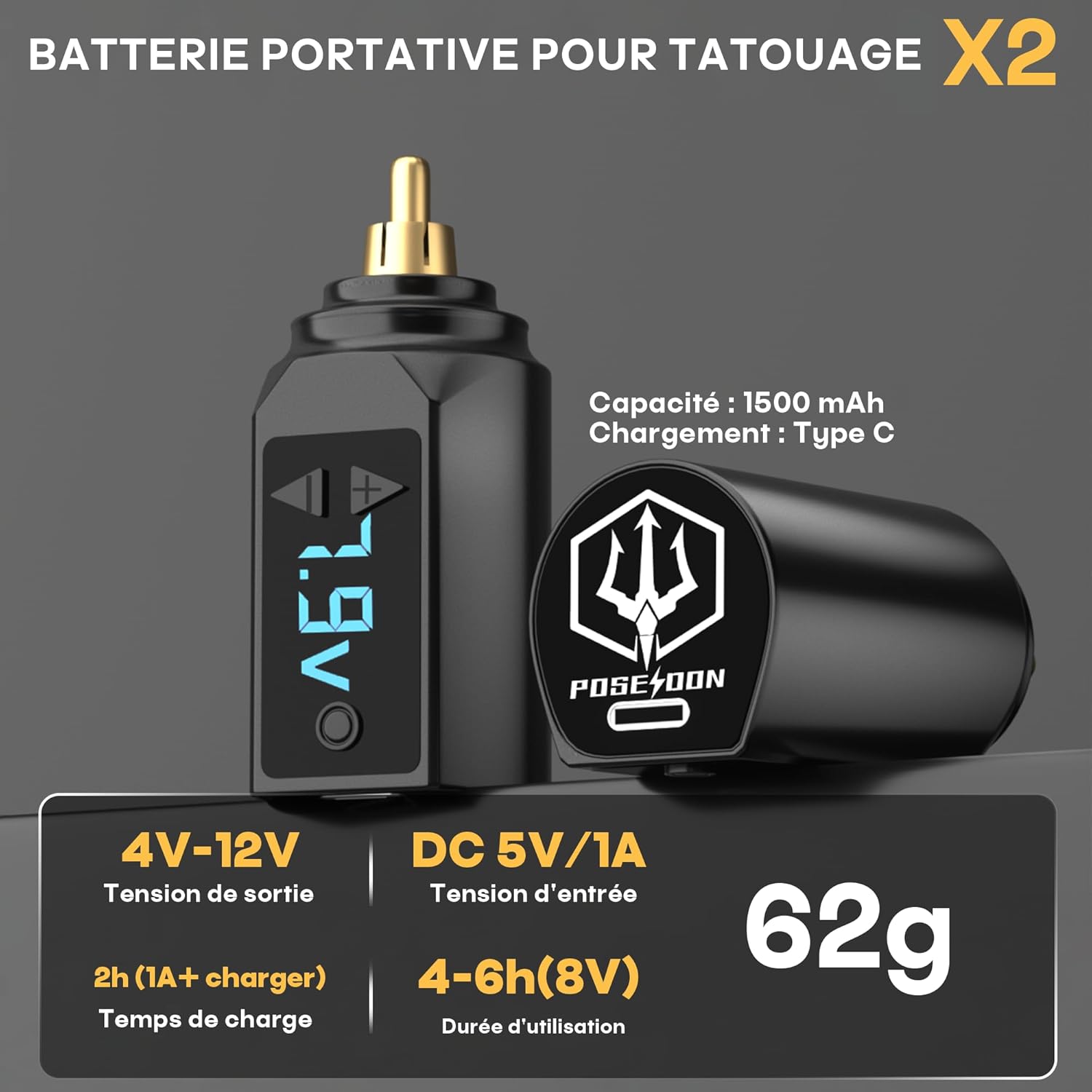
Image 4.2: Detailed view of the wireless battery, highlighting its 1500mAh capacity, Type-C charging port, 4V-12V output voltage range, 5V/1A input, 2-hour charge time, and 4-6 hours of usage at 8V. Each battery weighs 62g.
The kit includes two 1500mAh Lithium-polymer batteries, providing over 6 hours of wireless operation per charge. They feature a Type-C charging port for fast recharging.

Image 4.3: Close-up of the wireless battery controls, showing the power switch, digital voltage display, voltage adjustment buttons (+ and -), the RCA connector, and the Type-C charging port.
- Power Switch: Turns the battery on/off.
- Voltage Display: Shows the current operating voltage.
- Voltage Adjustment Buttons: Use '+' and '-' to adjust voltage between 4V and 12V.
- RCA Connector: Connects the battery to the tattoo pen.
- Type-C Port: For charging the battery.
5. Setup Instructions
Follow these steps to prepare your POSEIDON tattoo machine for use:
- Charge Batteries: Before first use, fully charge both wireless batteries using the provided Type-C cable and a compatible USB power adapter (not included). The display will indicate charging status.
- Attach Battery: Securely connect one of the charged wireless batteries to the RCA port of the tattoo pen. Ensure a firm connection.
- Insert Needle Cartridge: Select a sterile needle cartridge. Push the cartridge firmly into the front end of the tattoo pen until it clicks into place.
- Adjust Needle Protrusion: Rotate the grip of the tattoo pen to adjust the needle's protrusion to your desired length.
- Prepare Ink: Pour a small amount of desired tattoo ink into a sterile ink cup.

Image 5.1: The POSEIDON tattoo pen connected to a wireless battery via the RCA plug, ready for operation.
6. Operation Instructions
Once the machine is set up, follow these steps to operate it:
- Power On: Press and hold the power switch on the wireless battery for a few seconds until the voltage display illuminates.
- Adjust Voltage: Use the '+' and '-' buttons on the battery to set the desired operating voltage. The recommended voltage range is 4V-12V, with 8V being a common starting point for many applications.
- Dip Needle: Gently dip the needle cartridge into the ink cup, allowing the needle to draw up ink.
- Begin Tattooing: Carefully apply the needle to the practice skin or prepared surface.
- Power Off: After use, press and hold the power switch on the battery to turn off the machine.
- Battery Swap: If the battery runs low during a session, simply detach it and replace it with the second fully charged battery to ensure continuous operation.
7. Maintenance and Care
Proper maintenance ensures the longevity and performance of your tattoo machine.
- Cleaning: After each use, carefully remove and dispose of the needle cartridge. Wipe down the machine body and grip with a sterile wipe or disinfectant solution. The grip is detachable for thorough sterilization.
- Sterilization: Ensure all reusable components that come into contact with skin or ink are properly sterilized according to professional standards.
- Storage: Store the machine, batteries, and accessories in a clean, dry, and dust-free environment.
- Battery Care: Do not overcharge or completely drain the batteries. Store them at a partial charge if not used for extended periods.
8. Troubleshooting
If you encounter issues with your POSEIDON tattoo machine, refer to the following common problems and solutions:
| Problem | Possible Cause | Solution |
|---|---|---|
| Machine does not turn on. | Battery is not charged or not properly connected. | Ensure battery is fully charged. Reattach battery firmly to the machine. |
| Machine runs intermittently. | Loose battery connection or low battery charge. | Check battery connection. Charge or replace battery. |
| Needle not moving or moving weakly. | Incorrect needle cartridge insertion, low voltage, or motor issue. | Ensure cartridge is fully seated. Increase voltage. If problem persists, contact support. |
| Ink flow is inconsistent. | Clogged needle, insufficient ink, or incorrect needle depth. | Replace needle cartridge. Ensure adequate ink in cup. Adjust needle protrusion. |
9. Technical Specifications
| Feature | Detail |
|---|---|
| Model | TK035S (Rotary Tattoo Pen HM122) |
| Machine Dimensions | 116 x 27mm |
| Machine Weight | 165g |
| Stroke Length | 3.5mm |
| Battery Type | Lithium-polymer |
| Battery Capacity | 1500 mAh (each) |
| Output Voltage | 4V-12V (adjustable) |
| Input Voltage | DC 5V/1A |
| Charging Time | Approx. 2 hours (with 1A charger) |
| Usage Duration | 4-6 hours (at 8V) |
| Motor Speed | 8V/3000 rpm |
| Needle Compatibility | All standard cartridge needles |
| Water Resistance | Not waterproof |
| Package Dimensions | 23.4 x 21.4 x 10.2 cm |
| Package Weight | 1.12 kg |
| UPC | 716597329317 |

Image 9.1: Visual representation of the tattoo pen's stroke length (4mm indicated, but 3.5mm is from feature bullets, so I will stick to 3.5mm in text) and the battery's operating voltage and motor speed.

Image 9.2: Highlights the dual autonomy feature of the batteries, showing 2 hours for a full charge, 4-6 hours of usage, and 1500 mAh battery capacity.
10. Warranty and Support
POSEIDON is committed to customer satisfaction. Your POSEIDON Wireless Rotary Tattoo Machine Kit TK035S comes with a risk-free guarantee.
- 100% Satisfaction Guarantee: If you are not completely satisfied with your purchase, a refund or replacement policy is available.
- Contact Support: For any questions, concerns, or warranty claims, please contact POSEIDON customer service through your purchase platform.
Related documentsTK035S


Ask a question about this manual
Ask about setup, troubleshooting, compatibility, parts, safety, or missing instructions. Manuals+ will review the question and use this page’s manual context to help answer it.