
Introduction
Thank you for purchasing the Daewoo DW1115 Portable AM/FM Analogue Radio. This manual provides essential information for the safe and efficient operation of your device. Please read it thoroughly before use and retain it for future reference.
Safety Information
- Do not expose the radio to rain or moisture to prevent fire or electric shock.
- Do not disassemble the unit. Refer all servicing to qualified personnel.
- Avoid extreme temperatures, direct sunlight, and dusty or humid environments.
- Use only the specified battery type (1 AAAA battery). Ensure correct polarity during installation.
- Keep batteries out of reach of children.
Product Overview
The Daewoo DW1115 is a compact portable radio featuring an AM/FM analogue tuner and an integrated speaker. It is designed for ease of use and portability.
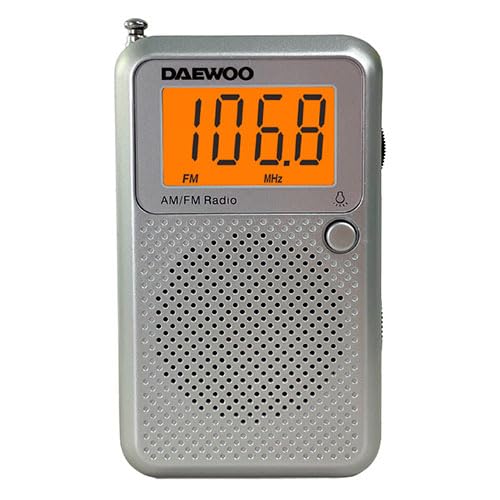
Figure 1: Front view of the Daewoo DW1115 Portable AM/FM Analogue Radio.
Controls and Components:
- Tuning Dial: Used to select AM or FM radio frequencies.
- Volume Control: Adjusts the sound output level.
- AM/FM Band Selector: Switches between AM and FM radio bands.
- Power ON/OFF Switch: Turns the radio on or off.
- Integrated Speaker: Provides audio output.
- Telescopic Antenna: Extends for improved FM reception.
- Battery Compartment: Located on the back, holds the AAAA battery.
Setup
1. Battery Installation:
- Locate the battery compartment cover on the back of the radio.
- Slide or unclip the cover to open it.
- Insert one (1) AAAA battery, ensuring the correct polarity (+ and -) as indicated inside the compartment.
- Replace the battery compartment cover securely.
Note: The radio requires 1 AAAA battery, which is included.
Operating
1. Powering On/Off:
- To turn the radio ON, slide the Power ON/OFF switch to the "ON" position.
- To turn the radio OFF, slide the Power ON/OFF switch to the "OFF" position.
2. Selecting a Band (AM/FM):
- Use the AM/FM Band Selector switch to choose between AM and FM frequencies.
3. Tuning to a Station:
- Slowly rotate the Tuning Dial until you hear your desired radio station clearly.
- For FM reception, extend the telescopic antenna fully and adjust its position for optimal signal.
- For AM reception, the radio has a built-in ferrite bar antenna. Rotate the entire radio for best reception.
4. Adjusting Volume:
- Rotate the Volume Control dial to increase or decrease the sound level.
Maintenance
Cleaning:
- Wipe the radio's exterior with a soft, damp cloth. Do not use abrasive cleaners or solvents.
- Ensure the radio is turned off and batteries are removed before cleaning.
Battery Replacement:
- Replace the AAAA battery when the sound becomes weak or distorted.
- Always dispose of used batteries responsibly according to local regulations.
Storage:
- If storing the radio for an extended period, remove the battery to prevent leakage.
- Store in a cool, dry place away from direct sunlight.
Troubleshooting
| Problem | Possible Cause | Solution |
|---|---|---|
| No sound / Radio does not turn on. | Battery is dead or incorrectly installed. | Check battery polarity; replace with a new AAAA battery. |
| Poor reception / Static. | Weak signal; antenna not adjusted. | Extend and adjust the telescopic antenna (FM). Rotate the radio (AM). Move to a different location. |
| Sound is distorted. | Low battery; tuning not precise. | Replace battery. Fine-tune the station. |
Specifications
- Model: DW1115
- Tuner Type: AM/FM Analogue
- Power Source: 1 x AAAA Battery (included)
- Integrated Speaker: Yes
- Item Weight: 5.6 ounces (0.16 Kilograms)
- Voltage: 28 Volts
- Manufacturer: Daewoo
Warranty and Support
Daewoo products are designed for reliability and performance. This product is covered by a limited warranty. For specific warranty terms and conditions, please refer to the warranty card included with your purchase or visit the official Daewoo website.
For technical support, troubleshooting assistance, or service inquiries, please contact Daewoo customer service through their official channels. Contact information can typically be found on the product packaging or the manufacturer's website.
Online Resources: Visit the Daewoo Store on Amazon


