
1. Setup
1.1 Unboxing and Initial Setup
Carefully unpack all items from the box. Ensure all components are present before proceeding with setup.
- BA-30 Bass Amp x 1
- Power cable x 1
- Power adapter x 1
- Owner's manual x 1
1.2 Powering the Amplifier
The BA-30 amplifier supports dual power modes for versatile use:
- Indoor Use: Connect the included AC adapter to a wall outlet.
- Outdoor/Portable Use: For cordless operation, connect the amplifier to a 65W or higher output PD (Power Delivery protocol 2.0, 3.0 or later) power bank using a 65W high-current USB-C cable. The amplifier does not contain an internal battery and requires continuous external power.

Image: The JOYO Vibe Cube BA-30 amplifier connected to a power bank, demonstrating its portable power options for outdoor use.
1.3 Connecting Your Instrument
Connect your bass guitar to the amplifier's 6.35mm input jack using a standard instrument cable.
1.4 Bluetooth 5.1 Pairing
To stream backing tracks wirelessly, activate Bluetooth on your device (e.g., smartphone, tablet). Press and hold the 'BASS' knob on the amplifier to enable Bluetooth pairing. The amplifier will appear as 'VIBE CUBE' in your device's Bluetooth settings. Select it to connect.
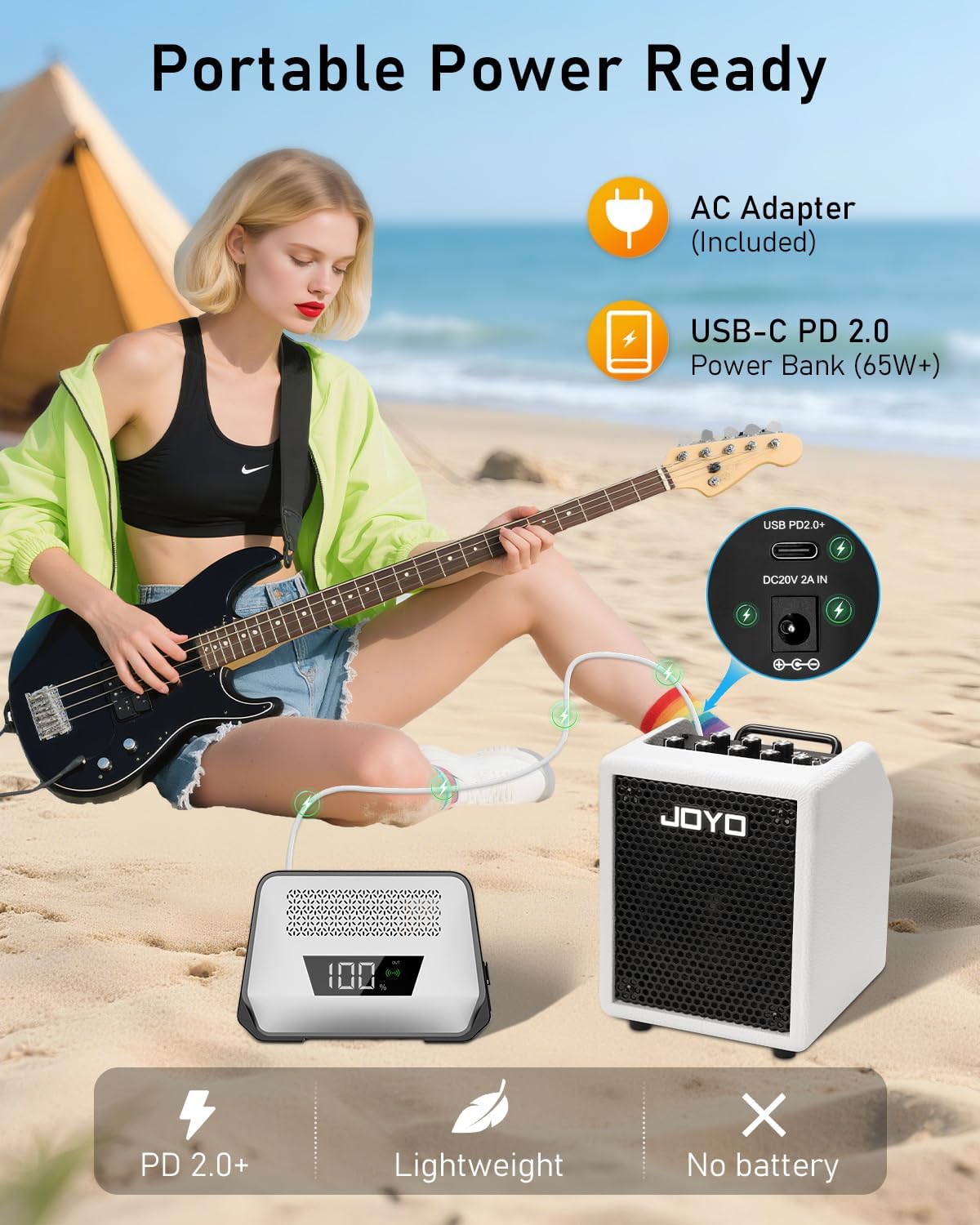
Image: A smartphone screen displaying a successful Bluetooth connection to the 'VIBE CUBE' amplifier, highlighting its wireless audio streaming capability.
1.5 OTG Direct Recording Setup
For direct recording to your phone or PC, connect your device to the amplifier's Type-C OTG port. The OTG audio interface allows for recording with independent volume control, ideal for demos, livestreams, or social media content.
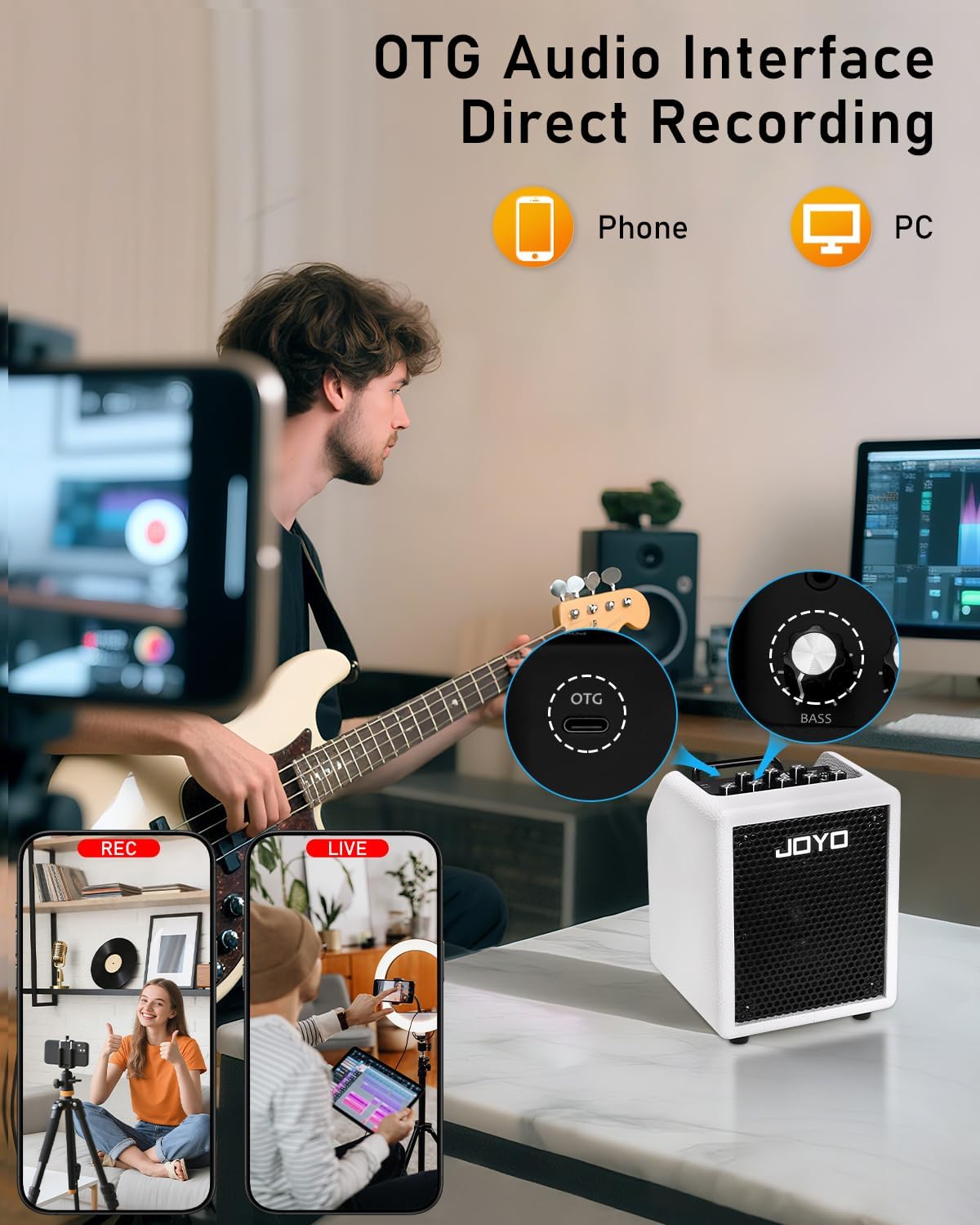
Image: A bassist playing while the JOYO Vibe Cube BA-30 amplifier is connected via its OTG port to a smartphone, demonstrating direct recording functionality.
2. Operating
2.1 Controls Overview
The amplifier features a comprehensive control panel for precise sound shaping:
- OTG VOL: Adjusts the volume of the OTG audio interface.
- VOLUME: Controls the overall output volume of the amplifier.
- COMPRESS: Adjusts the level of the built-in compressor.
- INPUT: 6.35mm jack for instrument connection.
- BASS: Adjusts low-frequency response. (Press for Bluetooth activation)
- MID FREQ: Sweeps the mid-frequency range (200Hz-2000Hz) for precise tonal adjustments.
- MIDDLE: Adjusts mid-frequency response.
- TREBLE: Adjusts high-frequency response.
- GAIN: Controls the input sensitivity and drive.

Image: A detailed view of the JOYO Vibe Cube BA-30 amplifier's control panel, illustrating the various knobs for EQ, volume, gain, and compression.
2.2 Tone Shaping with 3-Band EQ and Mid FREQ Control
Use the dedicated BASS, MIDDLE, and TREBLE knobs to adjust the amplifier's frequency response. The MID FREQ knob allows you to pinpoint and adjust specific mid-range frequencies between 200Hz and 2000Hz, offering flexible tone sculpting.
2.3 Using the Built-in Compressor
The COMPRESS knob controls the integrated compression effect. Engage the compressor to smooth out the attack of your notes and enrich quieter passages, providing a more consistent and polished bass tone.
2.4 Silent Practice with Headphones
For silent practice sessions, connect your headphones to the 3.5mm headphone jack. The amplifier's speaker will automatically mute, allowing you to hear full-range sound privately.

Image: A person using headphones with the JOYO Vibe Cube BA-30 amplifier, demonstrating its silent practice feature.
3. Maintenance
3.1 General Care
To ensure the longevity of your JOYO Vibe Cube BA-30, keep it in a dry environment and clean it regularly with a soft, dry cloth. Avoid exposing the amplifier to extreme temperatures or direct sunlight. Do not use abrasive cleaners or solvents.
4. Troubleshooting
4.1 Common Issues and Solutions
- Active Preamp Basses: If using an active preamp bass, avoid maxing out all EQ bands. This can lead to signal peaking.
- Signal Peaks: If the signal peaks, lower the bass EQ and adjust the amplifier's GAIN knob to prevent distortion.
- Smoother Bass Response: Engage the COMPRESS knob to achieve a smoother and more controlled bass tone.
5. Specifications
5.1 Technical Specifications
- Item Weight: 6.16 pounds (2.7 kg)
- Product Dimensions: 8.5 x 7.24 x 6.5 inches (215 x 182.5 x 165 mm)
- Output Wattage: 30 Watts
- Speaker: 4-inch full-range speaker with 113x113mm LF radiator
- Power Source: Corded Electric, Power Bank (USB Type-C jack, PD 2.0+ support, 65W+ required)
- Connector Types: 3.5mm Jack (Headphone), 6.35mm Jack (Input)
- Compatible Devices: Double Bass, Guitar, PC, Phone
- Material: Acrylonitrile Butadiene Styrene (ABS), Leatherette, Metal

Image: The JOYO Vibe Cube BA-30 amplifier with its dimensions and a list of included package items.
6. Warranty & Support
6.1 Product Support
For any product issues or inquiries, please refer to your order details and send a message to the seller. JOYO TECHNOLOGY is committed to assisting customers with their digital music products.
Specific warranty information is not provided in this manual. Please refer to your purchase documentation or contact the seller for details regarding warranty coverage.
7. Product Videos
7.1 JOYO 30W Portable Amp 4" Speaker with 3-Band EQ & Compressor
Video: A detailed overview of the JOYO 30W Portable Amp, showcasing its features including the 4-inch speaker, 3-Band EQ, and compressor.
7.2 BA-30 Bass Combo Amp Bluetooth 5.1 + OTG Direct Recording
Video: Demonstrates the Bluetooth 5.1 connectivity and OTG direct recording capabilities of the BA-30 Bass Combo Amp.
7.3 BA-30 Portable Bass Amp 3-Band EQ+Compressor - Peter K. Lee
Video: Peter K. Lee provides a review and demonstration of the BA-30 Portable Bass Amp's 3-Band EQ and compressor features.
7.4 Portable Bass Combo Amp 30W Headphone Practice-Adam R
Video: Adam R demonstrates the 30W Portable Bass Combo Amp, focusing on its utility for headphone practice.
7.5 JOYO 30W Portable Bass Combo Amp Try Out - Vibe Cube
Video: A trial and sound test of the JOYO 30W Portable Bass Combo Amp, the Vibe Cube.


