
1. Introduction
Thank you for choosing the iToncs 3-in-1 Rechargeable UV LED Flashlight. This versatile device combines a powerful LED flashlight, a UV blacklight, and a COB side light, designed for various applications including pet urine detection, camping, emergencies, and general illumination. This manual provides detailed instructions for safe and effective use, maintenance, and troubleshooting.
2. Product Features
- 395nm UV Light: Ideal for detecting pet urine, scorpions, verifying currency, official identity certificates, and passports.
- Portable LED Flashlight: High lumen output with a lifespan of over 100,000 hours. Capable of illuminating large areas or focusing on objects up to 660 feet away. Compact size (5.5 inches in length, 5 ounces in weight) with a pocket clip for portability.
- Strong Magnetic Base: Allows attachment to iron surfaces for hands-free operation.
- IPX6 Water Resistance: Constructed from durable aluminum, designed to withstand rain, snow, and other challenging weather conditions.
- 7 Lighting Modes: Includes High, Low, Strobe, UV light, COB white light, COB red light, and COB side strobe light. Features a wide-to-narrow beam twistable zoom function.
- One-Key Turn Off: Long press the power button for two seconds in any mode to turn off the flashlight.
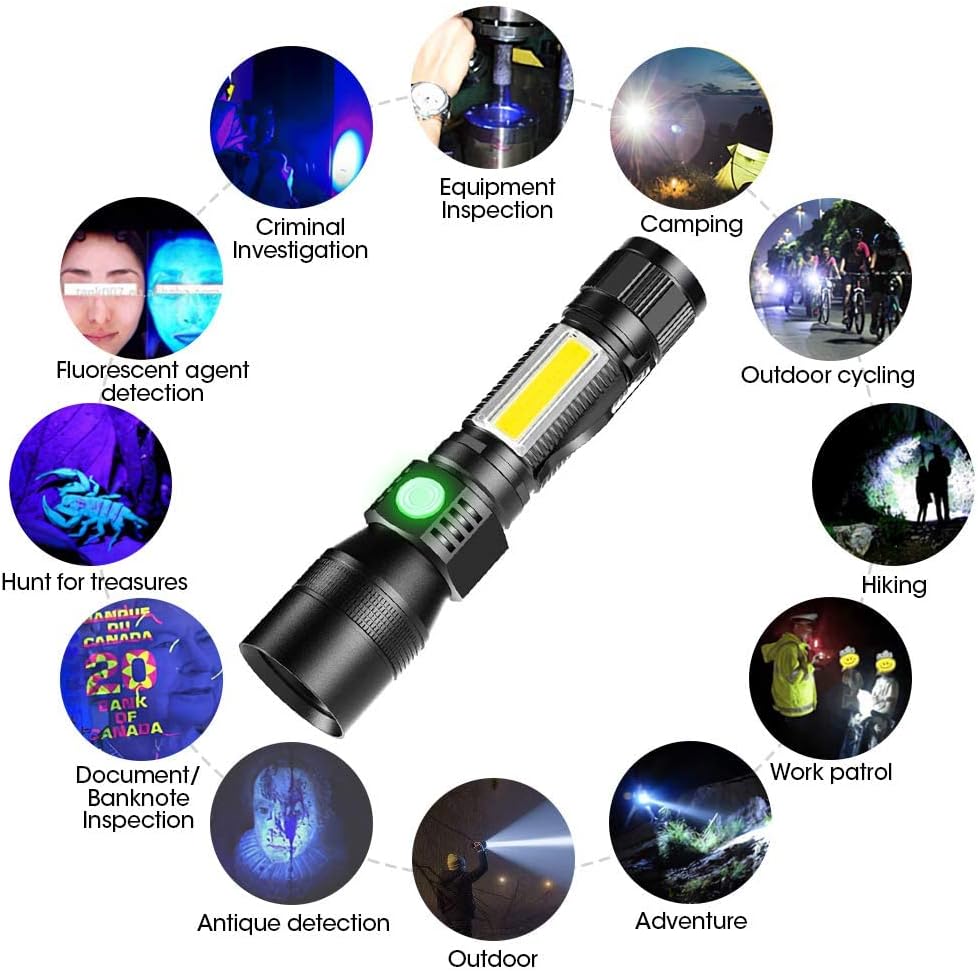
Image: The iToncs flashlight is shown in various application scenarios, highlighting its versatility for tasks like pet stain detection, outdoor activities, and security checks.
3. Package Contents
Please check the package for the following items:
- iToncs 3-in-1 Rechargeable UV LED Flashlight (4 units)
- USB Charging Cable (4 units)

Image: A visual representation of the package contents, showing four flashlights and their corresponding USB charging cables.
4. Specifications
| Feature | Specification |
|---|---|
| Model Number | 016-4pc |
| Light Source Type | UV, LED (Main LED, COB LED) |
| UV Wavelength | 395 nm |
| Power Source | Battery Powered (Rechargeable Lithium Ion) |
| Material | Aluminum |
| Water Resistance Level | IPX6 (Waterproof) |
| Product Dimensions | 6.3"D x 0.98"W x 0.98"H (16 x 2.5 x 2.5 cm) |
| Item Weight | 10.6 ounces (approximately 300g per flashlight) |
| Mounting Type | Magnetic Mount |
5. Setup
5.1 Charging the Flashlight
Before first use, fully charge the flashlight. The flashlight uses a rechargeable Lithium-Ion battery.
- Locate the charging port on the flashlight.
- Connect the provided USB charging cable to the flashlight's charging port.
- Connect the other end of the USB cable to a compatible power source, such as a laptop, wall charger, power bank, or car charger.
- The charging indicator light will illuminate (typically red) during charging and change color (typically green) when fully charged.
- A full charge typically takes approximately 3 hours.

Image: This image demonstrates how to charge the iToncs flashlight using various USB power sources and indicates the approximate battery life for different light modes.
5.2 Initial Use
Once charged, the flashlight is ready for use. Familiarize yourself with the power button and mode selection.
6. Operating Instructions
6.1 Power On/Off and Mode Selection
The flashlight features 7 lighting modes. Press the power button to cycle through the modes.
- Power On: Press the power button once to turn on the flashlight.
- Cycle Modes: Each subsequent press of the power button will cycle through the main LED modes (High, Low, Strobe), then UV light, then COB modes (COB white light, COB red light, COB side strobe light).
- One-Key Turn Off: To turn off the flashlight from any mode, press and hold the power button for approximately two seconds.
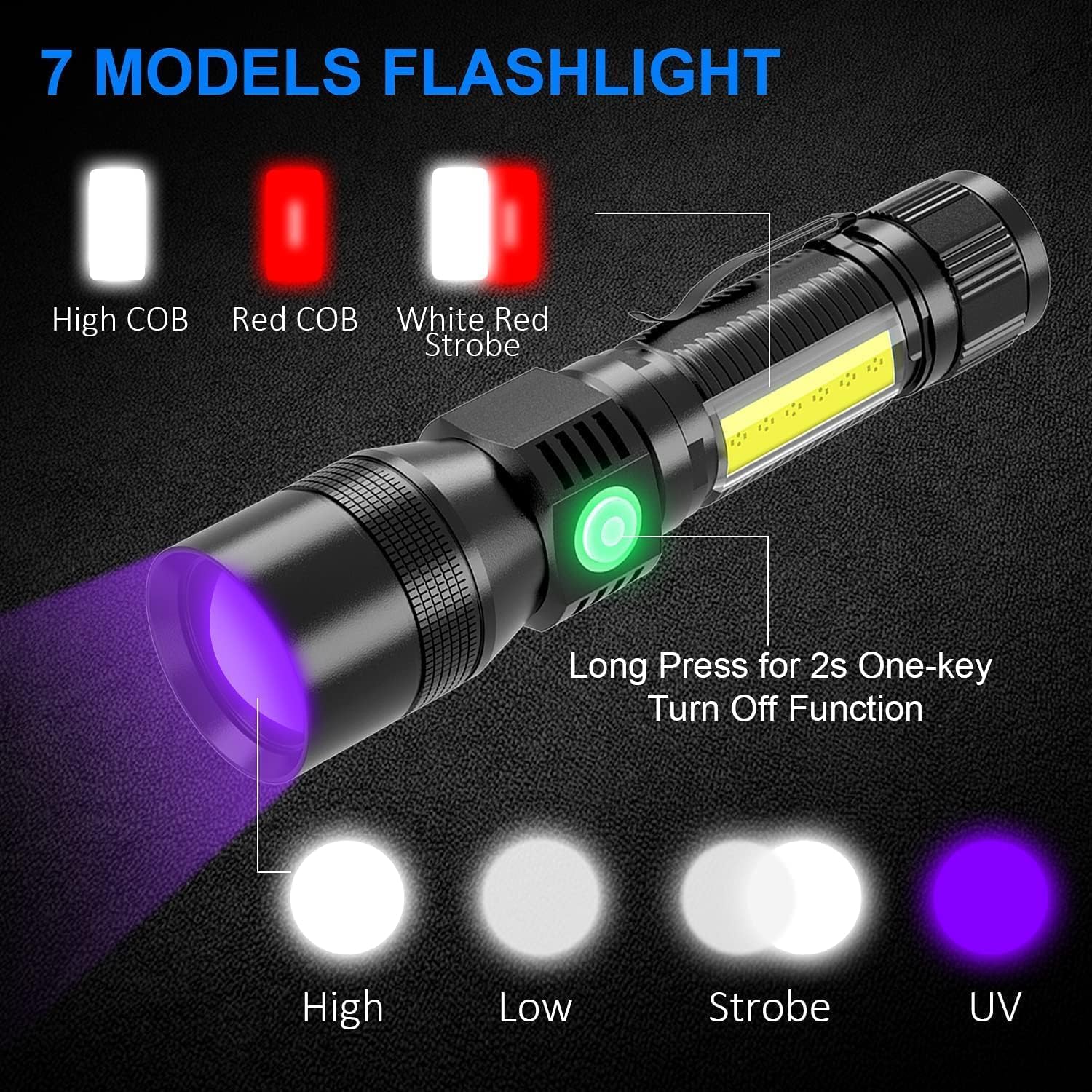
Image: This diagram illustrates the seven distinct lighting modes available on the iToncs flashlight and the method for quickly turning the device off.
6.2 Zoom Function
The main LED light features a zoom function to adjust the beam focus.
- Zoom In: Extend the head of the flashlight forward to narrow the beam, concentrating the light for a longer throw.
- Zoom Out: Retract the head of the flashlight to widen the beam, illuminating a larger area.
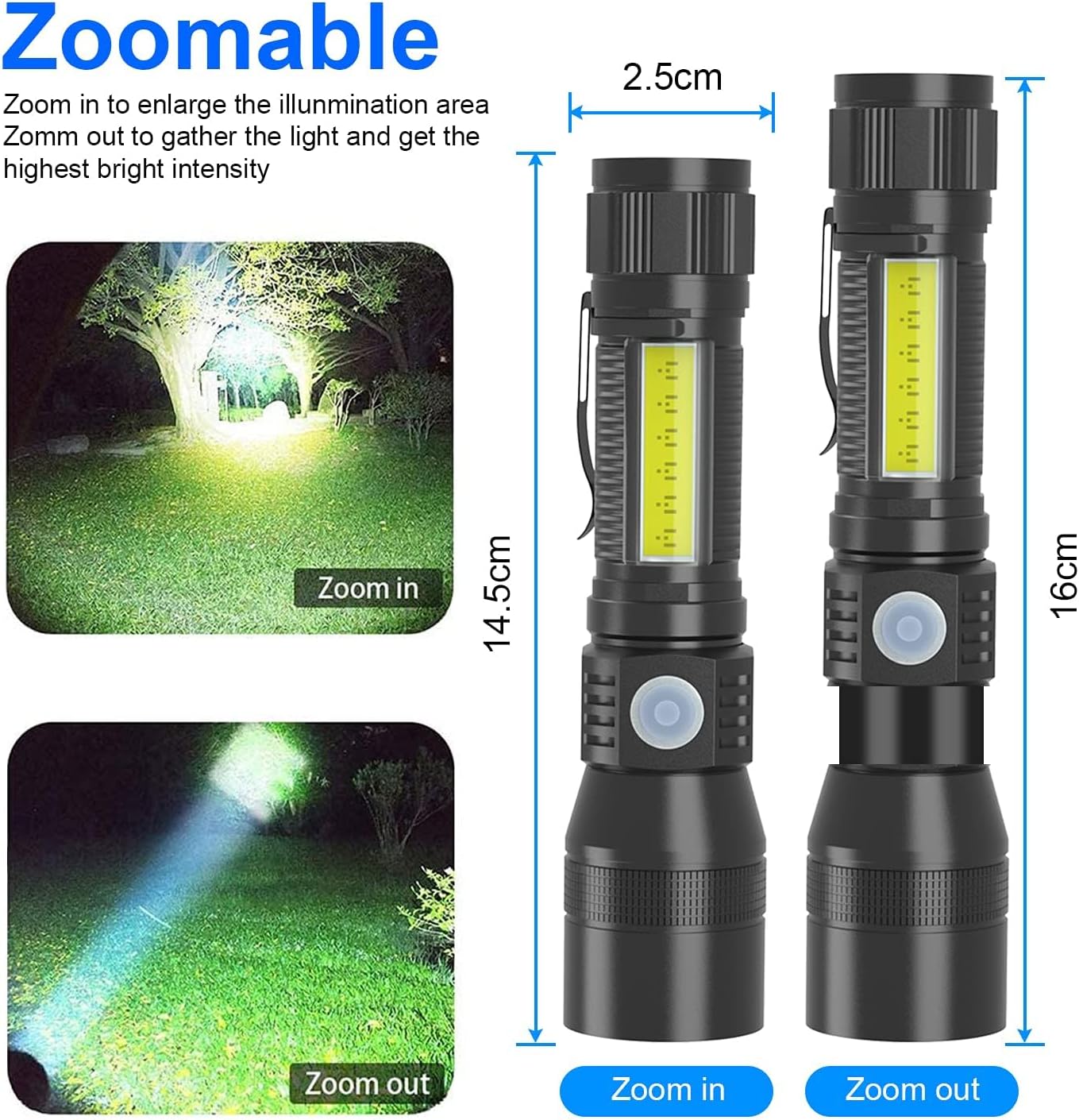
Image: This image visually explains the zoom functionality, showing how to adjust the flashlight's beam from wide to narrow, along with the physical dimensions of the flashlight.
6.3 Magnetic Base
The strong magnetic base allows for hands-free operation.
- Attach the magnetic base to any ferrous metal surface (e.g., car hood, metal workbench) to position the light as needed.
6.4 UV Light Function
To activate the UV light:
- Cycle through the modes until the UV light is active.
- Direct the UV light towards the area you wish to inspect for fluorescent substances.
6.5 COB Light Function
The COB (Chip-on-Board) side light provides broad area illumination.
- Cycle through the modes until the COB white light, COB red light, or COB side strobe light is active.
- The COB light is useful for close-range work, camping, or as an emergency signal.

Image: This image illustrates the various convenient ways the iToncs flashlight can be carried, such as clipped to clothing or a bag, highlighting its compact design and portability.
7. Maintenance
- Cleaning: Wipe the flashlight body with a soft, damp cloth. Do not use abrasive cleaners or solvents.
- Storage: Store the flashlight in a cool, dry place away from direct sunlight when not in use.
- Battery Care: To prolong battery life, charge the flashlight regularly, even if not used frequently. Avoid fully discharging the battery for extended periods.
- Water Resistance: While IPX6 rated, avoid prolonged submersion in water. Ensure the charging port cover is securely closed to maintain water resistance.

Image: The flashlight is shown with water on its surface, demonstrating its IPX6 water resistance, indicating it can withstand splashes and rain.
8. Troubleshooting
- Flashlight does not turn on:
- Ensure the battery is charged. Connect the flashlight to a power source using the USB cable and allow it to charge for at least 30 minutes before attempting to turn it on again.
- Light output is dim:
- The battery may be low. Recharge the flashlight fully. Also, ensure the lens is clean and free from dirt or smudges.
- Cannot cycle through all modes:
- Ensure the power button is being pressed firmly and released. If the issue persists, try fully charging the device.
- Charging indicator light does not work:
- Check the USB cable and power source to ensure they are functioning correctly. Try a different cable or power adapter. Ensure the charging port is clean and free of debris.
9. Safety Information
- Do not look directly into the LED or UV light beam to avoid eye injury.
- Keep out of reach of children.
- Do not disassemble the flashlight; this may void the warranty and cause damage.
- Use only the provided or a compatible USB cable for charging.
- Avoid exposing the flashlight to extreme temperatures or open flames.
- Dispose of the battery according to local regulations. Do not dispose of batteries in fire.
10. Warranty and Support
iToncs products are designed for reliability and performance. For specific warranty details, please refer to the warranty card included with your purchase or contact iToncs customer support. If you encounter any issues or have questions not covered in this manual, please reach out to our customer service team for assistance.
Contact Information: Please refer to the product packaging or the official iToncs website for the most current customer support contact details.