
anyloop Smart Watch B0FC627FXZ
Smart Watch User Manual
Model: Smart Watch B0FC627FXZ
Brand: anyloop
1. Introduction
Thank you for choosing the anyloop Smart Watch. This manual provides detailed instructions on how to set up, operate, and maintain your new device. Please read this manual carefully before use to ensure optimal performance and longevity of your smartwatch.

Figure 1.1: The anyloop Smart Watch, showcasing its sleek design and vibrant display.
2. Setup Guide
2.1 Package Contents
Before you begin, please ensure all items are present in the package:
- anyloop Smart Watch
- Charging Cable
- User Manual
2.2 Charging the Device
For first-time use, fully charge your smartwatch. Connect the magnetic charging cable to the charging contacts on the back of the watch and plug the USB end into a power adapter (not included) or a computer's USB port.

Figure 2.1: The smartwatch display showing battery level and charging indicators. A full charge typically takes 1-1.5 hours.
A full charge provides approximately 5-7 days of normal use or up to 21 days in standby mode.
2.3 App Installation and Pairing
To unlock the full potential of your smartwatch, download the dedicated "Fitbeing" app on your smartphone.
- Scan the QR code in the manual or search for "Fitbeing" in your smartphone's app store (compatible with iPhone iOS 13.0+ and Android 9.0+).
- Install and open the "Fitbeing" app.
- Create an account or log in.
- Enable Bluetooth on your smartphone.
- In the app, navigate to "Device" or "Add Device" and select your smartwatch from the list of available devices.
- Confirm the pairing request on both your smartphone and the smartwatch.

Figure 2.2: The Fitbeing app interface, used for managing health data, notifications, and watch settings.
3. Operating Instructions
3.1 Basic Navigation
- Touch Screen: Swipe left/right, up/down to navigate through menus and screens. Tap to select.
- Side Button/Digital Crown: Press to wake/sleep the screen, return to the home screen, or access the app menu. Rotate the digital crown to scroll through lists or adjust settings.

Figure 3.1: Key physical features of the smartwatch, including the digital crown for navigation.
3.2 Bluetooth Call Function
With Bluetooth 5.3 technology, you can make and receive calls directly from your wrist.
- Ensure your smartwatch is connected to your smartphone via Bluetooth.
- When a call comes in, the watch will display the caller ID. Tap the green icon to answer or the red icon to reject.
- During a call, you can use the watch's built-in microphone and speaker for hands-free communication.
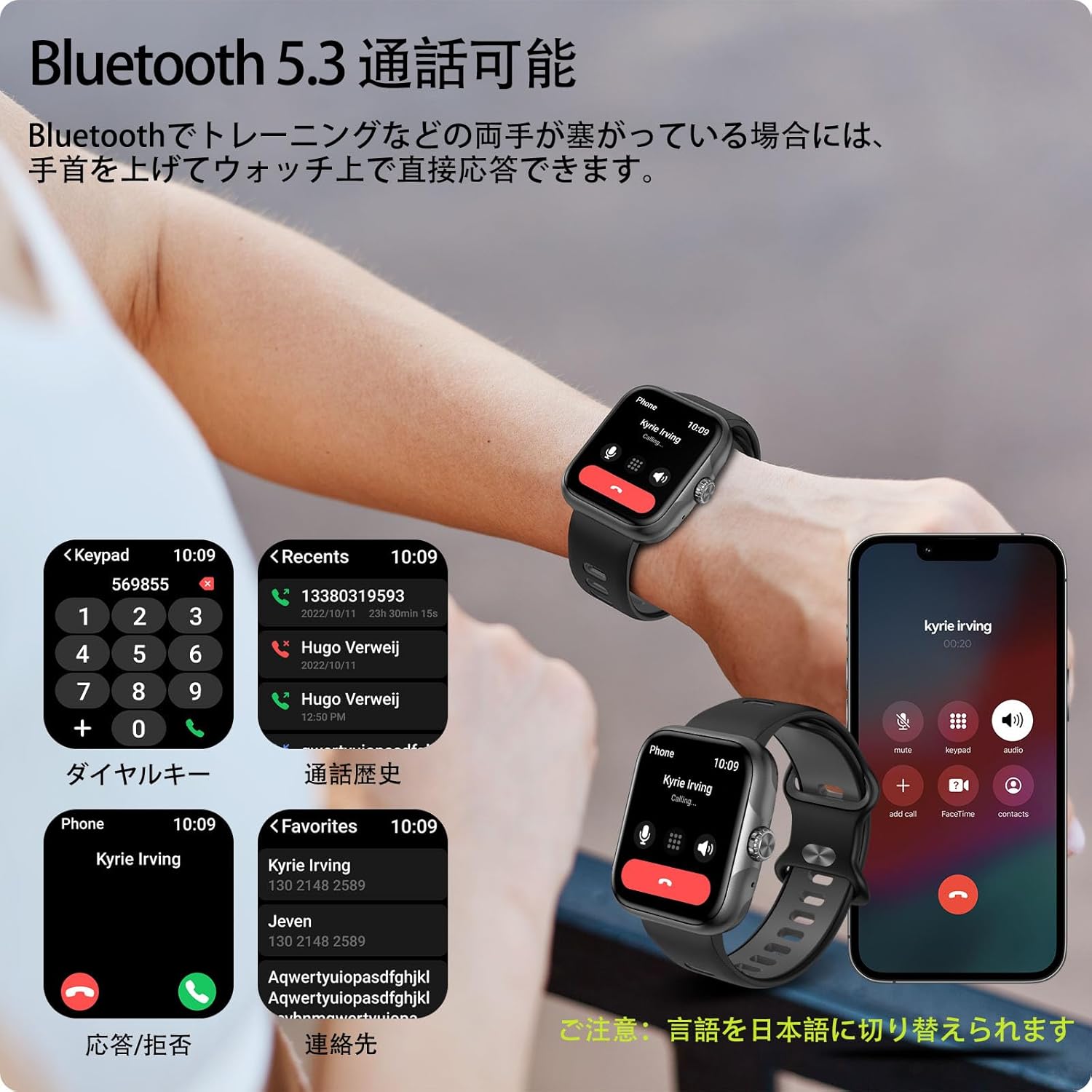
Figure 3.2: Hands-free calling feature, showing call interface on the watch and smartphone.
The advanced noise-canceling technology ensures clear audio quality during calls.
3.3 Notifications
Receive real-time notifications for calls, SMS, and various social media apps (LINE, Twitter, etc.) directly on your watch.
- Ensure notifications are enabled in the Fitbeing app and your smartphone's settings.
- Swipe down from the top of the watch face to view recent notifications.

Figure 3.3: Smartwatch receiving notifications from various applications.
4. Key Features
4.1 Display
The smartwatch features a 1.78-inch high-resolution AMOLED display (368x448 pixels), providing vivid colors and excellent clarity. The large screen and intuitive touch interface make it easy to read and operate.

Figure 4.1: The 1.78-inch AMOLED display offers superior visual quality.
4.2 Activity Tracking & Sports Modes
Track your daily activities and exercise performance with precision. The watch records steps, exercise duration, distance, and calories burned. With built-in GPS, it can accurately map your outdoor activities.
- 60+ Sports Modes: Supports various activities including running, swimming, yoga, and more.
- GPS Tracking: Visualize your running or cycling routes on a map within the app.
- Data Visualization: The Fitbeing app provides detailed analysis of your performance, helping you set and achieve fitness goals.

Figure 4.2: GPS tracking in action during an outdoor run, displaying real-time data.

Figure 4.3: Detailed activity data and route mapping available through the Fitbeing app.
4.3 Health Monitoring
The smartwatch provides comprehensive health monitoring features to help you stay informed about your well-being.
- Heart Rate Detection: Continuously monitors your heart rate throughout the day.
- Blood Oxygen Concentration: Measures your blood oxygen levels.
- Sleep Tracking: Analyzes your sleep patterns, including deep sleep, light sleep, and awake times.
- Stress Monitoring: Helps you understand and manage your stress levels.
- Women's Health Management: Provides features for menstrual cycle prediction and ovulation reference.

Figure 4.4: Health monitoring features including heart rate, blood oxygen, and women's health tracking.

Figure 4.5: Detailed sleep data recording and analysis.
4.4 Customization
Personalize your smartwatch with a wide range of watch faces and interchangeable bands.
- 100+ Watch Faces: Choose from a rich selection of watch faces available in the Fitbeing app to match your style or mood.
- DIY Watch Faces: Upload your favorite photos (family, pets, loved ones) to create unique, personalized watch faces.
- Interchangeable Bands: The watch supports standard 22mm bands, allowing for easy replacement with commercially available options.

Figure 4.6: Customize your watch with over 100 watch faces or your own photos.
4.5 Water Resistance
The smartwatch boasts 3ATM water resistance, making it suitable for daily use, including sweating during workouts, washing hands, and even unexpected rain. It is not recommended for hot water activities or deep diving.

Figure 4.7: The smartwatch is suitable for swimming and other water-related activities due to its 3ATM water resistance.
4.6 Other Smart Functions
The smartwatch integrates various practical features to enhance your daily life:
- Weather Forecast: Get real-time weather updates.
- Alarm: Set alarms directly from your wrist.
- Sedentary Reminder: Prompts you to move after periods of inactivity.
- Find Phone: Helps locate your misplaced smartphone.
- Music Control: Control music playback on your smartphone (play, pause, skip tracks).
- Camera Control: Use your watch as a remote shutter for your smartphone camera.
- SOS Function: For emergency situations.
- Voice Assistant: Control watch functions using voice commands.

Figure 4.8: A variety of smart functions available on the smartwatch.
5. Maintenance
- Cleaning: Regularly clean the watch screen and strap with a soft, dry cloth. For stubborn dirt, use a slightly damp cloth and dry thoroughly.
- Charging Contacts: Ensure the charging contacts on the back of the watch are clean and free of debris to ensure proper charging.
- Storage: When not in use for extended periods, store the watch in a cool, dry place.
- Avoid Extreme Temperatures: Do not expose the watch to extremely high or low temperatures, as this can affect battery life and performance.
- Chemicals: Avoid contact with harsh chemicals, detergents, or solvents, as they may damage the watch's finish or internal components.
6. Troubleshooting
| Problem | Possible Solution |
|---|---|
| Watch does not turn on. | Ensure the watch is fully charged. Press and hold the side button for a few seconds. |
| Cannot pair with smartphone. |
|
| Notifications are not received. |
|
| Inaccurate activity data. | Ensure the watch is worn snugly on your wrist. Calibrate settings in the Fitbeing app if available. |
| Short battery life. |
|
7. Specifications
| Feature | Detail |
|---|---|
| Model Name | Smart Watch B0FC627FXZ |
| Brand | anyloop |
| Display | 1.78-inch AMOLED (368x448 resolution) |
| Connectivity | Bluetooth 5.3 |
| Battery Capacity | 350mAh Lithium Ion |
| Battery Life (Typical Use) | 5-7 days |
| Battery Life (Standby) | Up to 21 days |
| Water Resistance | 3ATM |
| Compatibility | iPhone iOS 13.0+, Android 9.0+ |
| Dimensions | 28.6 x 9.3 x 1.9 cm; 180 g (Package Size) |
| Band Width | 22mm (Standard) |
| Included Components | Smart Watch |
8. Warranty and Support
For warranty information and customer support, please refer to the contact details provided with your purchase or visit the official anyloop website. Keep your purchase receipt as proof of purchase for warranty claims.
If you encounter any issues not covered in this manual, please contact our customer support team for assistance.
Related documentsSmart Watch B0FC627FXZ


Ask a question about this manual
Ask about setup, troubleshooting, compatibility, parts, safety, or missing instructions. Manuals+ will review the question and use this page’s manual context to help answer it.