
1. Introduction
The LIVALL PikaBoost 2 is an innovative rear-wheel e-bike conversion kit designed to transform your standard bicycle into an electric one with ease. It features a 220Wh battery, integrated LED lighting, and app control for a seamless riding experience. This manual provides comprehensive instructions for setup, operation, maintenance, and troubleshooting to ensure optimal performance and safety.

Figure 1: The LIVALL PikaBoost 2 E-Bike Conversion Kit installed on a bicycle.
2. Product Overview and Components
The PikaBoost 2 kit includes the main unit, a removable battery, a remote controller, and necessary installation tools. Key features include a durable V-shape tire for excellent grip, a multi-layered Battery Management System (BMS) for safety, and smart connectivity via a dedicated app.

Figure 2: Included components of the PikaBoost 2 kit.
Compatibility Guide
Ensure your bicycle meets the following compatibility requirements before installation:
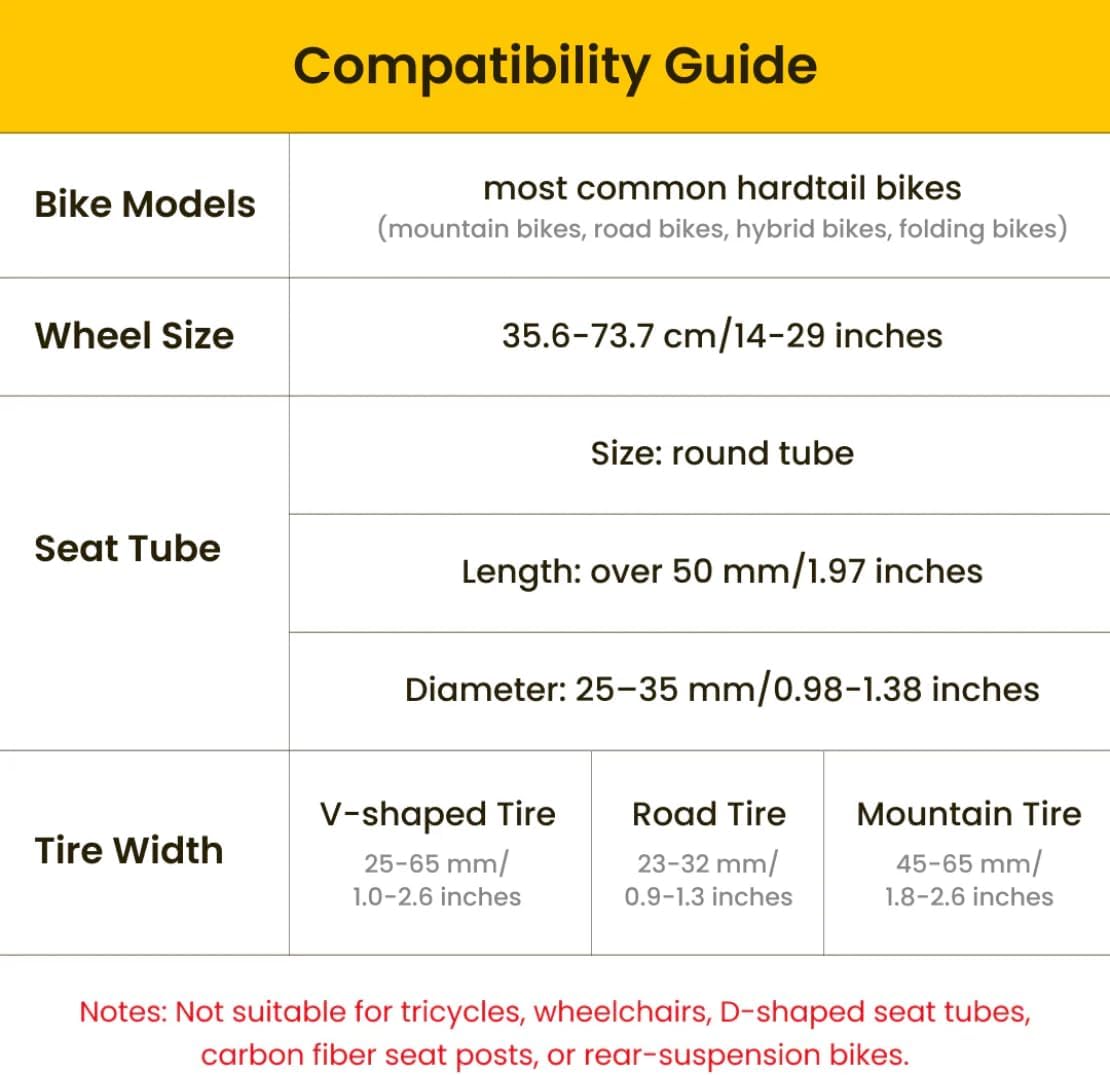
Figure 3: PikaBoost 2 compatibility specifications.
- Bike Types: Most common hardtail bikes (mountain bikes, road bikes, hybrid bikes, folding bikes).
- Wheel Size: 35.6-73.7 cm (14-29 inches).
- Seat Tube Size: Round tube, over 50mm (1.97 inches) length, 25-35mm (0.98-1.38 inches) diameter.
- Tire Width: V-shaped Tire: 25-65mm (1.0-2.6 inches); Road Tire: 23-32mm (0.9-1.3 inches); Mountain Tire: 45-65mm (1.8-2.6 inches).
- Note: Not suitable for tricycles, wheelchairs, D-shaped seat tubes, carbon fiber seat posts, or rear-suspension bikes.
3. Setup and Installation
The LIVALL PikaBoost 2 is designed for quick and secure installation without complex wiring. Follow these steps for proper setup:
- Attach the Main Unit: Securely attach the PikaBoost 2 main unit to your bike's seatpost using the provided clamp. Ensure the unit is positioned so the drive wheel makes firm contact with the bicycle's rear tire.
- Install the Remote Controller: Attach the Bling Remote Controller to your handlebar using the rubber band. For the intelligent e-brake feature, stick the small magnet sensor onto your brake lever. This allows the system to automatically cut off motor power when braking.
- Download and Connect to App: Download the LIVALL app from your device's app store. Connect the PikaBoost 2 to the app via Bluetooth.
- Initial Calibration: Use the app for automatic installation and calibration. This ensures the unit is properly aligned and ready for use.
- Firmware Update: Check for and install any available firmware updates through the LIVALL app to ensure optimal performance and access to the latest features.
Video 1: How to Easily Install and Remove PikaBoost 2. This video demonstrates the quick attachment and detachment process of the main unit to the bicycle's seatpost.
Video 2: How to Install the Remote Controller. This video guides you through attaching the remote and setting up the brake sensor.
Video 3: Firmware Upgrade Guide. This video shows how to connect the device to the app and perform a firmware upgrade, which is often part of initial setup and calibration.
4. Operating Instructions
The PikaBoost 2 offers multiple riding modes and smart features controlled via the remote and the LIVALL app.
Riding Modes
Switch between 4 modes using the app or remote controller to suit your riding style:
- Standby Status: The unit is ready but not providing assistance.
- Assist Mode: Provides power assistance to make pedaling easier, ideal for general riding and hills.
- Cruise Mode: Maintains a set speed, allowing for effortless cruising on flat surfaces.
- Workout Mode: Increases resistance for a more challenging workout, while also regenerating battery power.

Figure 4: PikaBoost 2 modes cater to diverse riding styles.
App Control and Connectivity
The LIVALL app provides advanced control and monitoring features:
- Automatic installation and calibration.
- Adaptation to local traffic regulations.
- Switching between all 4 modes.
- Over-The-Air (OTA) updates for firmware.
- Ability to create groups with friends for shared rides.
- Remote troubleshooting functions.
5. Battery and Charging
The PikaBoost 2 is equipped with a durable, long-lasting battery and versatile charging options.
- Battery Models: Available in 220Wh (up to 70km/43 miles range) and 158Wh (up to 50km/31 miles range) models under ideal conditions.
- Battery Management System (BMS): Features a multi-layered BMS for enhanced safety and longevity.
- Charging Options: Charge the PikaBoost 2 via the tail port or remove the battery for separate charging. Supports dual-way fast charging.
- Power Bank Functionality: The battery can also function as a power bank to charge your devices on the go.
- Charge Level Indicator: An external indicator shows the current charge level.

Figure 5: PikaBoost 2 battery with dual protection features.
Important Note: Use a 65W USB-C charger for optimal charging. The product only comes with the cable; the charger block must be purchased separately.
6. Safety Features
The PikaBoost 2 incorporates several features to enhance rider safety:
- Automatic Motor Shut-off: The motor automatically shuts off if the PikaBoost gyroscope detects a tilt over 30°.
- SOS Alert: If the tilt exceeds 60°, an SOS alert is triggered, reducing injury risk on slippery roads or sharp turns.
- Bright LED Rear Light: Integrated bright LED rear light for improved visibility.
- Durable Tire: The V-shape tire offers excellent grip and lasts for 3,000 to 5,000 km.

Figure 6: Multilayer protection features of the PikaBoost 2.
7. Maintenance
To ensure the longevity and optimal performance of your PikaBoost 2, regular maintenance is recommended:
- Clean the Unit: Regularly wipe down the main unit and drive wheel to remove dirt and debris.
- Check Tire Contact: Periodically inspect the contact between the PikaBoost 2 drive wheel and your bicycle's rear tire to ensure proper friction and prevent slippage.
- Battery Care: Store the battery in a cool, dry place. Avoid extreme temperatures. If not used for extended periods, charge the battery to about 50% every few months.
- Firmware Updates: Keep the device firmware updated via the LIVALL app to benefit from performance improvements and bug fixes.
- Remote Controller: Ensure the remote controller is securely mounted and its battery is functional.
8. Troubleshooting
Here are some common issues and their potential solutions:
| Issue | Possible Cause | Solution |
|---|---|---|
| Unit not turning on/off reliably. | Software glitch, battery issue, or improper power button use. | Ensure you press the power button to turn off the unit after riding. If issues persist, remove and re-install the battery, then try turning it on again. Check for app settings like 'Auto Off'. |
| Motor assistance is weak or inconsistent. | Insufficient tire contact, low battery, or calibration issue. | Ensure the PikaBoost 2 drive wheel has firm contact with your bike's tire. Check battery level. Re-calibrate the unit via the LIVALL app. |
| Rear light not working or flashing inconsistently. | App settings, firmware issue, or physical damage. | Check the rear light settings in the LIVALL app. Ensure firmware is up to date. If the issue persists, contact customer support. |
| Difficulty pairing with phone via Bluetooth. | Bluetooth interference, unit not in pairing mode, or app issue. | Ensure Bluetooth is enabled on your phone and the PikaBoost 2 is powered on. Try unbinding and re-pairing the device in the app. Keep your phone close to the unit during pairing. |
| Battery not fully charging or showing incorrect charge level. | Charger issue, battery degradation, or charging port problem. | Ensure you are using a 65W USB-C charger. Try a different charger or cable. If the battery is old, it may need replacement. |
| Unit adds noise or vibration during operation. | Tire tread type, improper installation, or unit malfunction. | Flatter tire treads may reduce noise. Ensure the unit is securely installed and calibrated. If excessive, contact customer support. |
9. Specifications
| Feature | Detail |
|---|---|
| Model Name | Essential Edition |
| Brand | LIVALL |
| Bike Type | Electric Bike (Conversion Kit) |
| Age Range (Description) | Adult |
| Number of Speeds | 1 |
| Color | Dark Gray |
| Frame Material | Aluminium alloy |
| Suspension Type | Rigid |
| Special Feature | Portable, Power Assist |
| Included Components | Tool Kit |
| Item Package Dimensions L x W x H | 17.24 x 7.6 x 5.2 inches |
| Package Weight | 8.8 Pounds |
| UPC | 199284230699 |
| Manufacturer | LIVALL |
10. Warranty and Support
The LIVALL PikaBoost 2 comes with a 1-Year Warranty Protection. For any issues, technical support, or warranty claims, please contact LIVALL customer service. Refer to the official LIVALL website or the quick guide for contact information.


