
Introduction
Thank you for choosing the Romicta AK55 Stereo Audio Amplifier. This manual provides essential information for the safe and efficient operation of your device. Please read it thoroughly before use and retain it for future reference.

Figure 1: Romicta AK55 Stereo Audio Amplifier front view, highlighting various input options like FM, Microphones, USB, Bluetooth, CD/DVD, AUX, Optical, and Coaxial.
What's in the Box
- 1 x Romicta AK55 Stereo Amplifier Receiver
- 1 x AC Power Cable
- 1 x FM Antenna
- 1 x Remote Control
- 1 x Instruction Manual
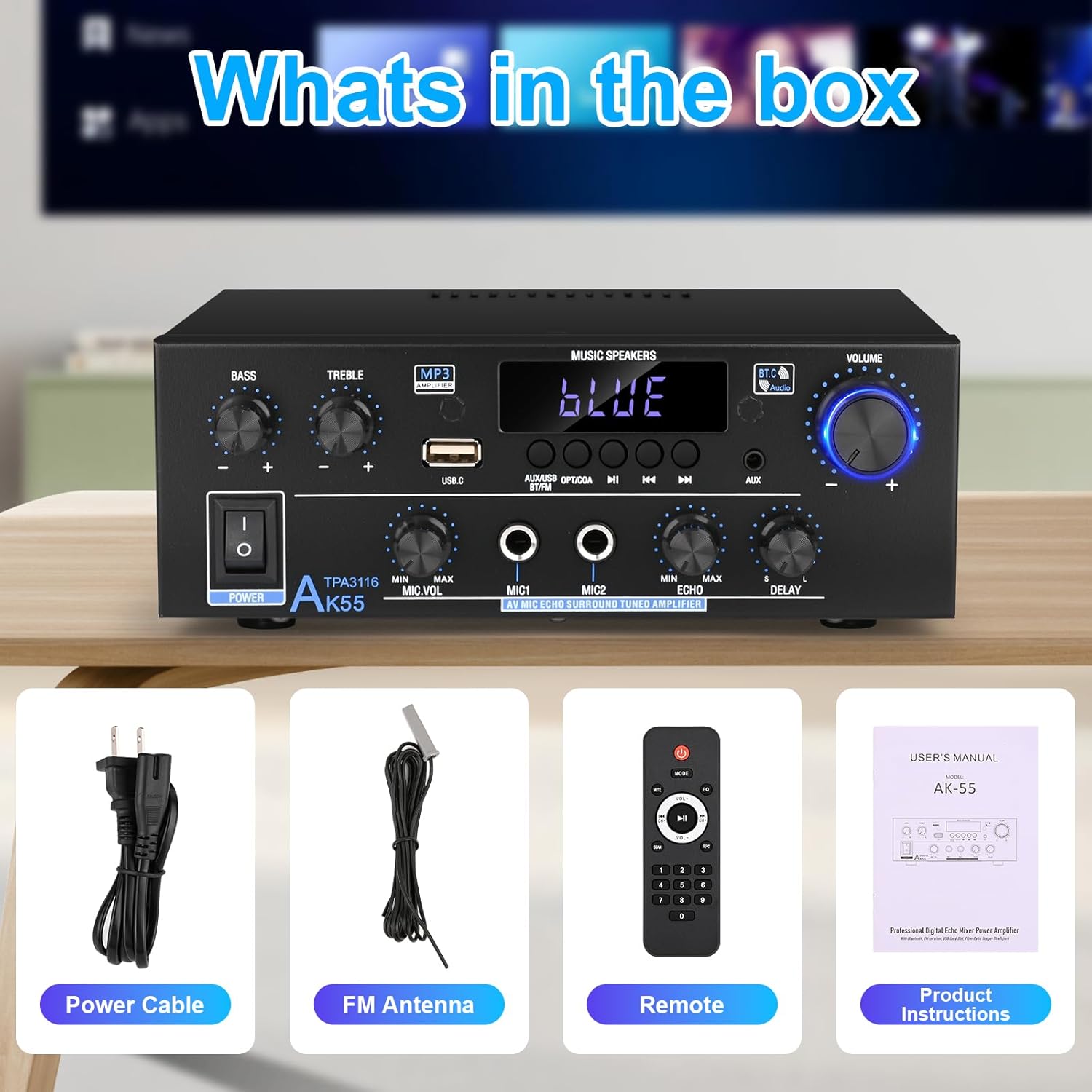
Figure 2: Image showing the contents included with the Romicta AK55 amplifier: the amplifier unit, power cable, FM antenna, remote control, and product instructions.
Setup
1. Connecting Speakers
The AK55 amplifier supports 4-16 ohm passive speakers and active subwoofers. Connect your speakers to the speaker terminals on the rear panel. Ensure correct polarity (+ to + and - to -) for optimal sound quality.
- Locate the speaker terminals on the rear panel (labeled "SPEAKER SYSTEM 4Ω-16Ω").
- Press down on the terminal clip, insert the stripped speaker wire, and release the clip to secure the wire.
- Connect the positive (+) wire from your speaker to the red (+) terminal on the amplifier, and the negative (-) wire to the black (-) terminal.
- Repeat for all speakers.
2. Connecting Power
Connect the provided AC power cable to the "AC POWER INPUT" port on the rear panel of the amplifier, then plug it into a standard wall outlet.
3. Connecting FM Antenna
For FM radio reception, connect the included FM antenna to the "FM ANT" port on the rear panel.
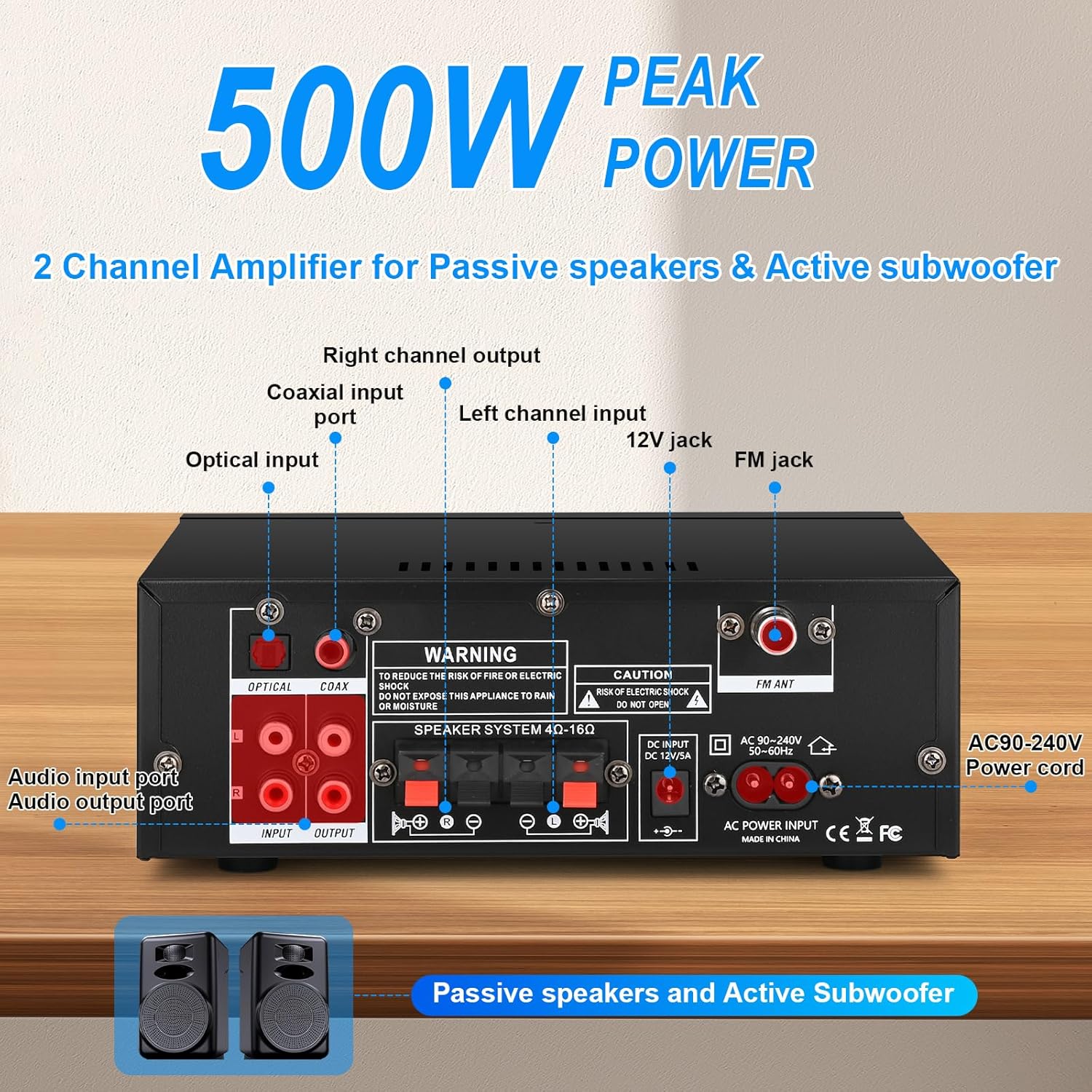
Figure 3: Rear view of the Romicta AK55 amplifier, showing optical, coaxial, AUX, and line inputs, speaker terminals, DC 12V/5A input, AC power input, and FM antenna connection.
Operating Instructions
1. Power On/Off
Press the POWER switch on the front panel to turn the amplifier on or off.
2. Input Mode Selection
Use the MODE button on the front panel or the remote control to cycle through available input sources: AUX, USB, SD, Bluetooth (BT), FM, Optical (OPT), and Coaxial (COAX).
3. Volume Control
Adjust the master volume using the large VOLUME knob on the front panel or the volume buttons on the remote control.
4. Tone Adjustment
Use the BASS and TREBLE knobs on the front panel to fine-tune the audio output to your preference.
5. Bluetooth Pairing
- Select BT mode using the MODE button. The display will show "BLUE".
- On your device (smartphone, tablet, laptop), enable Bluetooth and search for "AK55".
- Select "AK55" to pair. Once connected, the display will indicate successful pairing.
- Maintain a distance of within 30ft/10m between the device and amplifier without walls blocking. For TV or PC connections, maintain a distance of 15ft/5m.

Figure 4: The Romicta AK55 amplifier demonstrating Bluetooth 5.0 connectivity with a smartphone, showing a successful connection and a range of up to 32 feet (10 meters).
6. Microphone and Echo/Delay Functions
The amplifier features two microphone inputs (MIC1, MIC2) on the front panel, along with dedicated controls for microphone volume (MIC.VOL), echo, and delay effects. These are ideal for karaoke or public speaking applications.
- Connect microphones to MIC1 or MIC2 inputs.
- Adjust microphone volume using the MIC.VOL knob.
- Use the ECHO and DELAY knobs to add vocal effects.

Figure 5: The Romicta AK55 amplifier showcasing its karaoke capabilities with two microphone inputs and adjustable echo/delay effects, enhancing vocal performances.
7. Remote Control Usage
The included remote control allows for convenient adjustment of input modes, volume, track skipping, and other functions from a distance. Ensure the isolation plastic sheet is removed from the remote before first use.

Figure 6: A hand holding the remote control for the Romicta AK55 amplifier, demonstrating its use for convenient adjustments of input modes and volume.
Maintenance
- Keep the amplifier in a dry, well-ventilated area away from direct sunlight, heat sources, and moisture.
- Clean the unit with a soft, dry cloth. Do not use liquid cleaners or aerosols.
- Ensure proper airflow around the unit by not blocking the ventilation grilles on the top and sides.
- Regularly check all cable connections for security and damage.
Troubleshooting
- No Power: Ensure the power cable is securely connected to both the amplifier and a working power outlet. Check the power switch on the front panel.
- No Sound:
- Verify the correct input mode is selected.
- Check speaker connections for proper polarity and secure fit.
- Ensure the volume is turned up on both the amplifier and the connected audio source.
- Test with a different audio source or input cable.
- Bluetooth Connection Issues:
- Ensure the amplifier is in Bluetooth mode ("BLUE" displayed).
- Delete "AK55" from your device's Bluetooth list and attempt to re-pair.
- Reduce the distance between your device and the amplifier, and remove any obstructions.
- Poor FM Reception: Adjust the position of the FM antenna. Ensure it is fully extended and away from other electronic devices that may cause interference.
Specifications
| Feature | Detail |
|---|---|
| Model Number | AK55 |
| Output Power | 500W+500W Peak Power, 50W+50W Rated Power (TPA3116 chip) |
| Number of Channels | 2.0 CH |
| Bluetooth Version | 5.0 |
| Connectivity Technology | Bluetooth, AUX, USB, SD, Optical, Coaxial |
| Compatible Devices | Passive Speakers (4-16Ω), Active Subwoofer, Mobile phones, Computers, Tablets, Laptops, TV, MP3, CD, Projectors with AV audio outputs |
| Special Features | Bass & Treble Adjustment, Echo, Delay, FM Radio, Microphone Inputs |
| Controller Type | Remote Control, Front Panel Knobs/Buttons |
| Item Weight | 2.27 pounds |
| Package Dimensions | 9.02 x 8.54 x 3.82 inches |
Warranty and Support
For warranty information and customer support, please refer to the contact details provided by Romicta at the point of purchase or visit the official Romicta website. Protection plans may be available for extended coverage.
- Protection Plans: Optional 2-Year and 3-Year Protection Plans are available for purchase.
- Returns: A 30-day refund/replacement policy is typically offered.
- Manufacturer: Romicta