
Metro Mobility ZNH-Metro_M2BLUE_22.5AH
Metro Mobility M2-22.5AH Scooter User Manual
Model: ZNH-Metro_M2BLUE_22.5AH
Introduction
This manual provides essential information for the safe and efficient operation, maintenance, and troubleshooting of your Metro Mobility 4-Wheel Powered Mobility Scooter, Model M2-22.5AH. Please read this manual thoroughly before using the scooter to ensure proper handling and to maximize its lifespan.

Image: The Metro Mobility M2-22.5AH 4-wheel mobility scooter in blue, featuring a front basket, adjustable tiller, comfortable seat with armrests, and a stable base.
Safety Guidelines
Always prioritize safety when operating the mobility scooter. Adhere to all local traffic laws and regulations. Ensure you are familiar with all controls before operating the device.
- Do not operate the scooter under the influence of alcohol or medication.
- Always use the scooter on stable, level surfaces. Avoid steep inclines or uneven terrain.
- Ensure the electromagnetic braking system is functioning correctly before each use.
- Keep hands and feet clear of moving parts.
- Do not exceed the maximum weight capacity of 330 lbs.
- Utilize the front LED headlight and rear brake light for enhanced visibility, especially in low-light conditions.

Image: Close-up view of the scooter's front LED headlight illuminating the path and the rear brake light, highlighting safety features for visibility.
Setup and Assembly
The Metro Mobility M2-22.5AH scooter is designed for easy assembly and portability. Follow these steps to set up your scooter.
- Unpacking: Carefully remove all components from the packaging. Verify all parts are present according to the packing list.
- Attaching the Seat: Insert the seat post into the designated slot on the scooter's main frame. Secure it firmly. The seat features breathable padding for comfort and adjustable armrests.
- Adjusting the Tiller: The tiller (handlebar column) can be adjusted to your preferred height and angle for ergonomic comfort. Loosen the adjustment knob, position the tiller, and tighten the knob securely.
- Installing the Front Basket: Attach the front basket to the tiller column. This provides convenient storage for personal items.
- Battery Installation (if not pre-installed): Ensure the 22.5Ah lithium battery is correctly seated in its compartment.

Image: An exploded view of the scooter components, including the main frame (47 lbs), 12AH Battery (21 lbs), Seat with armrests (14.3 lbs), Basket (1.2 lbs), and Seat Post (1.2 lbs), illustrating the parts for assembly.
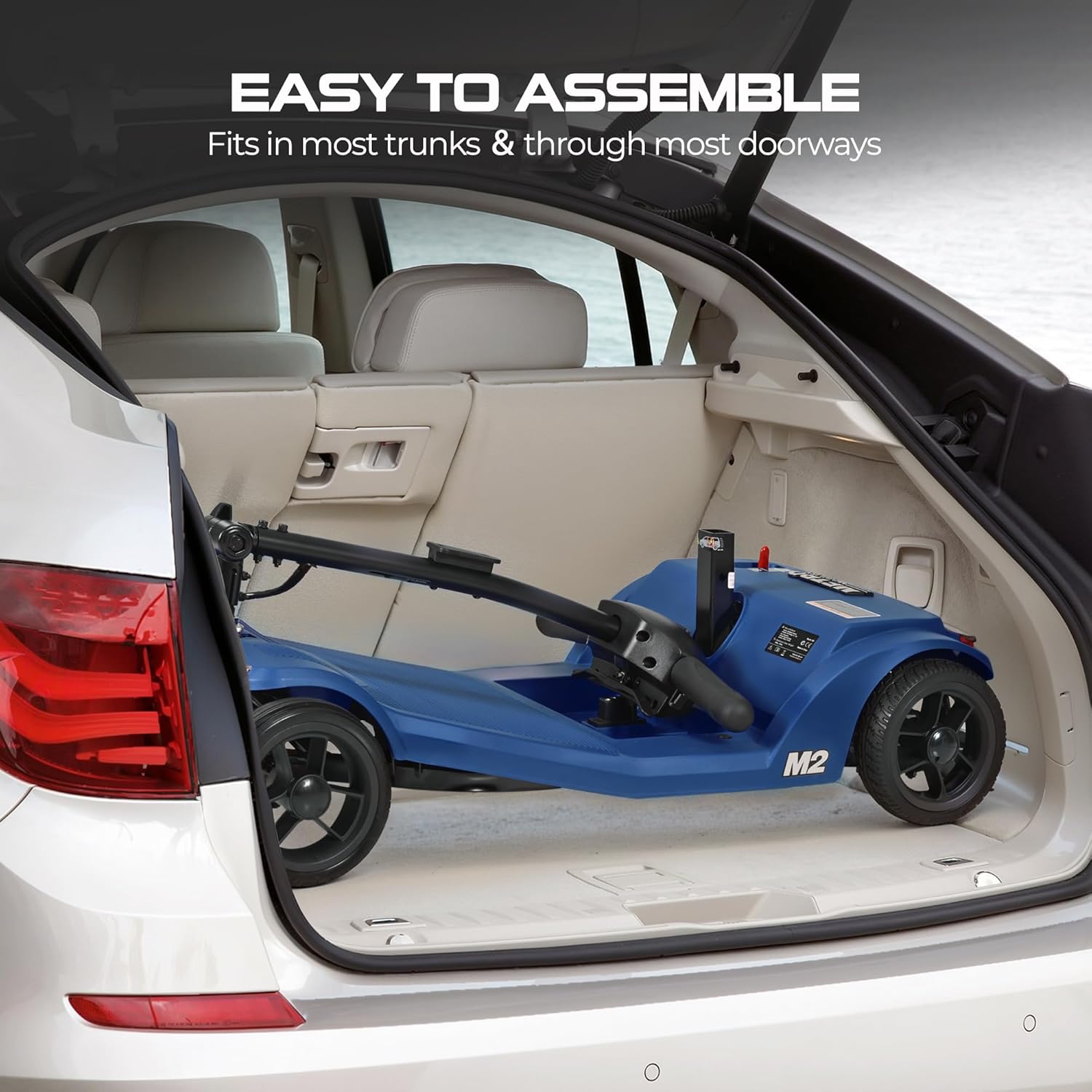
Image: The Metro Mobility scooter folded and stored in the trunk of a car, demonstrating its portability and ease of transport.
Operating Instructions
Charging the Battery
The scooter is equipped with a 22.5Ah lithium battery, providing a range of up to 20 miles. There are two methods for charging:
- Direct Charging: Plug the charger directly into the charging port on the scooter without removing the battery.
- Off-Board Charging: Remove the battery from the scooter and connect it to the charger separately.

Image: A visual representation of the two charging methods: direct charging with the battery in the scooter and off-board charging with the battery removed.
Starting and Driving
- Power On: Turn the key to the 'ON' position. The battery indicator will light up.
- Speed Control: Use the speed adjustment dial on the tiller to set your desired maximum speed. The scooter has a top speed of 4.97 mph.
- Acceleration: Gently press the throttle lever to move forward or backward. Release the throttle to engage the electromagnetic braking system, which provides instant stopping.
- Steering: Use the tiller to steer the scooter. The scooter has a tight turning radius of 47.2 inches for maneuverability.
- USB Charging Port: A built-in USB charging port is available on the tiller to power your mobile devices while on the go.

Image: A close-up of the scooter's tiller showing a smartphone connected to the built-in USB charging port, illustrating its convenience feature.
Comfort Features
- Wider Footrest: Provides ample space for comfortable foot positioning.
- Adjustable Seat Height: Customize the seat height for optimal comfort and posture.
- Anti-tipping Wheels: Enhance stability and prevent accidental tipping, especially on turns.
- Non-scuffing Tires: Designed to prevent marks on indoor surfaces.

Image: A composite image highlighting the scooter's comfort features: a wider footrest, freewheel function, anti-tipping wheels, adjustable armrests, adjustable tiller, adjustable seat height, and non-scuffing tires.
Maintenance
Regular maintenance ensures the longevity and safe operation of your Metro Mobility scooter.
- Battery Care: Charge the battery regularly, even if the scooter is not in frequent use, to maintain battery health. Avoid fully discharging the battery.
- Cleaning: Wipe down the scooter with a damp cloth. Avoid using abrasive cleaners or direct water spray.
- Tire Inspection: Periodically check the tires for wear and tear. Ensure they are free from punctures or damage.
- Fastener Check: Regularly inspect all nuts, bolts, and fasteners to ensure they are tight and secure.
- Brake System: Test the electromagnetic braking system before each ride to confirm it engages instantly upon throttle release.
Troubleshooting
This section provides solutions to common issues you might encounter with your scooter.
| Problem | Possible Cause | Solution |
|---|---|---|
| Scooter does not power on. | Battery is low or not connected; Key is not in 'ON' position. | Charge the battery; Ensure battery is properly connected; Turn key to 'ON'. |
| Scooter moves slowly or inconsistently. | Low battery charge; Speed setting too low; Overload. | Recharge battery; Adjust speed dial; Reduce load (ensure not exceeding 330 lbs capacity). |
| Brakes not engaging properly. | Throttle not fully released; System malfunction. | Ensure throttle is fully released; If issue persists, contact customer support. |
| Unusual noises during operation. | Loose components; Obstruction. | Inspect for loose parts and tighten; Check for any obstructions around wheels or motor. |
If you encounter issues not listed here or if solutions do not resolve the problem, please contact Metro Mobility customer support.
Specifications
| Feature | Detail |
|---|---|
| Model Number | ZNH-Metro_M2BLUE_22.5AH |
| Weight Capacity | 330 lbs |
| Motor | 260W Brushless Motor |
| Battery | 22.5Ah Lithium Battery (removable) |
| Range | Up to 20 miles |
| Top Speed | 4.97 mph |
| Turning Radius | 47.2 inches |
| Product Dimensions (L x W x H) | 39"D x 19.1"W x 33.9"H |
| Item Weight | 84.9 Pounds |
| Color | Blue |
| Features | LED Headlight, Rear Brake Light, USB Charging Port, Detachable Seat, Adjustable Tiller, Wider Footrest, Anti-tipping Wheels, Non-scuffing Tires |

Image: A detailed diagram illustrating the key dimensions of the Metro Mobility scooter, including overall length, width, height, seat width, seat length, and footrest space.
Warranty and Support
Metro Mobility is committed to customer satisfaction. Your scooter comes with a 1-year limited warranty.
For any issues, questions, or to utilize your warranty, please contact our customer support team:
- Phone: 888-616-3876
- Manufacturer: Metro Mobility USA LLC
You can also visit our service centers for in-person assistance.
Image: An image promoting Metro Mobility's service centers and providing the customer support phone number (888-616-3876) for assistance.
Ask a question about this manual
Ask about setup, troubleshooting, compatibility, parts, safety, or missing instructions. Manuals+ will review the question and use this page’s manual context to help answer it.