
Introduction
This manual provides instructions for the installation, operation, and maintenance of your Philips Solar Security Light. This outdoor floodlight features a PIR motion sensor, adjustable brightness, and a separate solar panel for optimal placement. Please read this manual thoroughly before installation and use to ensure proper function and safety.
What's in the Box
Verify that all components are present before beginning installation:
- LED Lens (Integrated into the light fixture)
- Instruction Manual (This document)
- Mounting Hardware (Screws and expansion plugs)

Image: The Philips Solar Security Light, showing the main light unit, separate solar panel, and the included mounting screws and expansion plugs.
Features
- High Brightness & Wide Beam Angle: Produces cool white light (5000 K) with two selectable brightness levels: 1800 lumens (50%) and 3600 lumens (100%). Designed for maximum light coverage.
- Adjustable Light Modes:
- Test Mode: Motion triggers 5 seconds of light, then auto-off. Operates in both daytime and nighttime.
- Security Mode: (Night only) Light automatically turns on when motion is detected. Duration can be set to 30, 60, or 120 seconds.
- High-Sensitivity Motion Sensor: Passive infrared (PIR) sensor detects motion up to 69 feet away over a 180° angle. Light duration can be programmed for 30, 60, or 120 seconds.
- Separate Solar Panel & High-Capacity Battery: The solar panel includes a 16.4 ft cable for flexible positioning and features a 2000 mAh battery for efficient charging and extended usage.
- Water-Resistant & Durable: Tested for resistance to corrosion, rust, heavy rain, humidity, UV exposure, and extreme temperatures, ensuring reliable outdoor performance.

Image: Overview of the Philips Solar Security Light highlighting its separate solar panel, high brightness, integrated motion sensor, water resistance, and corrosion-free design.

Image: Close-up of the upgraded solar panel and the light unit, detailing the 3600 LM output and 2000 mAh high-capacity battery.
Setup and Installation
The Philips Solar Security Light is designed for easy installation with no wiring required. Follow these steps:
- Choose a Location: Select a location for the light fixture that provides the desired illumination coverage. The recommended installation height is 8.2 feet.
- Solar Panel Placement: Position the separate solar panel in an area that receives maximum direct sunlight throughout the day for optimal charging. The 16.4 ft cable allows for flexible placement.
- Mounting the Light Fixture:
- Wall Mounted: Secure the light fixture to a wall using the provided mounting hardware.
- Eave Mounted: Secure the light fixture under an eave. Ensure a tight seal between the wall/eave and the lamp to enhance water resistance. Note that eave installation may slightly reduce the sensing range.
- Adjust Light Heads: The light heads are adjustable. Angle them to cover the desired area.
- Connect Solar Panel: Plug the solar panel cable into the light fixture.

Image: Visual guide demonstrating the easy installation process, including mounting the light and solar panel, and connecting the cable.

Image: Illustration showing the two available mounting methods: under an eave and directly on a wall.

Image: Depiction of the adjustable light heads, allowing users to customize the light angle.
Operating Instructions
The Philips Solar Security Light offers adjustable settings for sensing range, light duration, and brightness.

Image: Control panel showing dials for adjusting sensing range, light duration, and brightness.
- Sensing Range (Distance): Adjust the sensitivity of the motion sensor.
- L (Low): 0-26 ft
- M (Medium): 0-49 ft
- H (High): 0-68 ft
- Light Duration (Time): Set how long the light stays on after motion is detected.
- 30 seconds
- 60 seconds
- 120 seconds
- Brightness: Select the desired light output.
- 50%: 1800 lumens
- 100%: 3600 lumens
- Operating Modes:
- Test Mode: For initial setup and testing. Light activates for 5 seconds upon motion detection, then turns off. Works day and night.
- Security Mode: For normal operation. Light activates only at night when motion is detected, staying on for the set duration (30, 60, or 120 seconds).
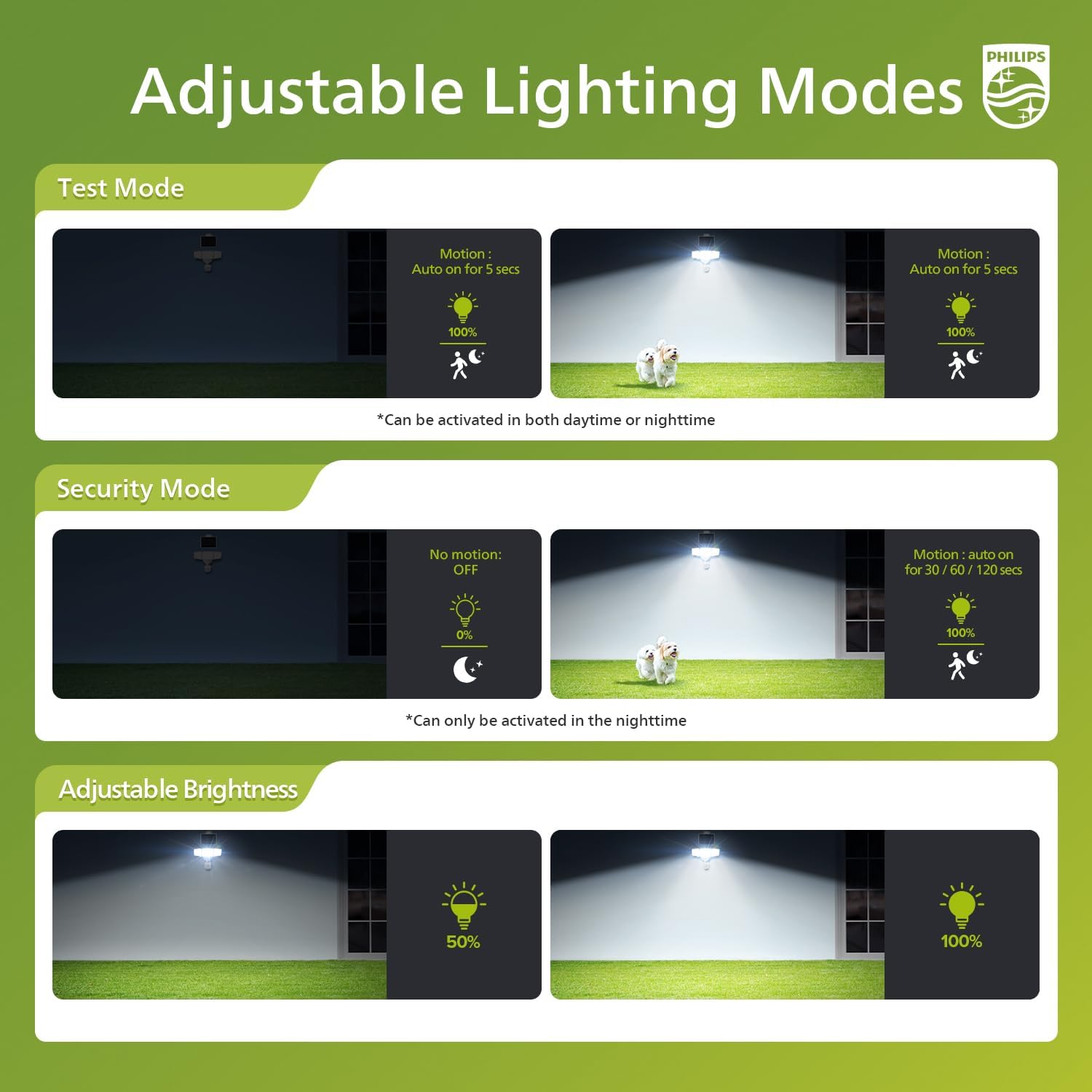
Image: Visual explanation of the Test Mode (motion triggers 5 seconds of light, day/night) and Security Mode (motion triggers light for set duration, night only) and adjustable brightness levels.

Image: Diagram illustrating the 180° detection angle and maximum sensing range of 69 feet for the motion sensor.
Maintenance
To ensure optimal performance and longevity of your Philips Solar Security Light, follow these maintenance guidelines:
- Clean Solar Panel: Regularly wipe the solar panel with a soft, damp cloth to remove dust, dirt, and debris. A clean panel ensures efficient charging.
- Inspect for Obstructions: Periodically check that no trees, bushes, or other objects are blocking direct sunlight from reaching the solar panel.
- Clean Light Fixture: Clean the light fixture and motion sensor lens with a soft, damp cloth as needed to maintain light output and sensor accuracy.
- Check Connections: Ensure the cable connecting the solar panel to the light fixture remains securely plugged in and free from damage.
Troubleshooting
If your Philips Solar Security Light is not functioning as expected, consider the following:
| Problem | Possible Cause | Solution |
|---|---|---|
| Light does not turn on at night. | Insufficient solar panel charging. | Ensure the solar panel is in direct sunlight for at least 6-8 hours daily. Clean the solar panel. |
| Light stays on constantly or turns on during the day. | Light mode set to Test Mode or sensor malfunction. | Switch to Security Mode for nighttime-only operation. Check for obstructions near the sensor. |
| Motion sensor is not detecting movement. | Sensor sensitivity too low or obstructed. | Adjust the sensing range to a higher setting (M or H). Clear any obstructions from the sensor's view. |
| Light is dim. | Brightness setting is low or battery charge is low. | Adjust the brightness setting to 100%. Ensure the solar panel receives adequate sunlight for full charge. |
Specifications
| Feature | Detail |
|---|---|
| Brand | Philips |
| Model Number | 6905001331 |
| Light Source | LED |
| Brightness | 3600 lumens (max) / 1800 lumens (min) |
| Light Color | Cool White (5000 K) |
| Power Source | Solar Powered |
| Battery Capacity | 2000 mAh |
| Motion Sensor Range | Up to 69 ft |
| Motion Sensor Angle | 180° |
| Cable Length (Solar Panel) | 16.4 ft |
| Material | Plastic |
| Water Resistance Level | Water Resistant |
| Dimensions (L x W x H) | 11.22"L x 4.33"W x 9.25"H |
| Voltage | 4.2 Volts |
| Wattage | 42.6 watts |
Warranty and Support
This Philips Solar Security Light comes with a 2-year manufacturer warranty. For warranty claims or technical support, please refer to the contact information provided with your purchase documentation or visit the official Philips website.


