
1. Safety Information
Read all safety instructions carefully before using the product. Keep this manual for future reference.
- This product is designed for indoor use only (IP20 rating). Do not expose to water or high humidity.
- Do not attempt to open or modify the device. This may void the warranty and pose a safety risk.
- Use only the provided USB cable or a certified equivalent for charging.
- Keep out of reach of children.
- Do not look directly into the LED light source.
- Dispose of the product and its battery responsibly according to local regulations.
2. Product Overview
The OSRAM LINEAR Mobile LED Light is a battery-powered, USB-rechargeable lighting solution featuring a motion sensor for energy-efficient illumination. It provides soft, indirect light suitable for various indoor applications such as shelves, under cabinets, and wardrobes.

Image: The OSRAM LINEAR Mobile LED Light shown in its retail packaging, highlighting key features like cool light, motion sensor, and USB charging.

Image: The OSRAM LINEAR Mobile LED Light next to its packaging, showing the light bar itself and the box design.
Key Features:
- Rechargeable Battery: Battery charges via USB cable, eliminating the need for battery replacement.
- Motion Sensor: Equipped with a PIR motion sensor and daylight sensor for energy-saving illumination.
- Soft Illumination: Indirect light distribution provides pleasant light.
- Flexible Mounting: Accessories for versatile mounting allow easy adaptation to different rooms and needs.
- Applications: Suitable for overhead cabinets, shelves, and workbench lighting in kitchens and work areas.
3. Setup
3.1 Unpacking
Carefully remove the LED light and all accessories from the packaging. Verify that all components are present:
- 1x OSRAM LINEAR Mobile LED Light (400mm)
- Mounting accessories (e.g., adhesive strips, magnetic mounts)
- USB charging cable
- Instruction manual
3.2 Charging the Battery
Before first use, fully charge the device. Connect the provided USB cable to the charging port on the LED light and to a standard USB power adapter (not included) or a computer USB port.
- A charging indicator light will typically show red during charging and turn green or off when fully charged.
- Charging time may vary.
3.3 Mounting Options
The light offers versatile mounting options. Choose the method best suited for your desired location.
- Adhesive Mounting:
- Clean the mounting surface thoroughly to ensure it is dry and free of dust and grease.
- Peel off the protective film from the adhesive strips (if included) and firmly press the light onto the desired surface.
- Magnetic Mounting:
- Attach the magnetic mounting plates (if included) to the desired surface using adhesive or screws.
- The LED light can then be easily attached to and removed from these magnetic plates.
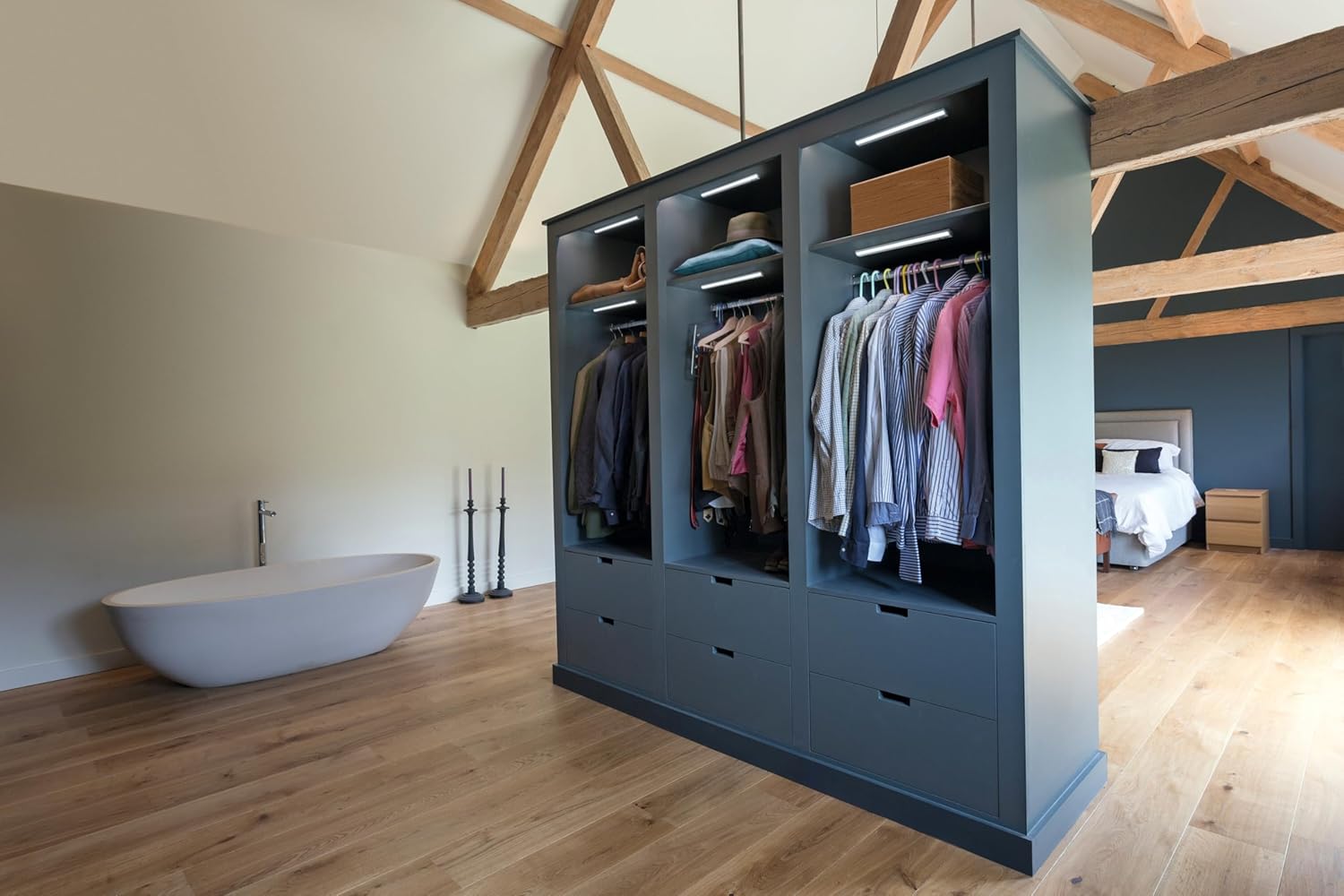
Image: The OSRAM LINEAR Mobile LED Light installed under a kitchen cabinet, illuminating the countertop. This demonstrates a typical mounting application.
4. Operating Instructions
4.1 Power On/Off and Mode Selection
Locate the switch or button on the device. It typically has multiple settings:
- OFF: The light is completely off.
- ON (Constant Light): The light stays on continuously, regardless of motion or ambient light.
- AUTO (Motion Sensor Mode): The light will activate when motion is detected in a dark environment. It will turn off automatically after a period of no motion (e.g., 30 seconds). The integrated daylight sensor prevents activation in bright conditions to save energy.
4.2 Motion Sensor Functionality
In AUTO mode, the PIR motion sensor detects movement within its range. The daylight sensor ensures the light only activates when the ambient light is low enough. This optimizes battery life.
- Detection Range: Typically a few meters, depending on placement and environmental factors.
- Detection Angle: Wide angle for broad coverage.
- Auto-off Timer: The light will remain on as long as motion is detected. After motion ceases, it will turn off after a preset delay (e.g., 30 seconds).

Image: The OSRAM LINEAR Mobile LED Light installed inside a wardrobe, providing illumination for clothing. This illustrates its use in enclosed spaces.
5. Maintenance
5.1 Cleaning
To clean the LED light, ensure it is switched off and disconnected from any charging cable.
- Wipe the surface with a soft, dry, or slightly damp cloth.
- Do not use abrasive cleaners, solvents, or harsh chemicals, as these can damage the finish or electronic components.
- Do not immerse the device in water.
5.2 Battery Care
To prolong battery life:
- Avoid fully discharging the battery frequently.
- Charge the battery regularly, even if the light is not in constant use.
- Store the device in a cool, dry place if not used for extended periods.
5.3 Light Source Replacement
The LED light source in this product is not user-replaceable. If the LEDs fail, the entire unit must be replaced. This product contains a light source of energy efficiency class E.
6. Troubleshooting
| Problem | Possible Cause | Solution |
|---|---|---|
| Light does not turn on. | Battery is discharged. | Charge the battery using the USB cable. |
| Switch is in OFF position. | Set the switch to ON or AUTO mode. | |
| Light does not turn on in AUTO mode. | Ambient light is too bright. | The daylight sensor prevents activation in bright conditions. Test in a darker environment. |
| No motion detected. | Ensure motion is within the sensor's range and angle. | |
| Light flickers or is dim. | Low battery. | Recharge the battery. |
| Short battery life. | Frequent activation or continuous ON mode. | Use AUTO mode for energy saving. Ensure the light is not constantly triggered by motion in high-traffic areas. |
7. Specifications
| Feature | Detail |
|---|---|
| Model Number | 4099854532016 |
| Brand | OSRAM |
| Manufacturer | LEDVANCE |
| Dimensions (L x W x H) | 45.1 x 4.6 x 4.1 cm |
| Weight | 360 g |
| Material | Aluminum, Polycarbonate (PC) |
| Color | White |
| Light Source Type | LED |
| Luminous Flux | 70 lumens |
| Wattage | 1 watt |
| Color Temperature | 4000 Kelvin (Cool White) |
| Power Source | DC (Battery-powered, USB rechargeable) |
| Switch Style | Motion Detector |
| Special Features | Energy-saving, Motion Sensor, Daylight Sensor |
| Ingress Protection (IP) Rating | IP20 (Indoor use only) |
| Energy Efficiency Class | E |
8. Warranty & Support
8.1 Warranty Information
This product is covered by a manufacturer's warranty. Please refer to the warranty card included in the packaging or visit the official OSRAM website for detailed warranty terms and conditions specific to your region.
Keep your proof of purchase (receipt or invoice) as it will be required for any warranty claims.
8.2 Customer Support
For technical assistance, troubleshooting beyond this manual, or warranty inquiries, please contact OSRAM customer support:
- Website: Visit the official OSRAM website for support resources, FAQs, and contact information.
- Contact Information: Refer to the product packaging or OSRAM's official website for regional phone numbers or email addresses.
When contacting support, please have your product model number (4099854532016) and purchase date available.


