
1. Introduction and Product Overview
The OSRAM ENDURA FLOOD PC 50W LED Projector with Sensor is a high-performance outdoor lighting solution designed for security and general illumination. It features a powerful 50W LED light source, emitting 5000 lumens of 3000K warm white light. Equipped with an intelligent motion sensor, this projector offers advanced detection capabilities for large areas such as industrial spaces, garages, and facades. Its robust construction and IP44 rating ensure reliable operation in various outdoor conditions.
This manual provides essential information for the safe installation, operation, and maintenance of your OSRAM ENDURA FLOOD PC 50W LED Projector.
2. Safety Information
- Electrical Safety: Installation and maintenance should only be performed by a qualified electrician in accordance with local electrical codes and regulations. Ensure the power supply is disconnected before any installation or servicing.
- Voltage: This product operates on 220 Volts AC. Verify your power supply matches this requirement.
- Mounting: Securely mount the projector to a stable surface. Improper mounting can lead to the unit falling and causing injury or damage.
- IP44 Rating: The IP44 rating indicates protection against solid objects larger than 1mm and splashing water from any direction. Do not submerge the unit in water or expose it to high-pressure water jets.
- Heat: The LED projector may become warm during operation. Avoid touching the light surface directly when in use.
- Light Source: Do not stare directly into the LED light source when it is illuminated, as this may cause eye discomfort or damage.
3. Package Contents
Please check the package for the following items:
- 1x OSRAM ENDURA® Flood Sensor Warm White PCR 50W Dark Grey LED Projector
- Instruction Manual (this document)

Image 3.1: OSRAM ENDURA FLOOD PC 50W LED Projector with its retail packaging.
4. Setup and Installation
The OSRAM ENDURA FLOOD PC 50W LED Projector is designed for wall mounting and surface installation. It is suitable for outdoor use in areas such as garages and facades.
4.1 Mounting the Projector
- Choose Location: Select a suitable wall mounting location that provides the desired illumination coverage and allows for optimal motion sensor detection. Consider the 9-meter detection range.
- Mark Drilling Points: Use the mounting bracket as a template to mark the drilling points on the wall.
- Drill Holes: Drill holes at the marked points and insert appropriate wall plugs (not included, choose based on wall material).
- Secure Bracket: Attach the mounting bracket to the wall using screws.
- Attach Projector: Securely attach the projector to the mounting bracket. Adjust the angle of the projector to direct the light as needed.
4.2 Electrical Connection
- Disconnect Power: Ensure the main power supply to the installation area is switched off at the circuit breaker.
- Wire Connection: Connect the projector's electrical wires to your main power supply (220V AC) according to local electrical codes. Ensure proper grounding.
- Secure Connections: Use appropriate waterproof connectors and junction boxes for outdoor installations to maintain the IP44 rating.
- Restore Power: Once all connections are secure and verified, restore power to the circuit.

Image 4.1: Front view of the OSRAM ENDURA FLOOD PC 50W LED Projector, showing the main light panel and the integrated motion sensor.
5. Operating Instructions
The OSRAM ENDURA FLOOD PC 50W LED Projector features an integrated motion sensor for automatic operation.
5.1 Motion Sensor Adjustment
The motion sensor typically has adjustable settings for:
- Detection Range (SENS): Adjusts the sensitivity of the sensor, influencing the maximum distance at which motion is detected (up to 9 meters).
- Time Duration (TIME): Sets how long the light remains on after motion is detected and no further motion is sensed (typically 10 seconds to 8 minutes).
- Light Sensitivity (LUX): Determines the ambient light level at which the sensor becomes active. For example, setting it to a low LUX value means the light will only activate in very dark conditions, while a high LUX value allows it to activate in brighter conditions (typically 10-2000 lux).
Refer to the markings on the sensor unit for specific adjustment dials or switches. Test the settings after adjustment to ensure desired operation.
5.2 Light Operation
Once installed and configured, the projector will automatically turn on when motion is detected within its range and the ambient light level is below the set LUX threshold. The light will remain on for the set time duration and turn off if no further motion is detected.
6. Maintenance
The OSRAM ENDURA FLOOD PC 50W LED Projector is designed for minimal maintenance. However, regular checks can ensure optimal performance and longevity.
- Cleaning: Periodically clean the surface of the projector and the sensor lens with a soft, damp cloth. Do not use abrasive cleaners or solvents, as these can damage the finish or the sensor. Ensure the power is off before cleaning.
- Inspection: Regularly inspect the mounting and electrical connections for any signs of wear, damage, or corrosion. Address any issues promptly.
- LED Lifespan: The integrated LED light source has a long operational life of approximately 30,000 hours and is not user-replaceable.
7. Troubleshooting
If you encounter issues with your projector, refer to the following troubleshooting guide:
| Problem | Possible Cause | Solution |
|---|---|---|
| Light does not turn on. | No power supply. Incorrect LUX setting. Sensor blocked. | Check circuit breaker. Adjust LUX setting to a lower value or 'daylight' mode for testing. Clear any obstructions from the sensor. |
| Light stays on continuously. | Continuous motion detected. LUX setting too high. Faulty sensor. | Ensure no constant movement in detection zone. Adjust LUX setting to a higher value. Contact support if sensor is faulty. |
| Light turns on during the day. | LUX setting too high. | Adjust LUX setting to a lower value (e.g., 'night' mode) so it only activates in darker conditions. |
| Motion not detected. | Detection range too low. Sensor blocked or misaligned. | Increase detection range (SENS) setting. Clear sensor lens. Re-align sensor for optimal coverage. |
8. Specifications
Detailed technical specifications for the OSRAM ENDURA FLOOD PC 50W LED Projector:
| Feature | Specification |
|---|---|
| Brand | OSRAM |
| Manufacturer | LEDVANCE |
| Model Number | 4099854487279 |
| Product Dimensions (L x W x H) | 17 x 7 x 22.3 cm |
| Weight | 720 grams |
| Color | Dark Grey |
| Material | Aluminum (body), Glass (shade) |
| Power | 50 Watts |
| Luminous Flux | 5000 lumens |
| Color Temperature | 3000 Kelvin (Warm White) |
| Voltage | 220 Volts (AC) |
| IP Rating | IP44 |
| Switch Style | Motion Detector |
| Installation Type | Wall Mount, Surface Mount |
| Specific Uses | Garage, Facades, Outdoor |
| Energy Efficiency Class | F |
| Motion Sensor Range | Up to 9 meters |
| Motion Sensor Time Duration | 10 seconds - 8 minutes |
| Motion Sensor Light Sensitivity | 10 - 2000 lux |
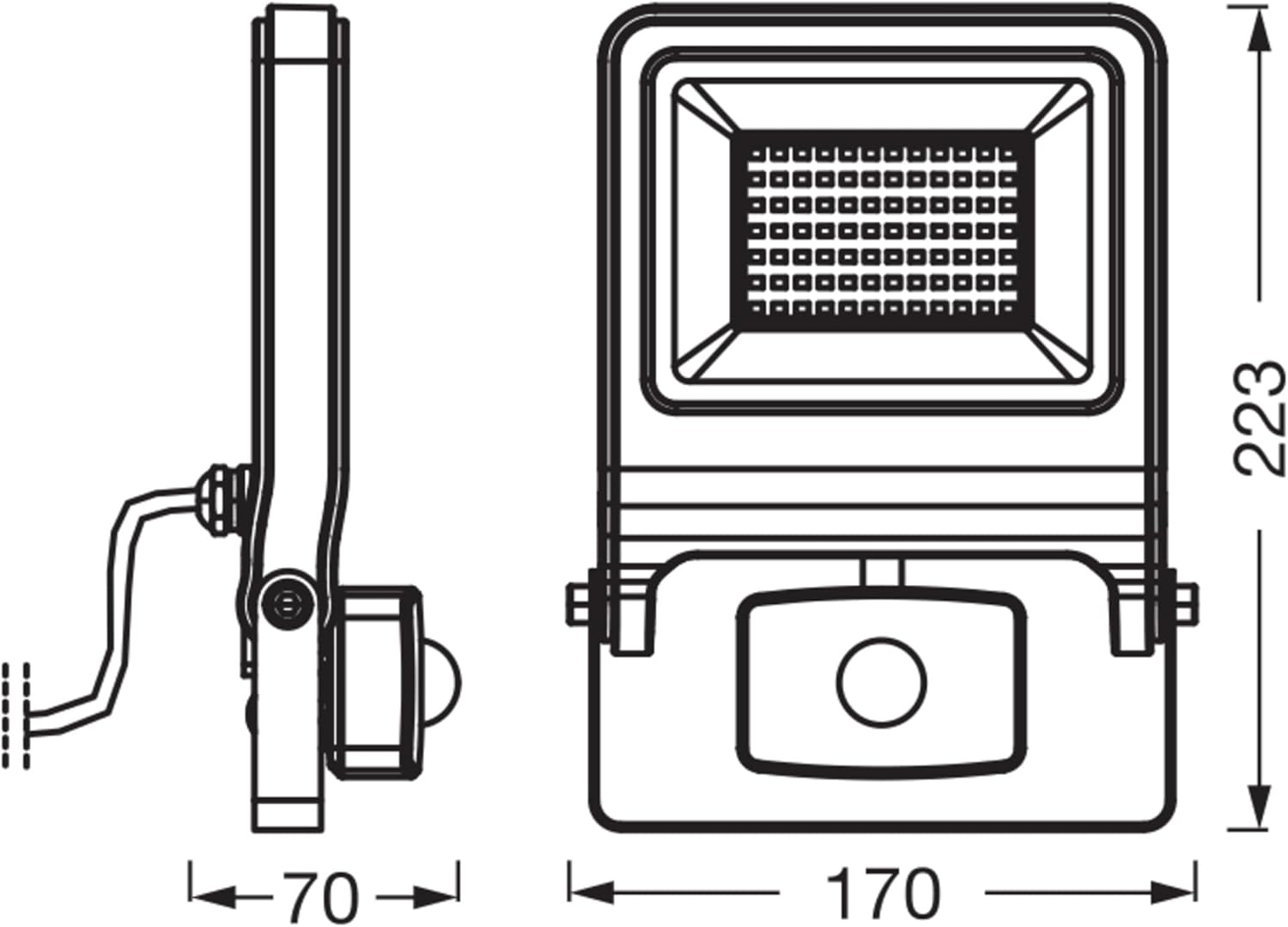
Image 8.1: Dimensional drawing of the OSRAM ENDURA FLOOD PC 50W LED Projector, showing measurements in millimeters.
9. Warranty and Support
This OSRAM ENDURA FLOOD PC 50W LED Projector comes with a 3-year warranty from the date of purchase. Please retain your proof of purchase for warranty claims.
For technical support, warranty claims, or further inquiries, please contact OSRAM customer service or visit the official OSRAM/LEDVANCE website. Contact information can typically be found on the product packaging or the manufacturer's website.
Manufacturer: LEDVANCE


