1. Product Overview
The BAOFENG UV-25 is a high-power, dual-band two-way radio designed for versatile communication. It features multiple power settings, a broad frequency range, and a high-capacity battery with USB-C charging. This manual provides essential information for safe and effective operation.
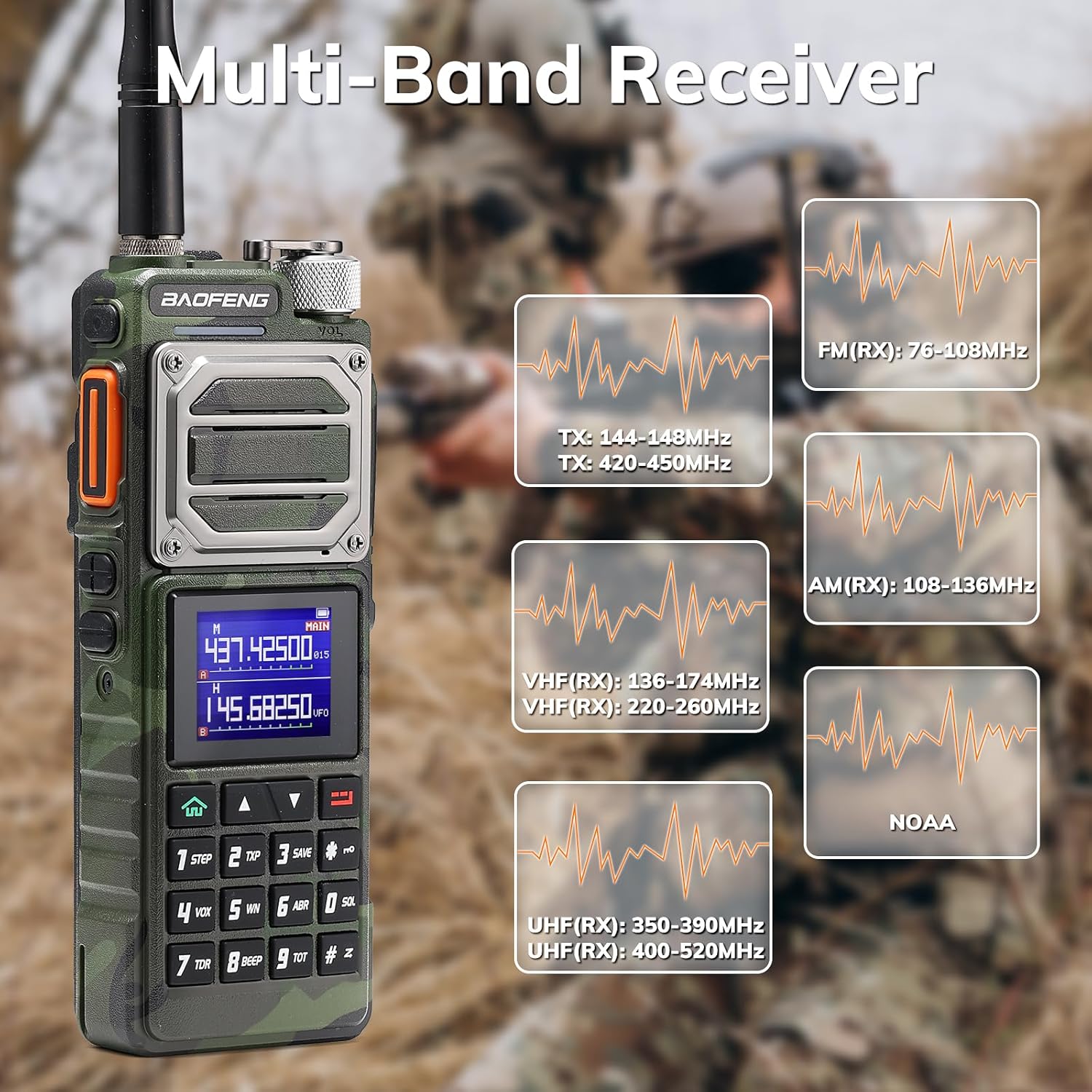
Figure 1: BAOFENG UV-25 Two Way Radio with its main features.
2. Package Contents
Verify that all items are present in the package before proceeding with setup.
- BAOFENG UV-25 Ham Radio Handheld x 1
- 5200mAh Battery x 1
- USB Charging Cable x 1
- Charging Adapter x 1
- Tactical Gooseneck Antenna x 1
- Foldable Whip Antenna x 1
- Headset x 1

Figure 2: All components included in the BAOFENG UV-25 package.
3. Setup
3.1 Attaching the Battery
- Align the battery pack with the grooves on the back of the radio.
- Slide the battery upwards until it clicks into place. Ensure it is securely fastened.
3.2 Attaching the Antenna
- Screw the desired antenna (Tactical Gooseneck or Foldable Whip) clockwise onto the antenna connector at the top of the radio until it is finger-tight. Do not overtighten.
3.3 Charging the Battery
The UV-25 radio is equipped with a 5200mAh battery that can be charged via a Type-C USB port.
- Connect the USB-C charging cable to the Type-C port on the battery pack.
- Connect the other end of the USB-C cable to the provided adapter, a laptop USB port, or a power bank.
- The charging indicator on the radio will show the charging status.
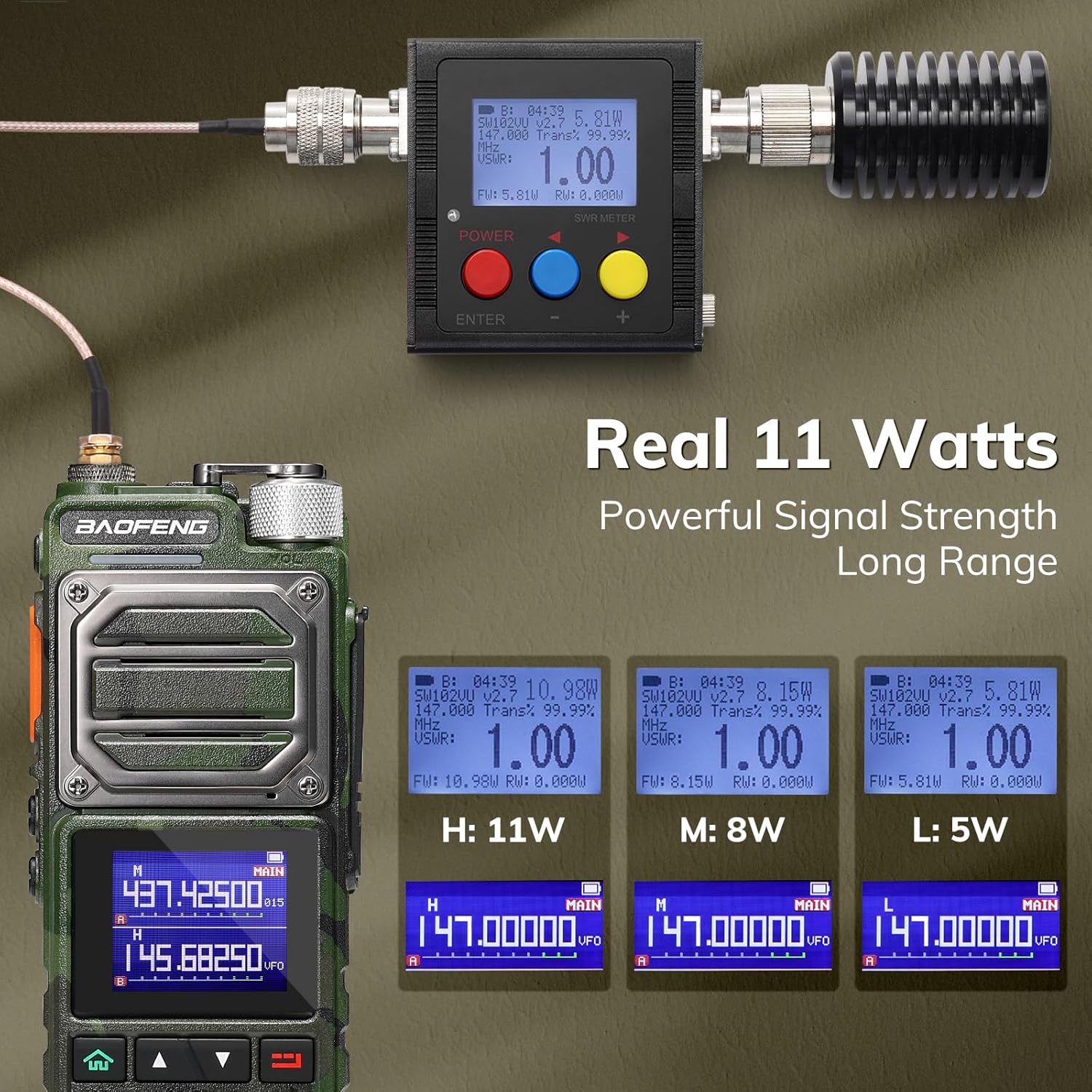
Figure 3: The 5200mAh battery features a Type-C charging port for convenient power replenishment.
4. Operating Instructions
4.1 Power On/Off and Volume Control
- To power on, rotate the volume knob clockwise until the display illuminates.
- To power off, rotate the volume knob counter-clockwise until it clicks.
- Adjust the volume by rotating the volume knob.
4.2 Channel Selection and Frequency Input
The radio supports up to 999 channels. You can select channels or input frequencies directly.
- Channel Mode: Use the UP/DOWN arrow keys to navigate through programmed channels.
- Frequency Mode: Enter desired frequencies directly using the numeric keypad.
4.3 Transmitting and Receiving
- To transmit, press and hold the Push-To-Talk (PTT) button on the side of the radio. Speak clearly into the microphone.
- Release the PTT button to receive.
4.4 One-Key Frequency Copy
The UV-25 features a one-key frequency copy function for quick setup with other compatible devices.
- Ensure both radios are powered on and within range.
- On the source radio, select the frequency to be copied.
- On the target UV-25 radio, press and hold the [SK1] key (refer to your radio's button layout for exact location) to initiate the frequency copy process.
- The radio will search for and copy the frequency from the source radio.

Figure 4: Demonstrating the one-key frequency copy feature between two radios.
4.5 DTMF Manual Dial
The radio supports DTMF (Dual-Tone Multi-Frequency) manual dialing for various functions, such as repeater control or selective calling.
- In frequency mode, press the appropriate key to enter DTMF dialing mode.
- Use the numeric keypad to input the desired DTMF tones.
- Press PTT to transmit the DTMF sequence.

Figure 5: Using the numeric keypad for DTMF manual dialing on the UV-25 radio.
5. Maintenance
5.1 Battery Care
- Avoid fully discharging the battery frequently to prolong its lifespan.
- Store the battery in a cool, dry place when not in use.
- Do not expose the battery to extreme temperatures or direct sunlight.
5.2 Cleaning the Radio
- Use a soft, damp cloth to clean the radio's exterior.
- Do not use harsh chemicals or abrasive cleaners.
- Ensure the USB-C port cover is closed to prevent dust and moisture ingress.
5.3 General Handling
- The radio features a durable metal construction, but avoid unnecessary drops or impacts.
- This device is not water-resistant; protect it from water exposure.
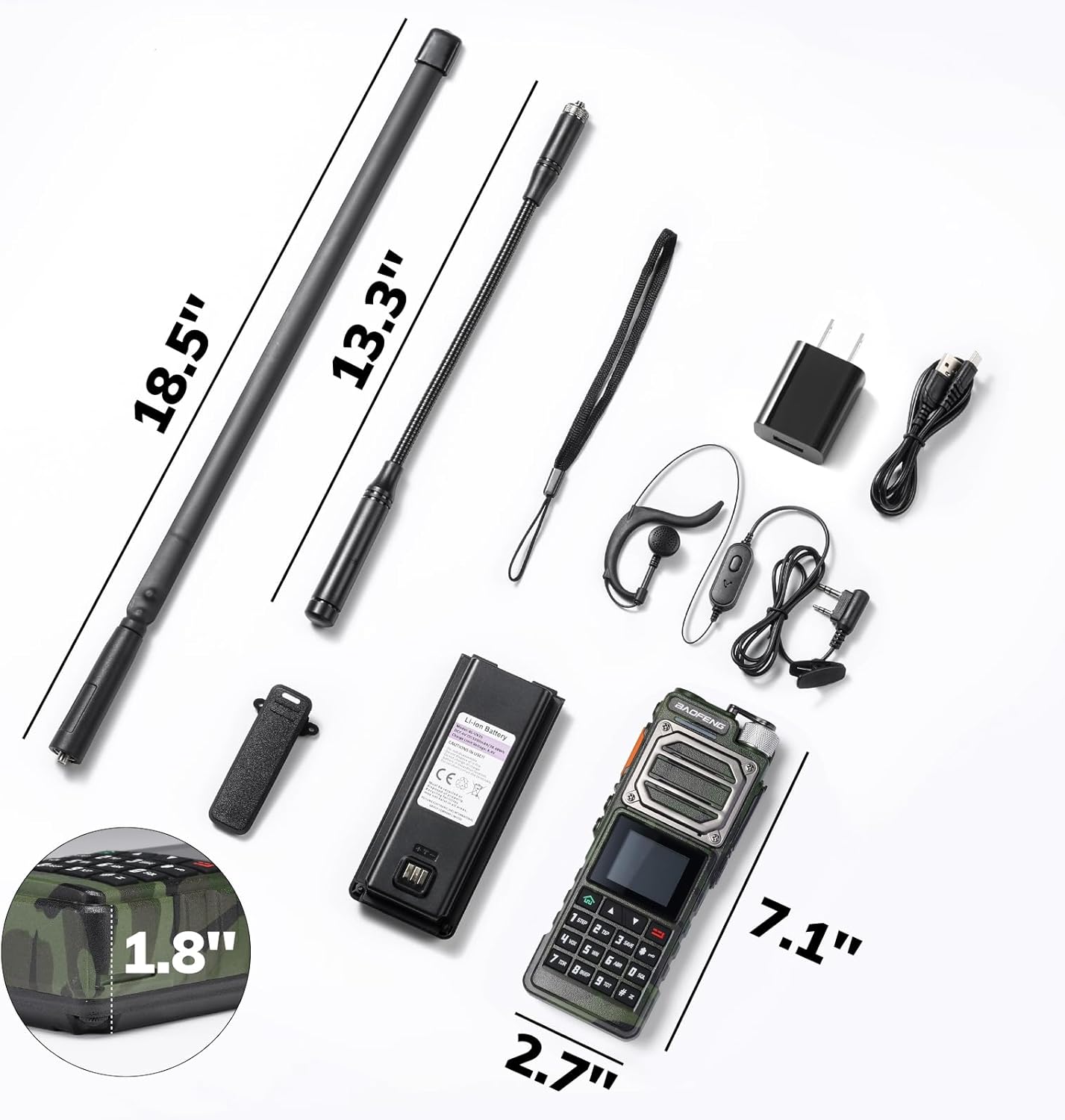
Figure 6: The robust metal design of the BAOFENG UV-25 radio.
6. Troubleshooting
| Problem | Possible Cause | Solution |
|---|---|---|
| Radio does not power on | Battery is low or not properly installed | Charge the battery or re-install it securely. |
| Cannot transmit or receive | Incorrect frequency/channel, antenna not connected, or low power setting | Verify frequency/channel, ensure antenna is attached, check power output setting. |
| Poor audio quality | Weak signal, incorrect squelch setting, or damaged microphone/speaker | Move to an area with better signal, adjust squelch level, or contact support if hardware issue. |
| Battery drains quickly | High power usage, frequent transmission, or aging battery | Use lower power settings when possible, reduce transmission time, or consider replacing the battery. |
7. Specifications
The BAOFENG UV-25 radio offers a range of features and capabilities:
- Power Output: 10W High, 8W Medium, 5W Low (Actual measured output up to 11W)
- Frequency Range: UV Dual-Band (136-174MHz, 400-520MHz), FM (76-108MHz), AM (108-136MHz), VHF (200-260MHz), UHF (350-390MHz), NOAA Weather Channels
- Channels: 999
- Battery: 5200mAh, 7.4V, USB-C Rechargeable
- Dimensions: 8.11 x 2.83 x 9.21 inches (Product), 8.11"D x 2.83"W x 9.21"H (Product)
- Item Weight: 2.27 pounds
- Special Features: Digital Display, Dual Band, Long Range, USB-C Rechargeable, Voice Operated Transmission (VOX)
- Water Resistance Level: Not Water Resistant

Figure 7: Overview of the multi-band receiving capabilities of the UV-25 radio.

Figure 8: Display showing the 11W, 8W, and 5W power output settings.
8. Official Product Video
Video 1: An overview of the BAOFENG UV-25 Handheld Ham Radio, demonstrating its features and components.
9. Warranty and Support
The BAOFENG UV-25 radio comes with an 18 Months Warranty. Additionally, Lifetime Support is provided for this product. For any technical assistance or warranty claims, please refer to the contact information provided with your purchase or visit the official BAOFENG support website.


