
Philips 111
PHILIPS Smartwatch Model 111 User Manual
Model: 111 | Brand: Philips
Introduction
Thank you for choosing the PHILIPS Smartwatch Model 111. This device is designed to enhance your daily life with features such as conference recording, real-time translation, Bluetooth calling, and comprehensive health monitoring. This manual provides essential information for setting up, operating, and maintaining your smartwatch.
Safety Information
- Do not attempt to disassemble or modify the smartwatch. This may void the warranty and cause damage.
- Keep the device away from extreme temperatures, direct sunlight, and corrosive liquids.
- Avoid strong impacts or drops, as these can damage the internal components.
- Ensure the charging cable is properly connected to prevent electrical hazards.
- Consult a medical professional before using health monitoring features if you have pre-existing medical conditions.
- The smartwatch is 5 ATM water-resistant, suitable for shallow-water activities like swimming. It is not suitable for diving or high-pressure water activities.
Package Contents
Please check the package for the following items:
- PHILIPS Smartwatch Model 111
- Magnetic Charging Cable
- User Manual (this document)
Setup
1. Charging the Smartwatch
Before first use, fully charge your smartwatch. Connect the magnetic charging cable to the charging points on the back of the watch and to a USB power source. The watch will display a charging indicator.
- Charging Method: Magnetic charging.
- Battery Life: Approximately 2-3 days with continuous use, up to 15 days with light use.

Image: The smartwatch connected to its magnetic charging cable.
2. Power On/Off
- Power On: Press and hold the side button until the PHILIPS logo appears.
- Power Off: Press and hold the side button, then select "Power Off" on the screen.
3. Pairing with Your Smartphone
To utilize features like Bluetooth calls and notifications, pair your smartwatch with your smartphone via Bluetooth.
- Ensure Bluetooth is enabled on your smartphone.
- Open the companion app (refer to the packaging or quick start guide for app name) on your smartphone.
- Follow the on-screen instructions in the app to search for and connect to your PHILIPS Smartwatch Model 111.
- Confirm the pairing request on both your phone and the smartwatch.

Image: The smartwatch displaying a phone call interface, demonstrating Bluetooth call functionality.
4. Software Update
It is recommended to update your smartwatch to the latest system version immediately after receiving it. This ensures optimal performance and access to all features, including real-time transcription in Spanish.
- Connect your smartwatch to your smartphone.
- Open the companion app and navigate to the update section.
- Follow the instructions to download and install any available updates.
Operating Instructions
1. Display and Navigation
The smartwatch features a 1.952-inch 3D high-definition square display with a resolution of 410x502 pixels, offering vibrant colors and sensitive touch response.
- Touch Screen: Swipe left, right, up, or down to navigate through menus and features. Tap to select.
- Changing Dials: Press and hold the screen to access multiple dial settings. Swipe to choose your preferred watch face and tap to confirm.
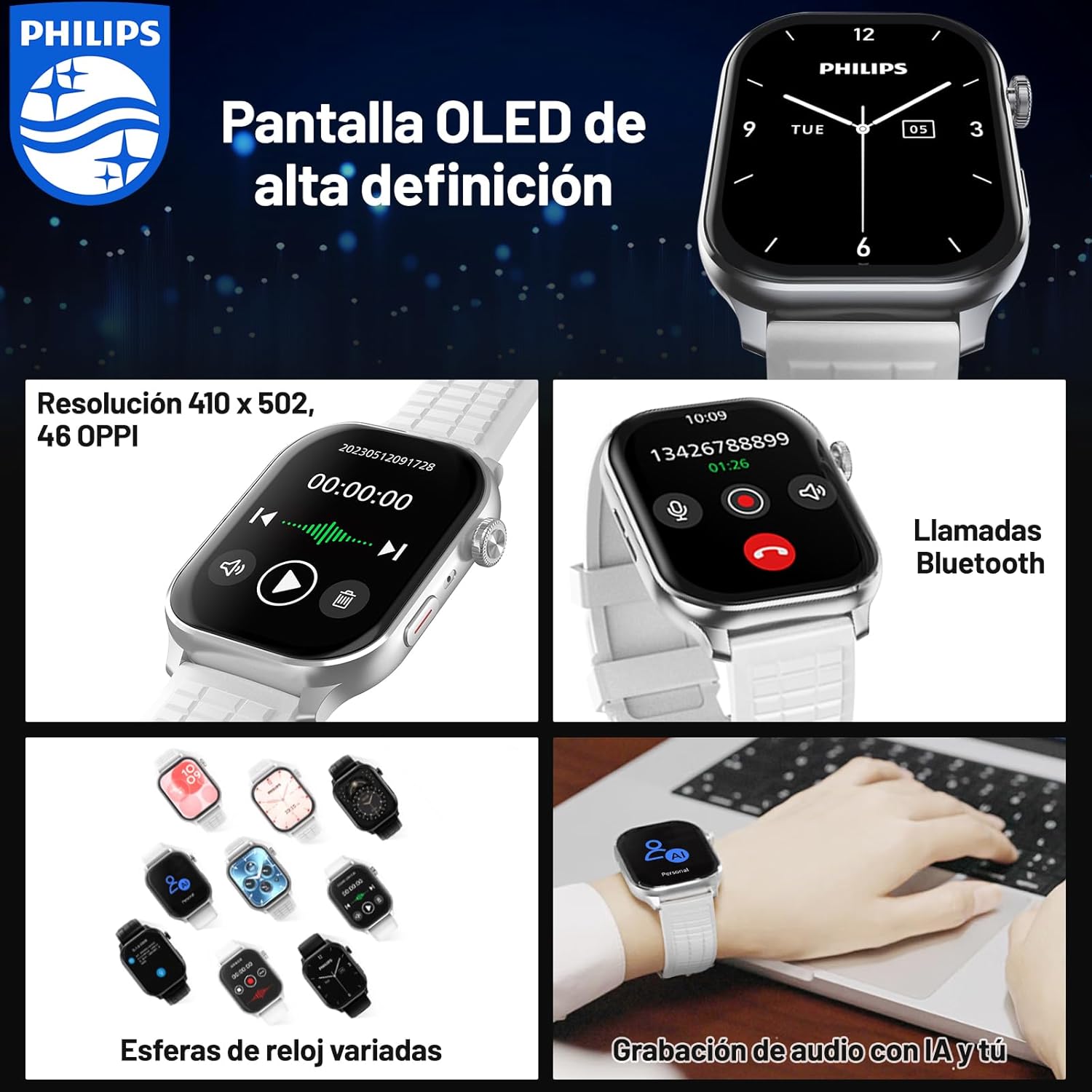
Image: The smartwatch displaying different watch faces and a Bluetooth call screen.

Image: A close-up view of the smartwatch's clear and vivid OLED display.
2. Conference Recording and Translation
The smartwatch is equipped with a one-click recording function and supports real-time voice transcription and translation, making it ideal for efficient meetings and cross-border communication.
- One-Click Recording: Access the recording feature from the main menu and tap to start/stop recording.
- Real-time Transcription & Translation: The device can accurately recognize conference conversations and generate text records simultaneously. It supports 2+24 languages for transcription and translation.
- Offline Recording: Voice notes are saved directly on the device, eliminating the need for an internet connection during recording.
- Local Storage: Recorded audio and transcribed text are stored in the smartwatch's 4GB memory for easy access and review.

Image: The smartwatch and a smartphone screen showing the real-time transcription and translation feature in action.

Image: The smartwatch demonstrating its audio recording capabilities, highlighting offline functionality and local storage.
3. Bluetooth Calling and Notifications
Stay connected by making and receiving calls directly from your wrist. Important information and notifications from your smartphone are synchronized to your smartwatch.
- Bluetooth Calls: Once paired with your phone, you can dial numbers, answer incoming calls, and view call history directly on the smartwatch.
- Synchronized Notifications: Receive alerts for messages, emails, and app notifications on your wrist, ensuring you don't miss important updates.

Image: The smartwatch displaying its Bluetooth calling interface, including a dial pad and recent call logs.
4. Health and Fitness Monitoring
The smartwatch supports multiple professional sports modes and monitors various health data in real-time to help you maintain an active and healthy lifestyle.
- Multiple Sports Modes: Track data for various activities, including exercise duration, heart rate, steps taken, and distance covered.
- Sedentary Reminders: Receive alerts to move if you've been inactive for too long.
- Personalized Event Reminders: Set custom reminders for important events.

Image: A user engaging in outdoor exercise, with the smartwatch displaying real-time fitness data and a companion app showing an activity summary.
Maintenance
- Cleaning: Wipe the smartwatch and strap with a soft, dry cloth. For stubborn dirt, use a slightly damp cloth and dry thoroughly. Avoid harsh chemicals.
- Water Resistance: The device is 5 ATM water-resistant. After exposure to water, especially saltwater, rinse with fresh water and dry completely. Do not press buttons underwater.
- Storage: Store the smartwatch in a cool, dry place when not in use for extended periods.

Image: The smartwatch submerged in water, illustrating its 5 ATM water resistance feature.
Troubleshooting
| Problem | Possible Solution |
|---|---|
| Smartwatch does not power on. | Ensure the device is fully charged. Connect to the magnetic charger and wait a few minutes before attempting to power on again. |
| Cannot pair with smartphone. |
|
| Transcription/Translation not working correctly. |
|
| Short battery life. |
|
Specifications
| Feature | Detail |
|---|---|
| Model Number | 111 |
| Brand | Philips |
| Display Size | 1.952 inches |
| Display Resolution | 410 x 502 pixels |
| Storage Capacity | 4 GB |
| Battery Capacity | 350 Milliamp Hours |
| Average Battery Duration | 3 days (continuous use) |
| Water Resistance | 5 ATM |
| Connectivity | Bluetooth |
| Compatible Devices | Smartphone |
| Special Features | Audio Recording, Phone Calls, Notifications, Touch Screen, Multi-sport Tracker, Sedentary Reminder |
| Dimensions | 13.7 x 13.6 x 6.7 cm; 230 g (Package) |
Warranty and Support
For warranty information and customer support, please refer to the warranty card included in your product packaging or visit the official Philips support website. If you have any questions or encounter issues not covered in this manual, please contact Philips customer service.
Online Support: www.philips.com/support
Related documents111


Ask a question about this manual
Ask about setup, troubleshooting, compatibility, parts, safety, or missing instructions. Manuals+ will review the question and use this page’s manual context to help answer it.