
1. Introduction
This manual provides essential instructions for the safe and efficient use of your OSRAM SMART+ ALPS Solar Path Light. Please read this manual thoroughly before installation and operation, and retain it for future reference. This solar-powered light offers smart control, warm white and RGB color options, and is designed for outdoor use.
2. Safety Information
Important Safety Instructions:
- If the battery compartment does not close securely, discontinue product use and keep it away from children.
- If you suspect batteries may have been swallowed or entered any part of the body, seek immediate medical attention.
- Avoid exceeding the maximum ambient temperature of +35°C during operation.
- Replacing a battery with an incorrect type can compromise safety precautions (e.g., certain lithium battery types).
- Disposing of a battery in fire, a hot oven, or mechanically crushing or cutting a battery may cause an explosion.
- Ensure the wall or ceiling is suitable for mounting if applicable. If unsure, consult a professional.
- This product is designed for outdoor use (IP44 rated), providing protection against splashing water from all directions.
3. Package Contents
Verify that all components are present and undamaged upon opening the package.
- 1 x OSRAM SMART+ ALPS Solar Path Light (70 cm, RGB + W)
- Mounting screws
- Wall plugs
- Power supply (for USB-C charging)
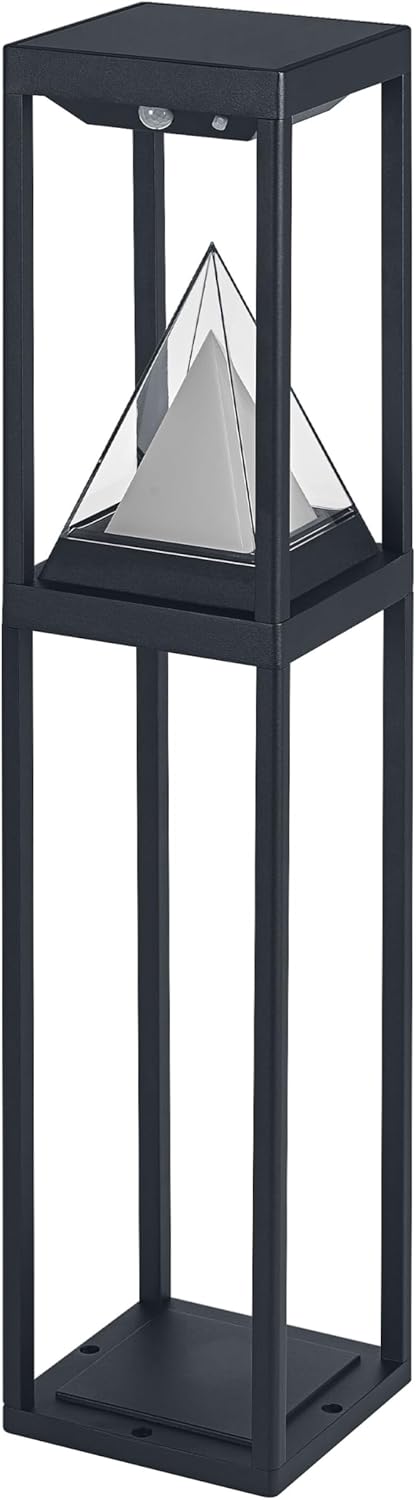
Image 1: The OSRAM SMART+ ALPS Solar Path Light, a black-framed outdoor light with a central pyramid-shaped diffuser.

Image 2: The product packaging for the OSRAM SMART+ ALPS Solar Path Light, showing the light and key features.
4. Setup
4.1 Initial Charging
Before first use, it is recommended to fully charge the light. While the light is solar-powered, an initial charge via the included USB-C cable ensures optimal performance from the start. Connect the USB-C cable to the designated port on the light and to a suitable power source.
4.2 Placement
For optimal solar charging, place the light in an area that receives direct sunlight for several hours daily. Avoid shaded areas or locations where artificial light sources might interfere with the daylight sensor.
4.3 Mounting (Optional)
The light can be placed freestanding or secured using the provided mounting screws and wall plugs. If mounting, ensure the surface is stable and capable of supporting the light's weight. Refer to the diagrams on the product packaging for typical mounting configurations.
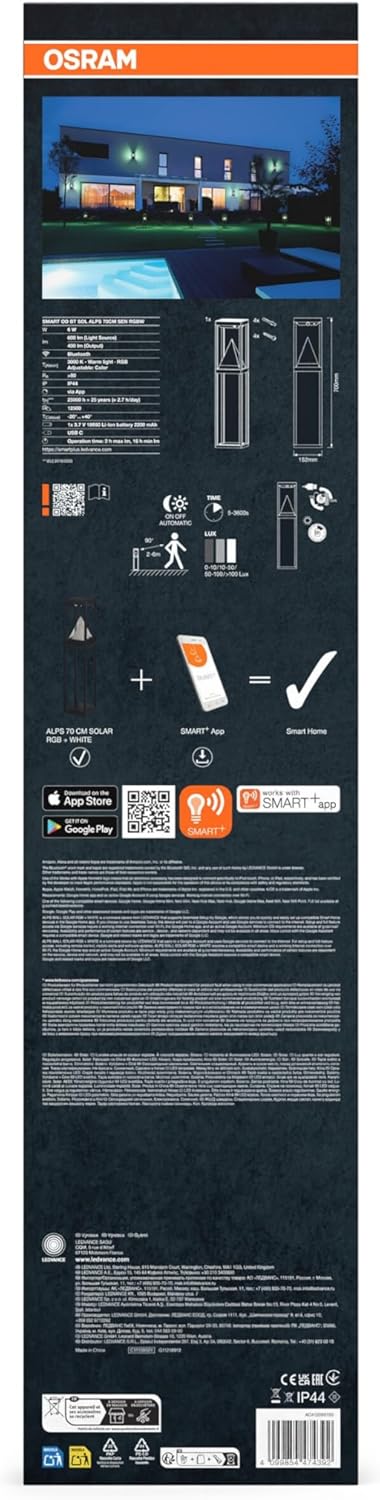
Image 3: The back of the product packaging, illustrating setup diagrams and features like solar charging and app control.
5. Operating Instructions
5.1 Powering On/Off
The light typically activates automatically at dusk and deactivates at dawn due to its integrated daylight sensor. A manual power button may be present for direct control; consult the device for its location.
5.2 Smart Control via Bluetooth App
To unlock the full features of your SMART+ ALPS Solar Path Light, download the OSRAM SMART+ app. The app is compatible with mobile phones or tablets running a minimum of Android 8.0 or iOS 14.0.
- Download the "SMART+ App" from your device's app store.
- Ensure Bluetooth is enabled on your mobile device.
- Open the SMART+ app and follow the on-screen instructions to discover and pair your light.
- Once paired, you can control various settings:
- Brightness: Adjust the light intensity (dimmable).
- Color: Select from approximately 16 million RGB color options or choose 3000K warm white light.
- Scenes: Create and activate custom light scenes.
- Battery Status: Monitor the current battery life.

Image 4: An individual relaxing outdoors with two OSRAM SMART+ ALPS Solar Path Lights illuminating the area with a purple hue, demonstrating color customization.
5.3 Motion and Daylight Sensor
The integrated motion and daylight sensors enable demand-oriented lighting and energy saving. The light will automatically turn on when motion is detected in low-light conditions and turn off when sufficient ambient light is present or after a set period of no motion. Sensor sensitivity and duration settings may be adjustable via the SMART+ app.
6. Maintenance
6.1 Cleaning
Regularly clean the solar panel and the light's surface with a soft, damp cloth to ensure optimal charging efficiency and light output. Avoid abrasive cleaners or solvents that could damage the finish or electronic components.
6.2 Battery Charging
While primarily solar-powered, the light can be recharged via the USB-C cable, especially during prolonged periods of low sunlight or if the battery level is low. A full charge provides approximately 2.5 hours of burn time at 100% light output. Monitor battery status through the SMART+ app.
7. Troubleshooting
- Light does not turn on:
- Ensure the light is placed in an area receiving sufficient direct sunlight for charging.
- Check the battery level via the SMART+ app and recharge using the USB-C cable if necessary.
- Verify that the daylight sensor is not being interfered with by artificial light sources at night.
- Light does not respond to app control:
- Ensure Bluetooth is enabled on your mobile device.
- Confirm that your mobile device meets the minimum OS requirements (Android 8.0 or iOS 14.0).
- Try restarting the app and re-pairing the device if connection issues persist.
- Ensure the light is within Bluetooth range of your device.
- Short burn time:
- The solar panel may not be receiving enough direct sunlight for a full charge. Relocate the light to a sunnier spot.
- The battery may be aging. While rechargeable, battery capacity can decrease over time.
- High brightness settings or continuous color changes consume more power, reducing burn time.
- Inconsistent sensor detection:
- Ensure the sensor lens is clean and free from obstructions.
- Adjust sensor sensitivity settings within the SMART+ app if available.
8. Technical Specifications
| Feature | Specification |
|---|---|
| Model | SMART+ BT ALPS Solar 70 cm RGB + W |
| Brand | OSRAM |
| Dimensions (L x W x H) | 15.2L x 15.2W x 70H centimetres |
| Item Weight | 1920 Grams |
| Brightness | 400 Lumen (Light Output Maximum) |
| Wattage | 6 watts |
| Color Temperature | 3000K (Warm White) + RGB (16 million colors) |
| Power Source | Solar / DC (USB-C rechargeable) |
| Material | Aluminum | Polycarbonate (PC) |
| Protection Class | IP44 (Splash-proof) |
| Connectivity | Bluetooth |
| App Compatibility | Android 8.0+ / iOS 14.0+ |
| Max Ambient Temperature | +35°C |
| Burn Time (100% light, full charge) | Up to 2.5 hours |
9. Warranty and Support
For warranty information, product support, or service inquiries, please refer to the separate warranty document included with your purchase or visit the official OSRAM website. Contact details for customer support are typically available on the manufacturer's website.