
Telbum PL-31P, 1500W Fog Machine
User Manual: Telbum DJ Lights with Stand PL-31P & 1500W Fog Machine
Model: PL-31P (Lighting System), 1500W (Fog Machine)
Brand: Telbum
1. Introduction
Thank you for purchasing the Telbum DJ Lights with Stand PL-31P and 1500W Fog Machine. This comprehensive system is designed to enhance your events with dynamic lighting and atmospheric fog effects. This manual provides essential information for safe operation, setup, maintenance, and troubleshooting to ensure optimal performance and longevity of your equipment.

Figure 1.1: Overview of the Telbum DJ Lights with Stand PL-31P and 1500W Fog Machine system.
This image displays the complete system, featuring the lighting bar with four individual lights mounted on a tripod stand, alongside the 1500W fog machine. A carry bag for the lighting system is also visible in the background.
2. Important Safety Instructions
Please read and understand all safety instructions before installing or operating this equipment. Keep this manual for future reference.
- Always connect to a grounded power outlet.
- Do not expose the unit to rain or moisture.
- Ensure proper ventilation around the units to prevent overheating.
- Do not operate if the power cord is damaged.
- Disconnect from power before cleaning or servicing.
- Use only Telbum-approved fog fluid with the fog machine.
- Keep fog machine away from flammable materials and heat sources.
- Do not touch the nozzle of the fog machine during operation as it becomes very hot.
- Avoid direct eye exposure to the light source.
3. Package Contents
Verify that all components listed below are included in your package:
- 1 x Telbum PL-31P DJ Lighting System (T-bar with 2 multi-color LED Par lights, 2 jelly moon lights, 1 UV/white LED light bar)
- 1 x Robust, Heavy Duty Tripod Stand
- 1 x Carry Bag for Lighting System
- 1 x IR Remote Control for Lighting System
- 1 x Telbum 1500W Fog Machine
- 1 x Wireless Remote Control for Fog Machine
- 1 x Wired Remote Control for Fog Machine
- 1 x Power Cable for Lighting System
- 1 x Power Cable for Fog Machine
- 1 x User Manual (this document)
4. Setup Instructions
4.1. DJ Lighting System Setup
- Unpack Components: Carefully remove the lighting system, stand, and accessories from their packaging.
- Assemble Tripod Stand: Extend the legs of the tripod stand to a stable position. Adjust the height to your desired level, ensuring the stand is secure.
- Mount Lighting Bar: Place the PL-31P lighting bar onto the top of the tripod stand. Secure it firmly using the provided mounting hardware.
- Connect Power: Plug the power cable into the lighting system and then into a suitable grounded power outlet.

Figure 4.1: Telbum PL-31P DJ Lighting System assembled on its stand with the remote control.
This image shows the PL-31P lighting bar, featuring two multi-color LED Par lights, two jelly moon lights, and a UV/white LED light bar, all mounted on the adjustable tripod stand. The included IR remote control is also displayed.

Figure 4.2: Dimensions of the Telbum DJ Lights stand and lighting bar.
This diagram illustrates the dimensions of the lighting system, including the 25.6-inch width of the lighting bar and the adjustable height of the stand, which can extend up to 7.5 feet (90.6 inches). Individual stand components are also shown with their respective lengths.
4.2. 1500W Fog Machine Setup
- Place Machine: Position the fog machine on a stable, flat surface, ensuring adequate clearance around it for ventilation and fog output.
- Fill Fluid Tank: Open the cap of the fog fluid tank and carefully pour Telbum-approved fog juice into the tank. Ensure the metal nozzle inside the tank is fully immersed in the fluid. The tank capacity is 2200ml (2.2 liters).
- Connect Remotes: Connect the desired remote control (wired or wireless receiver) to the corresponding port on the back of the fog machine.
- Connect Power: Plug the power cord into the fog machine and then into a suitable grounded power outlet.
- Power On: Turn the main power switch on the fog machine to the "ON" position.
- Warm-up: Allow 3-4 minutes for the machine to warm up. The green indicator light on the remote will turn on when the machine is ready to produce fog.
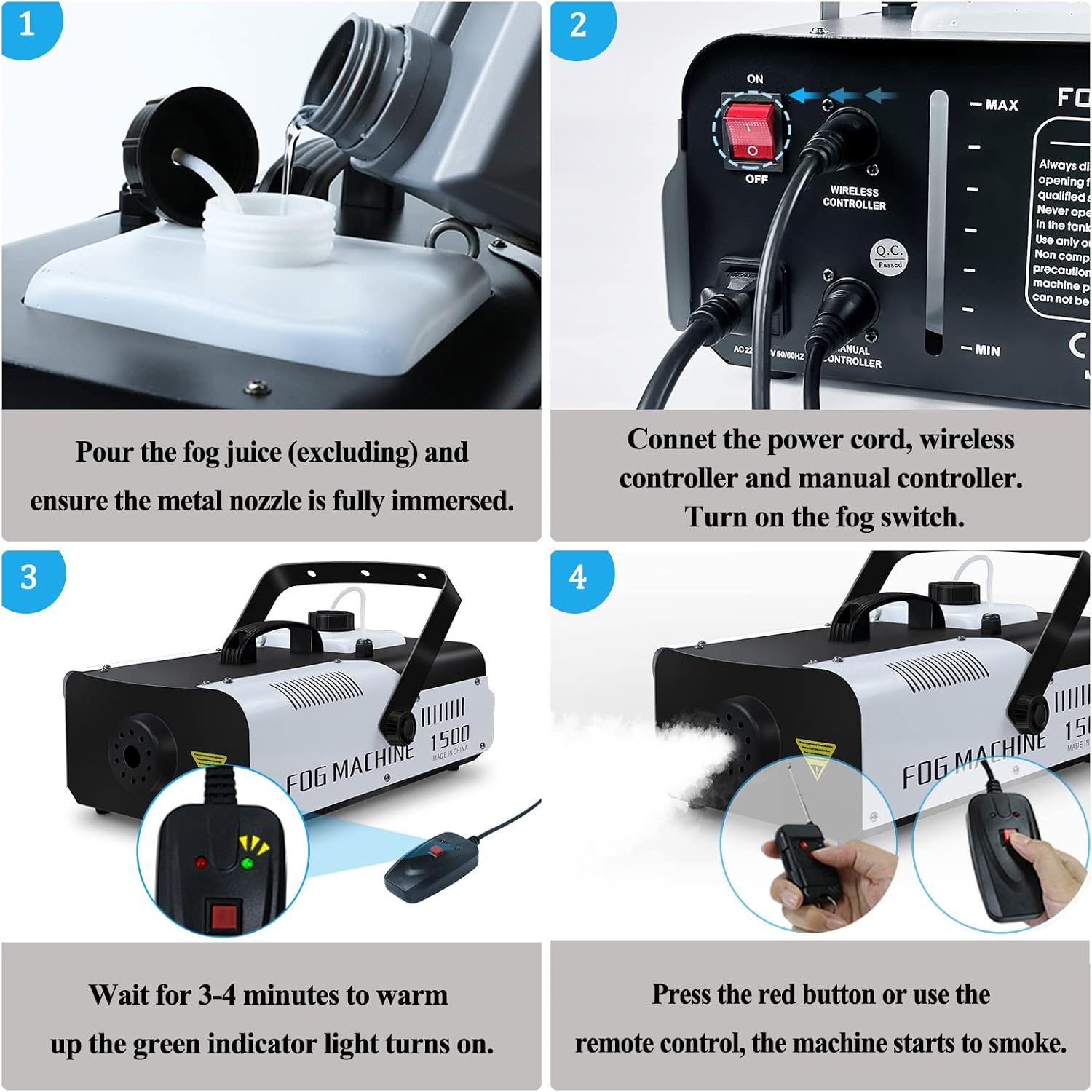
Figure 4.3: Step-by-step guide for fog machine setup and initial operation.
This image provides a four-step visual guide: 1) Pouring fog juice into the tank, ensuring the nozzle is immersed. 2) Connecting power and remote controls, then turning on the fog switch. 3) Waiting for the green indicator light to turn on (warm-up). 4) Pressing the red button on the remote to activate fog output.

Figure 4.4: Telbum 1500W Fog Machine with its wired and wireless remote controls.
This image showcases the 1500W fog machine, highlighting its robust design and the two types of remote controls included: a wired remote and a wireless keyfob remote, offering flexible control options.
5. Operating Instructions
5.1. DJ Lighting System Operation
The PL-31P lighting system can be controlled via the included IR remote or through DMX-512 (not detailed in this manual, refer to advanced DMX guides if applicable).
- Power On/Off: Use the "ON/OFF" button on the IR remote to power the lights on or off.
- Auto Mode: Press the "AUTO" button to cycle through pre-programmed lighting effects.
- Sound Mode: Press "MUSIC 1", "MUSIC 2", or "MUSIC 3" to activate sound-activated modes. The lights will change to the beat of the music or sounds.
- Strobe: Press "STROBE" to activate the strobe effect.
- Pro Light: Use the "PRO LIGHT" button to select specific light patterns or effects.
- Speed/Sensitivity: Use the "SPEED/SEN" buttons (up/down arrows) to adjust the speed of auto programs or the sensitivity of sound-activated modes.

Figure 5.1: Remote control for the Telbum DJ Lighting System and its functions.
This image highlights the ease of control for the lighting system, displaying the IR remote with clearly labeled buttons for power, auto mode, sound modes (Music 1, 2, 3), strobe, pro light, and speed/sensitivity adjustments. The lighting bar is shown in the background.

Figure 5.2: Key features of the Telbum LED Party Bar.
This image details the specific LED components of the PL-31P lighting system: 2 PAR 3x3W 4-in-1 LEDs, 2 Jelly Moon 4x3W 4-in-1 LEDs, and 1 UV/Strobe 6x2W UV/White LEDs. It also mentions RGBW color mixing, DMX-512 control (3/16-channel selectable), and Master/Slave mode capabilities.
5.2. 1500W Fog Machine Operation
Once the fog machine has completed its warm-up cycle (green indicator light on remote is on), you can activate fog output.
- Wired Remote: Press and hold the red button on the wired remote to produce fog. Release the button to stop.
- Wireless Remote: Press the button on the wireless keyfob remote to produce fog. Press again to stop.
- Continuous Use: The machine can produce fog continuously for 40-60 seconds per burst, with a recovery time needed between bursts for reheating. The 2200ml tank allows for continuous use for 3-4 hours before refilling.
6. Maintenance
Regular maintenance ensures the longevity and optimal performance of your Telbum DJ Lights and Fog Machine.
- Cleaning:
- Wipe down the exterior of both units with a soft, dry cloth.
- For the fog machine, periodically run a fog machine cleaning solution through the system to prevent clogs.
- Storage:
- Store the units in a cool, dry place when not in use.
- For the lighting system, use the provided carry bag for protection during transport and storage.
- Fluid Management (Fog Machine):
- Always use high-quality, water-based fog fluid.
- Do not mix different types of fog fluid.
- Ensure the fluid tank is adequately filled before operation to prevent pump damage.
7. Troubleshooting
| Problem | Possible Cause | Solution |
|---|---|---|
| Lights do not turn on. | No power, remote battery dead, unit not plugged in. | Check power connection. Replace remote battery. Ensure power outlet is functional. |
| Fog machine not producing fog. | Not warmed up, no fog fluid, clogged nozzle, pump issue. | Wait for green indicator light. Refill fog fluid. Run cleaning solution. Contact support if pump fails. |
| Fog output is weak or inconsistent. | Low fluid level, partial clog, insufficient warm-up. | Ensure fluid tank is full. Run cleaning solution. Allow full warm-up time. |
| Remote control for lights not working. | Battery dead, IR sensor blocked, remote out of range. | Replace battery. Ensure clear line of sight to IR sensor. Operate within specified range. |
8. Specifications
8.1. Telbum PL-31P DJ Lighting System
- Light Sources:
- 2 x PAR Lights: 3x3W 4-in-1 LEDs (RGBW)
- 2 x Jelly Moon Lights: 4x3W 4-in-1 LEDs (RGBW)
- 1 x UV/Strobe Light Bar: 6x2W UV/White LEDs
- Control Modes: Auto, Sound-Activated, IR Remote, DMX-512 (3/16-channel selectable), Master/Slave
- Color Mixing: RGBW
- Stand Height: Up to 7.5 ft (approx. 90.6 inches / 230 cm)
- Lighting Bar Width: 25.6 inches (approx. 65 cm)
- Power Input: AC 110V (standard for US market)
8.2. Telbum 1500W Fog Machine
- Power Consumption: 1500W
- Tank Capacity: 2200ml (2.2 Liters)
- Smoke Output: 25000 CFM (Cubic Feet per Minute)
- Smoke Output Distance: 20-26 feet (6-8 meters)
- Warm-up Time: 3-4 minutes
- Continuous Output Duration: 40-60 seconds per burst
- Control: Wireless Remote, Wired Remote
- Dimensions (L x W x H): 44cm (17.32in) x 25cm (9.84in) x 15cm (5.9in)
- Weight: 5.3 kg
- Power Input: AC 110V

Figure 8.1: Physical dimensions and key specifications of the Telbum 1500W Fog Machine.
This image provides a visual representation of the fog machine's dimensions (length, width, height) and its weight. A table below the image summarizes key electrical and performance specifications such as power input, consumption, tank capacity, and smoke output.
9. Warranty Information
Telbum products are manufactured to the highest quality standards. This product is covered by a limited warranty against defects in materials and workmanship from the date of purchase. Please retain your proof of purchase for warranty claims. The warranty does not cover damage caused by misuse, accident, unauthorized modification, or normal wear and tear.
For specific warranty terms and conditions, please refer to the product packaging or contact Telbum customer support.
10. Customer Support
If you have any questions, require technical assistance, or need to report an issue with your Telbum DJ Lights with Stand PL-31P and 1500W Fog Machine, please contact our customer support team.
Contact Information:
- Website: Visit the Telbum Store on Amazon
- Email: Refer to your product packaging or the Telbum website for the most current contact email.
- Phone: Refer to your product packaging or the Telbum website for the most current contact phone number.
Please have your product model number (PL-31P, 1500W Fog Machine) and purchase date ready when contacting support.
Ask a question about this manual
Ask about setup, troubleshooting, compatibility, parts, safety, or missing instructions. Manuals+ will review the question and use this page’s manual context to help answer it.