1. Important Safety Information
Before using your EYESUN Indoor Home Spin Bike, please read and understand all instructions and safety warnings. Keep this manual for future reference.
- Consult a physician before starting any exercise program, especially if you have pre-existing health conditions.
- Ensure the bike is placed on a flat, stable surface. Use a protective mat underneath to prevent damage to flooring.
- Keep children and pets away from the bike during operation.
- Regularly inspect the bike for loose parts, wear, or damage before each use. Do not use if any components are compromised.
- The maximum user weight capacity for this bike is 330 lbs (150 kg).
- Wear appropriate athletic clothing and footwear. Avoid loose clothing that could get caught in moving parts.
- The resistance knob also functions as an emergency brake. Press it down firmly to stop the flywheel immediately.
- Adjust the seat and handlebars to a comfortable and safe position before beginning your workout.
- Stay hydrated during your workout.
2. Product Overview
The EYESUN Indoor Home Spin Bike is designed to provide an effective and comfortable cardio workout in your home environment.
2.1 Key Features
- Adjustable Handlebar: 3-way adjustable non-slip handlebar for various riding positions.
- Adjustable Seat: 6-way padded seat, suitable for users with an inseam of 25 to 35 inches.
- Resistance System: Adjustable brake pad resistance for varied workout intensity.
- Drive System: Silent belt drive for smooth and quiet operation.
- LCD Monitor: Tracks time, speed, distance, calories, pulse, and odometer.
- Connectivity: Bluetooth enabled, compatible with FantomFite, KINOMAP, Zwift, Google Fit, and Apple Health.
- Tablet Holder: Integrated holder for entertainment during workouts.
- Safety: Adjustable cage pedals and an emergency resistance bar for instant stopping.
- Portability: Compact design with transport wheels for easy movement.
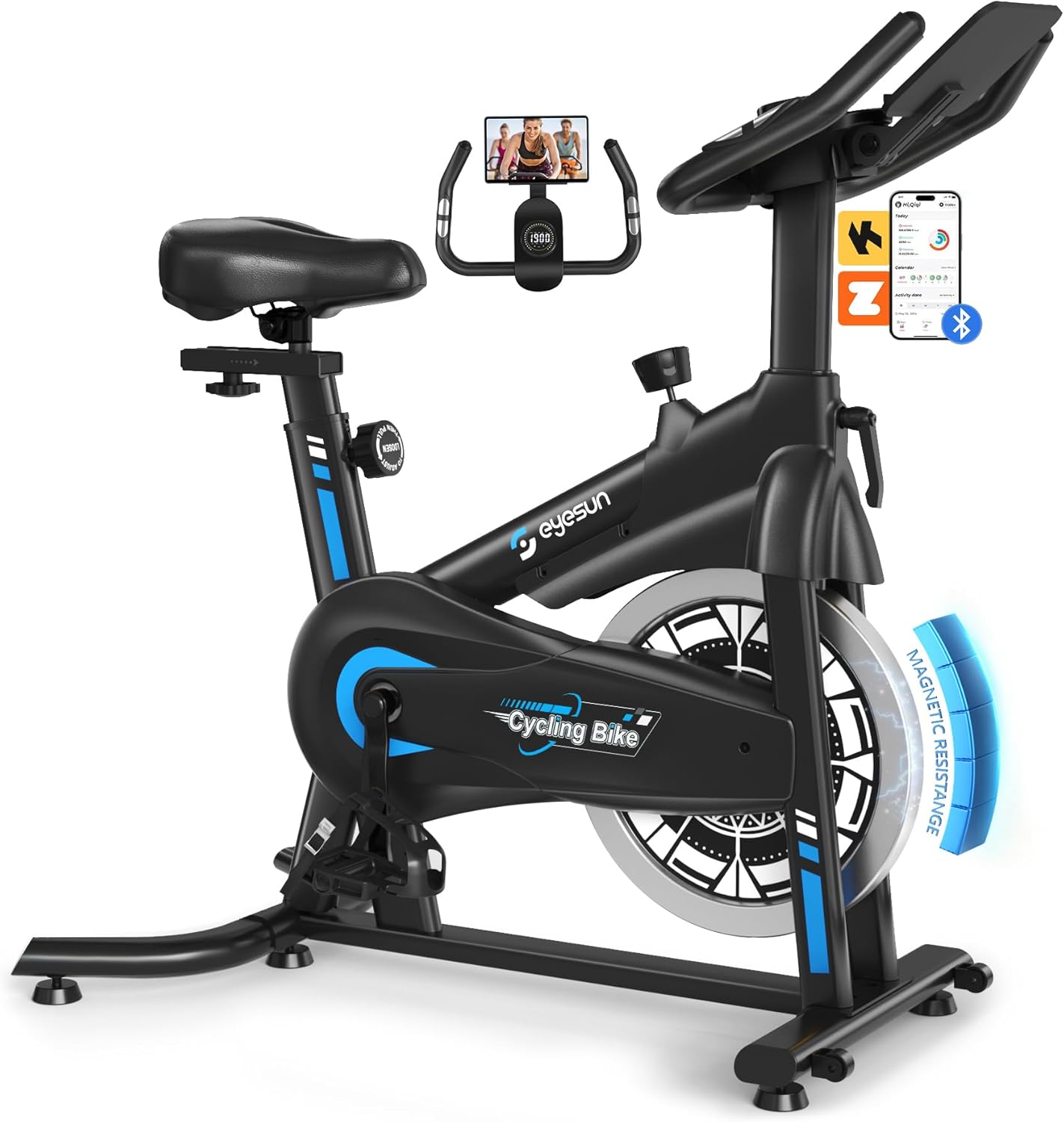
Figure 1: The EYESUN Indoor Home Spin Bike, showcasing its overall design and features.

Figure 2: Overview of key features including 330 lbs load capacity, sturdy steel frame, and silent operation.

Figure 3: Details of the humanized design, highlighting the smooth belt drive and integrated tablet holder.
3. Setup and Assembly
The EYESUN Indoor Home Spin Bike is designed for straightforward assembly. Approximately 80% of the bike comes pre-assembled. Please follow these steps carefully.
3.1 Unpacking
- Carefully remove all components from the packaging.
- Verify that all parts listed in the included user manual are present and undamaged.
- Place all components on a clean, flat surface.
3.2 Assembly Steps
Refer to the detailed assembly instructions and diagrams provided in the separate user manual included with your product. General steps include:
- Attach the front and rear stabilizer bars to the main frame.
- Install the pedals, ensuring the left and right pedals are correctly oriented (usually marked 'L' and 'R').
- Insert and secure the seat post and seat.
- Insert and secure the handlebar post and handlebars.
- Connect the LCD monitor cables and attach the monitor to the handlebar assembly.

Figure 4: The EYESUN Indoor Home Spin Bike with components laid out, illustrating its 80% pre-assembled state for quick installation.
4. Operating Instructions
Follow these instructions to operate your EYESUN Indoor Home Spin Bike safely and effectively.
4.1 Adjusting the Bike for Your Comfort
- Seat Adjustment: Loosen the adjustment knob below the seat. Adjust the seat height so that your leg has a slight bend at the knee when the pedal is at its lowest point. You can also adjust the seat forward or backward for optimal comfort and pedaling efficiency. Tighten the knob securely after adjustment.
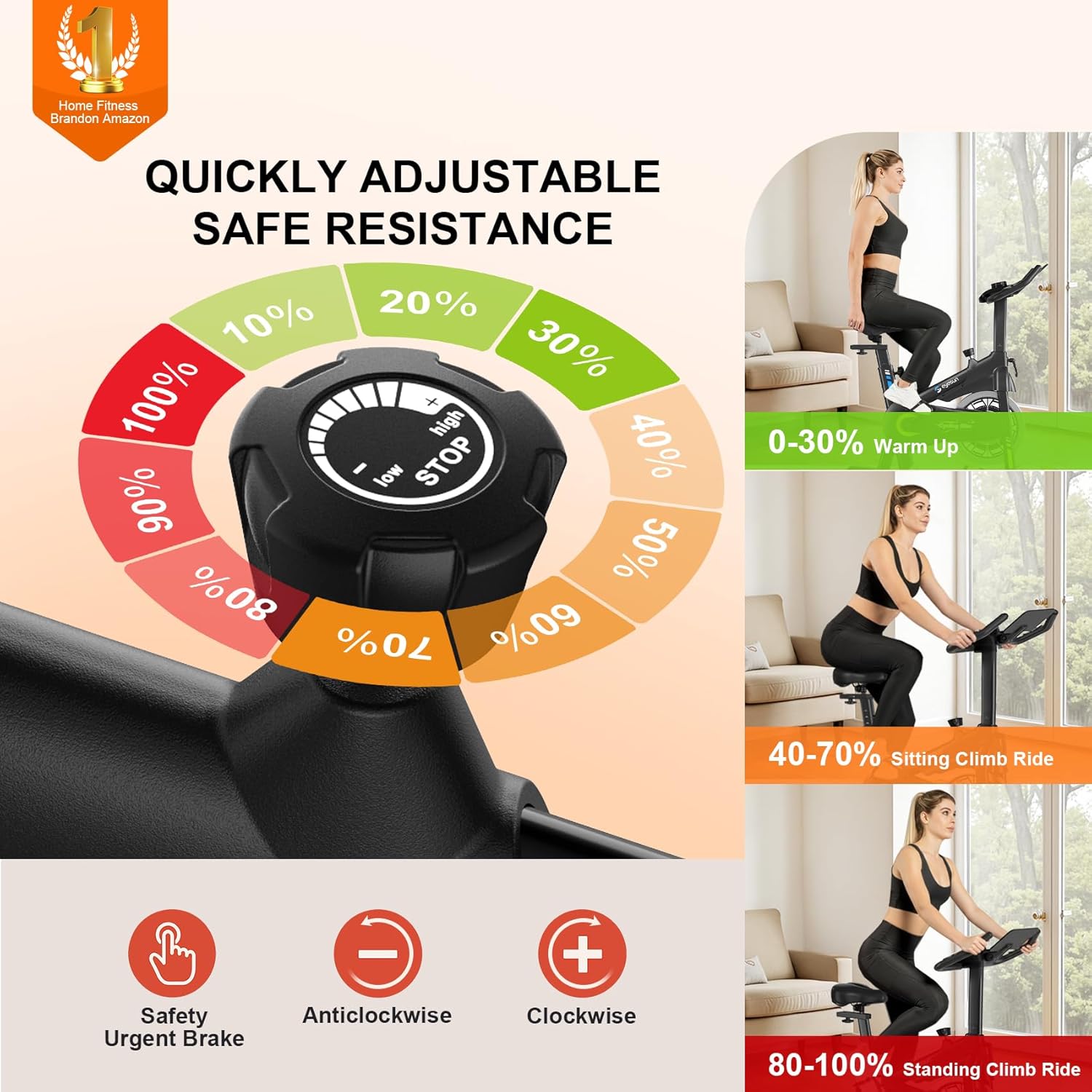
Figure 5: Demonstrating the adjustment of the seat for height and horizontal position.
- Handlebar Adjustment: Loosen the adjustment knob on the handlebar post. Adjust the handlebar height to a comfortable level that allows for a slight bend in your elbows. Tighten the knob securely.

Figure 6: Illustrating the adjustment of the handlebar height for user comfort.
- Pedal Straps: Place your feet firmly into the pedal cages and tighten the straps to secure your feet. This prevents your feet from slipping during intense workouts.
4.2 Starting Your Workout
- Mount the bike carefully.
- Adjust Resistance: Turn the red resistance knob clockwise to increase resistance and counter-clockwise to decrease it. Start with a low resistance and gradually increase as you warm up.
- Emergency Stop: In case of an emergency or if you need to stop the flywheel quickly, press down firmly on the red resistance knob.

Figure 7: Close-up view of the resistance knob, indicating its function for adjusting intensity and emergency stopping.
4.3 Using the LCD Monitor and Apps
- LCD Monitor: The monitor displays various workout metrics. Press the 'MODE' button to cycle through Time, Speed, Distance, Calories, Pulse, and Odometer.
- Bluetooth Connectivity: The bike features Bluetooth for connecting to compatible fitness apps.
- App Compatibility: Connect to apps like FantomFite, KINOMAP, and Zwift for interactive workouts. The bike also supports syncing with Google Fit and Apple Health.
- Tablet Holder: Place your tablet or smartphone in the integrated holder to enjoy media or fitness apps during your ride.

Figure 8: The digital LCD monitor showing various workout statistics and the convenient tablet holder.

Figure 9: Illustration of the EYESUN Indoor Home Spin Bike's compatibility with popular fitness applications like Zwift and Kinomap.
5. Maintenance
Regular maintenance is crucial for the longevity and safe operation of your EYESUN Indoor Home Spin Bike.
- Cleaning: Wipe down the bike with a damp cloth after each use to remove sweat and dust. Avoid abrasive cleaners.
- Check Fasteners: Periodically check all bolts, nuts, and screws to ensure they are tight. Tighten any loose fasteners.
- Brake Pad Inspection: Inspect the brake pad for wear. If it appears excessively worn, contact customer support for a replacement.
- Belt Drive: The silent belt drive system is generally maintenance-free. Do not attempt to lubricate the belt.
- Storage: Store the bike in a dry, cool place away from direct sunlight and moisture.
6. Troubleshooting
If you encounter any issues with your EYESUN Indoor Home Spin Bike, refer to the following common problems and solutions:
| Problem | Possible Cause | Solution |
|---|---|---|
| Wobbly seat | Seat adjustment knob not fully tightened. | Ensure all seat adjustment knobs are securely tightened. |
| Squealing noise during pedaling | Friction pad dry or worn. | If the noise persists, contact customer support. Do not apply lubricants to the brake pad unless specifically instructed. |
| LCD monitor not displaying data | Batteries low or incorrectly installed; sensor cable disconnected. | Replace batteries in the monitor. Check that the sensor cable is securely connected to the monitor and the bike frame. |
| Pedals feel loose | Pedals not fully tightened during assembly. | Retighten the pedals using the appropriate wrench. Ensure left and right pedals are on the correct sides. |
7. Specifications
Detailed specifications for the EYESUN Indoor Home Spin Bike:
| Feature | Specification |
|---|---|
| Brand | EYESUN |
| Model Number | indoor home Spin Bike |
| Product Dimensions (L x W x H) | 96.77 x 53.34 x 118.36 cm (38.1 x 21 x 46.6 inches) |
| Item Weight | 21.32 kg (47 lbs) |
| Maximum Weight Capacity | 330 Pounds (150 kg) |
| Material | Alloy Steel |
| Resistance Mechanism | Friction |
| Power Source (Monitor) | Battery Powered |
| Recommended User Height | 4'8" to 6'1" (142 cm to 185 cm) |
8. Warranty and Support
The EYESUN Indoor Home Spin Bike comes with a 24-month worry-free warranty. For any questions, issues, or support needs, please contact our dedicated customer service team.
Email: support@eyesun.net
Our customer service is available 24/7 to assist you with product inquiries, troubleshooting, or warranty claims.


