
Sinbo SCM-2975
Sinbo SCM-2975 Electric Turkish Coffee Pot User Manual
Model: SCM-2975
Introduction
Thank you for choosing the Sinbo SCM-2975 Electric Turkish Coffee Pot. This manual provides important information regarding the safe operation, maintenance, and troubleshooting of your appliance. Please read these instructions carefully before using the product and keep them for future reference.
Important Safety Instructions
- Read all instructions before use.
- Do not immerse the appliance, cord, or plug in water or other liquids.
- This appliance is for household use only.
- Ensure the voltage indicated on the appliance corresponds to your local mains voltage before connecting.
- Always unplug the appliance from the power outlet when not in use and before cleaning.
- Do not operate any appliance with a damaged cord or plug, or after the appliance malfunctions or has been damaged in any manner.
- Keep the appliance out of reach of children.
- Avoid contact with hot surfaces. Use handles or knobs.
- Do not place the appliance on or near a hot gas or electric burner, or in a heated oven.
- Do not use the appliance for anything other than its intended use.
- The appliance features overheat protection. If it overheats, it will automatically shut off. Allow it to cool down before reuse.
Product Overview
The Sinbo SCM-2975 is an electric Turkish coffee pot designed for ease of use and convenience. It features a hidden stainless steel heating element and a detachable handle for easy storage and cleaning.
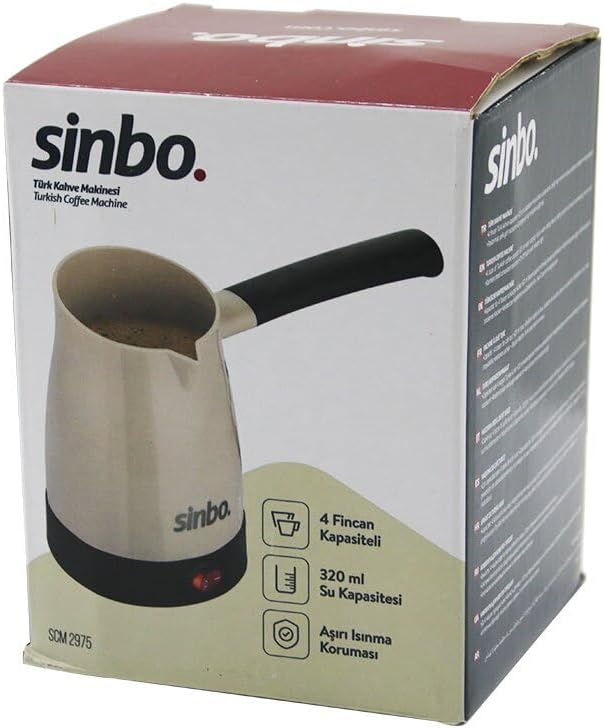
Image: The Sinbo SCM-2975 Electric Turkish Coffee Pot shown in its retail packaging. The image highlights the product's design, brand logo, and key features such as 4-cup capacity, 320ml water capacity, and overheat protection.
Key Features:
- Capacity: 4 cups (320 ml)
- Power: 700W
- Heating Element: Hidden stainless steel resistance
- Handle: Detachable for easy storage and cleaning
- Safety: Overheat protection system
Setup
- Unpack: Carefully remove the coffee pot and all accessories from the packaging.
- Initial Cleaning: Before first use, wash the interior of the coffee pot with warm soapy water, then rinse thoroughly with clean water. Wipe the exterior with a damp cloth. Ensure the electrical parts are not exposed to water.
- Placement: Place the coffee pot on a stable, flat, heat-resistant surface, away from water sources and direct heat.
- Handle Attachment (if detached): If the handle is detached, securely attach it according to the design. Ensure it clicks into place firmly.
Operating Instructions
Follow these steps to prepare delicious Turkish coffee:
- Add Water: Fill the coffee pot with cold water. Do not exceed the maximum fill line (320 ml or 4 cups).
- Add Coffee: For each cup of coffee, add approximately one full teaspoon of finely ground Turkish coffee. Adjust to your taste.
- Add Sugar (Optional): Add sugar to taste, if desired.
- Stir: Stir the mixture gently until the coffee and sugar are well combined with the water.
- Connect Power: Plug the power cord into a suitable electrical outlet.
- Start Brewing: Press the power button (usually indicated by a light) to start the brewing process. The indicator light will illuminate.
- Monitor: Stay near the coffee pot and monitor the brewing process. Turkish coffee brews quickly and can boil over if left unattended.
- Serve: Once the coffee starts to foam and rise, remove it from the heat immediately by pressing the power button or unplugging it. Pour the coffee into cups, distributing the foam evenly.
- Unplug: After serving, always unplug the appliance from the power outlet.
Note: For best results, do not re-boil coffee. Allow the appliance to cool down for a few minutes before preparing another batch.
Maintenance and Cleaning
- Always Unplug: Before cleaning, ensure the appliance is unplugged from the power outlet and has cooled down completely.
- Interior Cleaning: Wash the interior of the coffee pot with warm, soapy water using a soft sponge. Rinse thoroughly with clean water.
- Exterior Cleaning: Wipe the exterior surface with a soft, damp cloth. Do not use abrasive cleaners or scouring pads, as they may damage the finish.
- Do Not Immerse: Never immerse the main body of the coffee pot, its electrical base, cord, or plug in water or any other liquid.
- Drying: Ensure all parts are completely dry before storing or reusing the appliance.
- Storage: Store the appliance in a dry place, away from direct sunlight and moisture. If the handle is detachable, you may remove it for more compact storage.
Troubleshooting
| Problem | Possible Cause | Solution |
|---|---|---|
| Appliance does not turn on. | Not plugged in correctly, or no power from outlet. | Check if the plug is securely inserted. Test the outlet with another appliance. |
| Coffee does not heat up. | Overheat protection activated. | Unplug the appliance and allow it to cool down for at least 15-20 minutes before attempting to use it again. |
| Coffee boils over. | Too much water/coffee, or not monitored closely. | Do not exceed the maximum fill line. Always monitor the brewing process and remove from heat as soon as it starts to rise. |
| Coffee tastes weak or too strong. | Incorrect coffee-to-water ratio. | Adjust the amount of coffee to your personal preference. Ensure coffee is finely ground. |
Specifications
| Feature | Detail |
|---|---|
| Model | SCM-2975 |
| Brand | Sinbo |
| Power | 700W |
| Capacity | 320 ml (4 Turkish coffee cups) |
| Heating Element | Hidden Stainless Steel |
| Safety Features | Overheat Protection |
| Dimensions (approx.) | 10 x 10 x 30 cm |
| Color | Multi-color |
Warranty and Support
This product is covered by a manufacturer's warranty against defects in materials and workmanship. Please refer to the warranty card included with your purchase for specific terms and conditions, including the warranty period and how to make a claim.
For technical support, service, or spare parts, please contact your local Sinbo distributor or authorized service center. Keep your purchase receipt as proof of purchase.
For general inquiries, you may visit the official Sinbo website or contact their customer service department.
Related documentsSCM-2975

Ask a question about this manual
Ask about setup, troubleshooting, compatibility, parts, safety, or missing instructions. Manuals+ will review the question and use this page’s manual context to help answer it.