
1. Product Overview
The DOMICON 55 Inch Gaming Desk (Model MK-19) is a versatile computer desk designed for gaming and home office use. It features a space-saving design, ample storage options, integrated LED lighting, and a convenient power outlet station. Constructed with a durable carbon fiber textured desktop and a stainless steel frame, this desk offers stability and longevity.
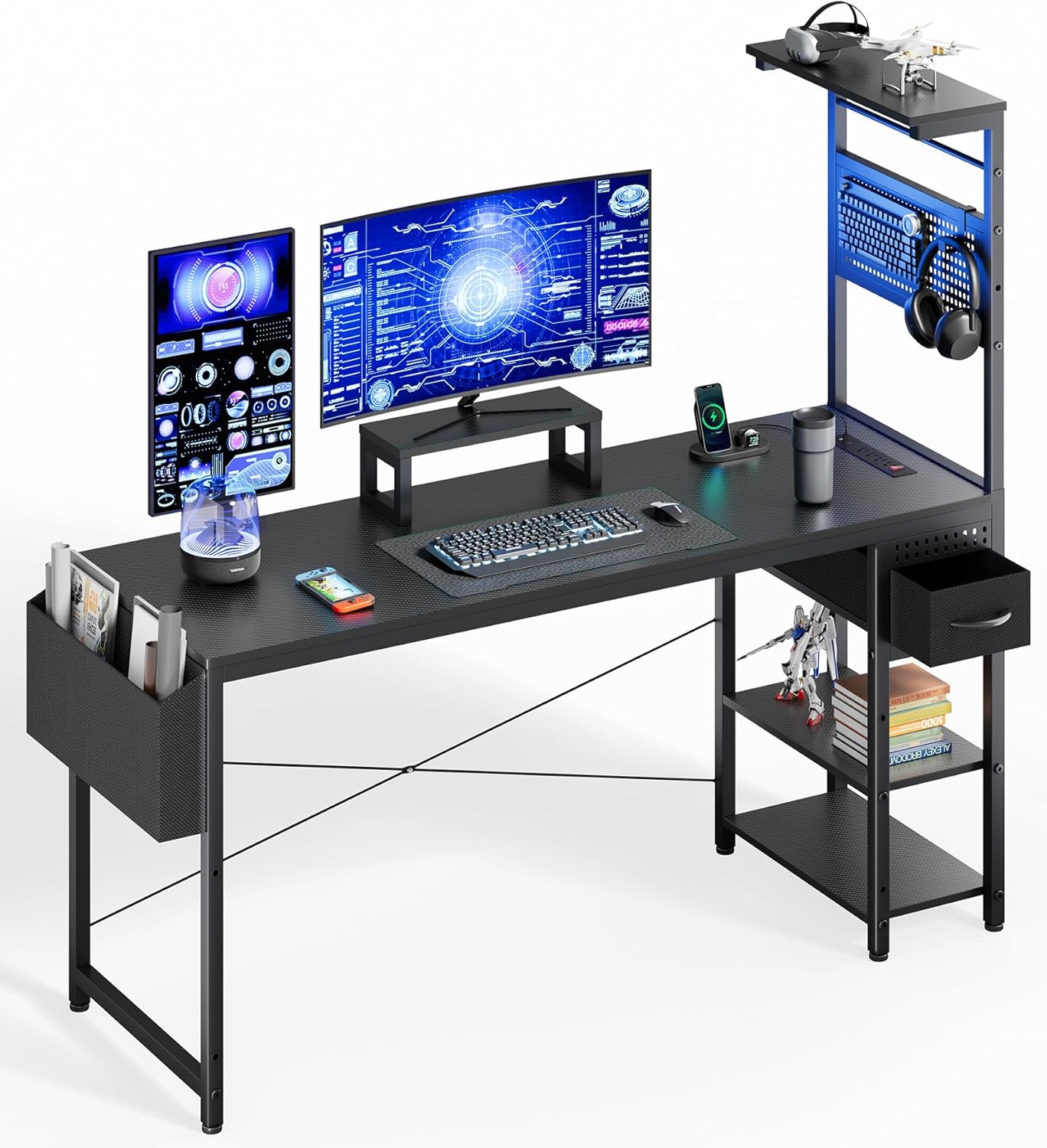
Figure 1: Overall view of the DOMICON 55 Inch Gaming Desk.
2. Safety Information
- Always assemble the desk according to the instructions provided.
- Ensure the desk is stable and secure before use.
- Be cautious when using the power outlets and do not overload them.
- Keep the desk and its components away from heat sources and liquids.
- Do not place heavy objects on the desk that could cause it to tip over.
- Always unplug the desk from the power source before making any adjustments or cleaning.
3. Setup and Assembly
Assembly of the DOMICON 55 Inch Gaming Desk is designed to be straightforward. Please follow the step-by-step instructions provided in the video below and refer to the component diagrams for clarity. It is recommended to have two people for easier and safer assembly.
3.1 Component Identification and Dimensions

Figure 2: Layout of desk components for assembly.

Figure 3: Product dimensions (19.7" D x 55" W x 53" H).
3.2 Assembly Video Guide
Video 1: Detailed installation guide for the computer desk. This video demonstrates the step-by-step process of assembling the desk, including attaching the frame, shelves, and other components. Ensure all screws are tightened securely for stability.
4. Features and Components
4.1 Integrated Power Outlets and USB Ports
The desk includes a 7-port charging station with 4 AC outlets, 2 USB-A ports, and 1 Type-C port, providing convenient power for all your devices. Cable organizers are also included to help manage wires and reduce clutter.

Figure 4: Close-up of the integrated 7-port charging station.

Figure 5: Cable organizers for a tidy workspace.
4.2 RGB LED Lighting
Enhance your gaming or work environment with built-in RGB LED lighting. The lights offer 21 flashing modes, 20 colors, and 7 brightness levels, allowing you to customize the ambiance.

Figure 6: RGB LED lighting in action, showcasing multiple color options.
Video 2: Demonstration of the LED lights and power outlet features. This short video highlights the dynamic lighting effects and the convenience of the integrated power strip.
4.3 Storage Solutions
The desk offers extensive storage, including a side fabric pocket, a fabric drawer, a mini DIY pegboard with two height options, a headphone hook, a top shelf, and two under-desk shelves. The convertible middle shelf can function as a bookcase or a CPU stand.

Figure 7: Fabric drawer and side pocket for organized storage.

Figure 8: Mini DIY pegboard for accessories and headphone hook.
4.4 PS5-Ready Monitor Stand
A dedicated monitor stand is included, optimized to securely hold your PS5 display, providing an ergonomic setup for gaming or studying.
5. Operating Instructions
5.1 LED Light Operation
The LED lights are controlled via a remote or integrated switch. Use the controls to select from 21 flashing modes, 20 static colors, and 7 brightness levels to achieve your desired lighting effect.
5.2 Power Outlet Usage
Plug your devices into the 4 AC outlets, 2 USB-A ports, or 1 Type-C port located on the desk. Ensure that the total power consumption of connected devices does not exceed the desk's rated capacity to prevent overloading.
6. Maintenance
- Regularly wipe the carbon fiber textured desktop with a soft, damp cloth to remove dust and spills. Avoid abrasive cleaners.
- Check all screws and connections periodically to ensure the desk remains stable. Tighten if necessary.
- Keep liquids away from the power outlets and LED light strip to prevent electrical hazards.
- Avoid placing extremely hot items directly on the desktop to prevent damage to the carbon fiber texture.
7. Troubleshooting
7.1 Stability Issues
If the desk feels wobbly, check that all screws are securely tightened. Ensure the adjustable height legs are properly adjusted to compensate for uneven ground.
7.2 LED Lights Not Working
Verify that the LED light strip is correctly plugged into a working USB port on the power outlet station. Check the connections and ensure the power outlet is receiving power.
7.3 Power Outlets Not Functioning
Ensure the main power cord for the desk's power outlet station is securely plugged into a wall outlet. Check if the wall outlet is functional by testing it with another device. Avoid overloading the outlets.
8. Specifications
| Feature | Detail |
|---|---|
| Brand | DOMICON |
| Model Number | MK-19 |
| Product Dimensions | 50.6"D x 3.5"W x 23.5"H (Note: Product title states 55 inch width, please refer to product listing for exact dimensions) |
| Color | Black |
| Top Material Type | Carbon Fiber |
| Base Material | Alloy Steel |
| Special Features | Adjustable Storage Rack, Built-In USB Outlet, Mini DIY Pegboard, Monitor Stand, RGB LED Lighting |
| Power Outlets | 4 AC outlets, 2 USB-A, 1 Type-C |
| LED Lighting | 21 flashing modes, 20 colors, 7 brightness levels |
| Item Weight | 40.79 Pounds |
| Required Assembly | Yes |
9. Warranty and Support
This product comes with a limited warranty. For any questions or assistance with your DOMICON 55 Inch Gaming Desk, please contact DOMICON Customer Service. Our team aims to respond within 24 hours to address your concerns.