
1. Introduction
Thank you for choosing T-SUN RGB Flood Lights. This manual provides essential information for the safe and efficient use of your new floodlights. Please read these instructions carefully before installation and operation, and retain them for future reference.

Image 1.1: T-SUN RGB Flood Lights package contents including two lights, remote, app interface, and ground stakes.
2. Product Features
- Color Changing: Offers 16 million colors for customizable lighting.
- Adjustable White Light: Color temperature range from 2700K (warm white) to 6500K (cool white).
- Multiple Control Options: Control via smartphone app, remote control, or voice commands (Alexa, Google Assistant).
- Dynamic Modes: Includes Music Sync, Microphone Control, and Scene modes.
- Timing Function: Schedule automatic on/off times.
- Memory Function: Retains last used settings.
- Dimmable: Adjustable brightness from 1% to 100%.
- Durable Design: IP66 waterproof rating, aluminum housing, tempered glass, and fin-type heat sink for heat and frost resistance.
- Adjustable Angle: 180° adjustable body for flexible light direction.

Image 2.1: Overview of T-SUN RGB Flood Light features.
3. What's in the Box
- 2 x T-SUN RGB Flood Lights
- 1 x Instruction Manual
- 1 x Remote Control
- 2 x Ground Stakes (for optional ground mounting)
4. Safety Information
- Ensure the power supply is disconnected before installation or maintenance.
- Do not attempt to disassemble or modify the product.
- Keep the product away from flammable materials.
- Ensure proper grounding to prevent electric shock.
- Do not stare directly into the light source when it is operating.
- If the external flexible cable or cord of this luminaire is damaged, it shall be exclusively replaced by the manufacturer or his service agent or a similar qualified person in order to avoid a hazard.
5. Setup and Installation
The T-SUN RGB Flood Lights offer flexible installation options. No wiring is required; simply plug into a standard AC power outlet.
5.1 Mounting Options
The 180° adjustable bracket allows for various mounting configurations:
- Wall Mounting: Secure the bracket to a wall using appropriate screws (not included).
- Ceiling Mounting: Attach the bracket to a ceiling surface.
- Floor Mounting: Position the light on a flat surface.
- Ground Stakes Mounting: Use the included ground stakes to install the lights in soft ground like a garden or lawn.

Image 5.1: Product dimensions and mounting options.

Image 5.2: Detailed view of four flexible installation methods.
6. Operating Instructions
6.1 Remote Control Operation
The included remote control allows for basic functions. Point the remote directly at the floodlight for optimal response.
- Power Button: Turn lights On/Off.
- Brightness +/-: Adjust light intensity.
- Static Color Selection: Choose from preset static colors (R, G, B, W, and other color buttons).
- Color Temperature Selection: Adjust white light from 2700K to 6500K.
- Modes +/-: Cycle through various dynamic modes.
- Scene Mode (S1-S4): Activate preset scene lighting effects.
- Night Lamp & Timing: Access night light and timing functions.

Image 6.1: Remote Control Functions.
6.2 Smart APP Control (WiFi & Bluetooth)
For advanced control and features, download the companion app. The app supports both WiFi and Bluetooth connectivity.
- Download the App: Scan the QR code provided in the product packaging or visit https://faqsys.magichue.net:4489/wifi/page/download/surpLife to download the 'SurpLife' app.
- Register/Sign In: Create an account or log in.
- Add New Device: Follow the in-app instructions to add your floodlights. You may choose Bluetooth mode for initial setup or WiFi mode for broader control.
- Connect to WiFi: If selecting WiFi mode, enter your WiFi network password.
- Control: Once connected, you can control the lights via the app.

Image 6.2: App Connection Guide.
6.3 App Features
- Color Adjustment: Access to 16 million colors and adjustable white light.
- Music Sync Mode: Lights change color in rhythm with music played through your phone's microphone.
- Microphone Mode: Lights respond to ambient sounds detected by your phone's microphone.
- Scene Mode: Select from various preset scenes or create custom ones.
- Timing Function: Set schedules for lights to turn on/off automatically.
- Group Control: Control multiple floodlights simultaneously by grouping them in the app.
- Individual Control: Control each floodlight independently.
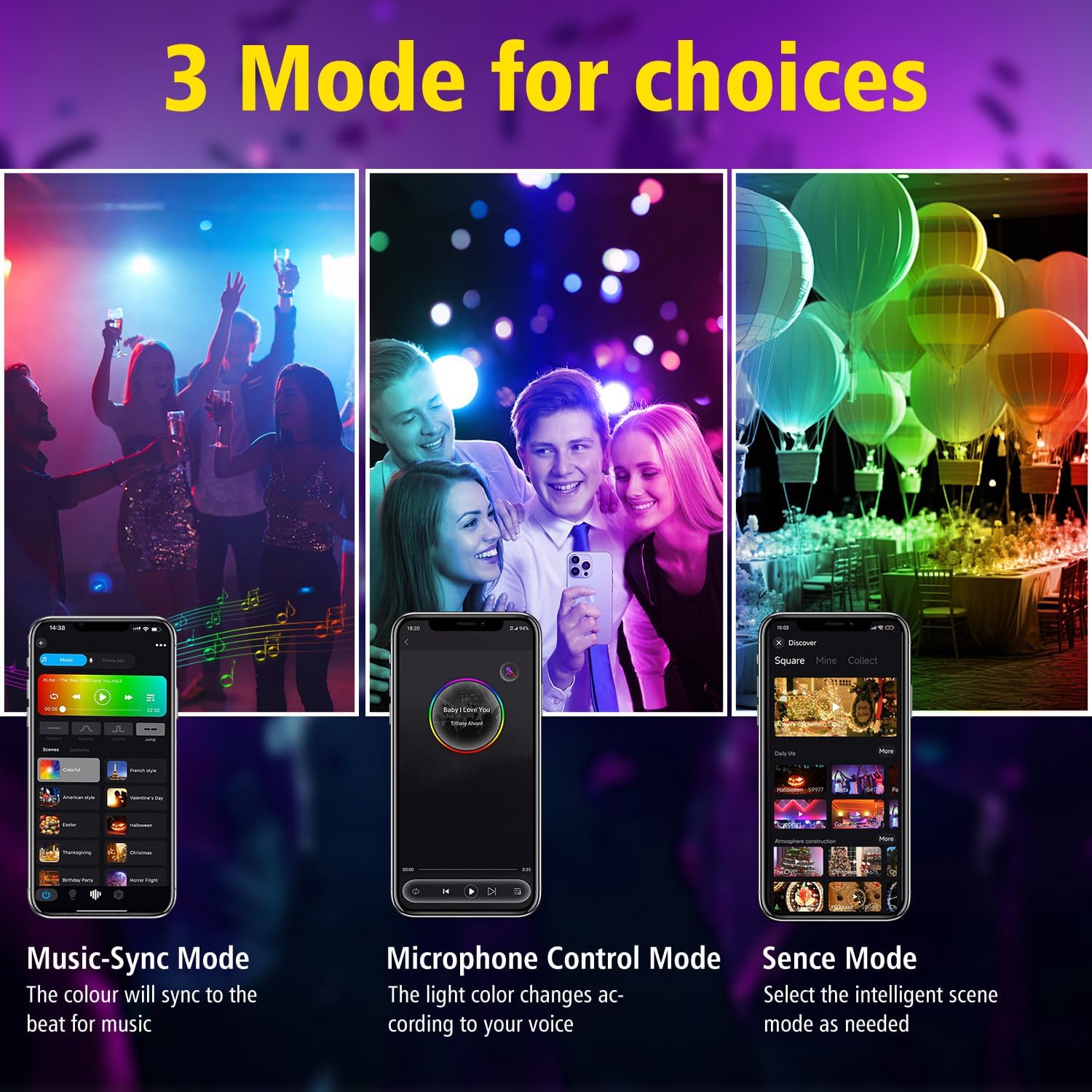
Image 6.3: App Dynamic Modes.

Image 6.4: Timing Function in action.
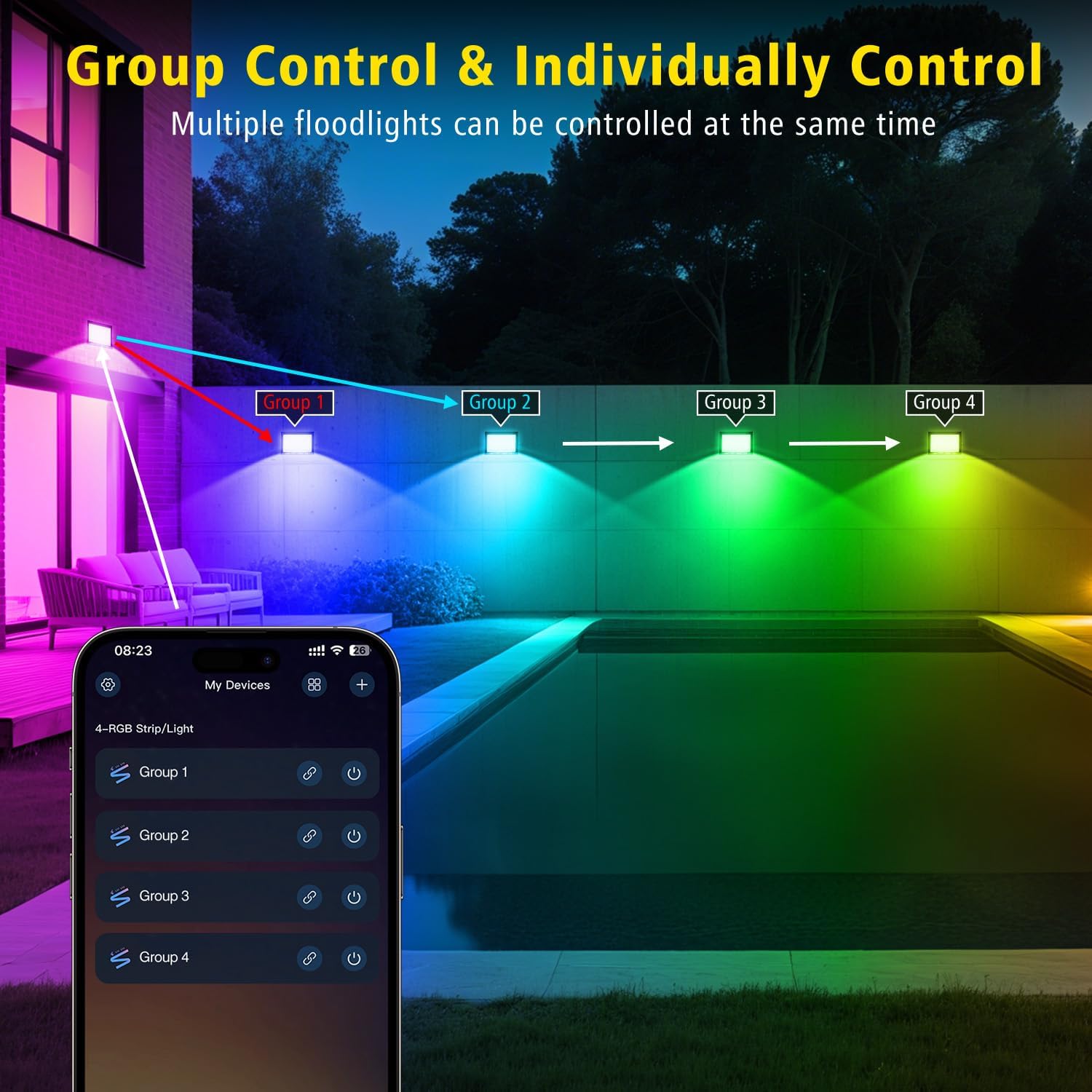
Image 6.5: Group Control functionality.
6.4 Voice Control (Requires WiFi Connection)
The floodlights are compatible with Alexa and Google Assistant for hands-free control. Ensure your lights are connected to WiFi for this feature.
- Link the 'SurpLife' app to your Alexa or Google Home account.
- Use commands such as "Alexa, turn on the flood lights" or "Hey Google, set flood lights to blue."

Image 6.6: Voice Control with Smart Assistants.
7. Maintenance
- Clean the light surface with a soft, damp cloth. Do not use abrasive cleaners.
- Regularly check the power cord for any damage.
- Ensure the mounting bracket is securely fastened.
- The IP66 rating ensures protection against dust and strong jets of water, making it suitable for outdoor use in various weather conditions (heat and frost resistant).

Image 7.1: IP66 Waterproof and Weather Resistance.
8. Troubleshooting
| Problem | Possible Cause | Solution |
|---|---|---|
| Light does not turn on. | No power supply. Remote control battery low. Light is damaged. | Check power connection. Replace remote control battery. Contact customer support. |
| Remote control not working. | Obstruction between remote and light. Remote battery low. Remote not paired (if applicable). | Ensure clear line of sight. Replace remote control battery. Refer to app for pairing instructions. |
| App cannot connect to light. | WiFi signal weak or disconnected. Incorrect app settings. Bluetooth not enabled. | Ensure strong WiFi signal and correct password. Restart app and light. Enable Bluetooth on your device. |
| Colors are not accurate. | Calibration issue. | Recalibrate colors through the app. |
9. Specifications
- Brand: T-SUN
- Model Name: Colored Flood Lights
- Part Number: TS-F42100-RGBCW-US-2P-V3
- Material: Aluminum, Glass
- Light Source Type: LED (168 SMD LED beads)
- Wattage: 100 Watts
- Brightness: 10000 Lumens
- Light Color: RGB + Cool White (6500K) / Warm White (2700K)
- Control Method: App, Remote Control, Voice Control (Alexa, Google Assistant)
- Indoor/Outdoor Usage: Indoor, Outdoor
- Water Resistance Level: IP66
- Product Dimensions: 9.56"L x 6.4"W x 1.14"H
- Item Weight: 2.4 Pounds
- Power Source: AC
- Included Components: 2*Flood Lights, Instruction Manual, Remote Control
10. Warranty and Support
T-SUN provides a 1-year warranty for this product from the date of purchase. If you encounter any issues or have questions, please contact our customer support team. We offer 24-hour after-sales assistance to ensure your satisfaction.
For support, please refer to the contact information provided with your purchase or visit the official T-SUN website.
