
Ledwood PLAYKARAOKE
Ledwood PLAYKARAOKE Portable Karaoke Speaker
Instruction Manual
Introduction
Thank you for purchasing the Ledwood PLAYKARAOKE Portable Karaoke Speaker. This manual provides essential information for the safe and efficient operation of your device. Please read it thoroughly before use and retain it for future reference.
Important Safety Information
- Do not expose the device to water or excessive moisture.
- Avoid extreme temperatures.
- Do not attempt to disassemble or repair the device yourself. Refer all servicing to qualified personnel.
- Keep out of reach of children.
- Use only the provided charging cable and adapter.
- Ensure proper ventilation during use and charging.
Package Contents
Please check that all items are present:
- Ledwood PLAYKARAOKE Portable Karaoke Speaker
- 2 Wireless Microphones
- Charging Cable (USB-C)
- User Manual
- 32GB USB Key
Product Overview
The Ledwood PLAYKARAOKE is a compact and powerful portable karaoke speaker designed for entertainment. It features a 120W output, dynamic RGB LED lighting, and multiple connectivity options.
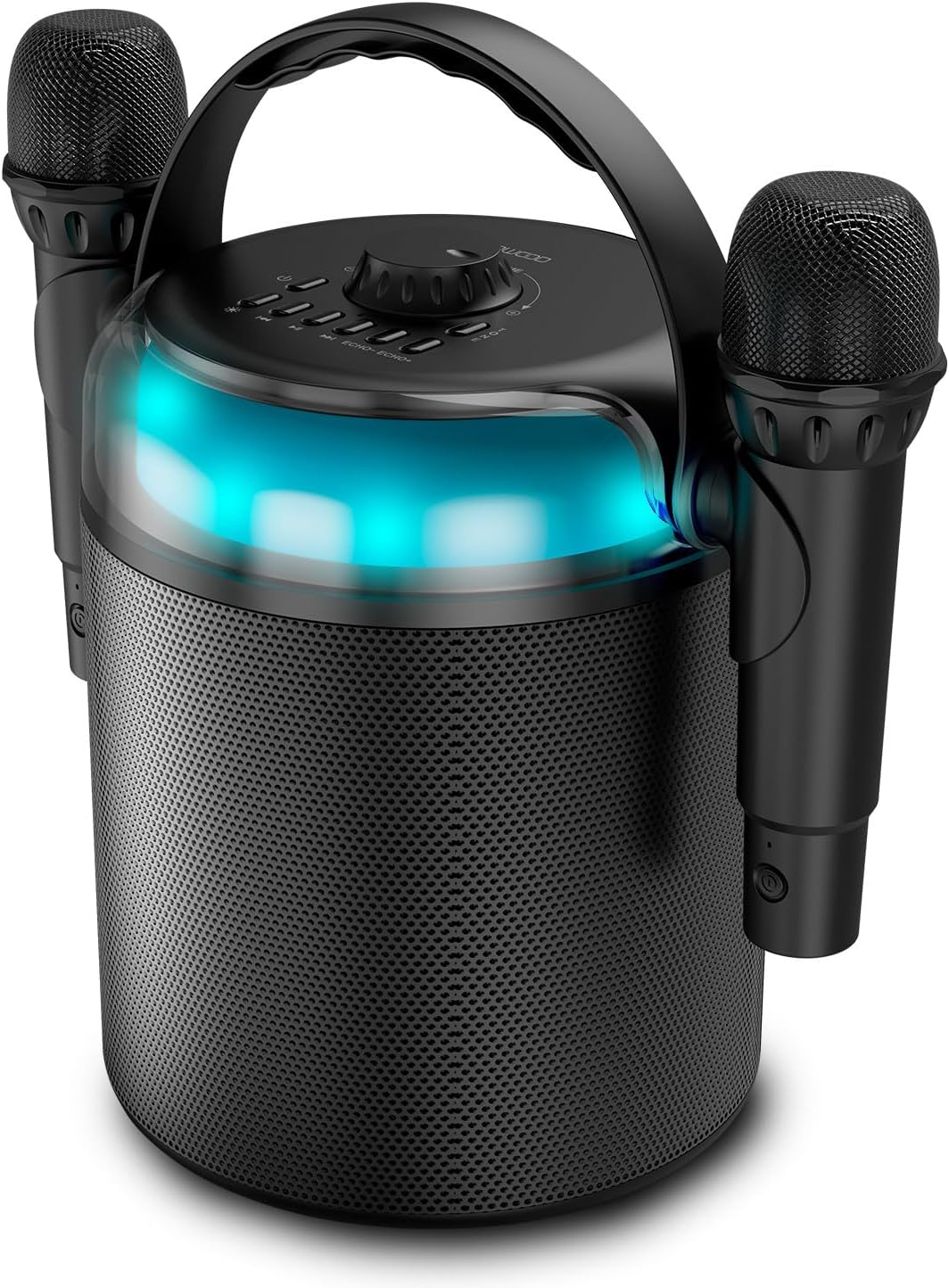
Figure 1: Ledwood PLAYKARAOKE Speaker with Microphones
This image shows the main unit of the Ledwood PLAYKARAOKE speaker, a cylindrical black device with a handle on top. Two wireless microphones are securely attached to the sides of the speaker. A blue LED light band is visible around the top section of the speaker.
Control Panel

Figure 2: Top Control Panel
This image provides a top-down view of the speaker's control panel. It features a large central volume knob, a power button, buttons for LED light control, playback controls (play/pause, skip), and echo adjustment for the microphones.
Familiarize yourself with the buttons and ports on the device:
- Volume Knob: Adjusts the overall sound output.
- Power Button: Turns the speaker on or off.
- LED Light Button: Cycles through LED light effects or turns them off.
- Playback Controls: Play/Pause, Previous Track, Next Track.
- Echo Controls (Echo-, Echo+): Adjusts the echo effect on the microphones.
- Mode Button: Switches between input sources (Bluetooth, USB, MicroSD, AUX, COAX).
- Vocal Effects Button: Cycles through different vocal effects (Man, Woman, Monster, Child, Reverb).
- USB Port: For USB drive playback.
- MicroSD Card Slot: For microSD card playback.
- AUX Input: 3.5mm audio input for external devices.
- COAX Input: Coaxial audio input.
- Charging Port: USB-C port for charging the speaker.
Setup
1. Charging the Speaker
- Connect the provided USB-C charging cable to the charging port on the speaker.
- Connect the other end of the cable to a suitable USB power adapter (not included) or a powered USB port.
- The charging indicator light will illuminate. A full charge takes approximately 4 hours.
- Once fully charged, disconnect the charging cable.
2. Powering On/Off
- To power on, press and hold the Power Button until the LED lights illuminate and you hear an audible prompt.
- To power off, press and hold the Power Button again until the LED lights turn off.
3. Pairing Wireless Microphones
The two wireless microphones are typically pre-paired with the speaker. If they do not connect automatically:
- Ensure the speaker is powered on.
- Insert batteries into the microphones (if not already installed).
- Power on each microphone. They should automatically connect to the speaker.
- If connection issues persist, refer to the Troubleshooting section.
Operating Instructions
1. Bluetooth Connection
- Power on the speaker. It will automatically enter Bluetooth pairing mode (indicated by a flashing LED).
- On your smartphone, tablet, or other Bluetooth-enabled device, enable Bluetooth and search for available devices.
- Select "Ledwood PLAYKARAOKE" from the list.
- Once connected, the speaker will emit an audible confirmation, and the LED will stop flashing.
- You can now play audio from your connected device through the speaker.
2. USB/MicroSD Playback
- Insert a USB drive or microSD card (with audio files) into the corresponding port/slot on the speaker.
- The speaker should automatically switch to USB/MicroSD mode and begin playing audio. If not, press the Mode Button to select the correct input.
- Use the Playback Controls (Play/Pause, Previous Track, Next Track) to manage your music.
3. AUX/COAX Input
- Connect an external audio device (e.g., TV, PC) to the speaker using a 3.5mm AUX cable or a coaxial cable (not included).
- Press the Mode Button repeatedly until the speaker switches to AUX or COAX input mode.
- Play audio from your external device. The speaker will output the sound.
4. Adjusting Volume
Rotate the large Volume Knob on the top panel clockwise to increase volume and counter-clockwise to decrease volume.
5. Using Vocal Effects
While using the microphones:
- Press the Vocal Effects Button to cycle through the available vocal effects: Man, Woman, Monster, Child, and Reverb.
- Use the Echo- and Echo+ buttons to adjust the intensity of the echo effect on your voice.
6. LED Light Effects
Press the LED Light Button to cycle through different dynamic RGB LED light patterns or to turn the lights off.
Maintenance
- Cleaning: Wipe the speaker with a soft, dry cloth. Do not use abrasive cleaners or solvents.
- Storage: Store the device in a cool, dry place away from direct sunlight and extreme temperatures.
- Battery Care: For optimal battery life, charge the speaker fully before long periods of storage and recharge it every few months.
Troubleshooting
| Problem | Possible Solution |
|---|---|
| Speaker does not power on. | Ensure the battery is charged. Connect the charging cable and try again. |
| No sound from speaker. |
|
| Microphones not working. |
|
| Bluetooth connection unstable. |
|
Specifications
- Model: Ledwood PLAYKARAOKE
- Output Power: 120W
- Speaker Drivers: 4" (10 cm) Woofer, 1.25" Tweeter
- Bluetooth Version: 5.1
- Battery Life: Up to 3 hours (at 70% volume)
- Charging Time: Approximately 4 hours
- Input Ports: USB, MicroSD, AUX (3.5mm), COAX
- Microphones: 2 Wireless Microphones
- Vocal Effects: Man, Woman, Monster, Child, Reverb (5 effects)
- LED Lights: Dynamic RGB
- Speaker Dimensions (H x W x D): 215 x 168 x 168 mm
- Microphone Dimensions (H x Dia): 175 x 50 mm
- Included Accessories: 32GB USB Key
Warranty and Support
For warranty information and technical support, please refer to the warranty card included with your product or visit the official Ledwood website. Keep your proof of purchase for any warranty claims.
Related documentsPLAYKARAOKE


Ask a question about this manual
Ask about setup, troubleshooting, compatibility, parts, safety, or missing instructions. Manuals+ will review the question and use this page’s manual context to help answer it.