
1. Introduction
Thank you for choosing the AMACOOL TF02 12-inch Table Fan. This manual provides essential information for the safe and efficient operation of your new fan. Please read it thoroughly before use and retain it for future reference.
2. Important Safety Instructions
To reduce the risk of fire, electric shock, or injury, observe the following safety precautions:
- Always unplug the fan before cleaning or performing any maintenance.
- Do not operate the fan with a damaged cord or plug. If the cord is damaged, it must be replaced by the manufacturer or a qualified service agent.
- Keep fingers, pencils, or any other objects out of the fan grille when it is running.
- Do not use the fan near a window, as rain may create an electrical hazard.
- Ensure the fan is placed on a stable, flat surface to prevent it from tipping over.
- This fan is intended for indoor use only. Do not use it outdoors or in wet locations.
- Do not immerse the fan in water or other liquids.
- Supervise children when the fan is in use.
3. Package Contents
Verify that all items are present in your package:
- AMACOOL TF02 12-inch Table Fan
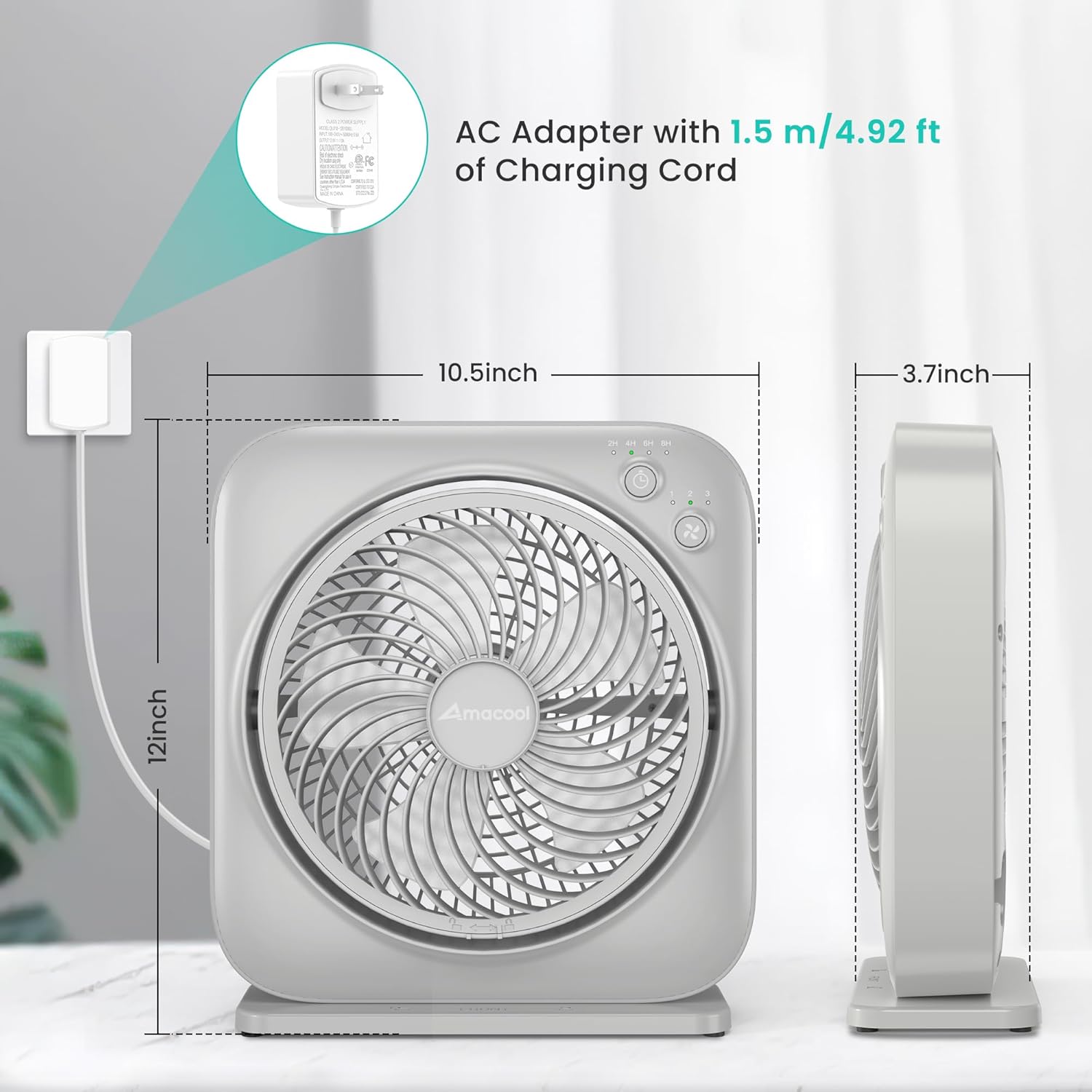
- AC Adapter with 1.5m/4.92ft Charging Cord
- Instruction Manual
4. Product Overview
The AMACOOL TF02 is a compact and quiet table fan designed for personal cooling. It features adjustable speeds, a timer function, and an adjustable blowing angle.
Key Features:
- 3 Adjustable Speeds: Customize airflow from gentle breeze to powerful circulation.
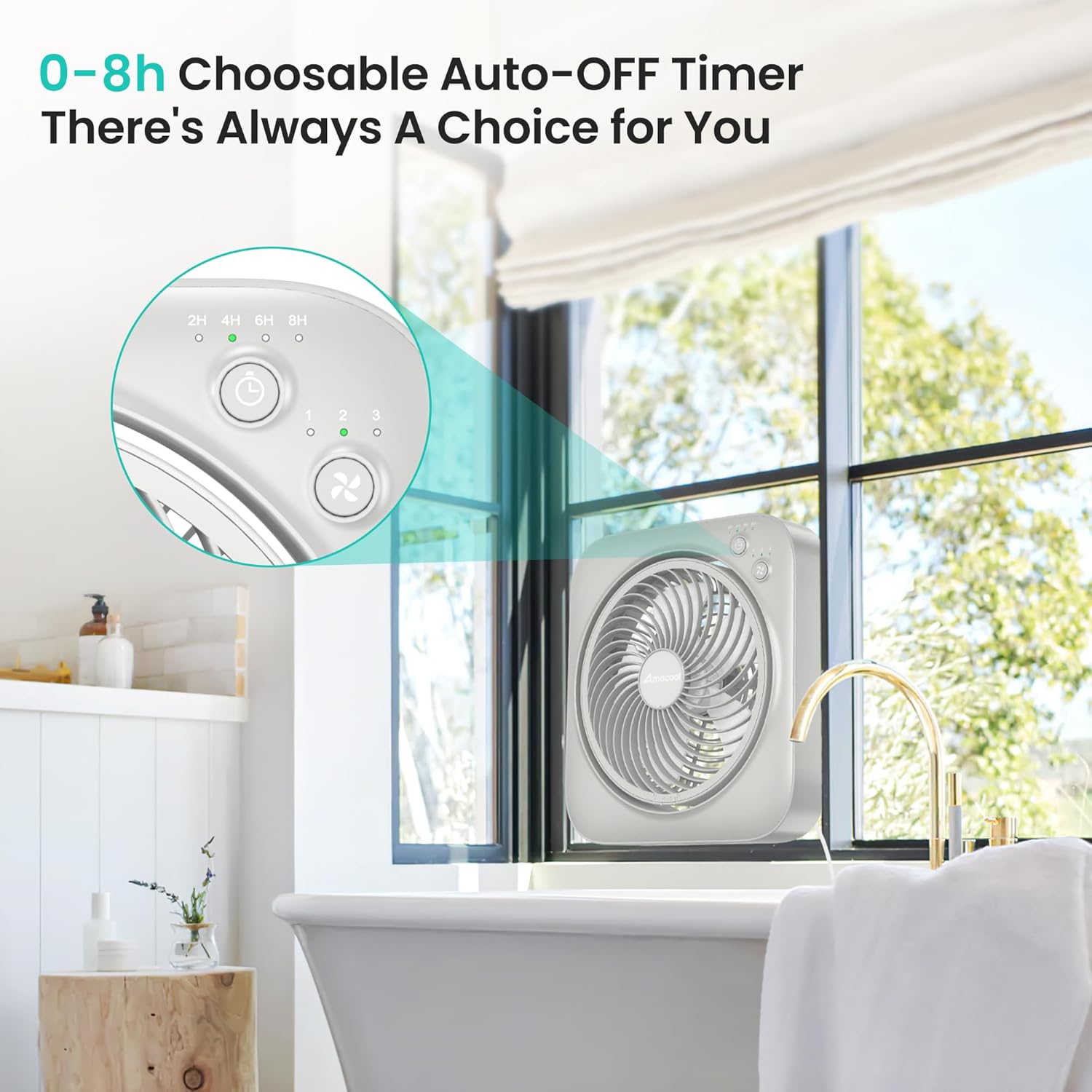
- 8-Hour Timer: Set the fan to automatically turn off after 2, 4, 6, or 8 hours.
- Adjustable Angle: Direct airflow up to 270 degrees vertically.
- Quiet Operation: Engineered for low noise, suitable for bedrooms and offices.
- Energy Efficient: Operates at only 7 watts.
- Portable Design: Lightweight and compact for easy relocation.
Component Identification:
- Front Grille
- Fan Blades
- Control Panel (Power/Speed Button, Timer Button, Indicator Lights)
- Rear Grille
- Power Input Port
- Base/Stand

5. Setup Instructions
Follow these steps to set up your AMACOOL TF02 Table Fan:
- Unpack: Carefully remove the fan and all accessories from the packaging.
- Positioning: Place the fan on a firm, level surface. Ensure there is adequate space around the fan for proper airflow.
- Connect Power: Insert the AC adapter into the power input port on the back of the fan. Plug the AC adapter into a standard electrical outlet. The power indicator light will illuminate (often orange) to show it is receiving power.
6. Operating Instructions
Your AMACOOL TF02 Table Fan is designed for simple operation.
Power On/Off and Speed Adjustment:
- Press the Power/Speed Button (often marked with a fan icon) once to turn the fan on to Speed 1 (low).
- Press the button again to cycle through Speed 2 (medium) and Speed 3 (high).
- To turn the fan off, continue pressing the Power/Speed Button until all speed indicator lights are off, or press and hold the button for 2 seconds at any speed.

Timer Function:
- While the fan is running, press the Timer Button (often marked with a clock icon) to activate the timer.
- Each press will cycle through the available timer settings: 2 hours, 4 hours, 6 hours, and 8 hours. Corresponding indicator lights will illuminate.
- The fan will automatically turn off once the selected time has elapsed.
- To deactivate the timer, press the Timer Button until all timer indicator lights are off.
Adjusting the Blowing Angle:
- The fan head can be manually tilted up or down to adjust the airflow direction.
- Gently hold the fan body and tilt the front grille to your desired angle, up to 270 degrees.

Quiet Operation:
The fan is designed to operate quietly, making it suitable for use in environments where noise is a concern, such as bedrooms or offices.

Versatile Placement:
Its compact size and adjustable features make it suitable for various locations, including desktops, kitchen counters, or bathroom windows.


Video 1: Demonstrating the AMACOOL Table Fan's cooling capabilities in various settings.
7. Maintenance
Regular cleaning and maintenance will ensure optimal performance and longevity of your fan.
Cleaning the Fan:
- Always unplug the fan before cleaning.
- Use a soft, damp cloth to wipe the exterior surfaces of the fan.
- To clean the fan blades, unscrew the front grille. Gently rotate and remove the front cover and grille. Wipe the blades with a soft cloth.
- Ensure all parts are completely dry before reassembling and plugging in the fan.
- Do not use abrasive cleaners or solvents, as they may damage the fan's surface.

8. Troubleshooting
If you encounter issues with your fan, refer to the following common problems and solutions:
| Problem | Possible Cause | Solution |
|---|---|---|
| Fan does not turn on. | No power supply. | Ensure the AC adapter is securely plugged into both the fan and a working electrical outlet. Check if the outlet has power. |
| Weak airflow. | Fan speed is too low; Grille or blades are dirty. | Increase the fan speed. Clean the fan blades and grilles as per maintenance instructions. |
| Unusual noise or vibration. | Fan not on a stable surface; Obstruction in blades. | Place the fan on a flat, stable surface. Unplug the fan and check for any obstructions around the blades. |
| Timer function not working. | Timer not set correctly. | Press the Timer Button to select the desired duration. Ensure the corresponding indicator light is on. |
9. Specifications
| Feature | Specification |
|---|---|
| Brand | AMACOOL |
| Model Name | TF02 Table Fan |
| Model Number | TF02 |
| Size | 12 inches |
| Color | Grey |
| Product Dimensions (D x W x H) | 3.7"D x 10.39"W x 11.57"H |
| Power Source | AC |
| Wattage | 7 watts |
| Number of Speeds | 3 |
| Timer Settings | 2H, 4H, 6H, 8H |
| Adjustable Tilt Angle | Up to 270 degrees |
| Control Method | Push Button, Touch |
| Material | Plastic |
| Indoor/Outdoor Usage | Indoor |
10. Warranty and Support
AMACOOL products are manufactured to high-quality standards. For warranty information, technical support, or customer service inquiries, please refer to the contact information provided on the product packaging or visit the official AMACOOL website. Please retain your proof of purchase for any warranty claims.
Visit the AMACOOL Store for more products and support.