
Introduction
Thank you for choosing the TECXERLLON X4 Dual Dash Cam. This manual provides essential information for the proper installation, operation, and maintenance of your device. Please read it thoroughly before use to ensure optimal performance and safety.
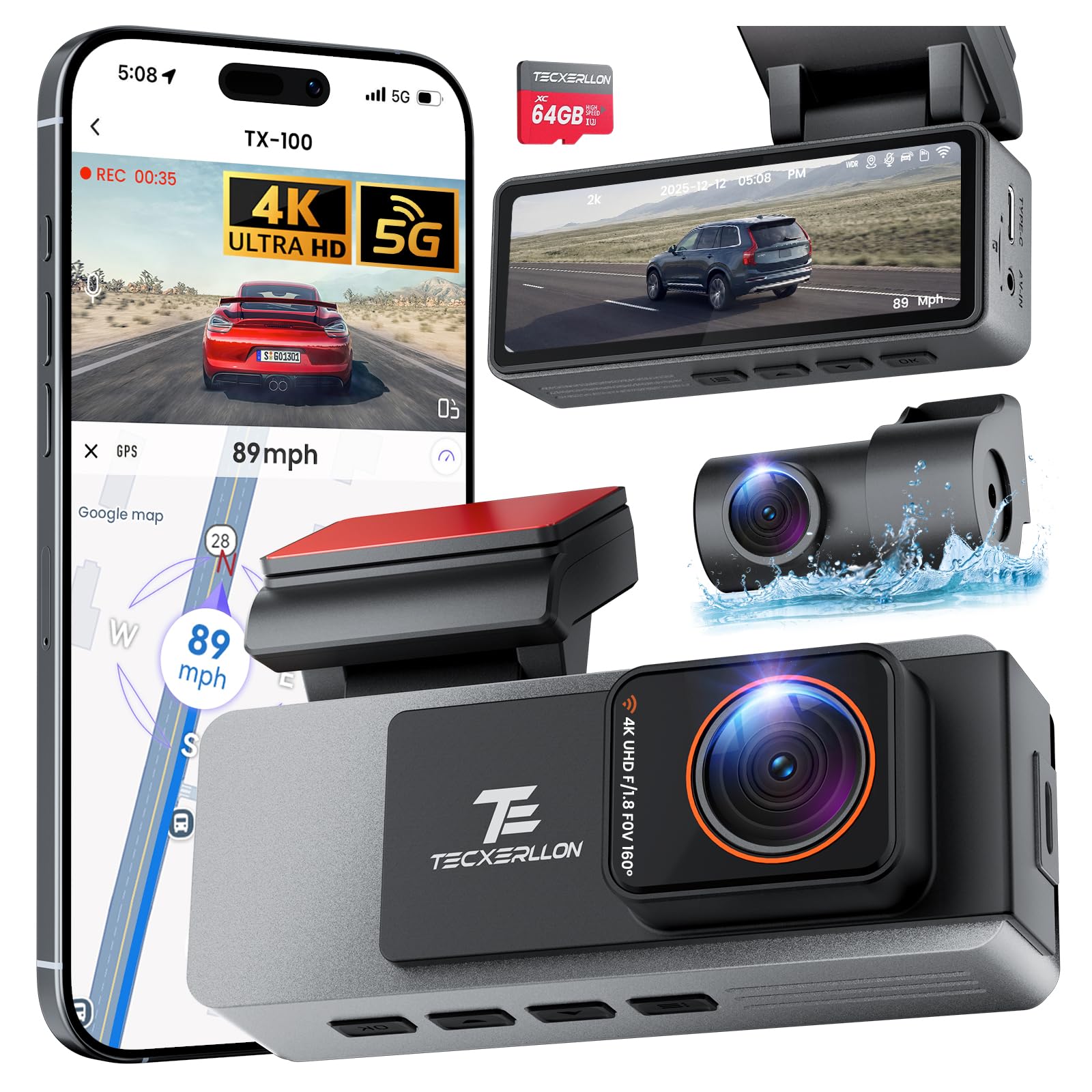
Image: TECXERLLON X4 Dual Dash Cam main unit, showcasing its compact design.
What's in the Box
Verify that all items are present in the package:
- 1 x TECXERLLON X4 Dual Dash Cam (Front Unit)
- 1 x Rear Camera
- 1 x 11.5 ft Car Charger Cable
- 1 x 64GB TF Card (pre-installed)
- 2 x Static Cling Assist Stickers
- 1 x User Manual
- 1 x Mount Tool
- 2 x 3M Glue
- Dust Free Cloth & Alcohol Cotton

Image: All components included in the TECXERLLON X4 Dual Dash Cam package, neatly arranged.
Product Features
Ultra HD 4K Front + 2K Rear Recording
The TECXERLLON X4 supports simultaneous dual-channel recording. The front camera captures footage in 3840×2160P resolution, while the rear camera records in 2560×1440P. This ensures comprehensive coverage with a 160° ultra-wide-angle front lens and a 150° rear lens, minimizing blind spots.

Image: Visual representation of the dual camera system, showing the 4K front and 2K rear cameras capturing wide-angle views of the road.
Seamless Loop Recording & G-Sensor Protection
The dash cam comes with a pre-installed 64GB SD card. Loop recording automatically overwrites the oldest footage to ensure continuous recording. The built-in G-Sensor detects sudden impacts, braking, or collisions, automatically locking and protecting the relevant video clips from being overwritten, preserving critical evidence.

Image: Depiction of the G-Sensor activating to lock video footage during various collision scenarios on the road and in a parking lot.

Image: Illustration of the loop recording function, where new videos automatically overwrite older ones when the 64GB memory card is full.
Super Starlight Night Vision
Equipped with a STARVIS image sensor and an F1.8 large aperture, the dash camera provides enhanced light intake for clear, detailed footage in low-light conditions. WDR (Wide Dynamic Range) technology optimizes exposure, reducing glare from headlights and preserving details like license plates and road signs.

Image: A side-by-side comparison demonstrating the superior clarity of Starlight Night Vision compared to standard night vision in dark environments.

Image: Diagram illustrating the benefits of WDR Smart Image Adjustment, including strong light suppression, enhanced night vision, and backlight optimization for balanced exposure.
Built-in 5G WiFi & GPS Tracking
The integrated 5.8GHz WiFi allows for seamless connection to your iOS or Android device to view, manage, and download recordings. The built-in GPS module accurately logs driving routes, location, and speed, embedding this data directly into each video file.

Image: Visual showing the built-in GPS functionality with offline maps, displaying accurate navigation and route tracking on a screen.

Image: Diagram illustrating the 5G WiFi connectivity, enabling fast app connection, real-time viewing, and quick setup for managing dash cam footage.
24/7 Parking Monitoring
The 24/7 parking monitoring feature uses time-lapse recording and G-Sensor activation to continuously protect your vehicle when parked. If an impact or theft attempt is detected, the dash cam automatically begins recording and secures the footage. Note: A separate hardwiring kit is required for parking mode functionality (ASIN: B0FQ4XLSQF).

Image: A car protected by a hexagonal shield, symbolizing 24-hour parking monitoring with anti-theft and collision detection capabilities.
Premium Aluminum Alloy Housing
The TECXERLLON X4 features a durable aluminum alloy casing, providing shockproof and water-resistant properties. This premium construction offers enhanced resilience and a refined aesthetic.
Setup & Installation
Follow these steps for proper installation:
- Prepare the Windshield: Clean the area on your windshield where the dash cam will be mounted using the provided alcohol cotton and dust-free cloth.
- Attach Static Cling Sticker: Apply one of the static cling assist stickers to the cleaned area. This helps protect your windshield and makes removal easier.
- Mount the Dash Cam: Peel off the protective film from the 3M adhesive on the dash cam mount and firmly press it onto the static cling sticker. Hold for 30 seconds to ensure a secure bond.
- Connect Power: Plug the 11.5 ft car charger cable into the dash cam's Type-C port and into your vehicle's 12V cigarette lighter socket. The charger also includes a USB port for additional device charging.
- Install Rear Camera: Connect the rear camera cable to the main unit. Route the cable neatly along the vehicle's headliner and trim using the provided mount tool to tuck the wires. Attach the rear camera to your rear window using its adhesive.
- Important Note: Ensure proper placement of the dash cam and cables to avoid interfering with the normal deployment and function of airbags.

Image: Step-by-step diagram illustrating how to install the front and rear dash cameras, including cable routing and power connection points within a car interior.
Operating Instructions
The TECXERLLON X4 is designed for intuitive operation. Once powered on, it will automatically begin recording. Use the buttons on the device or the mobile app for advanced controls.
Basic Operation
- Power On/Off: The device powers on automatically with vehicle ignition and powers off shortly after the engine is turned off.
- Recording: Recording starts automatically when the device is powered on. A red indicator light or on-screen icon will confirm recording status.
- Emergency Lock: Press the dedicated emergency button (or if G-Sensor detects impact) to lock the current recording, preventing it from being overwritten.
- Menu Navigation: Use the menu buttons (up/down arrows and OK) to navigate through settings on the device screen.
Using the Mobile App
Download the official TECXERLLON app from the Apple App Store or Google Play Store. Connect to the dash cam via its built-in 5G WiFi for real-time viewing, managing recordings, and adjusting settings.
- Real-time View: Stream live footage from both front and rear cameras to your smartphone.
- File Management: Browse, download, and delete recorded videos and photos.
- Settings Adjustment: Customize video resolution, loop recording duration, G-Sensor sensitivity, parking mode, and more.
- GPS Data: View detailed GPS logs including speed, route, and coordinates directly within the app.
Video: An official TECXERLLON video demonstrating the key features and functionality of the dash cam, including its 4K recording, G-Sensor, GPS, and WiFi capabilities.
Maintenance
Regular maintenance ensures the longevity and optimal performance of your dash cam:
- Clean Lenses: Periodically clean the front and rear camera lenses with a soft, lint-free cloth to ensure clear footage.
- Format SD Card: Format the 64GB TF card monthly to prevent data corruption and maintain recording efficiency. Back up any important files before formatting.
- Check Connections: Ensure all cables and mounts are securely connected and free from damage.
- Firmware Updates: Check the TECXERLLON website or app for available firmware updates to improve performance and add new features.
Troubleshooting
If you encounter any issues, refer to the following common solutions:
| Problem | Solution |
|---|---|
| Dash cam not powering on | Check the car charger connection and ensure the vehicle's 12V socket is active. |
| Recording stops unexpectedly | Format the SD card. Ensure the SD card is Class 10 or higher. Check for sufficient power supply. |
| Poor video quality | Clean camera lenses. Adjust video resolution settings in the app. Ensure proper lighting conditions. |
| WiFi connection issues | Restart the dash cam and your smartphone's WiFi. Ensure you are within 3 meters (10 ft) of the device. |
| Parking mode not working | Verify that a hardwiring kit is correctly installed and connected. Check parking mode settings in the app. |
Specifications
| Feature | Detail |
|---|---|
| Model Name | X4 |
| Product Dimensions | 0.98 x 3.35 x 2.17 inches |
| Item Weight | 1.39 pounds |
| Front Video Resolution | 3840x2160P (4K) |
| Rear Video Resolution | 2560x1440P (2K) |
| Front Field Of View | 160 Degrees |
| Rear Field Of View | 150 Degrees |
| Connectivity Technology | Wi-Fi (5.8GHz) |
| Special Features | App Control, Built-In GPS, Built-In WiFi, Loop Recording, Night Vision (STARVIS sensor, F1.8 aperture, WDR), G-Sensor, 24H Parking Mode |
| Included Storage | 64GB TF card |
| Max Storage Support | 512GB |
| Mounting Type | Windshield Mount |
| Color | Gray |
| Manufacturer | TECXERLLON |
Warranty and Support
TECXERLLON offers a 30-day money-back guarantee for any reason and a 24-month warranty for quality-related issues. For free user technical support, firmware updates, or new release promotions, please visit the official TECXERLLON website or contact customer support.
Technical Services: support@texcerllon.com
