
1. Introduction
Thank you for choosing the Desktronic HomePro Height-Adjustable Desk. This manual provides essential information for the safe and efficient assembly, operation, and maintenance of your new desk. Please read these instructions carefully before use and retain them for future reference.
The Desktronic HomePro desk features a robust design with a solid walnut wood tabletop, a whisper-quiet dual motor system, and a touch screen control panel for effortless height adjustment. It is engineered for high load capacity and lasting performance, supporting up to 160 kg.
Safety Information
- Ensure all connections are secure before operating the desk.
- Keep children and pets away from the desk during operation to prevent injury.
- Do not overload the desk beyond its maximum weight capacity of 160 kg.
- Avoid placing liquids directly on the control panel or near electrical components.
- If any unusual noise or movement occurs, discontinue use immediately and consult the troubleshooting section or contact support.
2. Package Contents
Please verify that all components are present before beginning assembly:
- Solid Walnut Wood Tabletop (200 x 80 cm)
- Height-Adjustable Desk Frame (Steel, 90mm x 60mm x 3mm)
- Dual Motor System
- Touch Screen Control Panel with 3 Memory Settings
- Power Adapter and Cables
- Assembly Hardware (screws, bolts, etc.)
- Assembly Tools
- User Manual
- Built-in USB and USB-C Charging Ports (integrated into control panel)
- Cable Grommets (2 units)
3. Setup and Assembly
The Desktronic HomePro desk is designed for straightforward assembly. It includes all necessary tools and multilingual instructions. We recommend two people for assembly due to the weight and size of the components.
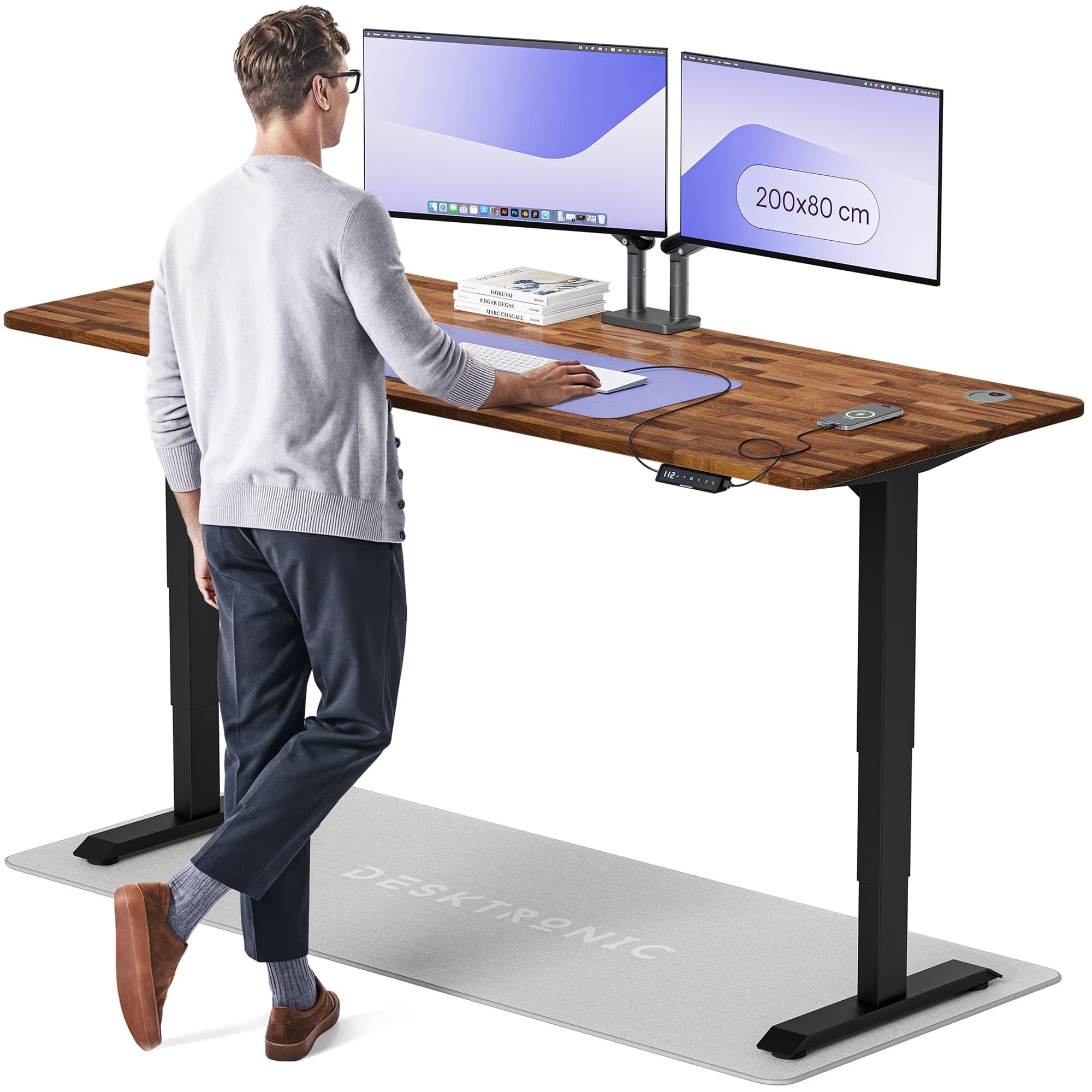
Image: Desktronic HomePro Height-Adjustable Desk. This image shows the assembled desk with its solid walnut wood top and black steel frame, highlighting its sleek design and spacious surface.
Assembly Steps:
- Unpack Components: Carefully remove all parts from the packaging. Place them on a soft, clean surface to prevent scratches.
- Assemble Desk Frame: Connect the crossbars to the lifting columns using the provided hardware. Ensure all stability struts are correctly aligned. The frame is constructed from 90mm x 60mm x 3mm steel for enhanced stability.
- Attach T-Feet: Secure the wide T-feet to the bottom of the lifting columns. These feet contribute to the desk's extra stable structure.
- Mount Tabletop: Carefully place the solid walnut wood tabletop onto the assembled frame. Align the pre-drilled holes and secure the tabletop to the frame using the designated screws.
- Install Control Panel: Attach the touch screen control panel to the underside of the tabletop in your preferred location.
- Connect Motors and Control Panel: Connect the motor cables to the control box, and then connect the control panel cable to the control box. Ensure all connections are firm.
- Connect Power: Plug the power adapter into the control box and then into a wall outlet.
- Cable Management: Utilize the two integrated cable grommets and any included cable ties to organize and secure all cables for a tidy workspace.
4. Operating Instructions
The Desktronic HomePro desk features an intuitive touch screen control panel for easy height adjustment and memory settings.
Height Adjustment:
- Raise Desk: Press and hold the "Up" arrow button on the touch screen. The desk will move upwards with a soft-start soft-stop activation. Release the button at your desired height.
- Lower Desk: Press and hold the "Down" arrow button on the touch screen. The desk will move downwards with a soft-start soft-stop activation. Release the button at your desired height.
- The desk can transition from sitting to standing height in approximately 12 seconds. The height range is from 62 cm (minimum) to 127 cm (maximum).
Memory Settings:
The control panel allows you to save up to three preferred height positions.
- Set a Memory Position: Adjust the desk to your desired height using the Up/Down buttons. Press the "M" button, then press one of the numbered memory buttons (1, 2, or 3) within 3 seconds. The display will confirm the setting.
- Recall a Memory Position: Simply press the corresponding numbered memory button (1, 2, or 3). The desk will automatically move to the saved height.
USB Charging Ports:
The control panel includes built-in USB and USB-C charging points. Connect your devices to these ports for convenient charging.
5. Maintenance
Proper maintenance ensures the longevity and optimal performance of your Desktronic HomePro desk.
- Cleaning: Wipe the desk surface and frame with a dry cloth. Avoid using abrasive cleaners or harsh chemicals, as these can damage the lacquered walnut wood finish and other components.
- Regular Checks: Periodically check all screws and connections to ensure they remain tight. Re-tighten if necessary.
- Cable Management: Ensure cables are neatly managed and not pinched or tangled, which could affect desk operation or cause damage.
- Motor Care: The dual motor system is designed for durability. Avoid obstructing the lifting columns during operation.
6. Troubleshooting
If you encounter any issues with your Desktronic HomePro desk, please refer to the following common solutions:
- Desk Not Moving:
- Check if the power cable is securely plugged into both the desk and the wall outlet.
- Ensure all motor and control panel cables are properly connected to the control box.
- If an error code appears on the display, refer to the specific error code section in the full manual (if available) or contact customer support.
- Desk is Shaky or Unstable:
- Verify that all assembly screws, especially those connecting the frame and feet, are fully tightened.
- Ensure the desk is placed on a level surface. Adjust the leveling feet if necessary.
- Do not exceed the maximum weight capacity of 160 kg.
- Anti-Collision Feature: The desk is equipped with an anti-collision system. If the desk encounters an obstruction during movement, it will stop and reverse slightly. Clear any obstructions and then resume operation.
- Unusual Noise During Operation: Ensure no cables or objects are interfering with the moving parts of the desk. If the noise persists, contact customer support.
7. Specifications
Key technical specifications for the Desktronic HomePro Height-Adjustable Desk:
| Feature | Specification |
|---|---|
| Brand | Desktronic |
| Model Number | HomePro |
| Product Dimensions (D x W x H) | 31.5" x 78.74" x 50" (78.74"W x 31.5"D x 50"H) |
| Tabletop Size | 200 x 80 cm |
| Tabletop Thickness | 24 Millimeters |
| Minimum Height | 62 Centimeters |
| Maximum Height | 127 Centimeters |
| Item Weight | 60 Kilograms |
| Maximum Weight Recommendation | 160 Kilograms |
| Top Material Type | Walnut Wood (Lacquered Finish) |
| Base Material | Stainless Steel |
| Special Feature | Electric Height Adjustment, Built-in USB Port |
| Required Assembly | Yes |
8. Warranty and Support
Desktronic is committed to providing high-quality products. Your Desktronic HomePro desk comes with a commitment to spare part availability.
- EU Spare Part Availability: Desktronic ensures spare part availability for a duration of 5 years within the EU.
- Customer Support: If you have any questions, require assistance with assembly, or encounter issues not covered in this manual, please contact Desktronic customer support. Refer to your purchase documentation for contact details.


