
Introduction
This manual provides instructions for the installation and care of your Lamshaw Screen Protector, designed specifically for the CATGIFF DR05 1.27-inch Smart Watch. This high-quality PMMA film offers comprehensive protection against daily scratches and impacts, ensuring your smartwatch screen remains in pristine condition.
Package Contents
- 3 x Screen Protectors
- 1 x Cleaning Kit (includes wet and dry wipes)
Key Features
The Lamshaw Screen Protector offers the following features:
- HD Clear: Maintains original screen clarity and visibility.
- Shatter-proof: Designed with an upgraded explosion-proof and scratch-resistant material to prevent breakage.
- Touch Sensitive: Ultra-thin design (0.1 cm) ensures original touch response and sensitivity.
- Waterproof: Provides a barrier against water.
- Bubble Free: Engineered for easy, bubble-free application.
- 3D Full Coverage: Features a 3D curved edge for complete screen protection.
- Anti-Scratch: Protects against daily wear and scratches.

Image: Visual representation of the screen protector's key features, including HD clarity, shatter-proof design, touch sensitivity, waterproof capability, bubble-free application, and 3D full coverage.

Image: A hand interacting with a smartwatch screen, highlighting the protector's sensitive touch response and its anti-scratch and anti-shatter characteristics for a natural user experience.

Image: An illustration depicting the shatter-proof cobweb structure of the screen protector, demonstrating its enhanced resistance to impacts and scratches, protecting the smartwatch screen.
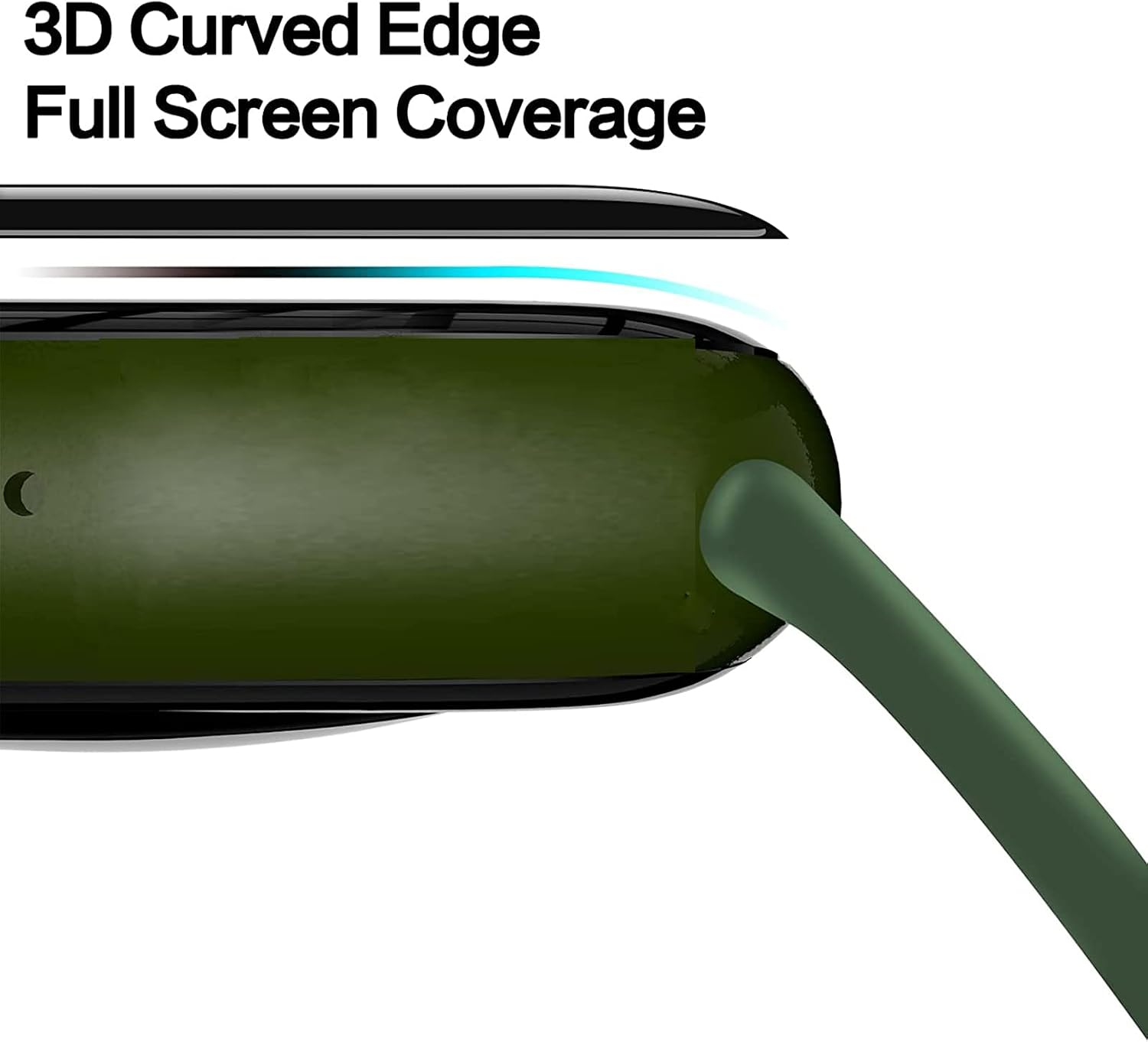
Image: A side profile of a smartwatch illustrating how the screen protector's 3D curved edge provides complete coverage, seamlessly integrating with the watch's design.
Setup: Installation Guide
Follow these steps for optimal installation of your screen protector:
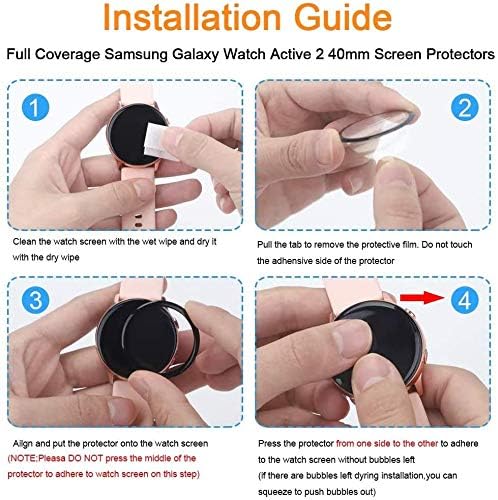
Image: A visual guide detailing the four steps required to correctly install the screen protector onto a smartwatch, ensuring proper alignment and adhesion.
- Step 1: Clean the Watch Screen
Use the wet wipe from the cleaning kit to thoroughly clean the smartwatch screen. Follow with the dry wipe to ensure the screen is completely dry and free of dust or smudges. - Step 2: Remove Protective Film
Carefully pull the tab to remove the protective film from the screen protector. Do not touch the adhesive side of the protector to avoid fingerprints or dust. - Step 3: Align and Apply
Align the screen protector precisely onto the watch screen. Gently place it down. Note: Do not press the middle of the protector to adhere it at this stage. - Step 4: Secure and Remove Bubbles
Press the protector from one side to the other to adhere it to the watch screen. If any bubbles remain after installation, gently push them towards the edges to remove them.
Operating Instructions
Once installed, the Lamshaw Screen Protector operates passively by providing continuous protection to your CATGIFF DR05 Smart Watch screen. Its ultra-thin design ensures that the original touch sensitivity and display clarity of your device are fully maintained, allowing for seamless interaction without compromise.
Maintenance
To maintain the clarity and effectiveness of your screen protector:
- Gently wipe the surface with a soft, lint-free cloth to remove dust and smudges.
- For stubborn marks, lightly dampen the cloth with water or a screen-safe cleaner. Avoid harsh chemicals.
- Do not use abrasive materials that could scratch the protector.
Troubleshooting
If you encounter any issues during or after installation:
- Bubbles: Small bubbles can often be pushed out to the edges using a soft cloth or a credit card wrapped in a cloth. For persistent bubbles, ensure the screen was thoroughly cleaned before application.
- Dust Particles: If dust is trapped under the protector, it may be necessary to carefully lift a corner of the protector (using a piece of tape to avoid touching the adhesive) to remove the dust with another piece of tape, then reapply.
- Poor Adhesion: Ensure the screen was completely dry and clean before application. Extreme temperatures can affect adhesion; apply in a moderate environment.
Specifications
| Attribute | Detail |
|---|---|
| Compatible Device | CATGIFF DR05 1.27-inch Smart Watch |
| Material | PMMA (Plastic Methacrylate) |
| Product Weight | 50 g |
| Product Dimensions | 5 x 5 x 1 cm |
| Thickness | 0.1 cm |
Warranty and Support
Lamshaw is committed to providing high-quality products and excellent customer service. While specific warranty details are not provided in this manual, if you have any questions or require assistance with your screen protector, please contact our customer support team. We are ready to provide the best after-sales service.
For support, please refer to the contact information provided with your purchase or visit the official Lamshaw website.