
1. Important Safety Instructions
Please read all instructions carefully before using this appliance and retain for future reference. Failure to follow these instructions may result in electric shock, fire, or serious personal injury.
- Always ensure the fan is placed on a stable, flat surface to prevent tipping.
- Do not operate the fan with a damaged cord or plug. If the cord or plug is damaged, contact customer support.
- Keep fingers and other objects away from the fan grilles when in operation. The fan features a fingertip anti-pinch grille for safety.
- Unplug the fan from the power outlet before cleaning or performing any maintenance.
- Do not use the fan in wet or damp locations, such as bathrooms or laundry areas.
- This appliance has a polarized plug (one blade is wider than the other). To reduce the risk of electric shock, this plug is intended to fit in a polarized outlet only one way. If the plug does not fit fully in the outlet, reverse the plug. If it still does not fit, contact a qualified electrician. Do not attempt to defeat this safety feature.
- Ensure the fan is not covered during operation to prevent overheating.
- This fan is equipped with built-in circuit protection design for enhanced safety.
2. Product Overview
The Sweetcrispy Tower Fan TS35INGYZZ is designed to provide efficient and quiet cooling for various indoor spaces. It features multiple modes, adjustable speeds, and a convenient timer function.

Figure 2.1: Sweetcrispy Tower Fan and Remote Control. This image shows the sleek design of the tower fan along with its included remote control, highlighting its modern aesthetic and ease of use.
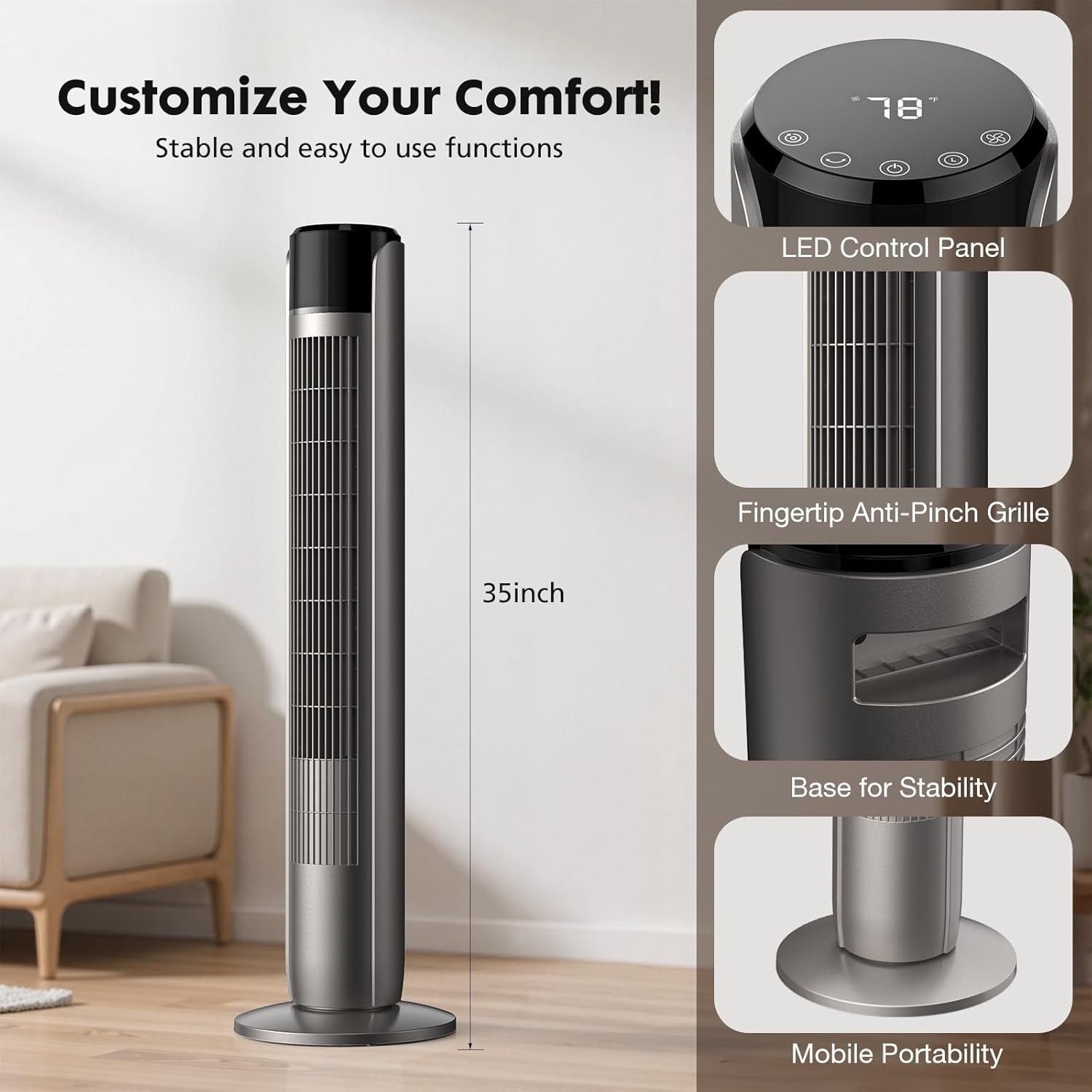
Figure 2.2: Key Features and Dimensions. This image details the fan's LED control panel, fingertip anti-pinch grille, stable base, and overall 35-inch height, emphasizing its user-friendly and safe design.

Figure 2.3: Large LED Control Panel. A close-up view of the fan's intuitive touch control panel, clearly labeling the Mode, Oscillating, Power, Timer, and Wind Speed buttons for easy operation.
3. Setup
Follow these steps to assemble and set up your Sweetcrispy Tower Fan.
3.1 Assembly
- Carefully remove all components from the packaging.
- Attach the base to the main body of the fan. Ensure the power cord is routed correctly through the base.
- Secure the base to the fan body using the provided screws and a screwdriver. Tighten the screws firmly to ensure stability.
Video 3.1: Sweetcrispy Tower Fan Assembly. This short video demonstrates the process of attaching and securing the fan base, including tightening the screws for a stable setup.
3.2 Placement
- Place the fan on a firm, level surface.
- Ensure there is adequate space around the fan for optimal airflow and oscillation.
- Keep the fan away from curtains, drapes, or any objects that could obstruct airflow or get caught in the fan.
4. Operating Instructions
Your Sweetcrispy Tower Fan can be operated using the touch control panel on top of the unit or the included remote control.
4.1 Power On/Off
- Plug the fan into a standard electrical outlet.
- Press the Power Button () on the control panel or remote to turn the fan on or off.
4.2 Adjusting Fan Speed
The fan offers 5 adjustable speed settings.
- Press the Wind Speed Button () repeatedly to cycle through the 5 speed levels.
4.3 Selecting Operating Mode
Choose from four distinct operating modes: Normal, Natural, Auto, and Sleep.

Figure 4.1: Fan Modes and Speeds. This image visually represents the four available modes (Normal, Natural, Auto, Sleep) and indicates the five adjustable speed settings, allowing users to customize their comfort.
- Press the Mode Button () repeatedly to switch between modes.
- Normal Mode: Provides a constant, steady airflow at your selected speed.
- Natural Mode: Simulates a natural breeze by varying the fan speed intermittently.
- Auto Mode: The fan speed automatically adjusts based on the ambient room temperature.
- Sleep Mode: Operates at a low, quiet speed (as low as 28 dB) and gradually decreases speed over time to ensure an undisturbed sleep environment. The display light may also dim or turn off automatically.

Figure 4.2: Sleep Mode Features. This image highlights the fan's quiet 28dB operation in Sleep Mode and the 1-12 hour timer function, ideal for a full night's sleep.

Figure 4.3: Automatic Wind Adaptation. This graphic illustrates how the fan's wind speed automatically adjusts to the room temperature in Auto Mode, providing optimal comfort.
4.4 Oscillation Function
The fan can oscillate up to 60 degrees to distribute air across a wider area.

Figure 4.4: Wider Oscillation. This image demonstrates the fan's 60-degree oscillation, showing how it distributes airflow across a room for broader cooling coverage.
- Press the Oscillating Button () to start or stop the oscillation function.
4.5 Timer Function
Set the fan to automatically turn off after a specified period, from 1 to 12 hours.
- Press the Timer Button () repeatedly to select the desired operating duration. The display will show the set time.
4.6 Remote Control
The remote control allows you to operate all fan functions from a distance.
- Ensure the remote control has working batteries.
- Point the remote control towards the fan's receiver when pressing buttons.
5. Maintenance
Regular cleaning and maintenance will help ensure optimal performance and longevity of your fan.
5.1 Cleaning
- Always unplug the fan before cleaning.
- Use a soft, damp cloth to wipe the exterior surfaces of the fan. Do not use abrasive cleaners or solvents.
- For dust accumulation on the grilles, use a vacuum cleaner with a brush attachment or compressed air to gently remove dust.
- Do not immerse the fan in water or allow water to drip into the motor housing.
5.2 Storage
- If storing the fan for an extended period, clean it thoroughly and place it back in its original packaging or cover it to protect it from dust.
- Store the fan in a cool, dry place.
6. Troubleshooting
If you encounter any issues with your fan, refer to the following common problems and solutions.
| Problem | Possible Cause | Solution |
|---|---|---|
| Fan does not turn on. | No power supply. Power button not pressed. | Ensure the fan is securely plugged into a working outlet. Press the Power Button on the unit or remote. |
| Weak airflow. | Low speed setting. Air intake/outlet blocked. | Increase the fan speed. Clear any obstructions from the grilles. |
| Fan is noisy. | Fan not on a level surface. Internal obstruction. | Place the fan on a flat, stable surface. Unplug and check for any foreign objects inside the grilles. |
| Remote control not working. | Dead batteries. Obstruction between remote and fan. | Replace batteries in the remote control. Ensure a clear line of sight to the fan's receiver. |
If the problem persists after trying these solutions, please contact customer support.
7. Specifications
Detailed technical specifications for the Sweetcrispy Tower Fan TS35INGYZZ.
| Feature | Specification |
|---|---|
| Brand | Sweetcrispy |
| Model Name | Tower Fan for Bedroom |
| Model Number | TS35INGYZZ |
| Color | Classical Grey |
| Electric Fan Design | Floor Fan |
| Style | Tower |
| Product Dimensions (D x W x H) | 9.8"D x 9.8"W x 35"H |
| Power Source | AC |
| Wattage | 85 watts |
| Number of Speeds | 5 |
| Speed (RPM) | 1520 RPM |
| Special Feature | Bladeless |
| Control Method | Push Button (Touch Panel) / Remote Control |
| Timer | 1-12 hours |
| Noise Level (Sleep Mode) | As low as 28 dB |
| Oscillation Angle | 60 degrees |
| Indoor/Outdoor Usage | Indoor |
| UPC | 781434688155 |
8. Warranty Information
Sweetcrispy products are manufactured to the highest quality standards. This product is covered by a limited warranty from the date of purchase against defects in materials and workmanship. Please retain your proof of purchase for warranty claims. The warranty does not cover damage caused by misuse, accident, unauthorized modifications, or normal wear and tear.
9. Customer Support
For any questions, assistance, or to report issues with your Sweetcrispy Tower Fan, please contact our customer support team. You can typically find contact information on the product packaging or on the official Sweetcrispy website.
Please have your model number (TS35INGYZZ) and proof of purchase ready when contacting support.
