
1. Introduction
Thank you for choosing the GVODE Electric Pasta Maker. This manual provides essential information for the safe and efficient operation, maintenance, and care of your new appliance. Please read it thoroughly before first use and keep it for future reference.
The GVODE Electric Pasta Maker is designed to simplify homemade pasta preparation, offering a 3-in-1 functionality with a pasta sheet roller, fettuccine cutter, and spaghetti cutter. Its powerful motor and adjustable thickness settings allow for a variety of pasta types with ease.
2. Product Overview & Features

Image: GVODE Electric Pasta Maker in action, showing pasta sheets and cut noodles.
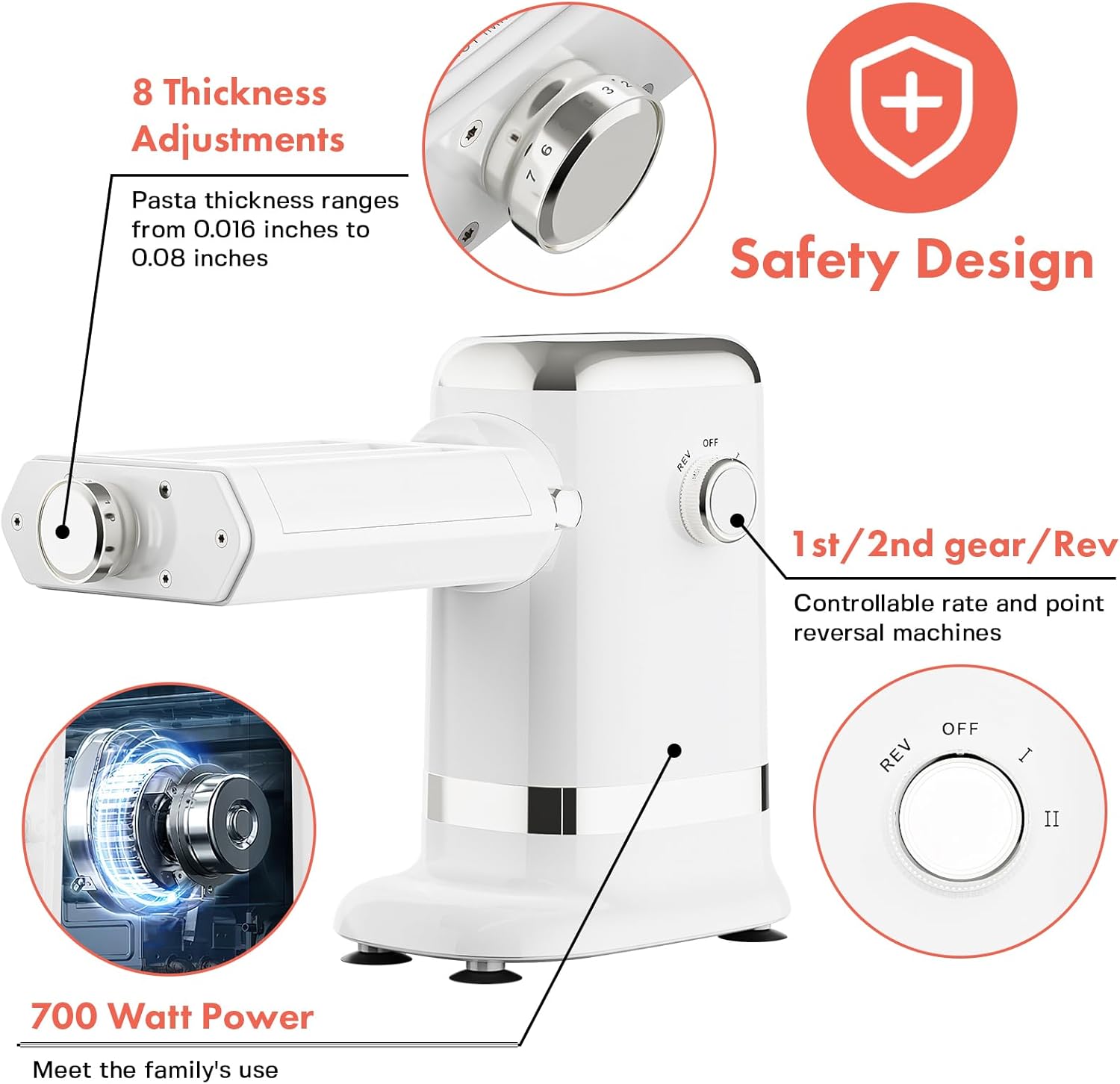
Image: Detailed view of the 3-in-1 pasta attachment, highlighting the roller and two cutting sections.
- 3-in-1 Functionality: Integrated pasta sheet roller, fettuccine cutter, and spaghetti cutter for versatile pasta making.
- Powerful Motor: Equipped with a robust 700W max motor for efficient operation.
- Adjustable Thickness: 8 settings ranging from 0.4 to 2 mm (0.016 to 0.08 in) for desired pasta sheet thickness.
- Durable Construction: Crafted from premium aluminum for safety and longevity.
- Easy to Use: Designed for effortless attachment and detachment.
- Safety Design: Features built-in safety mechanisms for secure operation.
- Control Knob: Includes settings for Reverse (REV), Off (OFF), Slow (I), and Fast (II) speeds.
- Compatibility: Can be used as a standalone electric unit or compatible with KitchenAid stand mixers for added versatility.
3. Safety Instructions
WARNING: To reduce the risk of injury, always follow these safety precautions:
- Read all instructions before using the appliance.
- Keep hands, hair, and clothing away from moving parts during operation.
- Never insert fingers or any utensils into the pasta rollers or cutters while the machine is operating.
- Ensure the appliance is stable on a clean, dry countertop before use. The base includes suction cups for stability.
- Do not immerse the main motor unit in water or other liquids.
- Unplug the appliance from the outlet when not in use, before assembling or disassembling parts, and before cleaning.
- Do not operate the appliance with a damaged cord or plug, or after the appliance malfunctions or has been dropped or damaged in any manner.
- Close supervision is necessary when any appliance is used by or near children.
4. Setup
- Unpack: Carefully remove all components from the packaging. Retain packaging for storage or transport.
- Position the Main Unit: Place the main electric unit on a clean, dry, and stable countertop. Press down firmly to engage the suction cups on the base for maximum stability.
- Attach the Pasta Attachment: Align the drive shaft of the 3-in-1 pasta attachment with the power hub on the main unit. Push the attachment firmly into place until it clicks. Secure it by tightening the knob on the side of the main unit.
- Connect Power: Plug the power cord into a standard electrical outlet.

Image: The pasta attachment being inserted into the main electric unit.
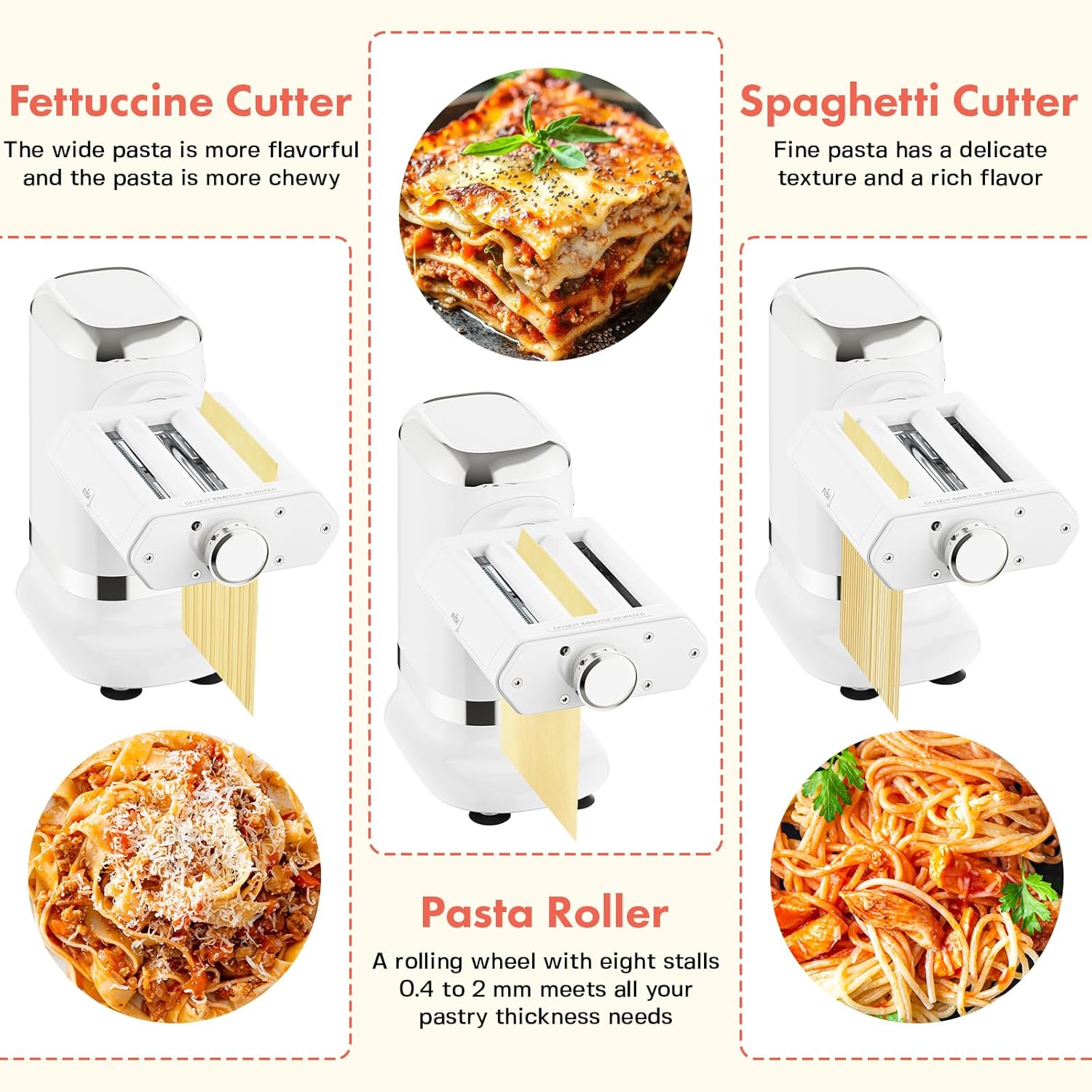
Image: The fully assembled GVODE Electric Pasta Maker on a kitchen counter.
5. Operating Instructions
5.1. Dough Preparation
For best results, use a firm, non-sticky pasta dough. A common recipe is 1 egg for every 100 grams of flour. Ensure the dough is well-kneaded and rested before use.

Image: Visual guide for preparing pasta dough, from ingredients to a flattened sheet.

Image: Visual guide for using the pasta maker to roll and cut pasta.
5.2. Rolling Pasta Sheets
- Initial Roll: Set the thickness adjustment knob to the thickest setting (e.g., 7 or 8). Turn the machine on to speed 'I' (slow). Feed a small, flattened piece of dough through the pasta roller.
- Fold and Repeat: Fold the rolled dough in half or thirds and feed it through the roller again at the same thickness setting. Repeat this process several times until the dough is smooth and pliable.
- Gradual Thinning: Gradually decrease the thickness setting, one step at a time, feeding the dough through the roller after each adjustment. Continue until you reach your desired pasta sheet thickness (e.g., 1 or 2 for thin sheets).
5.3. Cutting Pasta
Once your pasta sheets are rolled to the desired thickness, you can proceed to cut them into spaghetti or fettuccine.
- Select Cutter: For spaghetti, use the narrow cutting roller. For fettuccine, use the wider cutting roller.
- Feed Dough: Carefully feed the pasta sheet through the chosen cutting roller. The machine will cut the sheet into individual strands.
- Collect Pasta: Collect the freshly cut pasta strands and dust them lightly with flour to prevent sticking.
5.4. Control Knob Settings

Image: Thickness adjustment knob, showing settings from 1 to 7.

Image: Control knob with Reverse, Off, Slow, and Fast settings.
- OFF: Turns the machine off.
- I: Slow speed for gentle rolling and cutting.
- II: Fast speed for quicker processing.
- REV (Reverse): If dough gets stuck, switch to REV to reverse the rollers and clear the obstruction.
5.5. Official Product Video
Video: Official GVODE Electric Pasta Machine demonstration, showing assembly and operation.
6. Cleaning and Maintenance
Proper cleaning ensures the longevity and hygiene of your pasta maker.

Image: Step-by-step guide for cleaning the pasta maker.
- Disconnect Power: Always unplug the appliance before cleaning.
- Disassemble: Detach the pasta attachment from the main unit.
- Clean Attachment: The pasta attachment is not dishwasher safe. Use the provided cleaning brush to remove any dough residue from the rollers and cutters. For thorough cleaning, press the "PUSH" button on the attachment to lift the lid and access the internal rollers.
- Clean Main Unit: Wipe the main electric unit with a damp cloth. Do not use abrasive cleaners or immerse it in water.
- Air Dry: Allow all parts to air dry completely before reassembling or storing.
- Storage: Store the clean and dry pasta maker in a cool, dry place.
7. Troubleshooting
- Machine Not Turning On: Ensure the power cord is securely plugged into a working outlet. Check the control knob is not in the 'OFF' position.
- Dough Getting Stuck: The dough might be too soft or too dry. Adjust the dough consistency. Use the 'REV' setting on the control knob to reverse the rollers and clear the obstruction. Ensure you are gradually thinning the dough.
- Uneven Pasta Sheets: Ensure the dough is evenly flattened before feeding it into the roller. Fold and re-roll the dough multiple times at the same thickness setting to achieve a uniform consistency.
- Pasta Sticking Together: Lightly dust the pasta sheets and cut noodles with flour to prevent sticking.
8. Specifications
| Brand | GVODE |
| Model Number | G2503-4 |
| Color | White |
| Material | Aluminum, Plastic (Blade Material: Stainless Steel) |
| Item Weight | 8.2 Pounds |
| Included Components | 3-in-1 Pasta Attachment, Electric Drive Unit, Cleaning Brush |
| Number of Thickness Settings | 8 |
| Minimum Sheet Thickness | 0.4 Millimeters |
| Maximum Sheet Thickness | 2 Millimeters |
| Operation Mode | Automatic |
| Is Electric | Yes |
| Is Dishwasher Safe | No (Attachment) |
9. Warranty and Support
For warranty information or customer support, please refer to the 'After-Sale Card' included in your product packaging or contact GVODE customer service directly through their official website or the platform where the product was purchased.
Please retain your proof of purchase for any warranty claims.