
Introduction
The PAXA Ctbuds03 offers a versatile 2-in-1 design, combining clip-on open-ear headphones with traditional wireless in-ear earbuds. This allows users to seamlessly switch between different listening experiences to suit various scenarios, from active outdoor use to focused indoor work. Featuring advanced Bluetooth 6.0 technology, these earbuds provide stable connectivity, high-fidelity sound, and an impressive 140-hour ultra-long playtime with the charging case. Designed for comfort and durability, they are IPX5 water-resistant, making them suitable for sports and daily use.

Image: PAXA Ctbuds03 2-in-1 Wireless Earbuds in C-Purple, showcasing both the clip-on and in-ear styles, along with the unique rotating charging case.
What's in the Box
- Clip on Earbuds x2
- In Ear Earbuds x2
- Charging Case x1
- User Manual x1
- Type-C Charging Cable x1

Image: A visual representation of all items included in the PAXA Ctbuds03 product package.
Setup
Initial Charging
Before first use, ensure the charging case and earbuds are fully charged. The first full charge requires 6-8 hours to activate the battery. Subsequent full charges typically take about 2.5 hours.
- Connect the provided Type-C charging cable to the charging port on the case and a compatible USB power source.
- During charging, the red light on the earbud case will flash.
- Once fully charged, the red light will become steady.

Image: The PAXA Ctbuds03 charging case being charged via a USB-C cable, illustrating the fast charging capability.
Bluetooth Pairing
The PAXA Ctbuds03 utilizes Bluetooth 6.0 for ultra-stable and low-latency connections.
- Ensure the earbuds are in the charging case and the case has sufficient charge.
- Open the charging case. The earbuds will automatically enter pairing mode.
- On your device (smartphone, tablet, laptop), go to Bluetooth settings and turn Bluetooth on.
- Search for available devices. You should see "PAXA Ctbuds" or a similar name.
- Select the earbuds to connect. Once connected, you will hear an audible confirmation.
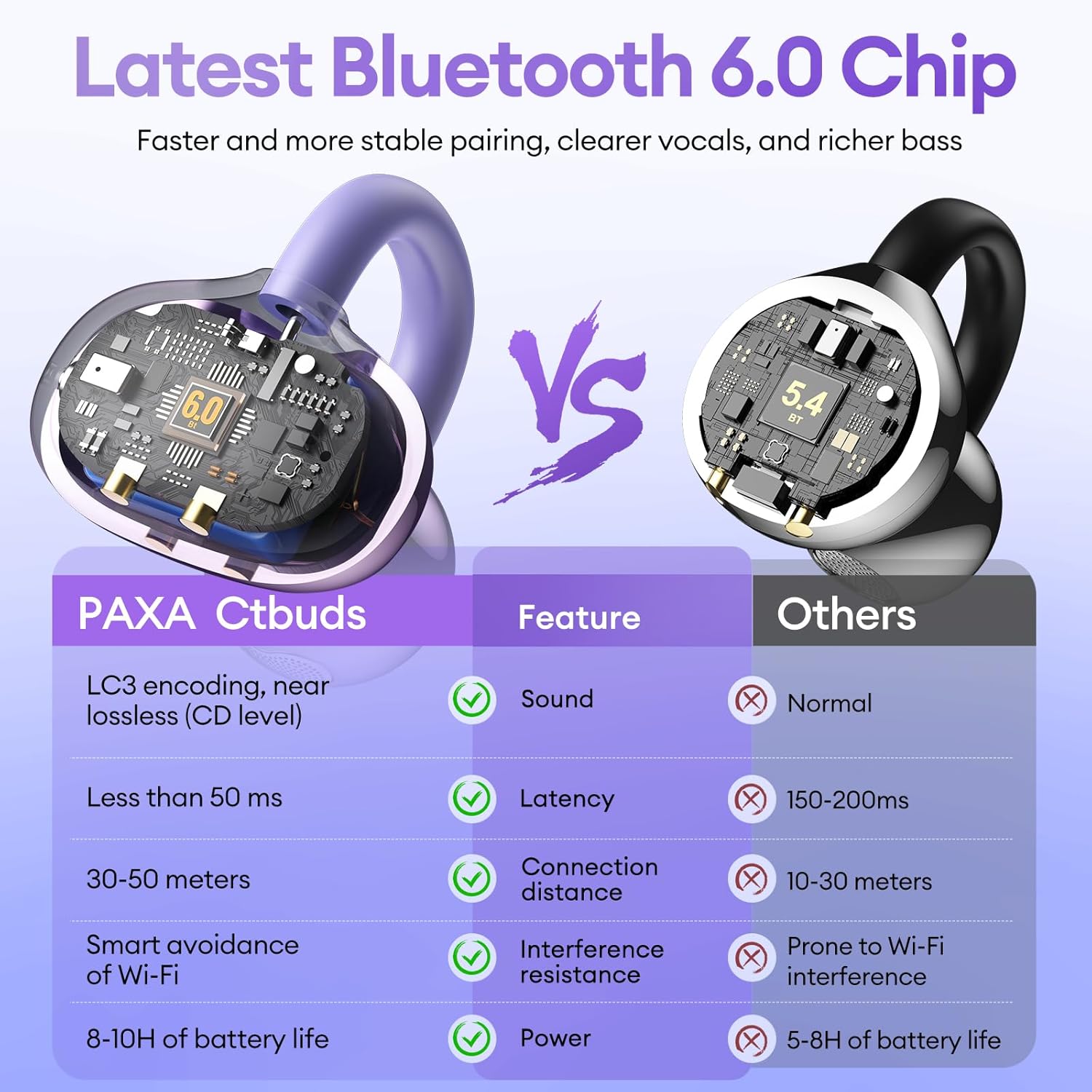
Image: A technical comparison highlighting the benefits of the Bluetooth 6.0 chip in PAXA Ctbuds, including lower latency and wider connection distance.
Operating Instructions
Switching Earbud Styles
The PAXA Ctbuds03 comes with two distinct earbud styles: clip-on open-ear and traditional in-ear. You can easily switch between them based on your activity and environment.
- Clip-on Open-Ear: Ideal for outdoor activities where situational awareness is crucial. They allow you to hear your surroundings while enjoying audio.
- In-Ear: Perfect for quiet environments like studying or working, providing privacy and minimizing sound leakage.

Image: A visual demonstration of the PAXA 2-in-1 earbuds, showing how to switch between the clip-on and in-ear designs for different uses.

Image: Examples of different scenarios where the PAXA Ctbuds03 can be used, including sports, work, and commuting.
Touch Controls
The earbuds feature intuitive touch controls for managing audio playback and calls.
| Action | Control |
|---|---|
| Answer/End Call | Double click either earbud |
| Reject Call | Press and hold either earbud for 2 seconds |
| Voice Assistant | Hold both earbuds for 2 seconds |
| Play/Pause | Double click either earbud |
| Previous Song | Triple-click the left (L) earbud |
| Next Song | Triple-click the right (R) earbud |
| Volume + | Click the right (R) earbud |
| Volume - | Click the left (L) earbud |

Image: A detailed diagram illustrating the touch control functions for the PAXA Ctbuds03 earbuds.
Maintenance
Water Resistance (IPX5)
The PAXA Ctbuds03 earbuds are IPX5 water-resistant, meaning they are protected against low-pressure water jets from any direction. This makes them suitable for workouts and light rain. However, they are not designed for submersion in water or heavy water exposure.
- Do not immerse the earbuds or charging case in water.
- Avoid exposing them to saltwater or other corrosive liquids.
- If they get wet, wipe them dry with a clean, soft cloth before placing them back in the charging case or using them.

Image: A person wearing PAXA Ctbuds03 earbuds in light rain, demonstrating their IPX5 water resistance.
Cleaning and Storage
- Regularly clean the earbuds and charging contacts with a dry, soft, lint-free cloth.
- Avoid using abrasive materials, alcohol, or chemical cleaners.
- Store the earbuds in their charging case when not in use to protect them and ensure they are charged for next use.
- Keep the device away from extreme temperatures and direct sunlight.
Troubleshooting
No Sound or Disconnection
- Ensure the earbuds are charged.
- Check if Bluetooth is enabled on your device and the earbuds are connected.
- Try placing the earbuds back in the case, closing it, and then reopening to re-establish the connection.
- If issues persist, try unpairing the earbuds from your device's Bluetooth settings and then re-pairing them.
- Ensure the earbuds are within the Bluetooth range (up to 10 meters).
Charging Issues
- Verify the charging cable is securely connected to both the case and the power source.
- Ensure the charging contacts on both the earbuds and the case are clean and free of debris.
- Try using a different USB port or power adapter.
- Remember the initial activation charge requires 6-8 hours.
Unresponsive Touch Controls
- Ensure your fingers are clean and dry when using touch controls.
- Try restarting the earbuds by placing them in the case and taking them out again.
Specifications
| Feature | Detail |
|---|---|
| Model Name | Ctbuds03 |
| Connectivity Technology | Wireless |
| Wireless Communication Technology | Bluetooth |
| Bluetooth Version | 6.0 |
| Bluetooth Range | 10 Meters |
| Ear Placement | Open Ear (with In-Ear option) |
| Form Factor | Over Ear / In Ear |
| Noise Control | Active Noise Cancellation (Hybrid Noise Reduction) |
| Battery Life (Earbuds) | 4 Hours (single charge) |
| Total Playtime (with Charging Case) | Up to 140 Hours |
| Charging Time | 2.5 Hours (earbuds + case) |
| Water Resistance Level | IPX5 |
| Control Method | Touch |
| Audio Driver Type | Dynamic Driver (13mm) |
| Frequency Range | 20 Hz - 20,000 Hz |
| Impedance | 1 Ohm |
| Material | Metal, Plastic, Silicone |
| Item Weight | 5 Ounces |
| Product Dimensions | 3.05 x 0.98 x 2.78 inches |

Image: An exploded view diagram illustrating the 13mm dynamic drivers responsible for the rich sound quality of the earbuds.
Official Product Video
Watch the official product video for a visual guide on the features and usage of the PAXA 2-in-1 Clip on Open Ear Headphones Wireless Earbuds.
Video: A demonstration of the PAXA 2-in-1 Clip on Open Ear Headphones, showcasing their design, functionality, and how to switch between the two earbud styles. (Duration: 0:35)
Warranty and Support
For warranty information and customer support, please refer to the product packaging or contact PAXA customer service directly. You may also visit the official PAXA store on Amazon for frequently asked questions and additional resources.
