
Uthfy JDAC66R-2
Uthfy Portable 3-in-1 Evaporative Air Cooler
Model: JDAC66R-2
1. Introduction
Thank you for choosing the Uthfy Portable 3-in-1 Evaporative Air Cooler. This versatile appliance integrates cooling, humidification, and ventilation functions to provide optimal comfort in your home, office, or bedroom. Please read this manual thoroughly before operation to ensure proper use, maintenance, and safety.

Image: The Uthfy Portable 3-in-1 Evaporative Air Cooler, showcasing its sleek design, remote control, and included ice packs for enhanced cooling.
2. Package Contents
Please check the package for the following items:
- 1 x Uthfy Portable Evaporative Air Cooler Unit
- 1 x Remote Control
- 6 x Ice Packs
- 1 x User Manual (this document)

Image: A set of six blue ice packs, designed to be used with the air cooler for improved cooling performance.
3. Product Features
- 3-In-1 Evaporative Cooler: Integrates cooling, humidification, and ventilation functions for comprehensive comfort.
- Enhanced Cooling: Comes with 6 ice packs to boost cooling efficiency and extend cooling duration.
- Multi-Speed Options and Wide Coverage: Features 3 adjustable speeds and 4 wind modes (Normal, Natural, Sleep, Refrigeration). The 120° oscillation ensures broad air distribution.
- Dual Control: Operate effortlessly with the touch control panel on top or the full-function remote control, effective up to 26 feet away.
- Effortless Movability: Equipped with 4 rotatable wheels for easy relocation across various indoor spaces.
- Easy Maintenance: Removable water tank, cooling pad, and grill allow for tool-free disassembly and quick cleaning.
- Quiet Operation & Timer: Sleep mode reduces fan speed to an ultra-quiet 25dB. Features a 12-hour timer for energy saving and convenience.

Image: Visual representation of the unit's three primary functions: fan (without water), humidifier (add water), and air cooler (cooling mode).

Image: An overhead view demonstrating the 120-degree oscillation feature, ensuring wide and far air circulation.
4. Setup
- Unpacking: Carefully remove the air cooler and all accessories from the packaging. Retain packaging for future storage or transport.
- Positioning: Place the unit on a flat, stable surface. Ensure there is adequate space around the unit for proper airflow. The 4 rotatable wheels allow for easy positioning.
- Filling the Water Tank:
- Locate the water tank at the bottom of the unit.
- Pull out the water tank gently.
- Fill the tank with clean water up to the 'MAX' line. Do not overfill.
- For enhanced cooling, place the provided ice packs (after freezing them) into the water tank.
- Carefully push the water tank back into place until it clicks securely.
- Power Connection: Plug the power cord into a standard 120V AC electrical outlet.

Image: The air cooler highlighting its upper and bottom dual water tanks, designed for convenient refilling and large capacity, along with the ice packs.
5. Operating Instructions
The air cooler can be operated using the touch control panel on the top of the unit or the included remote control.
Control Panel & Remote Functions:
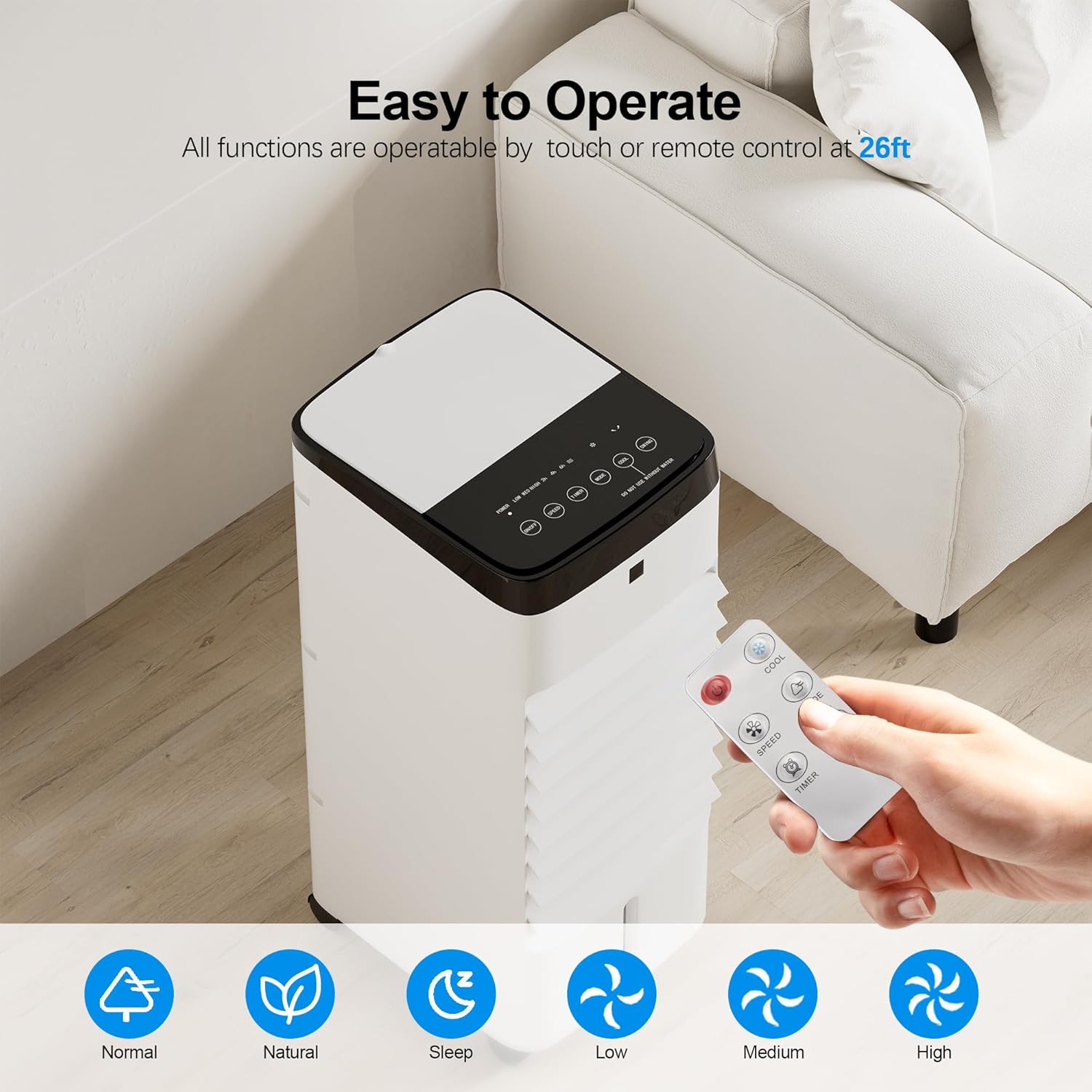
Image: The air cooler's top control panel and remote control, illustrating the ease of operation via touch or remote from up to 26 feet away.
- Power Button: Press to turn the unit ON or OFF.
- Speed Button: Cycle through 3 fan speeds: Low (L), Medium (M), High (H).
- Mode Button: Select from 4 wind modes:
- Normal: Constant airflow at selected speed.
- Natural: Simulates natural breeze with varying fan speeds.
- Sleep: Gradually reduces fan speed to a gentle level for quiet operation (25dB) and energy saving.
- Refrigeration (Cooling): Activates the evaporative cooling function, utilizing water and ice packs for cooler air.
- Oscillation Button: Press to activate or deactivate the 120° oscillation feature, distributing air widely.
- Timer Button: Set the operating timer from 1 to 12 hours. The unit will automatically turn off after the set time.
Using the Ice Packs:
For optimal cooling, freeze the 6 included ice packs for several hours before use. Place the frozen ice packs directly into the water tank along with water. This will significantly lower the air temperature output.

Image: The air cooler demonstrating its quiet sleep mode and 12-hour timer function, ideal for comfortable and energy-efficient nighttime use.
6. Maintenance
Regular cleaning ensures optimal performance and extends the lifespan of your air cooler. Always unplug the unit before cleaning.
Cleaning the Water Tank:
- Unplug the air cooler from the power outlet.
- Pull out the water tank.
- Empty any remaining water.
- Clean the tank with a soft cloth and mild detergent. Rinse thoroughly with clean water.
- Allow the tank to air dry completely before reinserting.
Cleaning the Cooling Pad and Rear Grill:
- Unplug the unit.
- Remove the rear grill (it's designed for tool-free disassembly).
- Carefully remove the cooling pad.
- Rinse the cooling pad under running water to remove dust and mineral deposits. For stubborn dirt, use a soft brush.
- Clean the rear grill with a soft cloth.
- Ensure both the cooling pad and grill are completely dry before reassembling.

Image: Exploded view of the air cooler's components (rear grill, cooling pad, water tank) demonstrating how easily they can be removed for cleaning.
Storage:
If the unit will not be used for an extended period, empty and clean the water tank and cooling pad. Store the unit in a cool, dry place, preferably in its original packaging.
7. Troubleshooting
| Problem | Possible Cause | Solution |
|---|---|---|
| Unit does not turn on | No power supply; Power cord not properly plugged in; Power button not pressed. | Check power outlet; Ensure power cord is securely plugged in; Press the Power button. |
| Weak airflow | Air filter/cooling pad clogged; Water tank empty (for cooling mode); Fan speed set too low. | Clean air filter/cooling pad; Refill water tank; Increase fan speed. |
| No cooling effect | Water tank empty; Cooling mode not activated; Ice packs not used or not frozen. | Fill water tank; Select 'Refrigeration' mode; Use frozen ice packs. |
| Unusual noise | Unit not on a flat surface; Obstruction in fan; Water level too low. | Place on a flat surface; Check for obstructions and remove; Refill water tank. |
| Remote control not working | Batteries dead or incorrectly inserted; Obstruction between remote and unit. | Replace batteries; Ensure clear line of sight to the unit's receiver. |
8. Specifications
| Feature | Specification |
|---|---|
| Brand | Uthfy |
| Model Name | Swamp Cooler (JDAC66R-2) |
| Mounting Type | Freestanding |
| Color | White |
| Controls Type | Remote, Touch Panel |
| Number of Speeds | 3 |
| Noise Level | 25 dB (Sleep Mode) |
| Product Dimensions | 10.43"D x 9.25"W x 22.05"H |
| Item Weight | 9.04 pounds |
| Voltage | 120 Volts |
| Included Components | Ice Pack (x6) |
| UPC | 774882976844 |
9. Warranty & Support
This Uthfy Portable 3-in-1 Evaporative Air Cooler comes with a 1 Year Manufacturer Warranty from the date of purchase. Please retain your proof of purchase for warranty claims.
For product support, troubleshooting assistance, or warranty inquiries, please visit the official Uthfy Store on Amazon: Uthfy Store.
Related documentsJDAC66R-2


Ask a question about this manual
Ask about setup, troubleshooting, compatibility, parts, safety, or missing instructions. Manuals+ will review the question and use this page’s manual context to help answer it.