
Introduction
Thank you for choosing the Kitstorack Adjustable Height TV Tray Table. This versatile C-shaped end table is designed to enhance comfort and convenience in various settings, including your living room, bedroom, or office. Its adjustable height, rounded metal corners, and sturdy design make it ideal for eating, working, or relaxing. Please read this manual carefully before assembly and use to ensure safe and optimal performance.
Safety Information
Caution:
- Rounded metal edges do not eliminate all risk of injury.
- Keep away from children and pets.
- Always ensure the table is stable and properly assembled to prevent tipping or collapse.
- Do not overload the table. Refer to specifications for weight capacity.
Package Contents
Before you begin assembly, please check that all parts are present and undamaged. If any parts are missing or damaged, please contact customer support.
- Tabletop (Engineered Wood)
- Adjustable Height Column (Metal)
- Base Frame (Metal)
- Assembly Hardware (Screws, Allen Wrench)
- Installation Manual (This document)

Image: All components of the Kitstorack TV Tray Table laid out for assembly, including the tabletop, adjustable column, base, and hardware.
Setup & Assembly
Assembly is quick and easy, typically taking only a few minutes with the included tools.
- Attach the Adjustable Column to the Base: Align the adjustable height column with the designated holes on the base frame. Secure it using the provided screws and Allen wrench. Ensure all screws are tightened firmly for stability.

Image: Detailed view of attaching the adjustable column to the table's base using screws and an Allen wrench.
- Attach the Tabletop to the Adjustable Column: Position the tabletop onto the top of the adjustable column. Secure it using the remaining screws and Allen wrench. Verify that the tabletop is securely fastened and does not wobble.

Image: A person securing the tabletop to the adjustable column with screws.
- Final Check: Once assembled, gently shake the table to ensure all connections are secure and the table is stable.
Assembly Video
Video: Official Kitstorack video demonstrating the quick and easy assembly process of the TV Tray Table. This video shows how to connect the base, column, and tabletop using the provided hardware.
Operating Instructions
Adjusting Height
The Kitstorack TV Tray Table features 9-level adjustable height (18.7" - 30") for versatile use. To adjust the height:
- Locate the latches on the adjustable column.
- Press the latches to release the locking mechanism.
- Raise or lower the tabletop to your desired height.
- Release the latches to lock the table securely in place. Ensure it clicks into position.
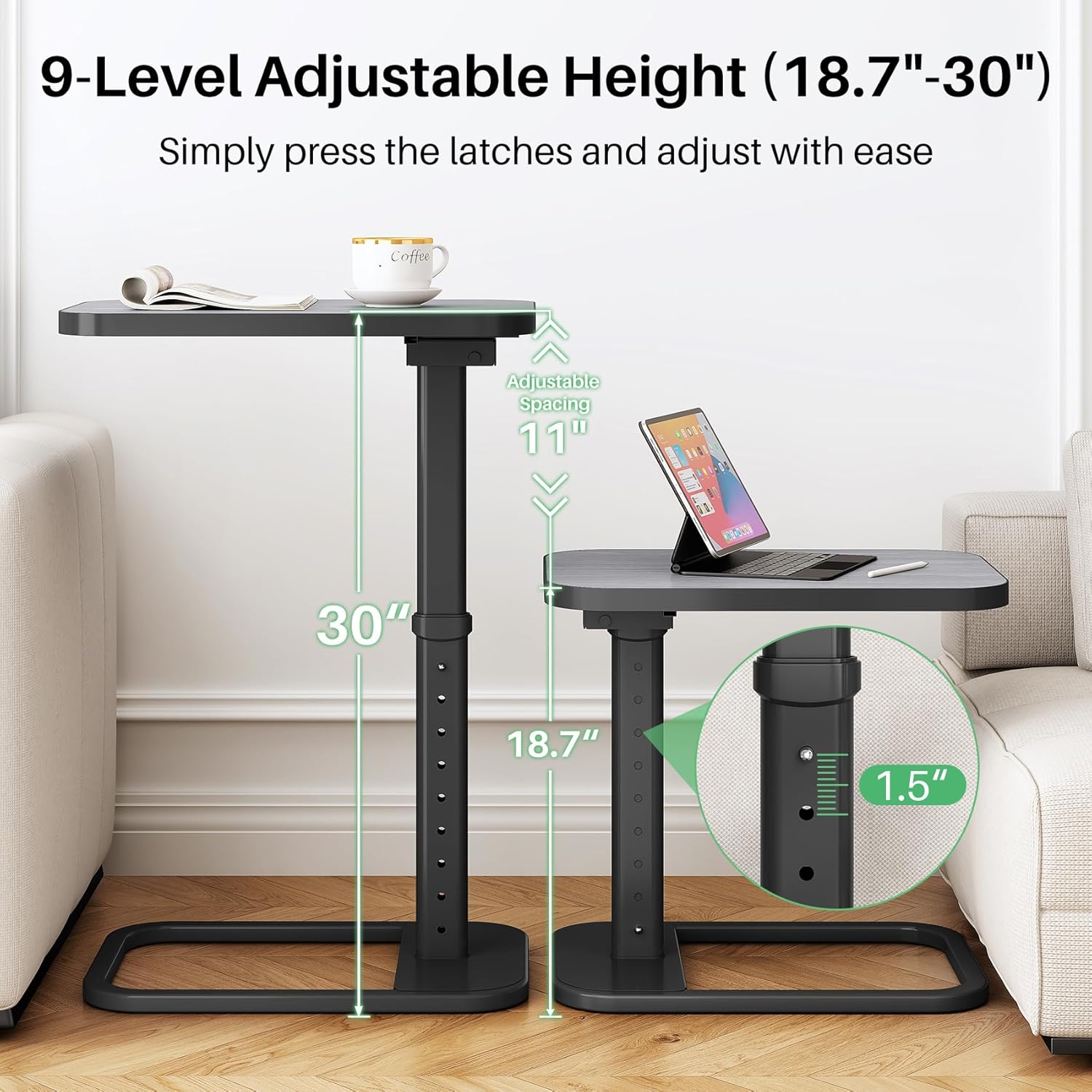
Image: Visual guide illustrating the 9-level height adjustment feature, ranging from 18.7 inches to 30 inches.
Folding and Storage
This table is designed for space-saving convenience. To fold the tabletop:
- Locate the locking lever mechanism underneath the tabletop.
- Pull the lever to unlock the tabletop.
- Carefully flip the tabletop upwards by 90 degrees until it locks into a vertical position. This allows for unhindered stand-up access or compact storage.

Image: The TV Tray Table with its tabletop folded vertically, demonstrating its space-saving design.
Folding Feature Video
Video: Official Kitstorack video showcasing the folding mechanism of the TV Tray Table, highlighting its space-saving benefits.
Versatile Placement
The C-shaped design allows the table to slide easily under sofas, couches, beds, or chairs, bringing the tabletop closer to you for maximum convenience.

Image: Demonstrates the table's versatility, showing it positioned next to a recliner, a bed, and a sofa.
Maintenance
- Cleaning: Wipe the tabletop and metal frame with a soft, damp cloth. Avoid using harsh chemicals or abrasive cleaners, which may damage the finish.
- Inspection: Periodically check all screws and connections to ensure they remain tight. Retighten if necessary.
- Storage: When not in use, fold the tabletop for compact storage to protect it from damage.
Troubleshooting
- Table Wobbles:
- Ensure all assembly screws are securely tightened.
- Verify the adjustable height latches are fully engaged and locked.
- Place the table on a flat, even surface.
- Difficulty Adjusting Height:
- Ensure the latches are fully pressed before attempting to adjust the height.
- Check for any obstructions in the adjustable column.
- Tabletop Does Not Fold:
- Confirm the locking lever underneath the tabletop is fully pulled to release the mechanism.
Specifications
| Feature | Detail |
|---|---|
| Brand | Kitstorack |
| Model Name | Adjustable Tv Tray |
| Color | Dark Gray |
| Style | Standard |
| Item Weight | 8 Pounds |
| Frame Material | Metal |
| Top Material Type | Engineered Wood |
| Adjustable Height Range | 18.7" - 30" (9 levels) |
| Tabletop Dimensions | 16.1" x 12.2" (approx.) |
| Base Dimensions | 16.5" x 12.5" (approx.) |
| Load Capacity | Up to 88 lbs (approx.) |
| Recommended Uses | Corner, Dining, Gaming, Reading, Writing |
| Indoor/Outdoor Usage | Indoor |

Image: Detailed dimensions of the table, showing height adjustment range and tabletop measurements.
Warranty and Support
For warranty information or customer support, please refer to the product packaging or contact Kitstorack directly through their official website or the retailer where the product was purchased.