
1. Introduction
Thank you for choosing the Mingdaln Military Smart Watch KW330heise. This manual provides essential information to help you set up, operate, and maintain your device. Please read it carefully to ensure optimal performance and longevity of your smart watch.
Included Components:
- Mingdaln Military Smart Watch KW330heise
- Charging Cable
- User Manual
2. Product Overview
Familiarize yourself with the key components of your Mingdaln Military Smart Watch.
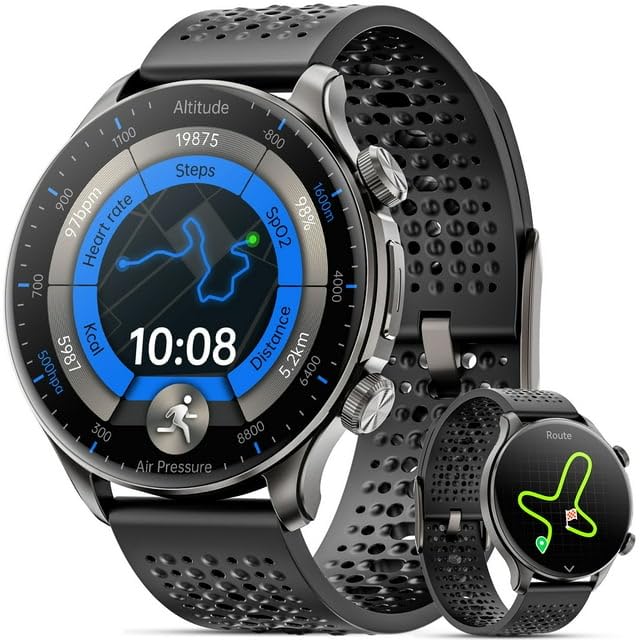
Image 2.1: Front view of the Mingdaln Military Smart Watch KW330heise, showcasing its 1.6-inch AMOLED screen and rugged design.
The watch features a durable casing, a vibrant 1.6-inch AMOLED touchscreen display, and physical buttons for navigation and function control. The rear of the watch houses the charging contacts and various sensors for health tracking.
3. Setup
3.1 Charging the Device
- Connect the charging cable to a USB power adapter (not included) or a computer's USB port.
- Attach the magnetic end of the charging cable to the charging contacts on the back of the watch. Ensure proper alignment.
- The watch screen will display a charging indicator. Allow the watch to charge fully before first use. A full charge typically takes approximately 2 hours.
3.2 Powering On/Off
- To Power On: Press and hold the power button (usually the top right button) for a few seconds until the Mingdaln logo appears.
- To Power Off: From the watch face, swipe down to access quick settings, then tap the power icon, or navigate to 'Settings' > 'System' > 'Power Off'. Confirm your selection.
3.3 Pairing with Your Smartphone
The Mingdaln Military Smart Watch is compatible with Android and iPhone devices. To unlock full functionality, you must pair it with your smartphone.
- Download the companion app (refer to the watch screen or included quick start guide for the app name and QR code) from your smartphone's app store (Google Play Store or Apple App Store).
- Ensure Bluetooth is enabled on your smartphone.
- Open the companion app and follow the on-screen instructions to create an account or log in.
- In the app, select 'Add Device' or 'Pair New Device'. The app will search for your watch.
- Select 'KW330heise' from the list of available devices.
- Confirm the pairing request on both your watch and smartphone.
3.4 Initial Configuration
After successful pairing, the app will guide you through initial settings such as language, time format, and personal profile information (height, weight, age) for accurate activity tracking.
4. Operating Instructions
4.1 Navigating the Interface
- Touchscreen: Swipe left, right, up, or down to navigate through menus, notifications, and widgets. Tap to select items.
- Power Button: Press to wake/sleep the screen, or return to the watch face. Long press to power on/off or access voice assistant.
- Function Button: (If present, typically bottom right) Customizable for quick access to a specific app or feature.
4.2 Making and Answering Calls
With your watch paired to your smartphone, you can manage calls directly from your wrist.
- Answering Calls: When a call comes in, tap the green phone icon on the watch screen.
- Making Calls: Access the 'Dialer' or 'Contacts' app on your watch. You can dial a number directly or select a contact to initiate a call. The watch uses its built-in speaker and microphone for communication.
4.3 Using the Compass
The watch includes a built-in compass for navigation assistance.
- Open the 'Compass' app on your watch.
- Hold the watch flat and rotate your wrist in a figure-eight motion to calibrate the compass if prompted.
- The display will show your current heading.
Note: This device does not feature integrated GPS. Location services rely on your paired smartphone's GPS.
4.4 Activity Tracking
The Mingdaln Military Smart Watch tracks various fitness metrics.
- Steps & Distance: Automatically records your daily steps and estimated distance.
- Heart Rate: Access the heart rate monitor app to measure your current heart rate.
- Sleep Monitoring: Wear the watch to bed to track sleep patterns.
- Workout Modes: Select from various sports modes (e.g., running, cycling) to track specific activities with detailed metrics.
4.5 Water Resistance
The watch is rated 50m waterproof, suitable for shallow-water activities like swimming. It is not recommended for diving, snorkeling, or high-pressure water activities. Avoid exposure to hot water, steam, or chemical solvents, as these can compromise the water resistance.
4.6 Battery Management
The 450mA super large battery provides extended usage. To maximize battery life:
- Adjust screen brightness to a lower setting.
- Disable unnecessary notifications.
- Turn off 'Always-On Display' if enabled.
- Limit frequent heart rate monitoring to manual checks.
5. Maintenance
5.1 Cleaning the Watch
Regular cleaning helps maintain the watch's appearance and functionality.
- Wipe the watch body and strap with a soft, damp, lint-free cloth.
- For stubborn dirt, use a small amount of mild soap and water, then rinse thoroughly with clean water and dry completely.
- Avoid using harsh chemicals, abrasive materials, or ultrasonic cleaners.
5.2 Storage
When not in use for extended periods, store the watch in a cool, dry place away from direct sunlight and extreme temperatures. Ensure the battery has some charge to prevent deep discharge.
6. Troubleshooting
6.1 Watch Not Powering On
- Ensure the watch is fully charged. Connect it to the charger for at least 30 minutes.
- Try pressing and holding the power button for 10-15 seconds to force a restart.
6.2 Pairing Issues
- Make sure Bluetooth is enabled on your smartphone and the watch.
- Ensure the watch is within Bluetooth range of your phone (typically 10 meters/33 feet).
- Restart both your watch and smartphone.
- Forget the device in your phone's Bluetooth settings and try pairing again through the companion app.
6.3 Inaccurate Activity Data
- Ensure the watch is worn snugly on your wrist, not too tight or too loose.
- Verify that your personal information (height, weight, age) is correctly entered in the companion app.
- Calibrate the compass if you suspect inaccuracies.
7. Specifications
| Model Number | KW330heise |
| Brand | Mingdaln |
| Display | 1.6-inch AMOLED Screen |
| Battery Capacity | 450mA |
| Water Resistance | 50m |
| Operating System | Wear OS 1.1 |
| Connectivity | Bluetooth |
| GPS | No (relies on smartphone GPS) |
| Special Features | Activity Tracker, Compass, Call Function |
| Compatible Devices | Android, iPhone Smartphones |
8. Warranty & Support
Your Mingdaln Military Smart Watch KW330heise comes with a standard manufacturer's warranty. Please refer to the warranty card included in your product packaging for specific terms and conditions, including coverage duration and claim procedures.
Contact Support:
For technical assistance, warranty claims, or further inquiries, please contact Mingdaln customer support through the contact information provided on our official website or in your product documentation.