
1. Product Overview
The TEKCOPLUS TK504PLUS is a 7-in-1 Wireless WiFi Water Quality Monitor designed for real-time monitoring of various water parameters in freshwater and saltwater aquariums, as well as ponds. This smart device provides continuous data on water conditions and sends alerts to your smartphone, ensuring optimal aquatic health.
Key Features:
- 7-in-1 Monitoring: Measures pH, Temperature, Total Dissolved Solids (TDS), Electrical Conductivity (EC), Salinity, Specific Gravity (SG), and Oxidation-Reduction Potential (ORP).
- Wireless Connectivity: Connects via 2.4GHz WiFi to the Tuya Smart App for remote monitoring and data tracking.
- Real-Time Alerts: Receive instant mobile notifications when water conditions fall outside set parameters.
- Replaceable Platinum Probe: Features a durable, replaceable probe with automatic temperature compensation (ATC).
- Multiple Installation Options: Probe can be installed using a floater, wall clip, or suction cups.
- User-Friendly Display: Easy-to-read color LCD screen shows real-time metrics.

Image: The TEKCOPLUS TK504PLUS 7-in-1 Water Quality Monitor displaying various parameters, shown next to an aquarium with its probe submerged.
Product Overview Video:
Video: An overview of the TEKCOPLUS 7-in-1 Wireless WiFi Water Quality Monitor, highlighting its features and parameters.
2. Setup Guide
2.1 Unpacking and Components
Before starting, ensure all components are present in the package:
- 1 x 7-in-1 Monitor Unit
- 1 x Electrode (Probe)
- 1 x Suction Cup
- 2 x Probe Floater Rings
- 1 x Wall Clip
- 1 x Perforated Cover
- 6 x pH Calibration Powder (pH 4.01, pH 6.86, pH 9.18)
- 2 x 3M Adhesive Stickers
- 1 x USB Power Cable
- 2 x Power Plugs
- English Instruction Manual

Image: A visual representation of all items included in the product package, such as the monitor, probe, various mounting accessories, calibration powders, and cables.
2.2 Probe Installation
The probe offers three installation methods to suit different aquarium setups:
- Wall Clip: Attach the probe to the aquarium wall using the provided clip.
- Wall Suction: Use the suction cups to secure the probe to the inside of the aquarium glass.
- Floating Sponge: Insert the probe into the floating sponge to allow it to float on the water surface, adjusting automatically with water level changes.
Important Note: Do not submerge the entire probe in water. Submerge the probe only halfway into the water. Excessive water pressure can damage it and shorten its lifespan. Ensure the hollow probe cap is replaced before use.

Image: Illustrations demonstrating the three probe installation methods: using a wall clip, suction cups, or a floating sponge.

Image: A diagram illustrating the correct way to use the probe, emphasizing that it should only be submerged halfway into the water.
2.3 Monitor Installation
To install the main monitor unit:
- Peel off the protective film from the adhesive sticker.
- Attach one adhesive sticker to the back of the device bracket.
- Attach the other adhesive sticker to the wall bracket.
- Align the device bracket with the wall bracket and slide down to secure the monitor.
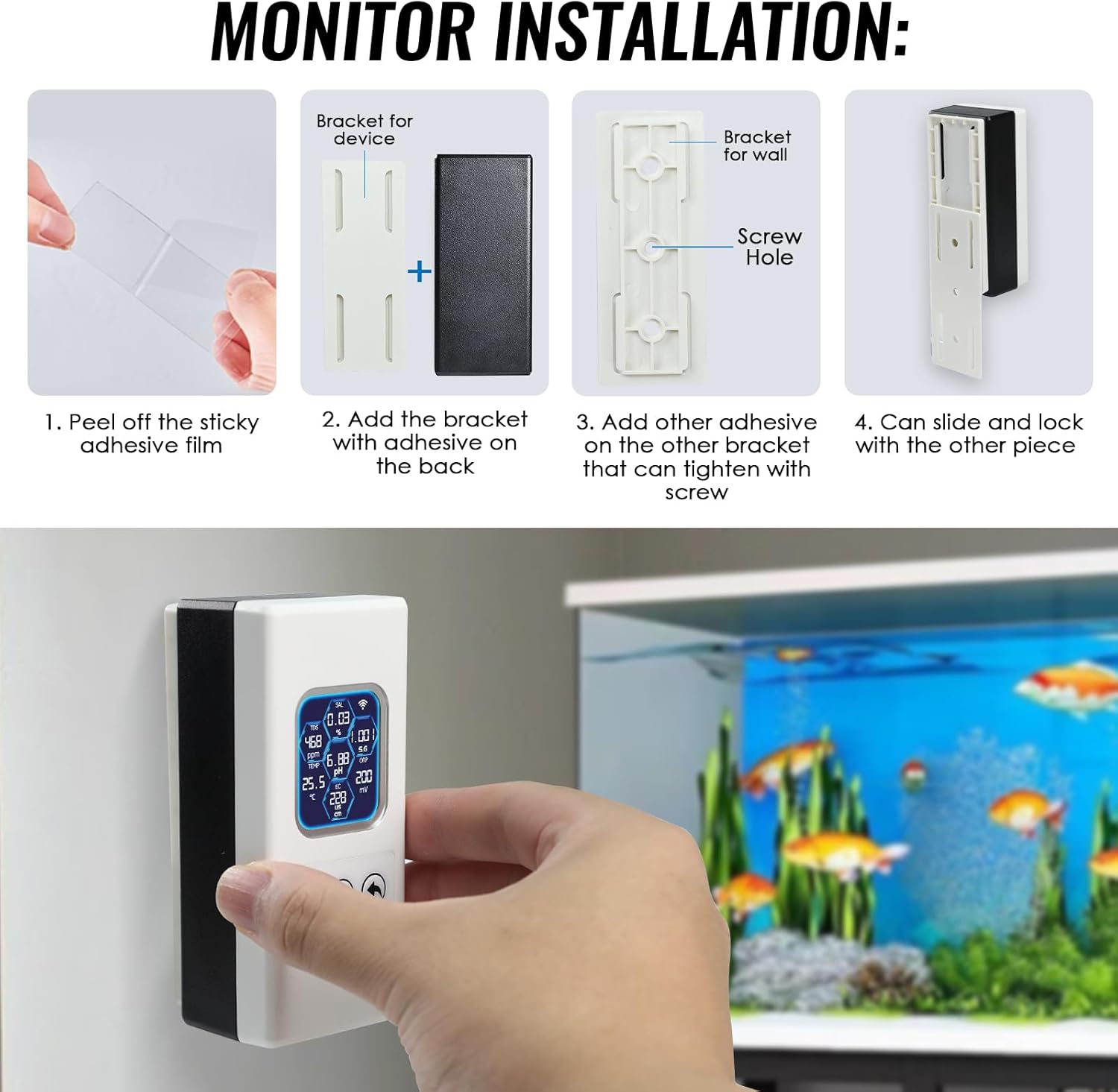
Image: A step-by-step visual guide on how to install the main monitor unit using the provided adhesive brackets.
2.4 Powering On and Initial Connection
- Plug the probe into the main monitor unit. The '!' mark on the screen should disappear if the probe is successfully connected.
- Plug the USB cable and adapter into the device to turn it on.
2.5 WiFi and App Connection
The monitor connects to your smartphone via the Tuya Smart App for remote monitoring and settings adjustments.
- Download the Tuya Smart App from Google Playstore (Android) or App Store (iOS).
- Login or register for an account in the Tuya app.
- On the monitor, press and hold the center button (recycle icon) for 3 seconds to activate WiFi pairing mode. The WiFi icon on the monitor's screen will flash.
- In the Tuya app, press the "+" icon to add a new device. The app should automatically detect the "Water monitor".
- Follow the on-screen instructions in the app to connect the device to your 2.4GHz WiFi network.
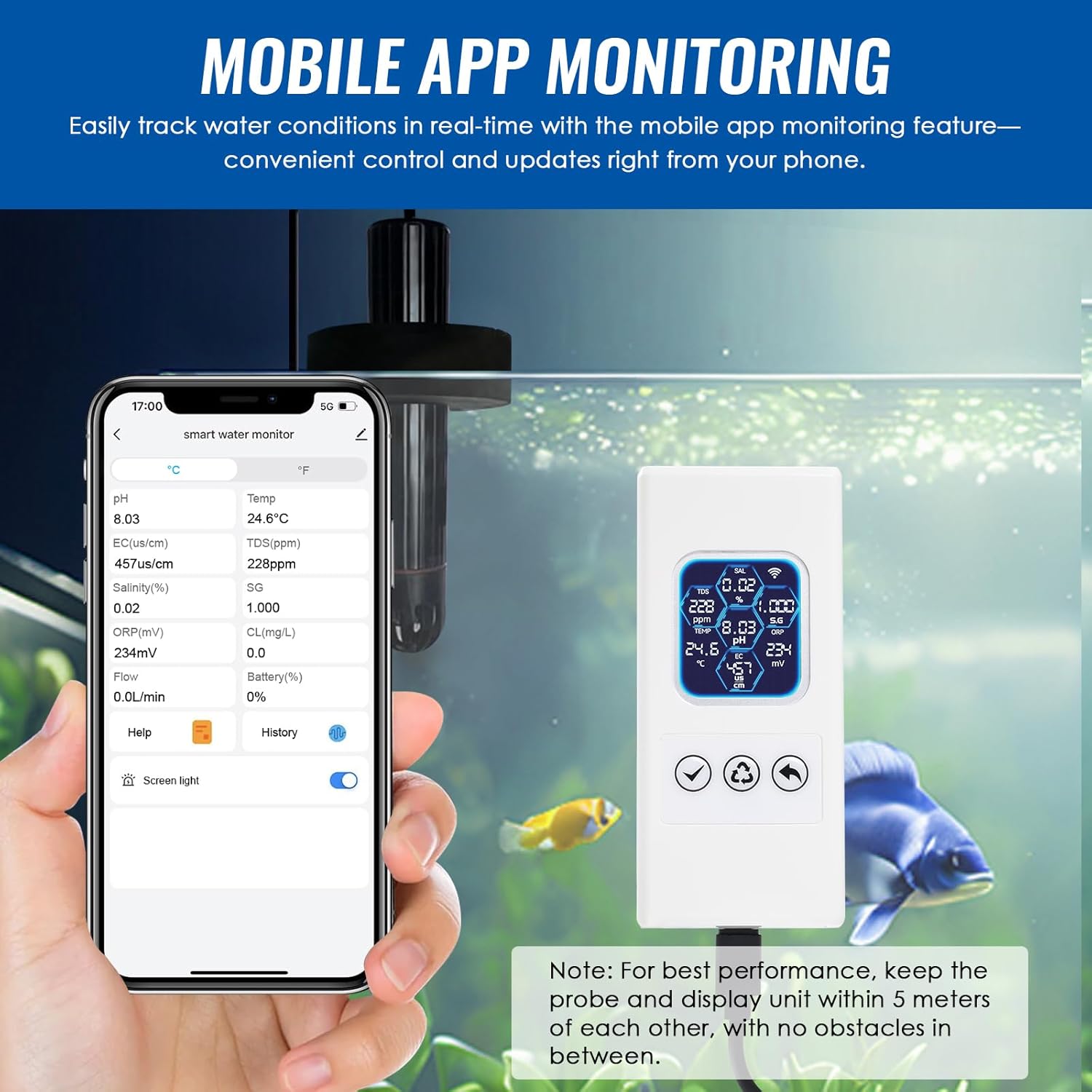
Image: A smartphone displaying the Tuya Smart App interface, showing real-time water quality parameters from the connected monitor.
Setup Video:
Video: A step-by-step guide on how to set up the TEKCOPLUS Smart Aquarium Water Monitor, including probe connection, power-on, and app pairing.
Important Wireless Range Note: The main unit and probe should be within a 5-meter (16.4 ft) distance for optimal wireless communication.

Image: A diagram illustrating the recommended wireless range of up to 5 meters (16.4 ft) between the main monitor unit and the probe.
3. Operating Instructions
3.1 Real-Time Monitoring
Once connected, the monitor's color LCD screen will display real-time readings for all 7 parameters. You can also view these readings and historical data through the Tuya Smart App on your smartphone.

Image: A detailed view of the monitor and probe, with labels indicating the Color LCD Screen, LCD Off/Confirm button, Setting/Next button, Back button, USB Port, Probe Sensor, Probe, and Probe Cap.
3.2 Parameter Details
- pH: Measures the acidity or alkalinity of the water.
- Temperature: Displays water temperature in Celsius or Fahrenheit.
- TDS (Total Dissolved Solids): Indicates the concentration of dissolved substances in the water.
- EC (Electrical Conductivity): Measures the water's ability to conduct electricity, related to dissolved salts.
- Salinity: Measures the salt content of the water.
- SG (Specific Gravity): Indicates the density of the water relative to pure water, commonly used for saltwater.
- ORP (Oxidation-Reduction Potential): Measures the water's ability to break down contaminants.
3.3 Temperature Unit Switching
You can switch between Celsius (°C) and Fahrenheit (°F) temperature units directly from the Tuya Smart App settings.
3.4 Alerts and Notifications
The Tuya Smart App allows you to set custom alert ranges for each parameter. When a parameter goes out of range, you will receive instant notifications on your smartphone. Ensure notifications are enabled in the app's settings to receive these alerts.
3.5 Data Recording
The device automatically records real-time data for all parameters. This historical data can be viewed by day and month within the Tuya Smart App, allowing you to track trends and changes in your water quality over time.
4. Maintenance
4.1 Probe Care and Replacement
The platinum probe is designed for durability but requires regular cleaning and eventual replacement to maintain accuracy. Clean the probe gently with distilled water and a soft cloth. If readings become inconsistent or inaccurate after cleaning and calibration, the probe may need to be replaced.
4.2 Calibration
The monitor supports 3-point pH calibration. Use the provided pH calibration powders (pH 4.01, pH 6.86, pH 9.18) according to the instructions in the Tuya Smart App to ensure accurate pH readings. Regular calibration is essential for precise measurements.
5. Troubleshooting
If you encounter issues with your TEKCOPLUS TK504PLUS monitor, consider the following:
- No Power: Ensure the USB power cable is securely connected to both the monitor and a working power source.
- No Readings/Incorrect Readings: Verify the probe is correctly plugged into the main unit and submerged halfway in the water. Clean the probe and perform a pH calibration if necessary.
- WiFi Connection Issues: Ensure your WiFi network is 2.4GHz. Restart the monitor and your router. Re-attempt the WiFi pairing process through the Tuya Smart App. Check that the monitor is within 5 meters of the probe.
- App Not Receiving Alerts: Check the notification settings within the Tuya Smart App and your smartphone's operating system settings to ensure alerts are enabled.
For further assistance, please refer to the official TEKCOPLUS support channels.
6. Specifications
| Parameter | Measuring Range |
|---|---|
| pH | 0 ~ 14 |
| Temperature | 0 ~ 60°C (32 ~ 140°F) |
| Total Dissolved Solids (TDS) | 0 ~ 999ppm (1 ~ 20ppt) |
| Electrical Conductivity (EC) | 0 ~ 999us/cm (1 ~ 400ms/cm) |
| Salinity | 0.01% ~ 25% |
| Specific Gravity (SG) | 1 ~ 1.222 |
| ORP | 0 ~ ±999mV |

Image: A table detailing the measurement ranges for pH, Temperature, TDS, EC, Salinity, Specific Gravity, and ORP.
General Product Specifications:
- Product Dimensions: 7.4 x 4.5 x 2 inches
- Item Weight: 4.6 ounces
- Item Model Number: TK504PLUS
- Manufacturer: Tekcoplus Lt
7. Warranty and Support
Specific warranty information and detailed support contacts are not provided in the product data. Please refer to the product packaging or the official TEKCOPLUS website for warranty details and customer support information.

