
Razor MX650
Razor MX650 Dirt Rocket Electric Ride-On User Manual
Model: MX650
Introduction
Welcome to the user manual for your new Razor MX650 Dirt Rocket Electric Ride-On. This manual provides essential information for the safe assembly, operation, maintenance, and troubleshooting of your electric dirt bike. Please read this manual thoroughly before operating the product to ensure proper use and to maximize your riding experience.
The Razor MX650 is designed for off-road conditions, offering speeds up to 17 mph with a high-torque, chain-driven motor. It features a durable steel frame, dual-crown fork, and front and rear suspension for handling rough terrain. The bike is equipped with a 36-volt battery system providing up to 40 minutes of continuous ride time.
Important Safety Information
WARNING: Riding an electric dirt bike can be a hazardous activity. Certain conditions may cause the equipment to fail without fault of the manufacturer. The product is intended for use in controlled environments, free from potential hazards and not on public streets or sidewalks. Always wear appropriate safety gear, including a helmet, knee pads, and elbow pads.
- Always wear a helmet and other protective gear (knee, elbow, wrist guards).
- Do not ride at night or in low visibility conditions.
- Keep both hands on the handlebars at all times.
- Avoid sudden starts, stops, or turns.
- Do not exceed the maximum rider weight of 220 pounds.
- Recommended for riders 16 years old and up.
- Always follow local laws and regulations regarding electric ride-on vehicles.
- Inspect the bike before each ride for loose parts, tire pressure, and brake function.
Setup and Assembly
Some assembly is required before the first use. Please ensure all components are present and undamaged before beginning assembly.
Unboxing and Initial Inspection
Carefully remove all contents from the box. Retain the packaging for future storage or shipping. Inspect the product for any signs of damage during transit. If any parts are missing or damaged, do not proceed with assembly and contact Razor customer support.
Required Tools (Not Included)
- Adjustable wrench or set of metric wrenches
- Phillips head screwdriver
- Allen wrench set
Assembly Steps
- Handlebar Installation: Insert the handlebar stem into the fork tube. Ensure the handlebars are aligned with the front wheel and tighten the clamp bolts securely.
- Front Wheel Attachment: Attach the front wheel to the fork. Ensure the axle is properly seated and tighten the axle nuts firmly.
- Fender and Fairing Installation: Secure the front and rear fenders and side fairings using the provided screws.
- Kickstand Attachment: The kickstand is included and needs to be attached to the designated mounting point on the frame.
- Brake Adjustment: Check that both front and rear disc brakes are properly aligned and functioning. Adjust cable tension as needed to ensure effective braking.
- Tire Inflation: Inflate both pneumatic tires to the recommended pressure (check tire sidewall for maximum PSI).

Figure 1: The Razor MX650 Dirt Rocket Electric Ride-On, showcasing its overall design and components from a front-side perspective.
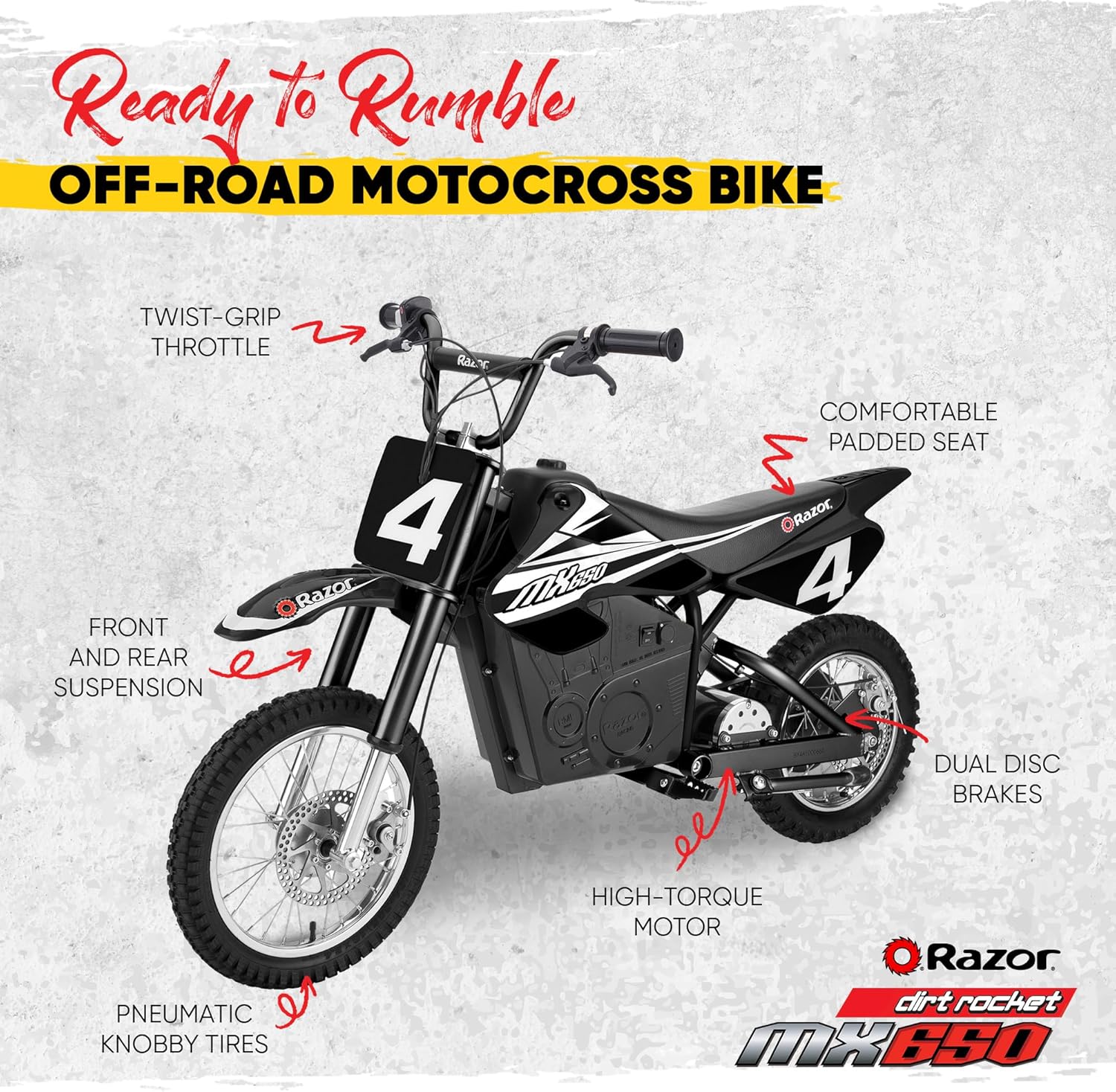
Figure 2: Diagram highlighting key features of the MX650, including the twist-grip throttle, comfortable padded seat, front and rear suspension, dual disc brakes, high-torque motor, and pneumatic knobby tires.
Battery Charging
The Razor MX650 is powered by a 36-volt (three 12-volt) sealed lead-acid battery system. For optimal performance and battery life, it is crucial to follow proper charging procedures.
- Before first use, charge the battery for a minimum of 12 hours.
- Always turn the power switch OFF before charging.
- Plug the charger into a standard wall outlet (100V-240V AC).
- Connect the charger plug to the charging port on the bike.
- The charger light will indicate charging status (refer to charger manual for specific light indicators).
- Do not overcharge the battery; typical recharge time is 12 hours, even if the light indicates full charge sooner. Do not charge for more than 24 hours.
- Disconnect the charger once charging is complete.
CAUTION: Use only the charger provided by Razor. Using an unauthorized charger may damage the battery or create a fire hazard.
Operating Instructions
Familiarize yourself with the controls before riding. Always ride in a safe, open area away from traffic and obstacles.
Controls Overview
- Power Switch: Located near the battery compartment. Turn ON to activate the bike.
- Twist-Grip Throttle: On the right handlebar. Twist to accelerate.
- Hand-Operated Brakes: Levers on both handlebars (front and rear). Squeeze to apply brakes.
- Kickstand: Retractable kickstand for parking.
Riding the MX650
- Ensure the kickstand is fully retracted.
- Turn the power switch to the ON position.
- Place both feet on the folding metal foot pegs.
- Slowly twist the throttle to begin moving. Increase throttle for more speed.
- To slow down or stop, release the throttle and gently squeeze the brake levers.
- Practice braking and turning at low speeds before attempting higher speeds or challenging terrain.

Figure 3: A rider demonstrating the use of the Razor MX650 Dirt Rocket on an unpaved path, highlighting its off-road capability.

Figure 4: A rider on the Razor MX650 Dirt Rocket in mid-air, illustrating the bike's robust suspension and suitability for dynamic off-road riding.
Maintenance and Care
Regular maintenance will extend the life of your Razor MX650 and ensure safe operation.
- Tires: Check tire pressure before each ride. Maintain proper inflation for optimal performance and safety. The 16-inch front and 14-inch rear pneumatic knobby tires require regular inspection for wear and punctures.
- Brakes: Regularly inspect brake cables, levers, and pads for wear. Adjust as necessary to ensure responsive braking.
- Chain: Keep the chain clean and lubricated. Check for proper tension and adjust if too loose or too tight.
- Battery: Always recharge the battery after each use, even if only for a short ride. Store the bike with a fully charged battery. If storing for extended periods, charge the battery once a month.
- General Cleaning: Wipe down the bike with a damp cloth after each ride. Avoid using harsh chemicals or abrasive cleaners. Do not use a high-pressure washer.
- Fasteners: Periodically check all nuts, bolts, and other fasteners to ensure they are secure.

Figure 5: A detailed view of the rear wheel and disc brake assembly of the Razor MX650, highlighting the pneumatic knobby tire and braking mechanism.

Figure 6: A close-up image of the high-torque electric motor of the Razor MX650, which powers the chain-driven system.
Troubleshooting Guide
This section addresses common issues you might encounter with your Razor MX650. If the problem persists after attempting these solutions, contact Razor customer support.
| Problem | Possible Cause | Solution |
|---|---|---|
| Bike does not run | Power switch is OFF Battery is low or dead Loose wiring connection Thermal breaker tripped | Turn power switch ON Charge battery for 12 hours Check all wire connections Allow unit to cool for 15-30 minutes, then reset breaker (if applicable) |
| Bike runs slowly | Battery is low Overloaded Tire pressure too low Rough terrain | Charge battery Reduce rider weight Inflate tires to recommended PSI Ride on smoother surfaces |
| Charger gets warm | Normal operation | This is normal. If it gets excessively hot, disconnect and contact support. |
| Brakes are not effective | Brake pads worn Brake cable loose | Inspect and replace brake pads Adjust brake cable tension |
Specifications
| Feature | Detail |
|---|---|
| Model | MX650 Dirt Rocket |
| Brand | Razor |
| Motor | High-torque, chain-driven |
| Battery | 36V (three 12V) sealed lead-acid rechargeable system |
| Max Speed | Up to 17 mph (27 km/h) |
| Run Time | Up to 40 minutes of continuous use |
| Max Rider Weight | 220 lbs (100 kg) |
| Recommended Age | 16+ years |
| Tires | Front: 16-inch pneumatic knobby Rear: 14-inch pneumatic knobby |
| Brakes | Dual disc, hand-operated |
| Product Dimensions | 56 x 24.5 x 36 inches (142.2 x 62.2 x 91.4 cm) |
| Item Weight | 160 pounds (72.5 kg) |
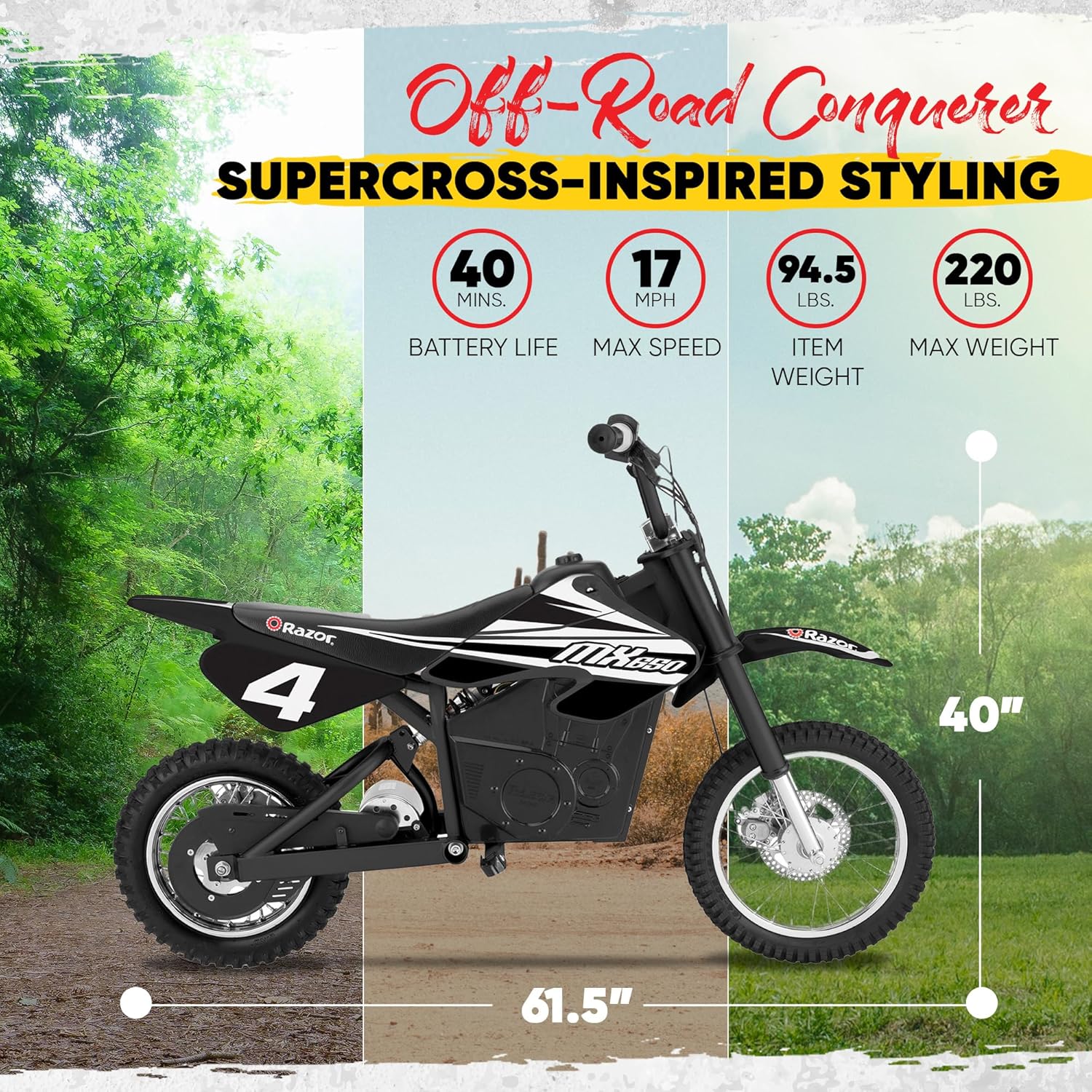
Figure 7: An infographic detailing the key specifications of the Razor MX650, including battery life (40 mins), max speed (17 mph), item weight (94.5 lbs), and max weight (220 lbs), along with overall dimensions.
Warranty Information
Razor products are manufactured under high-quality standards. For specific warranty details, including coverage period and terms, please refer to the warranty card included with your product or visit the official Razor website. Keep your purchase receipt as proof of purchase for any warranty claims.
Customer Support
For further assistance, replacement parts, or technical support, please contact Razor customer service:
- Website: www.razor.com
- Phone: Refer to the Razor website for regional contact numbers.
- Email: Refer to the Razor website for contact email.
Please have your product model number (MX650) and date of purchase ready when contacting support.
Ask a question about this manual
Ask about setup, troubleshooting, compatibility, parts, safety, or missing instructions. Manuals+ will review the question and use this page’s manual context to help answer it.