
FOUSAE MC57PRO
FOUSAE MC57PRO Under Desk Elliptical User Manual
Model: MC57PRO
1. Introduction
The FOUSAE MC57PRO Under Desk Elliptical is designed to provide a convenient and effective way to exercise your legs while sitting. This device offers adjustable resistance and speed settings, forward and reverse motion, and can be controlled via a touch screen or remote control. It is suitable for individuals seeking to maintain activity, improve circulation, or support rehabilitation with low-impact exercise.

Image: An elderly man uses the elliptical while reading, illustrating its low-impact benefits for circulation and joint protection.

Image: Various individuals, including office workers, seniors, and those in rehabilitation, using the elliptical in different environments.
2. Important Safety Instructions
- Read all instructions before using the appliance.
- Use the product only for its intended purpose as described in this manual.
- Keep the appliance away from water or moisture.
- Ensure the power cord is not damaged and is properly connected to a suitable power outlet.
- Do not attempt to disassemble or repair the unit yourself. Contact customer support for assistance.
- Place the elliptical on a flat, stable surface. Use the provided non-slip mat to prevent movement during use.
- Consult a physician before starting any new exercise program, especially if you have pre-existing health conditions.
- Keep children and pets away from the device during operation.
- Do not stand on the elliptical. It is designed for seated use only.
3. Package Contents
Please check the box for the following items:
- FOUSAE Under Desk Elliptical x 1
- Foot Straps (Pre-installed) x 2
- Power Cord x 1
- Remote Control x 1
- User Manual x 1
- Non-Slip Mat x 1

Image: All components included in the FOUSAE Under Desk Elliptical package.
4. Product Overview
The FOUSAE MC57PRO Under Desk Elliptical features a compact design with intuitive controls and a powerful, quiet motor. Key components include:
- LED Touch Display: Provides real-time data and allows direct control.
- Foot Pedals with Straps: Ergonomically designed wave pedals with adjustable straps for secure foot placement.
- Remote Control: For convenient operation without bending down.
- Built-in Handle: For easy portability.
- Non-Slip Base: Ensures stability during use.
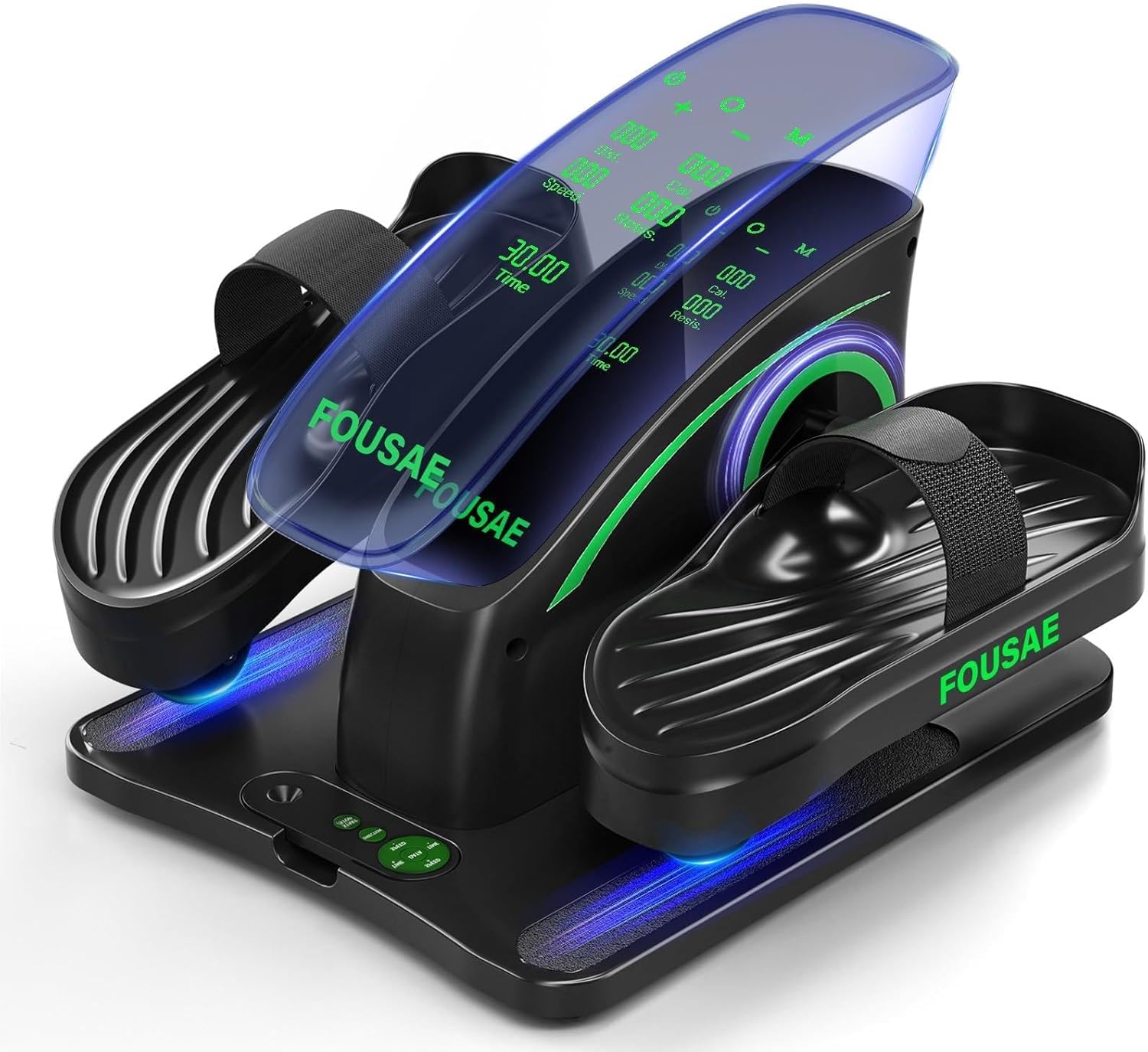
Image: Front view of the FOUSAE Under Desk Elliptical, showcasing its design and display.

Image: Diagram highlighting key features such as the LED touch display, silent wheels, wave pedals, anti-slip rubber, and remote control storage groove.
5. Setup
The FOUSAE MC57PRO Under Desk Elliptical comes fully assembled and ready to use. No complex installation is required.
- Remove the elliptical from its packaging.
- Place the non-slip mat on a flat, stable surface where you intend to use the elliptical.
- Position the elliptical on top of the non-slip mat.
- Connect the power cord to the elliptical and then plug it into a standard electrical outlet.

Image: The elliptical is shown being unboxed and carried, emphasizing its portability and no-assembly design.

Image: The elliptical is ready for use directly out of the box, highlighting its pre-assembled state.
6. Operating Instructions
The elliptical can be operated using either the integrated touch screen or the remote control.
6.1 Controls Overview

Image: The elliptical's touch screen and remote control, showing various display metrics.
6.2 Using the Touch Screen
The LED touch display allows direct control of the elliptical's functions.

Image: Detailed view of the touch screen buttons and their functions.
- O START/STOP: Press to start or pause the elliptical motion.
- C Switch Pedal Direction: Press to change between forward and reverse motion.
- M Switch Auto/Resistance Mode: Press to cycle through available exercise modes.
- + Increase Speed/Resistance Level: Press to increase the intensity.
- - Decrease Speed/Resistance Level: Press to decrease the intensity.
6.3 Using the Remote Control
The remote control provides convenient access to all functions without needing to reach the main unit.

Image: A user operating the elliptical with the remote control, showing the remote's layout.
- The remote control mirrors the functions of the touch screen.
- Ensure the remote has working batteries (typically 2x AAA, not always included or pre-installed).
- Point the remote towards the elliptical's display for optimal response.
- The remote can be stored in the magnetic groove on the elliptical's base when not in use.
6.4 Adjustable Speed and Resistance
The elliptical offers a combination of 15 speed levels and 6 resistance levels to customize your exercise intensity.

Image: Visual representation of the 6 resistance and 15 speed levels, along with forward and reverse motion.
Speed Levels (Auto Mode)
The 15 speed levels allow for various exercise intensities:

Image: Breakdown of the 15 speed levels and their corresponding exercise types.
- Levels 1-3: Muscle Relaxation
- Levels 4-6: Walking Speed
- Levels 7-9: Jogging Speed
- Levels 10-12: Running Speed
- Levels 13-15: Fast Running Speed
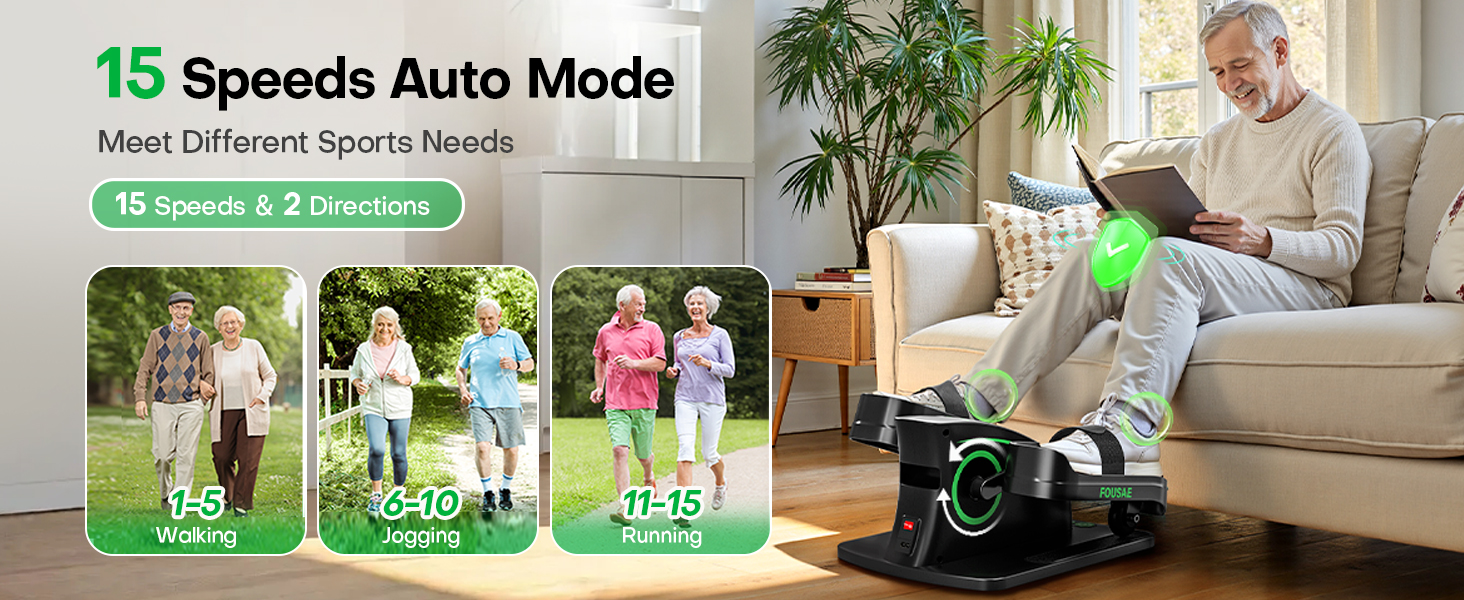
Image: Visual guide to the 15-speed auto mode, showing different exercise intensities.
Resistance Levels (Resistance Mode)
The 6 resistance levels allow you to activate and strengthen your muscles:

Image: Visual guide to the 6-level resistance mode, showing different muscle activation stages.
- Levels 1-2: Warm Up
- Levels 3-4: Burn Calories
- Levels 5-6: Leg Strengthening
6.5 Forward and Reverse Direction
The elliptical supports both forward and reverse pedaling directions. This allows for targeting different muscle groups and varying your exercise routine. Use the 'Switch Pedal Direction' button on the touch screen or remote to change direction.
7. Maintenance
Regular maintenance ensures the longevity and optimal performance of your elliptical.
- Cleaning: Wipe the unit with a soft, damp cloth after each use. Do not use abrasive cleaners or solvents.
- Storage: Store the elliptical in a cool, dry place away from direct sunlight and extreme temperatures.
- Inspection: Periodically check the power cord for any signs of damage. Ensure foot straps are securely attached.
- Motor: The 80W brushless motor is designed for quiet and smooth operation and requires no user maintenance.

Image: A woman uses the elliptical quietly, demonstrating its low noise level, which is a result of its efficient motor and design.
8. Troubleshooting
If you encounter any issues, please refer to the table below for common problems and solutions.
| Problem | Possible Cause | Solution |
|---|---|---|
| Elliptical does not power on. | Power cord is not properly connected or power outlet is not working. | Ensure the power cord is securely plugged into both the elliptical and a functional wall outlet. Test the outlet with another device. |
| Remote control is unresponsive. | Low or dead batteries in the remote. Remote not pointed correctly. | Replace the batteries in the remote control. Ensure the remote is pointed towards the elliptical's display. |
| Unusual noise during operation. | Unit not on a flat surface. Obstruction. | Ensure the elliptical is placed on a flat, stable surface with the non-slip mat. Check for any foreign objects obstructing the pedals. |
| Pedals feel stiff or motion is not smooth. | Resistance level is too high. | Decrease the resistance level using the '-' button on the control panel or remote. |
9. Specifications
| Feature | Detail |
|---|---|
| Model Name | MC57PRO |
| Brand | FOUSAE |
| Color | Green |
| Product Dimensions (LxWxH) | 16.3"D x 13"W x 10.4"H |
| Material | Alloy Steel |
| Resistance Mechanism | Magnetic |
| Maximum Weight Recommendation | 350 Pounds |
| Number of Resistance Levels | 6 |
| Number of Speed Levels | 15 |
| Item Weight | 6.5 Kilograms |
| Motor Power | 80W |
| UPC | 716523202394 |
10. Warranty and Support
10.1 Manufacturer's Warranty
The FOUSAE MC57PRO Under Desk Elliptical comes with a 1-Year Manufacturer's Warranty from the date of purchase. This warranty covers defects in materials and workmanship under normal use. It does not cover damage caused by misuse, accidents, unauthorized modifications, or normal wear and tear.
10.2 Customer Support
For any questions, technical assistance, or warranty claims, please contact FOUSAE customer support. Please have your model number (MC57PRO) and proof of purchase ready when contacting support.
Contact information can typically be found on the product packaging or the official FOUSAE website.
Ask a question about this manual
Ask about setup, troubleshooting, compatibility, parts, safety, or missing instructions. Manuals+ will review the question and use this page’s manual context to help answer it.