Product Overview
The btfarm 6.6FT 400 LED Christmas Tree Lights are designed for both indoor and outdoor decorative lighting. These lights feature a USB plug-in for versatile power options, a remote control for convenient operation, and multiple lighting modes with dimmable settings and a timer function. The flexible wire construction helps prevent tangling, making installation straightforward.

Image: Overview of the btfarm Christmas Tree Lights, showing the top ring, cascading light strands, USB plug, and remote control.
What's Included
- 1 x USB plug-in Christmas tree lights (6.6FT, 400 LED)
- 1 x Remote control
- 1 x User manual
Specifications
| Brand | btfarm |
| Model Number | TL01-2 |
| Light Length | 6.6 feet (2 meters) |
| LED Count | 400 LEDs (16 strands, 25 LEDs each) |
| Suitable Tree Height | 5-7 feet |
| Light Color | Warm White |
| Power Source | USB Plug-in (Corded Electric) |
| Special Features | Dimmable, Remote Controlled, Timer, Twinkling |
| Ingress Protection (IP) Rating | IP65 (Lights only, USB plug is not waterproof) |
| Indoor/Outdoor Usage | Indoor, Outdoor |
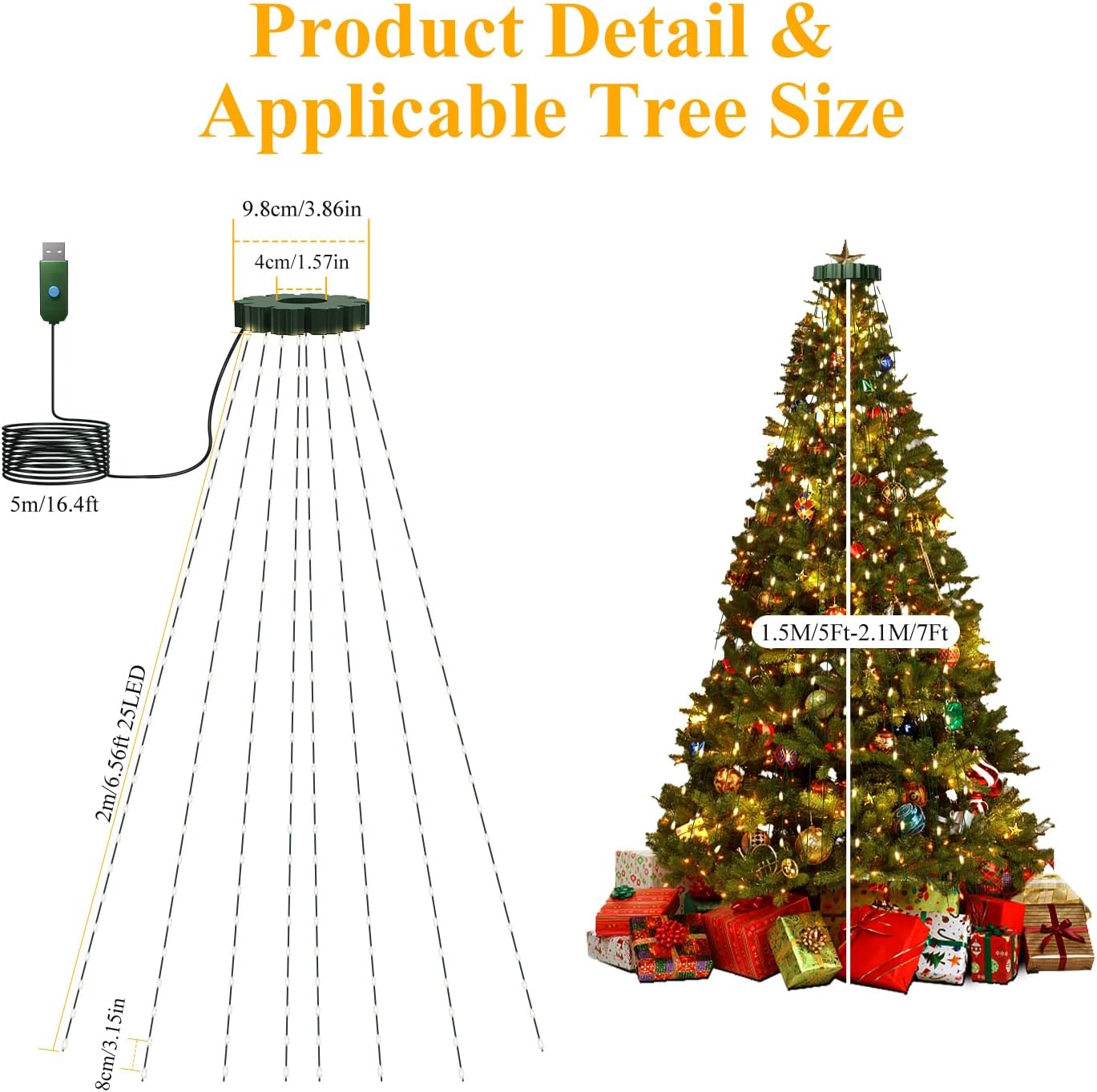
Image: Diagram illustrating the dimensions of the light set, including the 9.8 cm top ring and 2-meter (6.6 ft) light strands, and showing suitability for 5-7 ft Christmas trees.
Setup Instructions
- Unpack the Lights: Carefully remove the lights from the packaging. The flexible wire design helps prevent tangling, but gentle handling is recommended.
- Position the Top Ring: Place the circular top ring of the light set over the top of your Christmas tree. Ensure it sits securely.
- Drape the Strands: Allow the 16 individual light strands to cascade down the tree evenly. Adjust them as needed to achieve desired coverage.
- Connect Power: Plug the USB connector into a compatible USB power source (e.g., USB wall adapter, power bank).
- Activate with Remote: After connecting the USB plug, use the remote control to turn on the lights.

Image: Visual guide showing three steps for easy installation: 1. Placing the ring on top of the tree, 2. Arranging the light strands, and 3. Plugging in the USB connector.
Operating Instructions
The btfarm Christmas Tree Lights are operated using the included remote control. Ensure the remote is pointed towards the USB receiver for optimal functionality.
Remote Control Functions:
- ON/OFF: Press the green "ON" button to turn the lights on, and the red "OFF" button to turn them off.
- MODE (1-8): Select from 8 different lighting modes:
- Combination
- In Waves
- Sequential
- Slo-glo
- Chasing Flash
- Slow Fade
- Twinkle Flash
- Steady On
- TIMER: Activate the built-in timer function. The lights will automatically turn off after 6 hours and turn back on after 18 hours, repeating the cycle.
- DIM (+/-): Adjust the brightness level. There are 4 brightness settings: 25%, 50%, 75%, and 100%.

Image: The remote control displaying buttons for ON/OFF, Timer, Mode selection (1-8), and Dimming (+/-), with a visual representation of the 8 lighting modes on a Christmas tree.

Image: Illustration of the timer function (6 hours on/18 hours off) and the four dimmable brightness levels (25%, 50%, 75%, 100%) on a lit Christmas tree.
Video: Demonstrates the functionality of the USB Christmas Tree Lights with Remote, showcasing various lighting modes and dimming capabilities.
Maintenance
- Cleaning: Gently wipe the lights with a soft, dry cloth. Do not use harsh chemicals or abrasive cleaners.
- Storage: When not in use, carefully coil the light strands and store them in their original packaging or a suitable container in a cool, dry place. Avoid excessive bending or tangling.
- Inspection: Periodically inspect the wires and LED bulbs for any damage. Do not use if any damage is detected.
Troubleshooting
- Lights not turning on:
- Ensure the USB plug is securely connected to a working power source.
- Verify that the remote control battery is functional and correctly inserted.
- Point the remote directly at the USB receiver (the small green box near the USB plug).
- Press the "ON" button on the remote after plugging in the USB.
- Remote not responding:
- Check the remote control battery.
- Ensure there are no obstructions between the remote and the USB receiver.
- Reduce the distance between the remote and the receiver.
- Lights are too dim/bright:
- Use the "DIM +" or "DIM -" buttons on the remote to adjust brightness.
Safety Information
- USB Plug: The USB plug is NOT waterproof. It must be kept dry and away from water and fire sources.
- Waterproof Rating: The light strands themselves have an IP65 waterproof rating, allowing them to withstand rain, snow, and frost.
- Low Voltage: The lights operate on a low-voltage design, ensuring they remain safe to touch even after prolonged use, making them suitable for environments with children and pets.
- Power Source: Use only with compatible USB power sources.
- Overheating: If the USB plug or any part of the lights becomes excessively hot, immediately unplug the device and discontinue use.
- Installation: Ensure proper installation to prevent damage to the lights or injury.

Image: Depicts the lights on a Christmas tree outdoors in snowy conditions, highlighting their waterproof, snowproof, windproof, and cold-resistant features. A close-up shows the sealed LED bulbs.
Warranty and Support
For warranty information or product support, please refer to the contact details provided with your purchase or visit the btfarm official website.


