
1. Introduction
This manual provides essential information for setting up, operating, and maintaining your ORIGIMAGIC C4 Mini PC. Please read these instructions carefully before use to ensure optimal performance and longevity of your device.
The ORIGIMAGIC C4 Mini PC is a compact computing solution designed for various applications, including office work, web browsing, home entertainment, and multi-monitor setups. It features an AMD Ryzen 5 3550H processor, 16GB DDR4 RAM, and a 512GB NVMe PCIe 3.0 SSD, offering efficient performance in a small form factor.
2. Package Contents
Verify that all items are present in the package:
- Mini PC C4 x1
- HDMI Cable x1
- User Manual x1
- Power Adapter x1
- VESA Mount x1

Video: Unboxing the ORIGIMAGIC C4 Mini PC. This video demonstrates the contents of the product package, including the mini PC unit, power adapter, HDMI cable, user manual, and VESA mount.
3. Product Overview
3.1 Front Panel
- Power Button: Press to turn the device on or off.
- Audio Jack: For headphones or external speakers.
- USB-C Port: Supports 1080P@60Hz video output and 5Gbps data transfer.
- USB 3.2 Gen2 Ports (x2): For high-speed data transfer with compatible devices.
3.2 Rear Panel
- DC Power Input: Connect the provided power adapter.
- RJ45 LAN Ports (x2): For wired network connections, supporting 1000Mbps.
- DisplayPort (DP): Supports 4K@60Hz video output.
- HDMI 2.0 Port: Supports 4K@60Hz video output.
- USB 3.2 Gen2 Ports (x2): For high-speed data transfer with compatible devices.
- USB 2.0 Port: For standard USB devices.
- Kensington Lock Slot: For security locking.
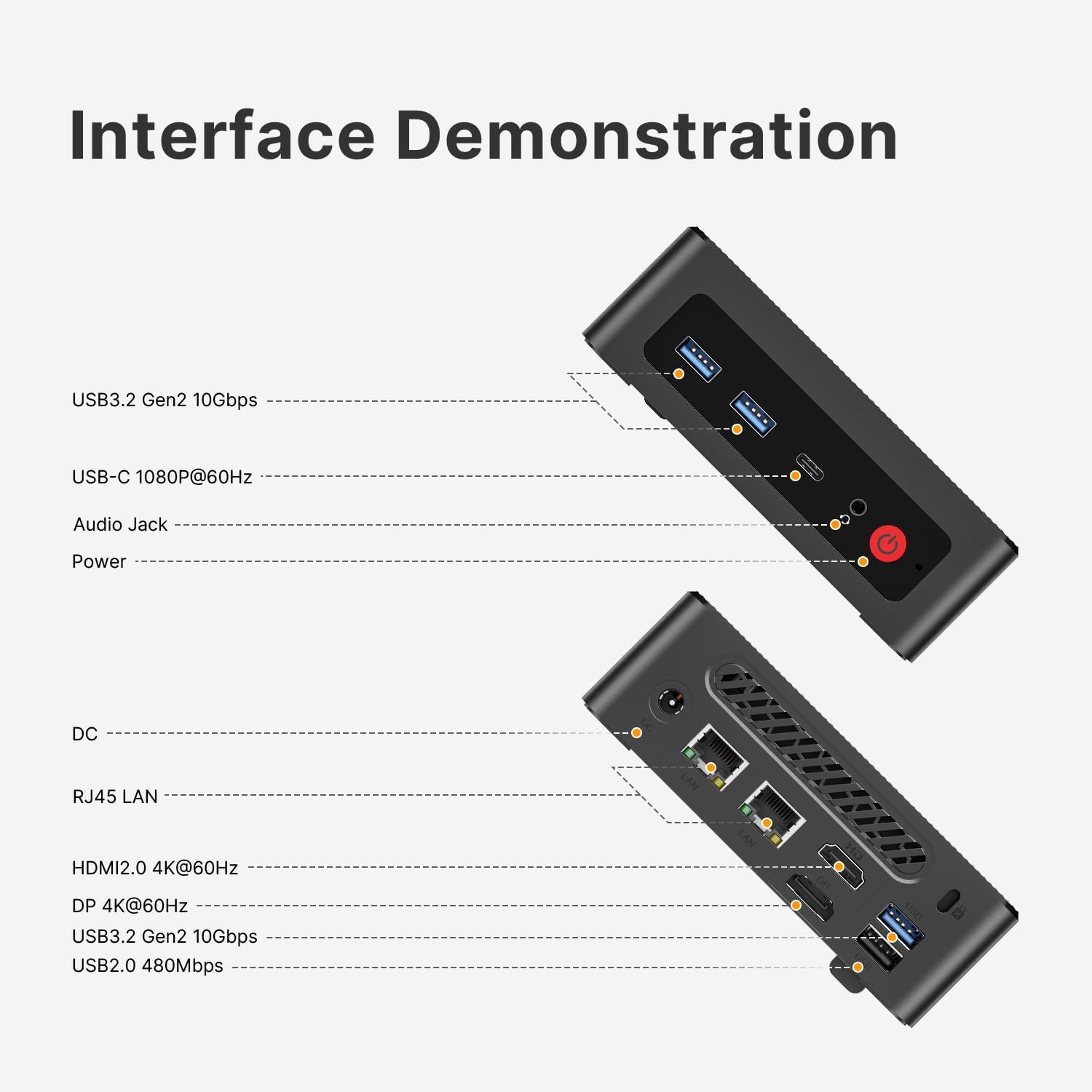
Image: Detailed view of the front and rear ports on the ORIGIMAGIC C4 Mini PC.
4. Setup
4.1 Initial Connection
- Connect your monitor(s) to the HDMI, DisplayPort, or USB-C video output ports.
- Connect your keyboard and mouse to the USB ports.
- For wired internet, connect an Ethernet cable to one of the RJ45 LAN ports.
- Connect the power adapter to the DC power input port and then to a power outlet.
- Press the power button on the front panel to turn on the Mini PC.
4.2 Operating System Installation (Windows 11)
The Mini PC comes with Windows 11 Pro pre-installed. If you need to reinstall or perform a clean installation, follow these steps:
- Prepare a bootable USB drive with Windows 11 installation media (at least 8GB). You can download the Media Creation Tool from the official Microsoft website.
- Plug the bootable USB drive into a USB port on the Mini PC.
- Restart the computer and repeatedly press the F7 key to enter the boot device selection menu.
- Select your USB drive from the boot menu and press Enter.
- Follow the on-screen instructions to install Windows 11. During the installation, it is recommended to delete existing hard drive partitions and install the OS on the primary drive for a clean setup.
- Do not connect to the internet until you reach the desktop. If prompted to connect to a network, press Shift + F10 to open Command Prompt, type
oobe\bypassnro, and press Enter. The computer will restart, allowing you to proceed without an internet connection.
Video: Guide on installing a new OS version. This video demonstrates the process of creating a bootable USB drive and installing Windows 11 on the Mini PC.
4.3 BIOS Setup
To access the BIOS settings:
- Turn on the Mini PC.
- Continuously press the Delete key during startup to enter the BIOS setup utility.
- Navigate through the BIOS menu using the arrow keys.
- To enable or disable Auto Power On, go to the 'Advanced' tab, then 'Auto Power On', and select 'Power On' or 'Power Off'.
- To adjust power performance settings, go to 'Power Performance' and select 'Quiet' or 'Balance' mode.
- Press F4 to save changes and exit.
Video: Instructions on how to set up BIOS. This video guides users through accessing and configuring BIOS settings, including power options.
5. Operating Instructions
5.1 Triple Display Setup
The ORIGIMAGIC C4 Mini PC supports connecting up to three monitors simultaneously for enhanced multitasking and productivity. Use the HDMI 2.0, DisplayPort, and USB-C ports to connect your displays.
- HDMI 2.0: Supports 4K@60Hz resolution.
- DisplayPort (DP): Supports 4K@60Hz resolution.
- USB-C: Supports 1080P@60Hz resolution.
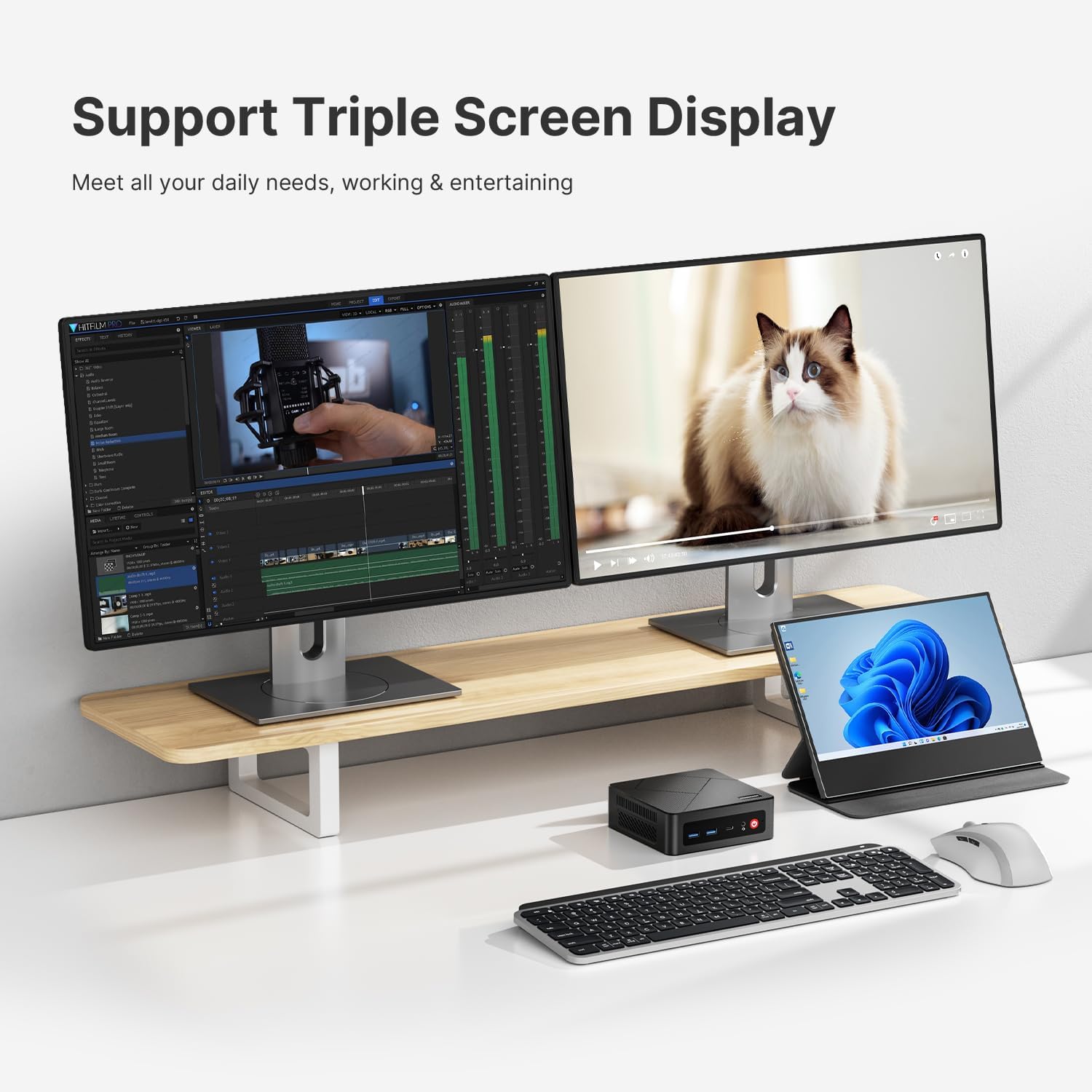
Image: A desktop setup demonstrating the triple screen display capability of the ORIGIMAGIC C4 Mini PC.
Video: Demonstration of the C4 Mini PC's triple screen display functionality. This video highlights how to connect and utilize multiple monitors.
5.2 Network Connectivity
The Mini PC offers versatile network options:
- Dual RJ45 LAN Ports: Provides stable and high-speed wired internet connections, suitable for network firewall or VPN channel configurations.
- WiFi 5 (802.11ac): For wireless internet connectivity.
- Bluetooth 5.0: For connecting wireless peripherals such as keyboards, mice, and headphones.

Image: Visual representation of the Mini PC's fast and stable connectivity options, including WiFi, Bluetooth, and dual LAN ports.
6. Maintenance and Upgrades
6.1 RAM and SSD Upgrade
The ORIGIMAGIC C4 Mini PC allows for memory and storage upgrades:
- RAM: Equipped with 16GB DDR4 SODIMM (2400MHz), expandable up to 32GB across two slots.
- SSD: Includes a 512GB M.2 NVMe PCIe 3.0 SSD, expandable up to 4TB.
To upgrade, carefully remove the bottom cover by unscrewing the four screws. Then, gently remove the existing components and install the new ones, ensuring they are properly seated. Refer to the disassembly video for visual guidance.

Image: Illustration of the 16GB DDR4 SODIMM memory and 512GB M.2 NVMe SSD components.
Video: Disassembly guide for the C4 Mini PC. This video shows how to open the device and access internal components for upgrades or maintenance.
6.2 Cooling System
The Mini PC is equipped with a low-noise fan and a powerful cooling system, including heat sink fins, to ensure stable processor output and reliable performance. This design helps maintain optimal operating temperatures and quiet operation.

Image: Exploded view illustrating the cooling fan and heat sink fins within the Mini PC for efficient heat dissipation.
7. Specifications
| Brand | origimagic |
| Series | C4 |
| Model Number | C4 |
| Processor | AMD Ryzen 5 3550H (2.1 GHz, 4 Cores, 8 Threads, Max Boost 3.7GHz, 4MB Cache) |
| Graphics Coprocessor | Radeon Vega 8 (Integrated, up to 1200MHz) |
| RAM | 16 GB DDR4 (2400 MHz, expandable up to 32GB) |
| Hard Drive | 512 GB M.2 NVMe PCIe 3.0 SSD (expandable up to 4TB) |
| Operating System | Windows 11 Pro (pre-installed), compatible with Linux and Ubuntu |
| Max Screen Resolution | 3840x2160 Pixels (4K@60Hz) |
| Wireless Type | WiFi 5, Bluetooth 5.0 |
| LAN Ports | 2x RJ45 (1000Mbps) |
| USB 3.0 Ports | 4 (USB 3.2 Gen2) |
| USB 2.0 Ports | 1 |
| USB-C Port | 1 (Supports 1080P@60Hz video output) |
| Product Dimensions | 5.04 x 5 x 1.69 inches (128 x 127.1 x 42.8 mm) |
| Item Weight | 14 ounces |
8. Troubleshooting
If you encounter issues with your ORIGIMAGIC C4 Mini PC, consider the following general troubleshooting steps:
- No Power: Ensure the power adapter is securely connected to both the Mini PC and a working power outlet. Test the outlet with another device.
- No Display: Verify that the monitor is powered on and correctly connected to the Mini PC's video output port (HDMI, DP, or USB-C). Try a different cable or monitor if available. Ensure the correct input source is selected on your monitor.
- Peripheral Issues: If a keyboard, mouse, or other USB device is not working, try connecting it to a different USB port. Ensure drivers are installed if required.
- Network Connectivity Problems: For wired connections, check Ethernet cable connections and router status. For wireless, ensure WiFi is enabled and you are connected to the correct network with the correct password.
- System Slowdown: Check for excessive background processes or insufficient storage space. Consider upgrading RAM or SSD if performance remains consistently low.
- Overheating: Ensure the Mini PC has adequate ventilation and is not placed in an enclosed space. Clean any dust from the vents.
For persistent issues, refer to the Warranty and Support section for contact information.
9. Warranty and Support
Your ORIGIMAGIC C4 Mini PC comes with a 2-year warranty. For any questions or technical assistance, please contact our customer service team.
9.1 Customer Service
You can reach our support team via:
- Amazon Support: Log in to your Amazon account, go to 'Your Orders', and select 'Ask Product Question' for the ORIGIMAGIC C4 Mini PC.
- Email: Send an email to support@origimagic.com for after-sales support.
We are committed to providing 24-hour customer service and lifetime technical support to ensure your satisfaction.

Image: Overview of ORIGIMAGIC's warranty and support services, including 24-month warranty and technical support.


