
EONIX SXXY003992
EONIX Power Zero Wall Hugger Power Recliner Chair User Manual
Model: SXXY003992
Introduction
This manual provides instructions for the safe assembly, operation, maintenance, and troubleshooting of your EONIX Power Zero Wall Hugger Power Recliner Chair. Please read this manual thoroughly before use and retain it for future reference.

Figure 1: EONIX Power Zero Wall Hugger Power Recliner Chair (Cream White)
Safety Information
Adhere to the following safety guidelines to ensure safe operation and prevent injury or damage:
- Do not exceed the maximum weight capacity of 400 pounds.
- Ensure the chair is properly assembled and placed on a stable, flat surface.
- Keep children and pets away from the moving parts of the chair, especially during operation.
- Avoid placing hands or feet near the reclining mechanism to prevent pinching.
- Unplug the chair from the power outlet before cleaning or performing any maintenance.
- Follow the instructions for safe operation of the reclining, massage, and heating features.
Package Contents
Your EONIX Power Recliner Chair is typically shipped in 2 or 3 boxes. Please verify all components are present before assembly.
- Seat Base (1)
- Backrest (1)
- Headrest (1)
- Wired Controller (1)
- Power Cord (1)
- User Manual (this document)
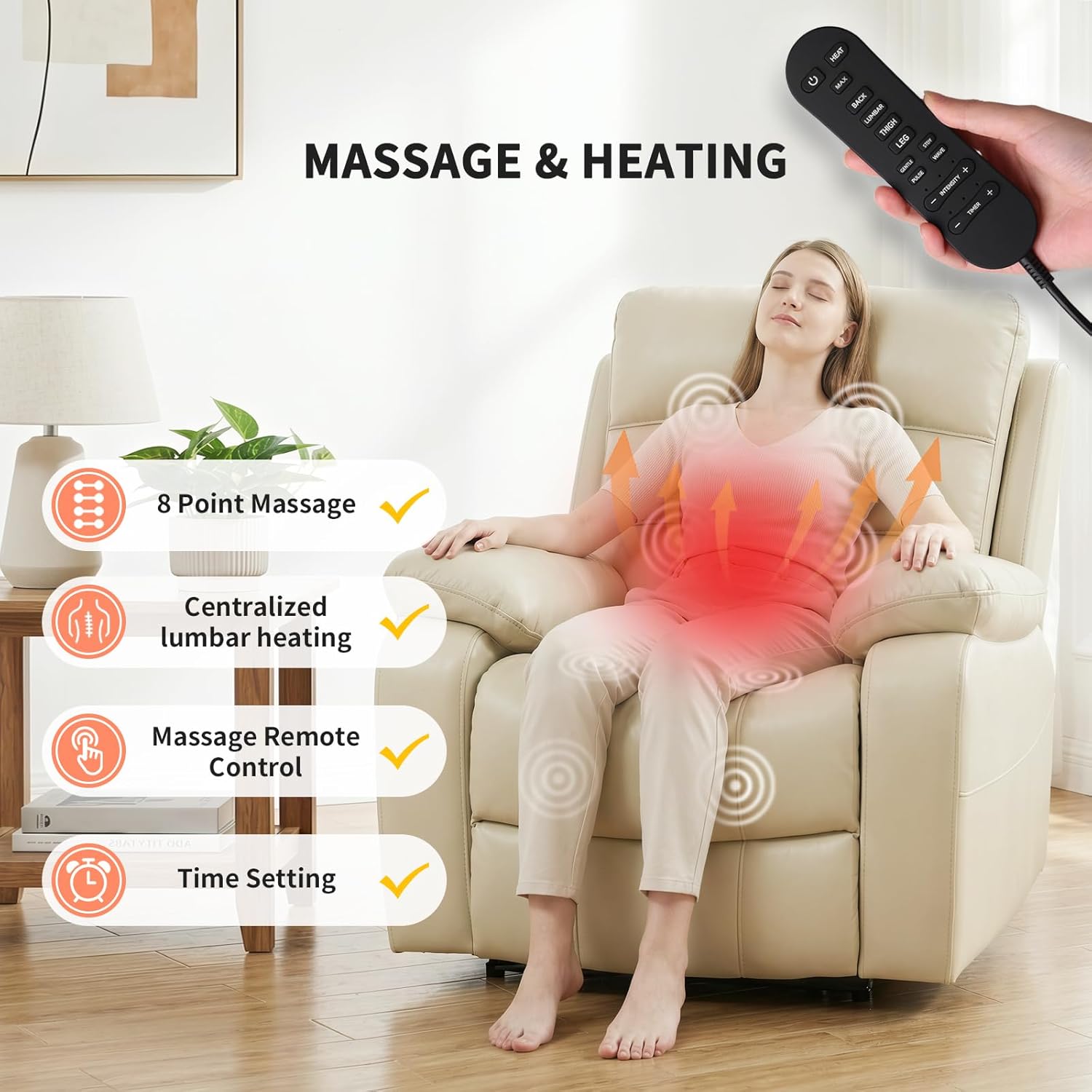
Figure 2: Typical packaging showing chair components in multiple boxes.
Setup and Assembly
Assembly is designed to be straightforward and typically takes approximately 15 minutes. No additional tools are required.
- Unpack all components from the boxes and place them on a clean, flat surface.
- Slide the backrest into the seat base. Ensure it clicks securely into place.
- Attach the headrest to the top of the backrest.
- Connect all necessary cables located under the chair. Match the colored connectors.
- Plug the power cord into a suitable electrical outlet.
Video 1: Step-by-step installation guide for the EONIX Power Recliner Chair.
Operating Instructions
Power Reclining and Headrest Adjustment
The chair features a dual motor system allowing independent adjustment of the backrest and footrest, along with an adjustable power headrest. The 'Zero Wall' design allows full recline with minimal wall clearance.
- Use the buttons on the side panel to recline the backrest and extend the footrest. Release the button at your desired position to stop movement.
- Use the dedicated headrest control button on the side panel to adjust the angle of the headrest for optimal neck support.

Figure 3: The chair's zero wall hugger design allows it to recline fully while placed close to a wall.
Video 2: Demonstration of the EONIX Power Recliner's zero wall hugging capability and smooth reclining motion.
Massage and Heating Functions
The chair includes an 8-point massage system and centralized lumbar heating, controlled by a wired remote.
- Connect the massage remote control to the chair's designated port.
- Press the POWER button on the remote to activate the massage and heating functions.
- Use the HEAT button to turn on or off the lumbar heating.
- Select specific massage areas (Back, Lumbar, Thigh, Leg) using the corresponding buttons.
- Adjust massage intensity with the INTENSITY +/- buttons.
- Choose from various massage modes (Gentle, Steady, Pulse, Wave) using the mode buttons.
- Set a timer for the massage duration using the TIMER +/- buttons.

Figure 4: The wired remote control for activating and adjusting massage and heating functions.
USB & USB-C Charging Ports
Integrated USB and USB-C ports are located on the side panel for convenient device charging.
- Connect your device's charging cable to the appropriate USB or USB-C port.
- Ensure the chair is powered on for charging functionality.

Figure 5: Integrated USB and USB-C charging ports on the side of the chair.
Maintenance
To maintain the appearance, functionality, and longevity of your recliner, follow these care instructions:
- For general cleaning, wipe the breathable faux leather upholstery with a soft, damp cloth.
- Avoid using harsh chemicals, abrasive cleaners, or solvents, as these can damage the material.
- Regularly vacuum the chair to remove dust and debris from crevices.
- Periodically check all connections and fasteners to ensure they are secure. Tighten if necessary.
- Keep the chair away from direct sunlight and heat sources to prevent material degradation.
Troubleshooting
If you encounter issues with your recliner, refer to the following common troubleshooting steps:
Power Issues
- Chair does not power on: Ensure the power cord is securely plugged into both the chair and a functional wall outlet. Test the wall outlet with another device.
- Intermittent power: Check all cable connections under the chair to ensure they are firmly seated.
Reclining/Massage Malfunction
- Reclining mechanism not responding: Verify the chair is powered on. Check for any obstructions around the footrest or backrest mechanism.
- Massage or heat not working: Ensure the wired remote control is properly connected and powered on. Check the remote's battery if applicable (though this model uses a wired remote).
- Unusual noises during operation: Inspect the reclining mechanism for any loose parts or obstructions. If the noise persists, discontinue use and contact support.
If these steps do not resolve the issue, please contact EONIX customer support for further assistance.
Specifications
| Feature | Detail |
|---|---|
| Brand | EONIX |
| Model Name | SXXY003992 |
| Color | Cream White |
| Material | Breathable Faux Leather, Cotton, Sponge |
| Product Dimensions (D x W x H) | 39"D x 36.2"W x 42.5"H |
| Item Weight | 145 Pounds |
| Maximum Weight Recommendation | 400 Pounds |
| Additional Features | Adjustable Headrest, Heated, Heavy Duty, Power Recliner, Space Saving, USB & USB-C Charging Ports |
| Assembly Required | Yes (approx. 15 minutes) |
| Room Type | Bedroom, Home Theater, Living Room, RV, Study Room |
Warranty and Support
Warranty Information
EONIX offers a 2-Year Replacement Promise. If your product experiences non-human-caused defects or issues within this period, a brand-new replacement will be provided free of charge. For other issues, affordable replacement parts are available to maintain your product's functionality.
Customer Support
For any questions regarding adjustment operations, assembly, maintenance, or other inquiries, please contact EONIX customer support via Amazon message. Support is available 24/7, with responses typically provided within 12-24 hours.
Additionally, a 30-day hassle-free return/exchange policy is available for brand-new, unused, or quality-issue products.
Ask a question about this manual
Ask about setup, troubleshooting, compatibility, parts, safety, or missing instructions. Manuals+ will review the question and use this page’s manual context to help answer it.