
Product Overview
The Waitbird Handheld Steam Cleaner is a versatile and powerful cleaning device designed to tackle a wide range of household and automotive cleaning tasks using high-temperature steam. With a maximum steam temperature of 248°F (120°C), it effectively removes dirt, grease, and grime without the need for harsh chemicals, providing a safe and eco-friendly cleaning solution. Its portable design and comprehensive set of 21 accessories make it suitable for various surfaces and applications.

Image: The Waitbird Handheld Steam Cleaner shown with its full array of 21 accessories, highlighting its comprehensive cleaning capabilities.
Important Safety Instructions
- Always read all instructions before using the appliance.
- Do not leave the appliance unattended when plugged in. Unplug from outlet when not in use and before servicing.
- To reduce the risk of electric shock, do not immerse the appliance in water or other liquids.
- Do not direct steam at people, animals, or electrical outlets.
- Use only as described in this manual. Use only manufacturer’s recommended attachments.
- The steam cleaner is equipped with a child safety lock to prevent accidental operation. Always engage the child lock when the device is not in active use, especially around children or pets.
- Never attempt to open the water tank cap immediately after use. Allow the unit to cool down and release residual pressure before opening.
What's Included
Your Waitbird Steam Cleaner comes with a comprehensive set of accessories to handle various cleaning tasks:
- Steam Cleaner Main Unit
- 4 x Nylon Utility Brushes
- 2 x Brass Utility Brushes
- 3 x Ironing Towels
- 2 x Microfiber Mop Pads
- 2 x Extension Tubes
- 1 x Measuring Cup
- 1 x Glove
- 1 x Ironing Brush
- 1 x Shoulder Strap
- 1 x Glass Brush
- 1 x Big Nozzle
- 1 x Floor Brush
- 1 x Carpet Glider
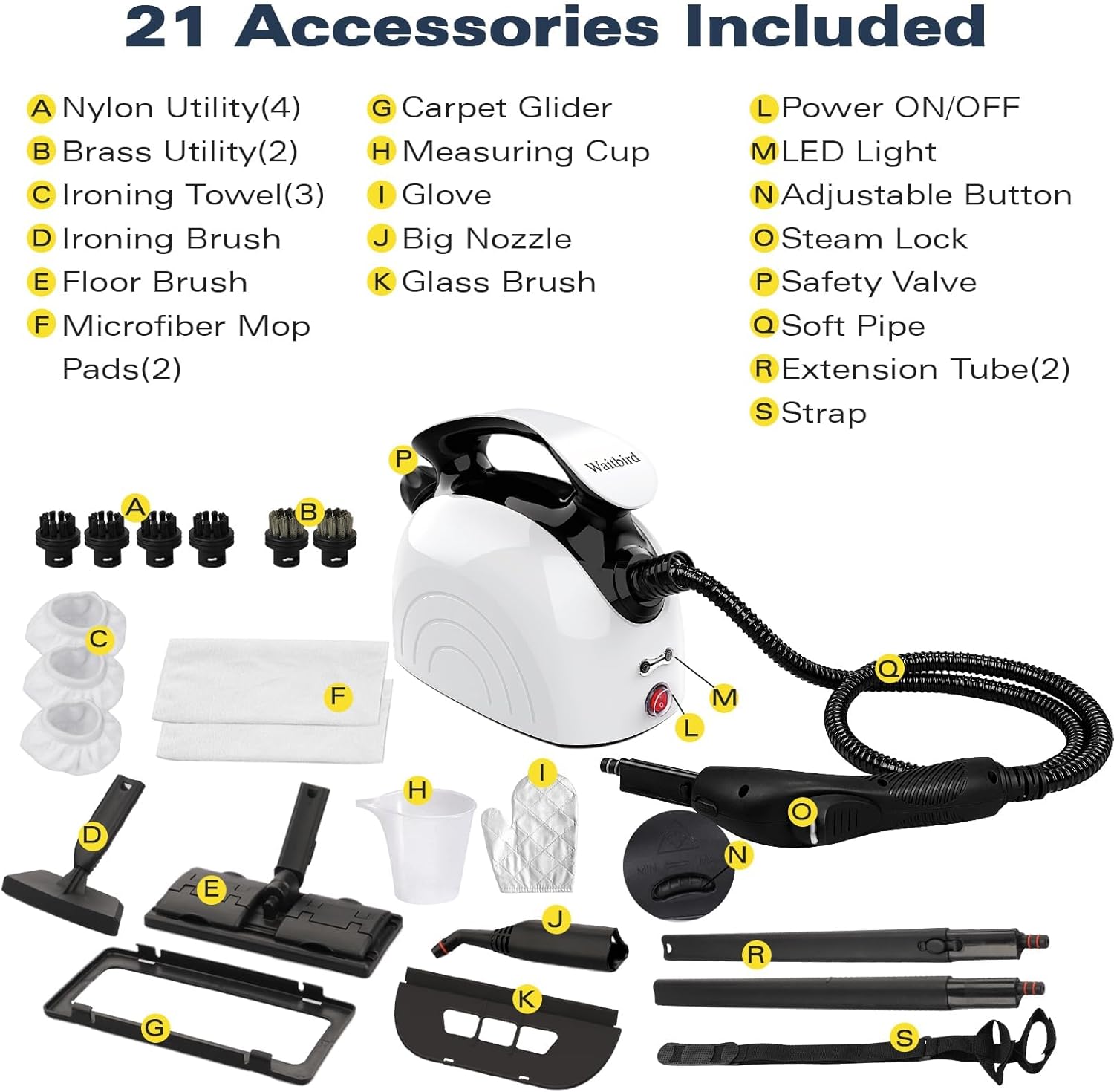
Image: A detailed diagram illustrating all 21 accessories and their names, providing a clear overview of the included components.
Setup Guide
1. Filling the Water Tank
- Ensure the steam cleaner is unplugged and completely cool.
- Unscrew the safety cap counter-clockwise.
- Using the provided measuring cup, carefully pour up to 30 ounces (900 ml) of clean water into the tank. Do not overfill. Overfilling may cause leaks during heating or operation.
- Securely screw the safety cap back on clockwise until it is tight.

Image: A hand demonstrates pouring water into the steam cleaner's tank using the included measuring cup, illustrating the correct filling procedure.
2. Attaching Accessories
Select the appropriate accessory for your cleaning task. Align the accessory with the nozzle or extension tube and push firmly until it clicks into place. Ensure a secure connection to prevent steam leakage.
3. Powering On
- Plug the power cord into a grounded electrical outlet.
- Press the Power ON/OFF button. The indicator light will illuminate, signifying that the unit is heating up.
- Allow approximately 5 minutes for the steam cleaner to heat up to its optimal temperature of 248°F (120°C). The indicator light will change color or turn off when ready for use.

Image: A finger presses the power button on the steam cleaner, indicating the simple process to turn on the device.
Operating Your Steam Cleaner
Steam Modes: Manual & Automatic
The steam cleaner offers two convenient operating modes:
- Manual Mode: Hold the steam gun and press the steam button forward to release steam. Release the button to stop steam flow.
- Automatic Mode: For continuous steam without holding the button, turn the steam lock to the right side. This will keep the steam flowing automatically.
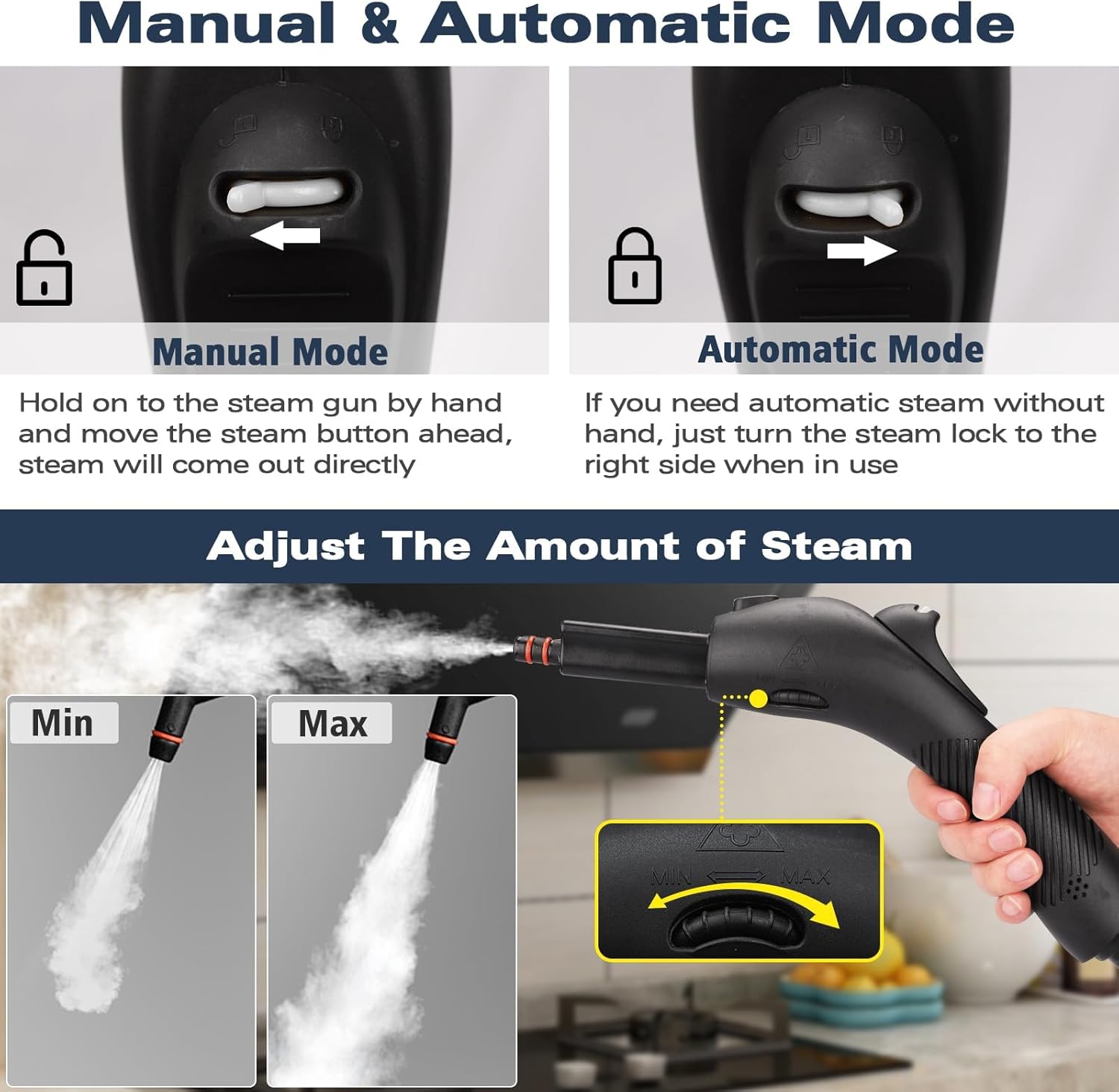
Image: A visual guide demonstrating both manual and automatic steam release modes, along with the adjustable steam output settings.
Adjusting Steam Output
Use the adjustable button on the steam gun to control the intensity of the steam, from minimum to maximum output, depending on your cleaning needs.
Cleaning Applications
The Waitbird Steam Cleaner is suitable for a wide range of surfaces and applications:
- Floors: Use the floor brush and microfiber mop pads for sealed wood flooring, laminate, ceramic tile, and grout.
- Carpets: Attach the carpet glider for refreshing and spot cleaning carpets.
- Kitchen: Effectively clean kitchen range hoods, stovetops, ovens, and countertops.
- Bathrooms: Sanitize tiles, grout, toilets, and showers.
- Windows & Mirrors: Use the glass brush for streak-free cleaning.
- Upholstery & Furniture: Refresh and clean sofas, chairs, and other fabric surfaces.
- Cars: Clean car interiors, including upholstery, dashboards, and floor mats.
- Children's Products: Safely sanitize toys, high chairs, and other items without chemicals.

Image: A collage showcasing the steam cleaner's effectiveness in deep cleaning various surfaces around the home, including floors, carpets, windows, stoves, ovens, range hoods, sofas, and toilets.
Care and Maintenance
After Each Use
- Unplug the unit from the power outlet.
- Turn the unit upside down and press the vapor release button until all pressure is vented.
- Once the unit has cooled down completely, gently unscrew the lid (one full turn) to prevent it from getting stuck due to temperature changes. This maintains the integrity of the seals for long-term use.
- Empty any remaining water from the tank.
- Clean accessories with a damp cloth and allow them to air dry before storing.
Storage
Store the steam cleaner and its accessories in a cool, dry place, away from direct sunlight and extreme temperatures. Ensure all components are dry before storage to prevent mold or mildew growth.
Troubleshooting Guide
Refer to the following common issues and their solutions:
Q: Why can't steam stay hot indefinitely?
A: The high heat of steam naturally dissipates quickly for quick cleaning. To maintain optimal performance, keep the unit energized during use.
Q: Why can't I open the lid immediately after use?
A: Residual steam and pressure inside the tank are still dangerously high. Please follow these steps: 1: Unplug the unit. 2: Turn it upside down and press the vapor release button until all pressure is vented. 3: Safely open the lid. 4: Refill with water as needed (it is recommended that no more than 900ml of water be added at one time).
Q: How much water should I add?
A: Never fill completely to overflow, it is recommended to add no more than 30 ounces (900 ml) at a time. Overfilling may cause leaks during heating or operation. If a leak occurs, contact our support team immediately via email/phone with photos/videos for assistance.
Q: Why do I need to loosen the lid after each use?
A: Prolonged tightening may result in the lid getting stuck due to temperature changes. To prevent this, gently unscrew the lid (one full turn) once it has cooled down. This maintains the integrity of the seals for long term use.
Q: Why does the unit leak air after connecting the accessories?
A: 1: Press the steam switch once to allow steam to be released. This usually resolves a slight pressure imbalance. 2: If the leak persists, contact our support team for troubleshooting or replacement parts.
Q: Why is there not enough steam pressure?
A: Before heating, make sure the safety cap is fully tightened. If the pressure is still low: 1: Allow the unit to cool completely. 2: Reopen and securely fasten the cap and reheat. Never operate with the cap loose as there is a risk of burns or malfunction.
Product Specifications
| Brand | Waitbird |
| Model Name | CB-03A |
| Color | White |
| Wattage | 1500 watts |
| Heat Time | 5 minutes |
| Capacity | 1.08 Liters (38 oz) |
| Maximum Temperature | 248 Degrees Fahrenheit (120°C) |
| Item Weight | 10.13 pounds |
| Package Dimensions | 20.2 x 11.4 x 7.6 inches |
| Special Features | Child Lock, High Pressure, Large Capacity Tank, Rapid Heat Up, Carry Handle |
Warranty and Customer Support
Your Waitbird Steam Cleaner comes with a 12-month warranty from the date of purchase, covering manufacturing defects. Please retain your proof of purchase for warranty claims.

Image: A visual representation highlighting the 12-month warranty period for the product.
For any questions, technical support, or warranty inquiries, please contact Waitbird customer service. Contact information can typically be found on the product packaging or the official Waitbird website.

Image: A customer service representative with a headset, ready to assist with inquiries.

