
1. Important Safety Information
Please read and understand all instructions before assembling and using this product. Failure to follow these instructions may result in serious injury.
- Assembly: Always assemble the loft bed strictly according to the provided instructions to ensure structural stability.
- Weight Limit: Do not exceed the maximum recommended weight capacity of 350 pounds for the upper bed.
- Clearance: Maintain a clear area around the loft bed, especially near the ladder and sleeping surface, to prevent falls.
- Guardrails: The upper bed is equipped with protective guardrails. Ensure they are properly installed and maintained to prevent accidental falls.
- Supervision: Never leave children unattended on or around the loft bed.
- USB Charging Station: Exercise caution when using the USB charging station to prevent entanglement or electrical hazards. Ensure cables are routed safely.
- Certification: This loft bed has passed the Children's Product Certificate (CPC) test, indicating compliance with safety standards for children's products.
2. Product Specifications
| Feature | Detail |
|---|---|
| Size | Full |
| Product Dimensions (L x W x H) | 82.7" x 56.7" x 68.9" |
| Material | Metal |
| Color | Black With Wood Desk |
| Finish Type | Lacquered |
| Compatible Mattress Size | Full |
| Item Weight | 44 pounds |
| Special Features | Integrated Desk, USB Charging Station, DIY Smart LED Light, Guardrails, Ladder |
Note: All dimensions are approximate and may vary slightly.
3. Package Contents
Before beginning assembly, ensure all components listed below are present and undamaged. If any parts are missing or damaged, please contact customer support.
- Metal Bed Frame Components
- Desk Surface
- Guardrails (for upper bed)
- Ladder
- Bed Slats
- USB Charging Station
- DIY Smart LED Light Kit
- Assembly Hardware (screws, bolts, washers, etc.)
- Assembly Tools (e.g., Allen wrench)
- Instruction Manual
4. Setup and Assembly Instructions
Assembly of the Bellemave Full Metal Loft Bed is designed to be straightforward. Follow the numbered steps in the included manual carefully. It is recommended to have two adults for assembly.
- Preparation: Clear a spacious area for assembly. Lay out all components and hardware, matching them against the parts list in your separate assembly manual.
- Frame Assembly: Begin by assembling the main metal frame components as indicated in the detailed assembly guide. Ensure all connections are secure but do not fully tighten bolts until instructed.
- Desk Installation: Attach the desk surface to the designated frame sections. Connect the USB charging station cable to a power source as directed.
- Slat Installation: Place the bed slats onto the upper bed frame. Ensure they are evenly spaced and securely fastened.
- Guardrail and Ladder Attachment: Install the guardrails around the perimeter of the upper bed. Securely attach the ladder to the bed frame.
- LED Light Installation: Follow the instructions provided with the DIY smart LED light kit for proper installation and connection.
- Final Tightening: Once all components are in place, systematically tighten all bolts and screws. Do not overtighten.
- Inspection: Perform a final inspection to ensure all parts are correctly assembled, secure, and stable before use.

Figure 1: Fully assembled Bellemave Full Metal Loft Bed with integrated desk.
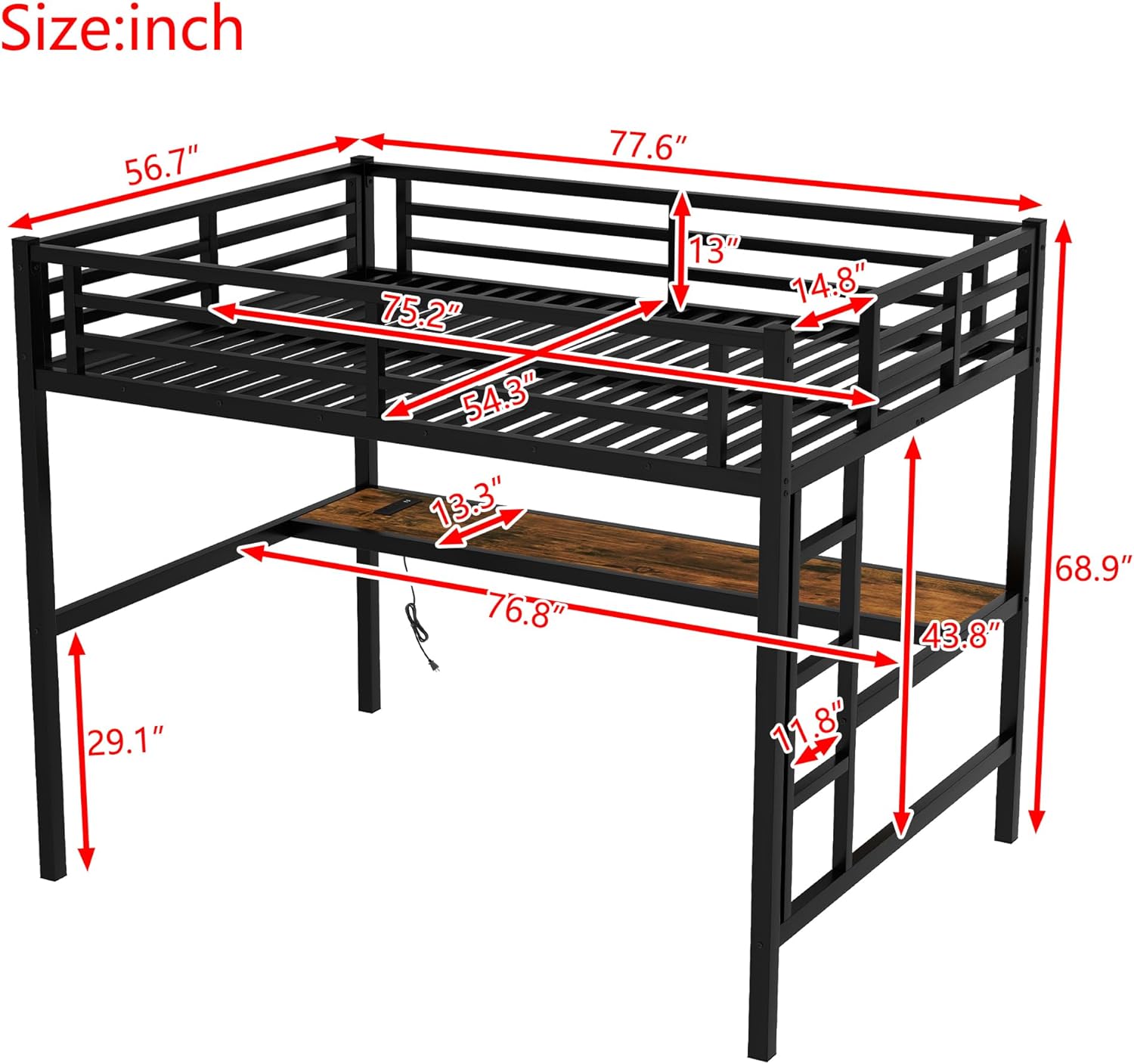
Figure 2: Detailed dimensions of the Bellemave Full Metal Loft Bed, showing length, width, and height measurements.
5. Operating Instructions
5.1 USB Charging Station
The integrated desk features a USB charging station for convenient power access.
- Power Connection: Ensure the charging station is properly plugged into a functional wall outlet.
- Usage: Connect your electronic devices (e.g., smartphones, tablets) to the USB ports for charging.
- Safety: Avoid overloading the charging station. Disconnect devices when fully charged or not in use.

Figure 3: Close-up view of the integrated desk surface, highlighting the USB charging station.
5.2 DIY Smart LED Light
The loft bed includes a DIY smart LED light kit to enhance your space with customizable lighting.
- Power On/Off: Use the provided remote control or integrated switch to turn the LED lights on or off.
- Mode Selection: The smart LED light offers various lighting modes and color options. Refer to the separate LED light manual for detailed instructions on changing colors, brightness, and effects.
- Customization: Experiment with different settings to create your desired ambiance.

Figure 4: The Bellemave loft bed showcasing the customizable LED lighting feature and its remote control.
6. Maintenance
Regular maintenance will help prolong the life and ensure the safety of your Bellemave Loft Bed.
- Cleaning: Wipe down the metal frame and desk surface with a soft, damp cloth. Avoid harsh chemicals or abrasive cleaners that could damage the finish.
- Hardware Check: Periodically check all bolts, screws, and connections to ensure they remain tight. Retighten as necessary to maintain structural integrity.
- Guardrails: Ensure guardrails are always securely attached and free from damage.
- Ladder: Inspect the ladder rungs and connections for any signs of wear or looseness.
- Electrical Components: Ensure the USB charging station and LED light wiring are free from damage or fraying. Discontinue use if any damage is observed and contact support.
7. Troubleshooting
If you encounter any issues with your loft bed, refer to the common problems and solutions below.
- Bed feels wobbly:
- Ensure all assembly hardware (bolts, screws) are fully tightened.
- Verify that the bed is placed on a flat, level surface.
- USB charging station not working:
- Check if the power cord is securely plugged into a functional wall outlet.
- Test the outlet with another device to confirm it has power.
- Ensure your device's charging cable is not damaged.
- LED lights not illuminating or changing modes:
- Verify the LED light kit is properly connected to its power source.
- Check the remote control battery and replace if necessary.
- Ensure there are no obstructions between the remote and the LED receiver.
- Missing or damaged parts during assembly:
- Refer to the package contents list and contact Bellemave customer support for assistance.
8. Warranty and Support
Bellemave products are manufactured with quality and customer satisfaction in mind. For specific warranty details, please refer to the warranty card included with your purchase or visit the official Bellemave website.
If you require further assistance, have questions about assembly, or need to report missing/damaged parts, please contact Bellemave customer support through the retailer where the product was purchased or via the contact information provided in your product documentation.
For more information, you may visit the Bellemave Store on Amazon.


