
Introduction
Thank you for choosing the hygger Aquarium Light HG075. This light is designed to provide optimal illumination for small aquariums, supporting both ornamental fish and aquatic plant growth. It features a 24/7 natural mode, programmable timer, adjustable colors, and brightness levels to create a vibrant and healthy aquatic environment. Please read this manual carefully before use to ensure proper setup and operation.
Product Features
- Compact Design for Small Tanks: Specifically designed for small aquariums ranging from 18-28cm (7-11 inches). Includes two adjustable metal brackets for easy installation, saving space.
- 24/7 Natural Mode: Simulates a natural light cycle (sunrise, daytime, sunset, nighttime) over 24 hours with automatic dimming. Features orange, full spectrum, and blue light transitions. Lighting duration can be set from a minimum of 2 hours to a maximum of 24 hours in 2-hour increments.
- Timer and Memory Function: Offers 6-hour, 10-hour, and 12-hour timer settings. Once set, the light will automatically turn on and off at the same time daily. The memory function retains the last used lighting mode even after a power outage, eliminating the need for re-setting.
- Adjustable Color and Brightness: Provides 8 color options (Red, Blue, Green, Orange, Yellow, Cyan, Purple, Full Spectrum). Features 7 fixed single colors and a gradient lighting function. The color cycle speed can be adjusted to 10, 20, or 40 seconds by pressing the cycle button 1-3 times. Brightness is adjustable in 5 levels: 10%, 25%, 50%, 75%, and 100%.
- High Brightness & Color Rendering: Equipped with 30 LEDs (3 rows of 2835 LEDs and 2 rows of 5054 WRGB LEDs) providing 314 lumens of brightness. Enhances the vibrant colors of fish and aquatic plants, creating a visually appealing aquarium. Ideal for freshwater tanks and promoting aquatic plant growth.
Package Contents
Please check the package for the following items:
- hygger Aquarium Light Unit (HG075)
- Power Adapter
- Adjustable Metal Brackets (2 pcs)
- Integrated Controller
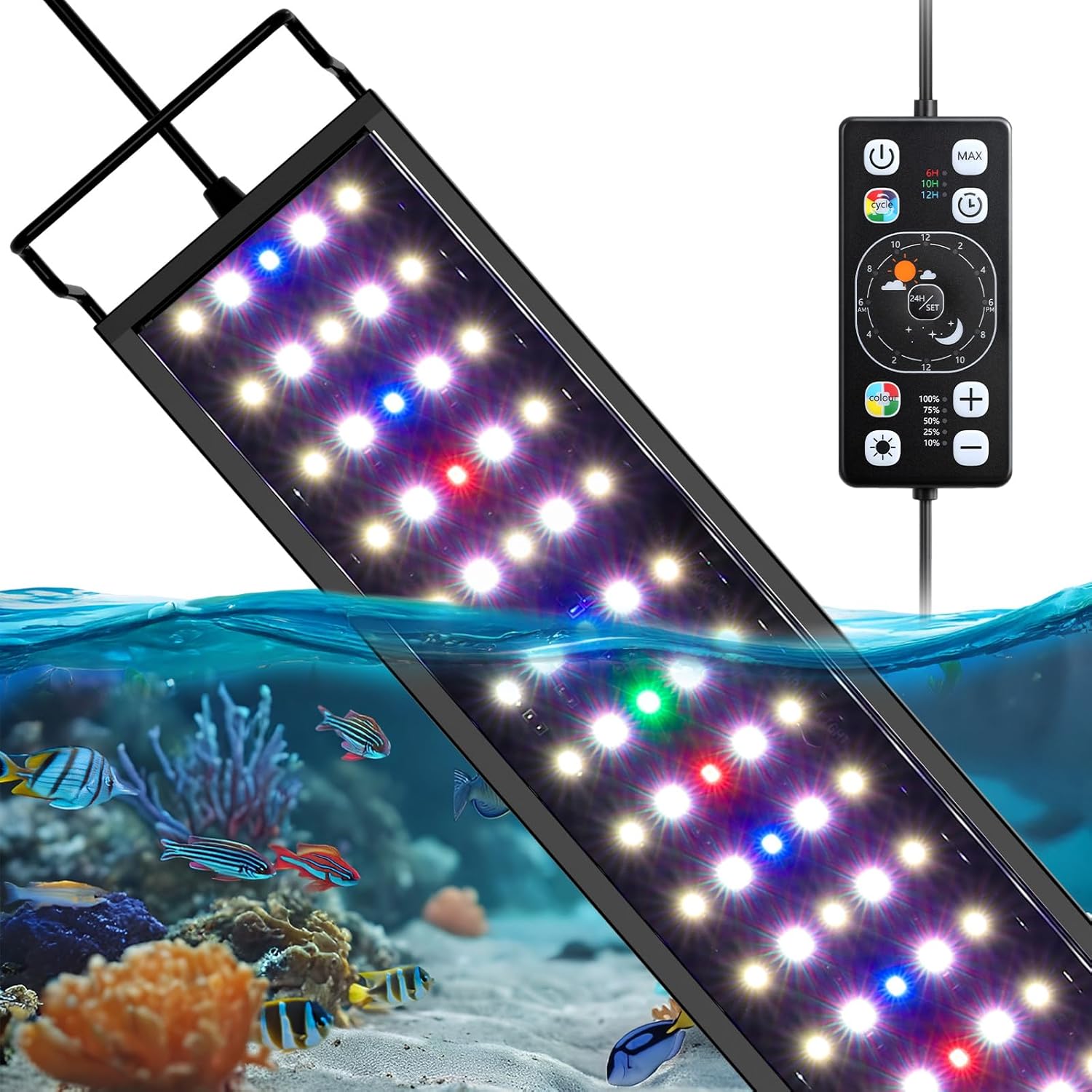
Image: Hygger Aquarium Light unit with power adapter and adjustable brackets.
Setup Instructions
- Unpack: Carefully remove all components from the packaging.
- Attach Brackets: Slide the adjustable metal brackets into the slots on both ends of the light fixture.
- Position Light: Place the light fixture on top of your aquarium, adjusting the brackets to fit the tank width (18-28cm). Ensure the light is securely seated.
- Connect Power: Connect the power adapter to the light fixture's cable, then plug the adapter into a suitable power outlet.
- Initial Power On: Press the power button on the integrated controller to turn on the light.

Image: Overview of the hygger Aquarium Light HG075 highlighting its features.
Operating Instructions
Controller Overview
The light is controlled via an integrated remote. Familiarize yourself with the buttons:

Image: Diagram of the hygger Aquarium Light controller with labeled functions.
- Power Button: Turns the light ON/OFF.
- MAX Button: Activates 100% full spectrum light.
- Timer Button (6H/10H/12H): Sets the daily lighting duration.
- Cycle Button: Changes the speed of the 7-color cycle (10s, 20s, 40s).
- 24H/SET Button: Activates and sets the 24/7 natural mode.
- Color Button: Selects fixed single colors (Red, Green, Blue, Orange, Yellow, Cyan, Purple, Full Spectrum).
- Brightness +/- Buttons: Adjusts brightness levels (10%, 25%, 50%, 75%, 100%).
24/7 Natural Mode
This mode simulates a natural day-night cycle for your aquarium, promoting a healthy environment for fish and plants.
- Press and hold the 24H/SET button to initiate the 24/7 natural mode setup.
- Use the +/- buttons to set the desired ON time (e.g., 8:00 AM). Press 24H/SET to save.
- Use the +/- buttons to set the desired OFF time (e.g., 4:00 PM). Press 24H/SET to save.
- Set the current time to synchronize the light cycle with your actual time.
In 24/7 natural mode, the light will gradually change intensity and color throughout the day, mimicking sunrise, daylight, sunset, and moonlight. Color and brightness cannot be manually adjusted in this mode.
Video: This video demonstrates the various features and modes of the hygger Aquarium Light, including its 24/7 natural mode, color adjustments, and timer functions, showcasing its effect on an aquarium environment.

Image: Illustration of the hygger Aquarium Light's 24/7 natural mode cycle, showing transitions from sunrise to night.
Timer Mode
Set the light to turn on and off automatically for a fixed duration each day.
- Press the Timer Button (6H/10H/12H) to select your desired lighting duration.
- Select a color using the Color Button.
- Adjust brightness using the +/- buttons.
The light will automatically turn on and off at the set time daily. The memory function ensures settings are retained.
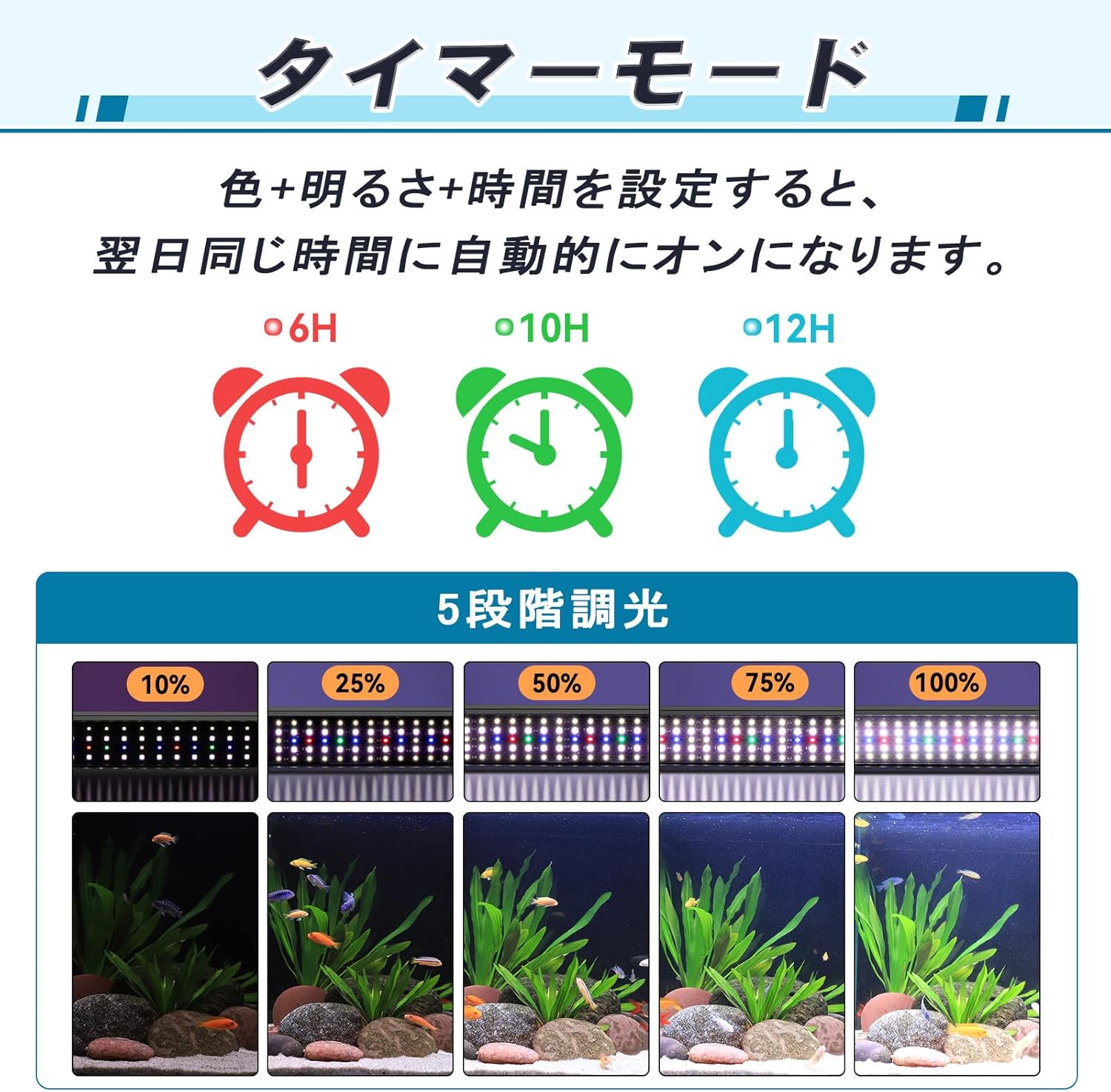
Image: Diagram illustrating the 6H, 10H, and 12H timer options and 5 dimming levels.
Color and Brightness Adjustment
Customize the lighting to suit your preferences or the needs of your aquatic life.
- Fixed Colors: Press the Color Button repeatedly to cycle through Red, Green, Blue, Orange, Yellow, Cyan, Purple, and Full Spectrum.
- Color Cycle: Press the Cycle Button to activate the 7-color gradient mode. Press 1-3 times to adjust the cycle speed (10s, 20s, or 40s).
- Brightness: Use the +/- buttons to adjust the brightness from 10% to 100% in 5 steps.
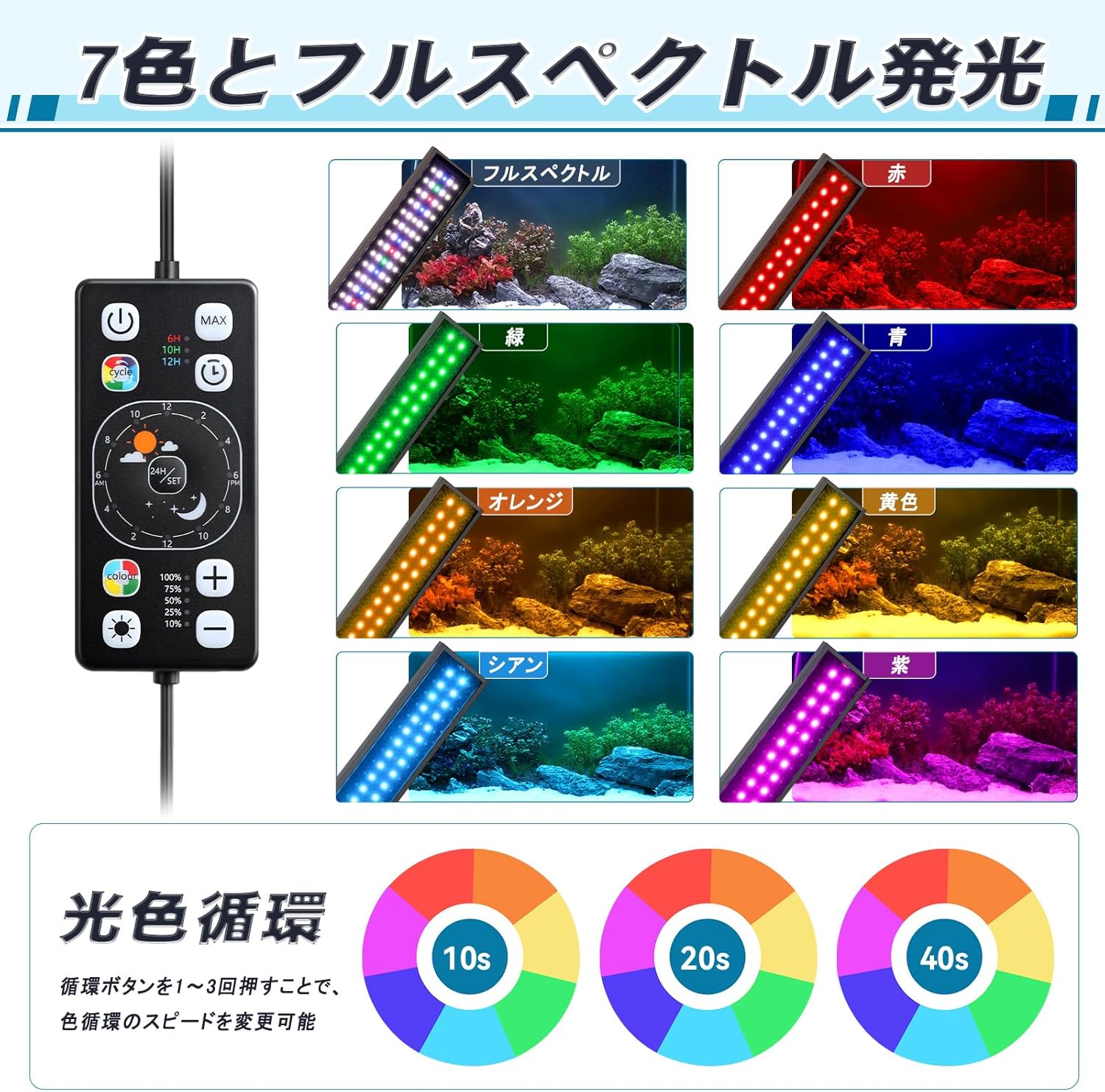
Image: Displays the controller and various color outputs (Red, Green, Blue, Orange, Yellow, Cyan, Purple, Full Spectrum) and color cycle speeds.

Image: Shows the controller and brightness levels from 10% to 100%.
Maintenance
Regular maintenance ensures the longevity and optimal performance of your hygger Aquarium Light.
- Cleaning: Gently wipe the light fixture and LED surface with a soft, damp cloth to remove dust, water spots, or algae. Ensure the light is unplugged before cleaning. Do not use abrasive cleaners or solvents.
- Inspection: Periodically check the power cord and adapter for any signs of damage. If any damage is found, discontinue use immediately and contact customer support.
- Water Contact: While the light is waterproof (IP68 rated), avoid submerging the power adapter or controller. Ensure the light is securely mounted to prevent accidental drops into the water.
Troubleshooting
| Problem | Possible Cause | Solution |
|---|---|---|
| Light does not turn on. | No power, loose connection, faulty adapter. | Check power outlet, ensure all connections are secure. Test with another outlet. If still not working, contact support. |
| Light flickers or dims unexpectedly. | Unstable power supply, loose connection, internal fault. | Check power connections. Ensure power supply is stable. If problem persists, contact support. |
| Timer or 24/7 mode not working correctly. | Incorrect settings, power interruption. | Re-set the timer or 24/7 mode according to the operating instructions. The memory function should retain settings after power interruption. |
| Colors or brightness cannot be adjusted. | Light is in 24/7 natural mode. | Manual color and brightness adjustments are disabled in 24/7 natural mode. Switch to manual mode or timer mode to adjust. |
Specifications
| Specification | Value |
|---|---|
| Model Number | HG075 |
| Color | Black |
| Light Source Type | LED |
| Brand | hygger |
| Max Luminous Flux | 314 Lumens |
| Light Source Wattage | 12 Watts |
| Mounting Type | Adjustable Brackets |
| Special Features | Color changing, Dimmable |
| Number of Light Sources | 1 |
| Item Dimensions (L x W x H) | 30L x 8W x 7H cm |
| Included Components | Aquarium light unit, Adapter |
| Country of Origin | China |
| ASIN | B0FBRJ34BW |
| Average Customer Rating | 4.0 out of 5 stars |
Warranty and Support
hygger is committed to providing high-quality aquarium products and ensuring customer satisfaction.
- Warranty: We offer a 1-year warranty from the date of purchase. In the unlikely event of any issues, please contact our customer support.
- Contact: For support, questions, or warranty claims, please refer to the contact information provided with your purchase or visit the official hygger brand store online.
Our philosophy is to focus on aquariums and deliver products with ultimate quality, ensuring a comfortable and relaxing experience for you and your aquatic pets.

Image: hygger brand logo.


