
1. Introduction
This manual provides instructions for the setup, operation, and maintenance of your TRIGKEY Key R8 Mini PC. Please read this manual thoroughly before using the device.

Image 1.1: Front view of the TRIGKEY Key R8 Mini PC.
2. Package Contents
Verify that all items are present in the package:
- 1 x TRIGKEY Key R8 Mini PC (8745HS model)
- 1 x User Manual
- 1 x HDMI Cable (100CM)
- 1 x Power Adapter (19V/5.26A)
3. Product Overview: Ports and Components
The TRIGKEY Key R8 Mini PC features a variety of ports and components for connectivity and expansion. Refer to the diagram below for a visual guide.
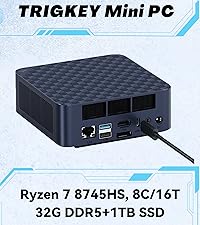
Image 3.1: Detailed port layout of the Mini PC.
Front Panel Ports:
- USB4 Port (40Gbps/TBT3/PD/DP1.4): 1 port. Supports high-speed data transfer, power delivery, and DisplayPort 1.4 video output.
- Type-C USB3.2 Port (10Gbps): 1 port.
- 3.5mm Audio Jack: For headphones or speakers.
- Power Button: To turn the device on/off.
Rear Panel Ports:
- LAN Port (2.5G): 1 port. For wired network connection.
- USB3.2 Ports (10Gbps): 2 ports.
- USB2.0 Port (480Mbps): 1 port.
- HDMI 2.1 Port (4K 120Hz): 1 port. For video output.
- DP1.4 Port (4K 144Hz): 1 port. For video output.
- 3.5mm Audio Jack: For headphones or speakers.
- DC IN (Pogopin): For power adapter connection.
4. Setup Instructions
- Connect to a Display: Connect your monitor(s) to the Mini PC using the HDMI, DisplayPort, or USB4 ports. The device supports up to three 4K displays simultaneously.
- Connect Peripherals: Connect your keyboard, mouse, and other USB devices to the available USB ports.
- Connect to Network: For a wired connection, connect an Ethernet cable to the 2.5G LAN port. For wireless, the device supports WiFi 6.
- Connect Power: Plug the power adapter into the DC IN port on the rear panel, then plug the adapter into a power outlet.
- Power On: Press the power button on the front panel to start the Mini PC.

Image 4.1: Connecting the 2.5G Ethernet cable.
5. Operating System
The TRIGKEY Key R8 Mini PC comes with an operating system pre-installed. Follow the on-screen instructions for initial setup. The device supports features such as Wake On LAN and Auto Power On, which can be configured in the BIOS settings.
6. Memory and Storage Expansion
The Mini PC is equipped with 32GB LPDDR5 5600MHz RAM (dual-channel, 2x16GB) and supports expansion up to 256GB (128GB*2). It also includes a 1TB M.2 PCIe 4.0 SSD and features dual SSD slots, supporting up to 4TB*2 for a total of 8TB storage.

Image 6.1: Illustration of DDR5 5600MHz memory modules.

Image 6.2: Illustration of dual M.2 PCIe 4.0 SSD slots.
For detailed instructions on upgrading RAM or SSD, refer to the official TRIGKEY support resources or consult a qualified technician.
7. Display Configuration
The Mini PC supports triple display output via its HDMI2.1, DisplayPort1.4, and USB4 ports. Each port can support up to 4K resolution at 144Hz (DP1.4) or 120Hz (HDMI2.1). This allows for an extended desktop environment across multiple screens.

Image 7.1: Example of triple display setup with the Mini PC.
8. Network and Wireless Connectivity
The device features a 2.5G LAN port for high-speed wired internet. For wireless connectivity, it includes dual-band WiFi 6, offering transmission speeds up to 2.4Gbps. Bluetooth 5.2 is also integrated for connecting wireless peripherals.

Image 8.1: WiFi 6 connectivity diagram.

Image 8.2: Bluetooth 5.2 connectivity diagram.
9. Audio Configuration
The Mini PC features dual 3.5mm audio jacks, one on the front and one on the rear. If both jacks are used simultaneously, the front jack takes priority, and the rear jack's audio output will be automatically disabled.
10. Maintenance
- Keep the device in a clean, dry environment away from direct sunlight and heat sources.
- Ensure proper ventilation by not blocking the air vents.
- Clean the exterior with a soft, dry cloth. Do not use liquid cleaners.
- Regularly back up important data.
- Keep the operating system and drivers updated.
11. Troubleshooting
| Issue | Possible Cause | Solution |
|---|---|---|
| No power | Power adapter not connected or faulty. | Ensure power adapter is securely connected to the device and a working power outlet. Test with another outlet if possible. |
| No display | Monitor not connected, incorrect input selected, or faulty cable. | Check display cable connections. Ensure the correct input source is selected on your monitor. Try a different cable or port. |
| No internet connection (wired) | Ethernet cable disconnected or network issue. | Verify Ethernet cable is securely connected. Check router/modem status. Restart network devices. |
| No internet connection (wireless) | WiFi disabled, incorrect password, or signal issue. | Ensure WiFi is enabled in the operating system. Verify WiFi password. Move closer to the router or check for interference. |
| Slow performance | Too many applications running, insufficient RAM, or storage nearly full. | Close unnecessary applications. Check system resources. Consider upgrading RAM or SSD if consistently slow. |
12. Specifications
| Feature | Detail |
|---|---|
| Processor | AMD Ryzen 7 8745HS (8 Cores, 16 Threads, up to 4.9GHz, 16MB L3 Cache) |
| Graphics | Integrated AMD Radeon 780M (12 Cores, 2600MHz) |
| RAM | 32GB LPDDR5 5600MHz (Dual-channel, 2x16GB), expandable up to 256GB |
| Storage | 1TB M.2 PCIe 4.0 SSD, dual M.2 slots, expandable up to 8TB (4TB*2) |
| Video Output | 1x HDMI 2.1 (4K 120Hz), 1x DP 1.4 (4K 144Hz), 1x USB4 (4K 144Hz) - Triple Display Support |
| USB Ports | 1x USB4 (40Gbps/TBT3/PD/DP1.4), 1x Type-C USB3.2 (10Gbps), 2x USB3.2 (10Gbps), 1x USB2.0 (480Mbps) |
| Network | 1x 2.5G LAN Port, WiFi 6, Bluetooth 5.2 |
| Audio | 2x 3.5mm Audio Jacks (Realtek ALC897) |
| Power Input | DC IN (Pogopin) 19V/5.26A |
| Operating System | Pre-installed OS (as per product configuration) |
| Dimensions | 12 x 12 x 8 cm (approximate parcel dimensions) |
| Weight | 1 kg (approximate parcel weight) |
13. Warranty and Support
The TRIGKEY Key R8 Mini PC comes with a one-year warranty. For technical support or warranty claims, please contact TRIGKEY customer service.
- Email Support: support@trigkey.com
- Phone Support: +86 18138216795
- Manufacturer: Shenzhen AZW Technology Co., Ltd,

Image 13.1: TRIGKEY customer support team.


