
1. Safety Information
Please read and understand all safety warnings and instructions before operating this product. Failure to follow the warnings and instructions may result in electric shock, fire, and/or serious injury.
General Safety
- Always wear eye protection when operating the leaf blower.
- Keep children and bystanders away while operating the tool.
- Do not operate the tool in wet conditions or in the rain.
- Ensure the work area is clear of obstacles and debris that could be thrown.
- Do not point the blower nozzle at people or animals.
Battery Safety
- Use only the specified charger for the battery pack.
- Do not charge the battery in damp or wet locations.
- Store the battery pack away from metal objects that could short the terminals.
- Do not incinerate the battery pack, even if it is severely damaged.
2. Package Contents
Verify that all items listed below are included in your package:
- 1 x Cordless Leaf Blower Body
- 1 x Extension Tube
- 2 x 4.0Ah Battery
- 1 x Charger
- 1 x User Manual

Image: The TaskStar Cordless Rotary Leaf Blower components laid out, showing the main blower unit, detachable extension tube, two 21V 4000mAh Li-ion batteries, a battery charger, and the user manual.
3. Product Features
- Powerful Airflow: Delivers up to 550 CFM of airflow and wind speeds of 150 MPH for efficient cleanup of leaves, grass clippings, dust, and sawdust.
- Versatile 180-Degree Swivel Head: Allows effortless switching between ground-level and above-ground cleaning tasks, reducing strain.
- Dual 4.0Ah Batteries: Includes two 4.0Ah batteries for extended runtime, up to 90 minutes on low speed and over 24 minutes on high speed.
- Lightweight Design: Weighs only 3.7 lbs, making it easy to maneuver and comfortable for prolonged use.
- 5-Speed Adjustable Settings: Provides precise control over airflow for various tasks, from gentle dust clearing to powerful leaf blowing.
- Simple One-Touch Start: Ensures easy and quick operation without complicated setup.
- Cordless, Quiet, and Low Maintenance: Offers freedom of movement, quieter operation than gas models, and minimal maintenance.
- 4 Adjustable Configurations: Features an extension tube and two work modes for adaptable cleaning.

Image: A person operating the leaf blower, effectively moving a large volume of leaves across a grassy area, highlighting the powerful airflow.

Image: The leaf blower is shown in two modes: one for blowing leaves on the ground and another with its head swiveled upwards for cleaning debris off a car.

Image: The leaf blower is shown alongside its two 4.0Ah batteries, with text indicating the long-lasting power and runtime for both minimum and maximum flow settings.

Image: A person holding the lightweight leaf blower, emphasizing its ease of handling.
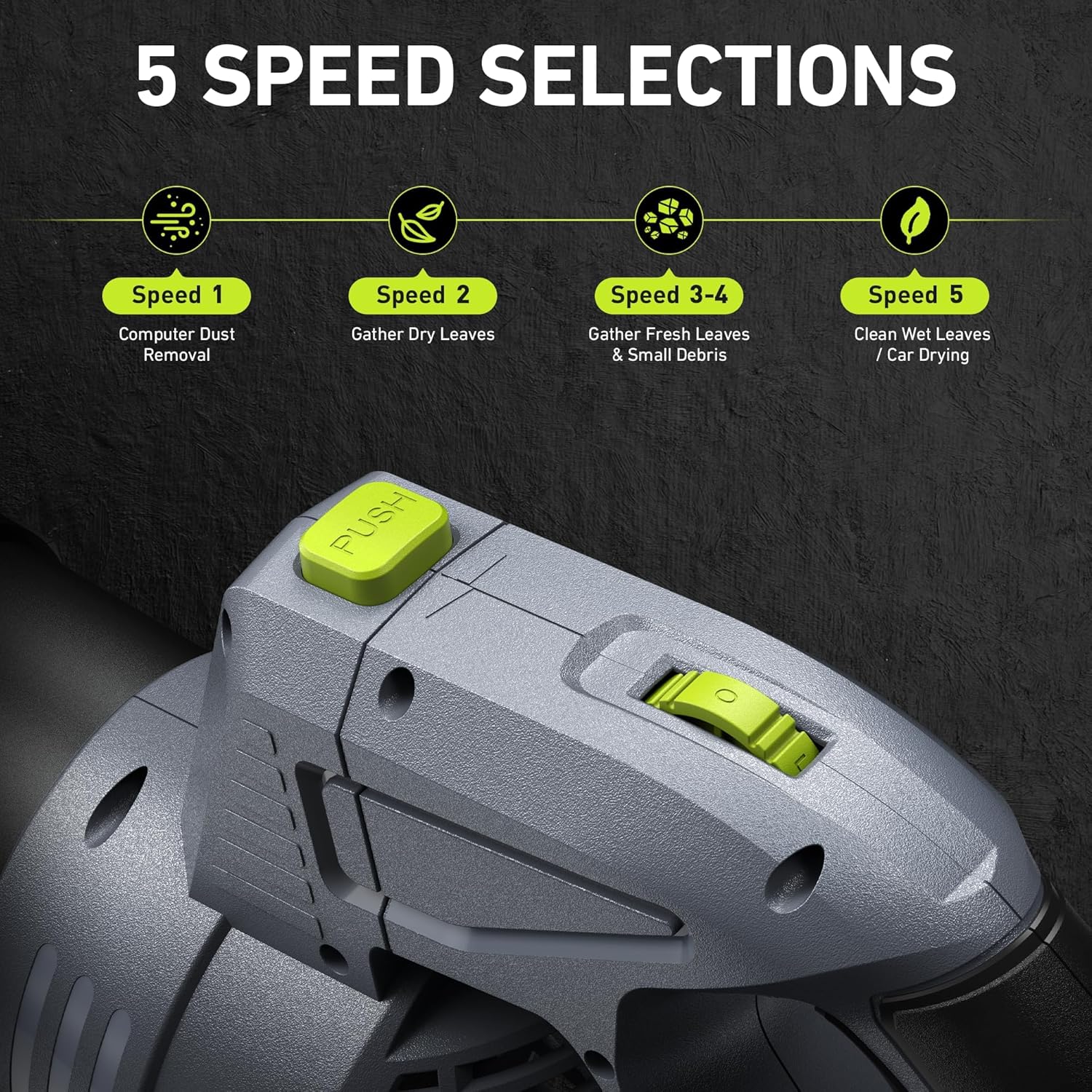
Image: A detailed view of the leaf blower's control panel, illustrating the 5-speed settings and their recommended uses.
4. Setup
Attaching the Extension Tube
- Align the grooves on the extension tube with the corresponding slots on the blower body.
- Push the tube firmly onto the blower body until it clicks into place.
- To detach, press the release button and pull the tube off.
Installing/Removing the Battery
- To install, slide the fully charged battery pack into the battery slot on the blower handle until it locks securely.
- To remove, press the battery release button and slide the battery pack out.
5. Operating Instructions
Powering On/Off
- To power on, press the main power button located on the handle. The battery level indicator will light up.
- To power off, release the main power button.
Adjusting Speed
- Use the 5-speed adjustable switch on the handle to select your desired airflow intensity.
- Slide the switch forward to increase speed (1-5) and backward to decrease speed.
Using the Swivel Head
- Press the 'PUSH' button near the blower head to unlock the swivel mechanism.
- Rotate the blower head 180 degrees to switch between ground-level and above-ground cleaning orientations.
- Release the 'PUSH' button to lock the head in the desired position.
Demonstration Video
Video: A demonstration of the TaskStar Blower in action, clearing leaves and debris from a driveway and patio, showcasing its effectiveness for various outdoor cleaning tasks.
6. Maintenance
Cleaning the Blower
- Ensure the blower is turned off and the battery is removed before cleaning.
- Wipe the exterior with a damp cloth. Do not use harsh chemicals or abrasive cleaners.
- Clear any debris from the air intake and exhaust vents to maintain optimal performance.
Battery Charging and Storage
- Charge batteries fully before storage and every 3-6 months if not in regular use.
- Store batteries in a cool, dry place away from direct sunlight and extreme temperatures.
7. Troubleshooting
Blower Not Turning On
- Check if the battery is properly inserted and fully charged.
- Ensure the power button is pressed firmly.
Reduced Airflow/Power
- Verify the battery is fully charged.
- Check for any obstructions in the air intake or nozzle.
- Ensure the speed setting is appropriate for the task.
Battery Not Charging
- Ensure the charger is properly plugged into a working outlet.
- Check if the battery is correctly seated in the charger.
- Verify that the charger indicator light is functioning as expected (e.g., red for charging, green for charged).
8. Specifications
| Feature | Specification |
|---|---|
| Brand | TaskStar |
| Model Name | Cordless Rotary Leaf Blower |
| Item Model Number | TK-BL5002 |
| Color | Greyish-green |
| Power Source | Battery Powered |
| Voltage | 21 Volts |
| Batteries | 2 Lithium Ion batteries (4.0Ah each) |
| Airflow (CFM) | Up to 550 CFM |
| Maximum Speed | 150 Miles per Hour |
| Form Factor | Handheld |
| Item Weight | 6.63 pounds (3.01 Kilograms) |
| Product Dimensions | 16.5"L x 7.8"W x 7.2"H |
| Special Feature | 180° swivel head, 550 CFM, Adjustable Speed, Lightweight, Rechargeable |
9. Warranty and Support
Warranty Information
The TaskStar Cordless Rotary Leaf Blower BL200 comes with a 3-Year Warranty. This warranty covers defects in materials and workmanship under normal use. Please retain your proof of purchase for warranty claims.
Customer Support
For any questions, technical assistance, or warranty claims, please contact TaskStar customer support. Refer to the contact information provided on the product packaging or the official TaskStar website.