
1. Introduction
Thank you for purchasing the SHEHDS 80W LED Moving Head Spot Light. This manual provides essential information for the safe and efficient operation of your device. Please read it thoroughly before installation and use, and retain it for future reference.

Image 1.1: The SHEHDS 80W LED Moving Head Spot Light, showcasing its compact design and powerful lens.
2. Safety Instructions
- Electrical Safety: Ensure the power supply matches the device's requirements (AC 90-275V, 50-60Hz). Always connect to a grounded outlet. Disconnect power before cleaning or servicing.
- Installation: Mount the fixture securely using appropriate clamps and safety cables. Ensure adequate ventilation around the unit to prevent overheating. Do not block ventilation openings.
- Operation: Avoid direct eye exposure to the light source. Do not operate the unit if the power cord is damaged. Keep away from flammable materials.
- Maintenance: Refer all servicing to qualified personnel. Do not attempt to repair the unit yourself.
- Environment: This device is intended for indoor use. Protect it from rain, moisture, and extreme temperatures.
3. Package Contents
Verify that all items are present and in good condition upon unpacking:
- 1 x SHEHDS 80W LED Moving Head Spot Light
- 1 x DMX Cable
- 1 x Power Cord
- 1 x User Manual
- 1 x Mounting Bracket
4. Product Overview
Familiarize yourself with the components and control interface of the moving head light.

Image 4.1: Detailed view of the control panel, rear connections (DMX In/Out, Power), and the 3-facet prism component.
Control Panel
- Display Screen: Shows current settings and menu options.
- Function Keys: Navigate through menus.
- Up/Down Buttons: Adjust values or select options.
- Confirm Key: Enter or save selections.
Rear Connections
- DMX IN/OUT: 3-pin XLR connectors for DMX signal.
- Power Input: PowerCon socket for AC power connection.
- Fuse: Overcurrent protection.

Image 4.2: Dimensions of the unit and its horizontal (Pan 540°) and vertical (Tilt 270°) movement capabilities.
5. Setup
5.1 Mounting
- Attach the provided mounting bracket to the base of the fixture using the designated screws.
- Securely mount the fixture to a truss or stable surface using appropriate clamps (not included) and a safety cable. Ensure the mounting point can support the weight of the fixture (4 kg).
- Allow sufficient space around the fixture for ventilation and movement.
5.2 Power Connection
- Connect the power cord to the PowerCon input on the rear of the fixture.
- Plug the other end of the power cord into a grounded AC power outlet (90-275V, 50-60Hz).
5.3 DMX Connection (Optional)
- Connect a 3-pin DMX cable from your DMX controller's output to the DMX IN port of the first fixture.
- For multiple fixtures, daisy-chain them by connecting the DMX OUT of the first fixture to the DMX IN of the next, and so on.
- Terminate the DMX chain with a 120-ohm DMX terminator on the last fixture's DMX OUT port for reliable signal transmission.
6. Operation
6.1 Control Panel Navigation
Use the function keys and up/down buttons to navigate the menu and adjust settings on the display screen. Press the confirm key to enter a menu or save changes.
6.2 DMX Control
The fixture supports 10 or 13 DMX channels. Set the DMX address on the fixture via the control panel to match your DMX controller's settings. Refer to the DMX channel chart (not provided in this manual, typically found in a separate DMX protocol sheet) for specific channel functions.
6.3 Operating Modes
- Auto Mode: The fixture runs through pre-programmed light shows automatically. Select different auto programs via the menu.
- Sound-Activated Mode: The fixture reacts to sound detected by its built-in microphone, creating dynamic light effects synchronized with music. Adjust sound sensitivity if available.
- Master/Slave Mode: Connect multiple fixtures via DMX cables. Set one fixture as 'Master' and others as 'Slave'. The slave units will mimic the master's operation.
6.4 Key Features
- Color Wheel: Features 7 distinct colors plus an open white position. Colors can be rotated or selected individually.
- Gobo Wheel: Includes 7 static gobos (patterns) plus an open position. Two of these are glass gobos. Gobos can be rotated or selected.
- 3-Facet Rotating Prism: Activates a prism effect to multiply the beam, creating wider and more complex patterns. The prism can rotate.
- Electronic Linear Focus: Adjusts the sharpness of the gobo patterns from 15 to 20 degrees.
- Dimmer: 0-100% mechanical dimmer for brightness control.
- Strobe: Variable strobe speed effect.

Image 6.1: Illustration of beam angle differences (15° vs 20°) and examples of gobo patterns projected by the light.
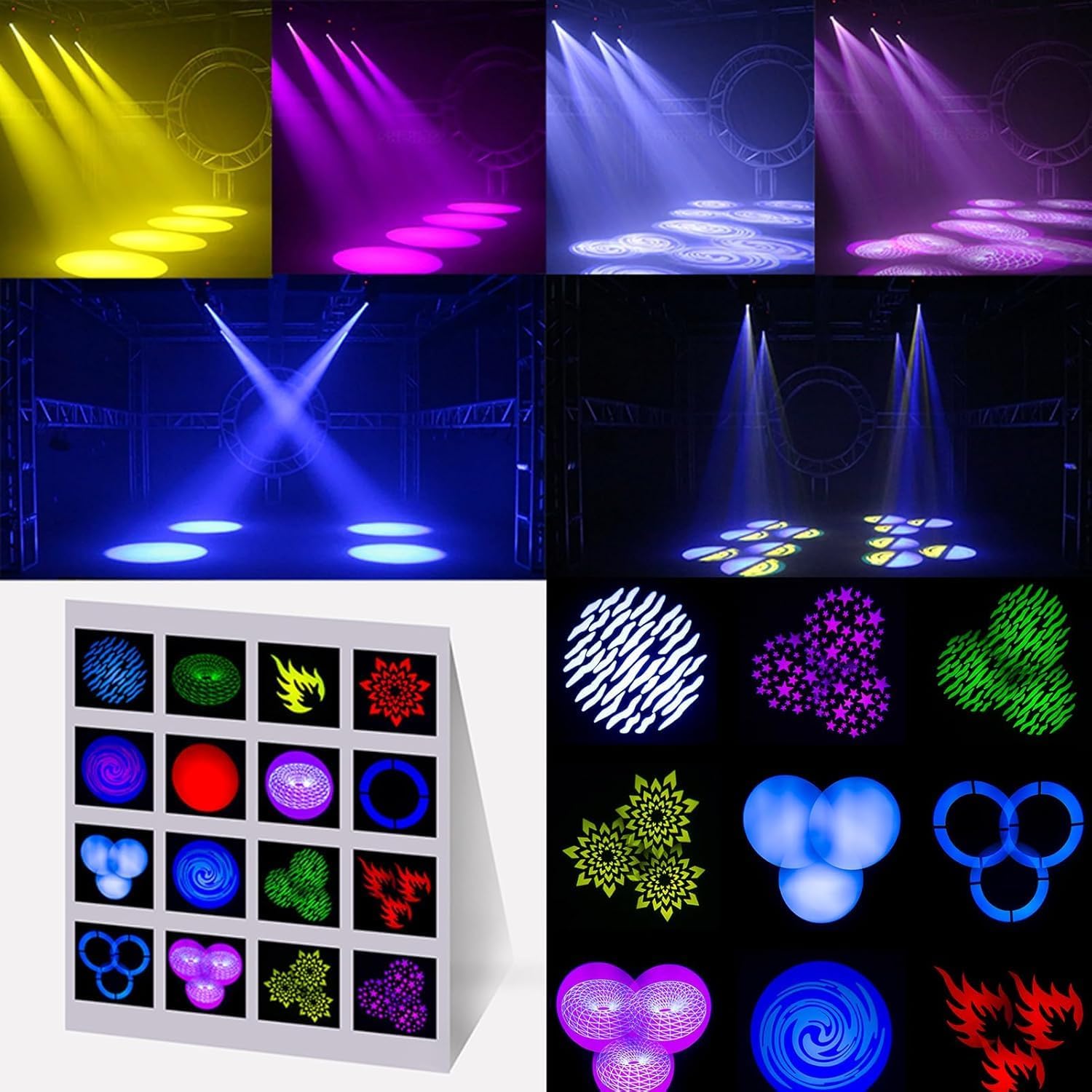
Image 6.2: Examples of the diverse color and gobo combinations achievable with the SHEHDS 80W LED Moving Head Spot Light.
7. Maintenance
7.1 Cleaning
- Regularly clean the lens and exterior casing with a soft, lint-free cloth.
- For stubborn dirt, use a mild glass cleaner. Avoid abrasive materials or solvents.
- Ensure the unit is powered off and cooled down before cleaning.
7.2 Fan and Ventilation
- Periodically check the cooling fan and ventilation openings for dust accumulation.
- Use compressed air to clear any dust from the fan and vents to ensure efficient heat dissipation.
8. Troubleshooting
| Problem | Possible Cause | Solution |
|---|---|---|
| No power | Power cord disconnected; no power from outlet; blown fuse. | Check power connections; test outlet; replace fuse (if applicable). |
| No DMX control | Incorrect DMX address; faulty DMX cable; no terminator; DMX controller issue. | Verify DMX address; check DMX cable integrity; add DMX terminator; check DMX controller. |
| Fixture not moving/responding | Motor calibration issue; incorrect mode selected. | Power cycle the unit; check selected operating mode (Auto, Sound, DMX). |
| Light output is dim | Dimmer setting too low; dirty lens. | Adjust dimmer setting; clean the lens. |
9. Specifications
| Feature | Detail |
|---|---|
| Product Type | LED Moving Head Spot Light |
| Power Supply | AC 90-275V, 50-60Hz |
| Power Consumption | 80W |
| DMX Channels | 10/13 Channels |
| Beam Angle | 15 Degrees (Electronic linear focus 15-20 degrees) |
| Pan Movement | 540° (8-16 bit fine) |
| Tilt Movement | 270° (8-16 bit fine) |
| Dimmer | 0-100% Mechanical Dimmer |
| Color Wheel | 7 Colors + Open |
| Gobo Wheel | 7 Gobos + Open (2 glass gobos) |
| Prism | 3-Facet Rotating Prism |
| Data Input/Output | 3-pin XLR |
| Control Modes | DMX512, Master/Slave, Sound-Activated, Auto, Strobe |
| LED Lifespan | Up to 60,000 hours |
| Cooling | Integrated Fan |
| Material | Aluminum, Plastic |
| Dimensions (L x W x H) | 33 x 28 x 22 cm |
| Weight | 4 kg |
10. Warranty and Support
SHEHDS provides the following for this product:
- 1 Month Replacement: For manufacturing defects within the first month of purchase.
- 1 Year Warranty: Covers defects in materials and workmanship under normal use.
- Customer Service: For technical assistance or warranty claims, please contact SHEHDS customer service.


