
msi DP18014M1025
MSI Pro DP180 Desktop User Manual
Model: DP18014M1025 | Brand: MSI
Introduction
This manual provides comprehensive instructions for setting up, operating, maintaining, and troubleshooting your MSI Pro DP180 Desktop. Please read this manual thoroughly before using the product to ensure proper operation and to prevent damage.
What's in the Box
Upon unpacking, please verify that all items listed below are present and in good condition:
- Keyboard
- Mouse
- Desktop (MSI Pro DP180)
- Manual (this document)
Product Overview
The MSI Pro DP180 is a powerful desktop computer designed for various applications, including business, education, and multimedia. It features an Intel Core i5-14400 processor, Intel UHD 770 graphics, 32GB DDR5 RAM, and a 1TB NVMe SSD for high performance and fast data access.


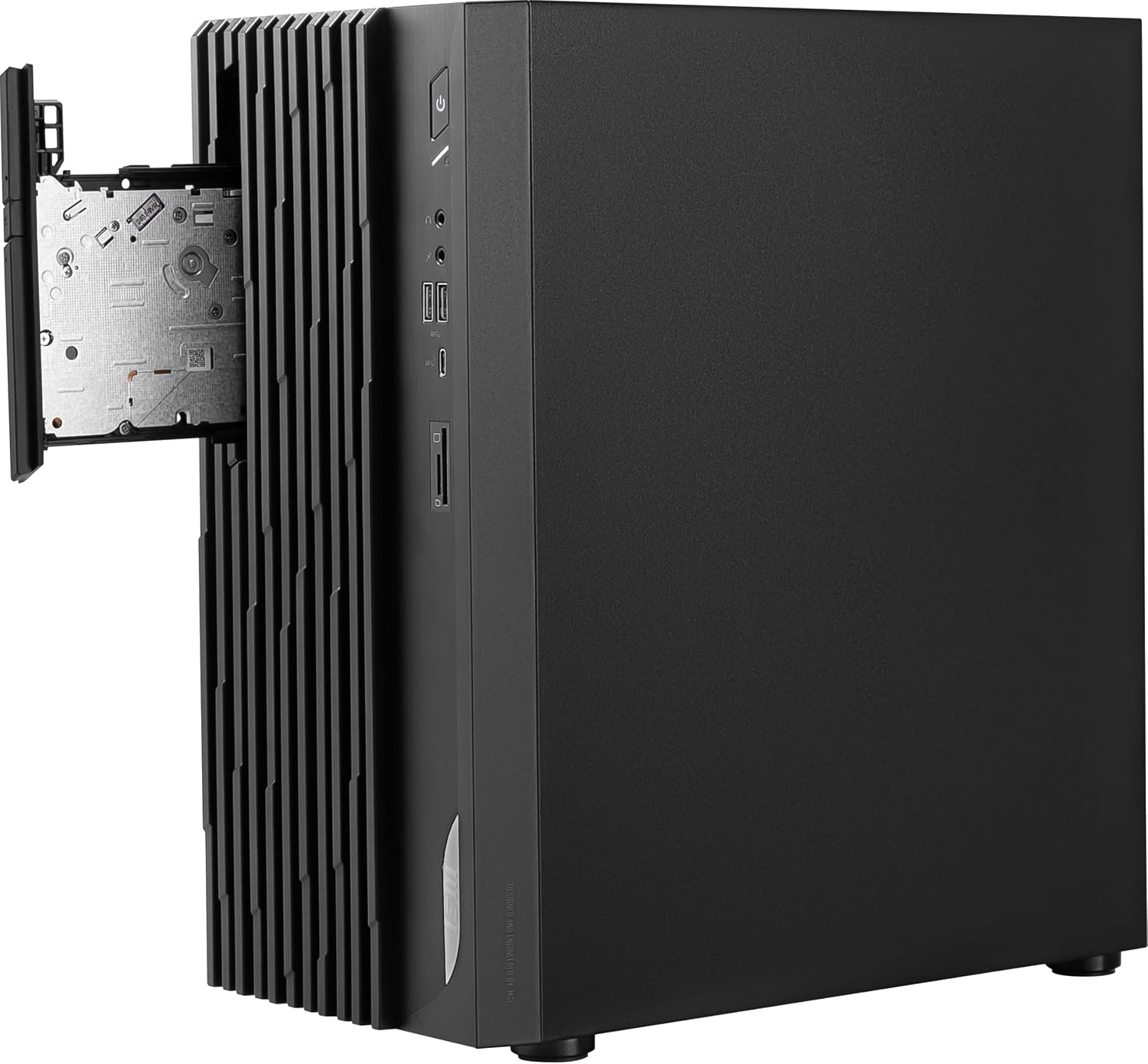


Key Features:
- Processor: Intel Core i5-14400, optimized with a hybrid processing architecture for exceptional performance.
- Graphics: Intel UHD 770 Graphic.
- Wireless Connectivity: WIFI 6E - AX 211 for high-speed wireless networking.
- Memory: 32GB DDR5 RAM for efficient multitasking.
- Storage: 1TB M.2 NVMe SSD for rapid boot times and application loading.
- Operating System: Pre-installed with Windows 11 Pro.
Setup Guide
1. Unpacking and Placement
- Carefully remove the desktop and all accessories from the packaging.
- Place the desktop on a stable, flat surface with adequate ventilation. Ensure there is enough space around the unit for airflow.
2. Connecting Peripherals
- Monitor: Connect your monitor to the desktop using an HDMI or DisplayPort cable.
- Keyboard and Mouse: Connect the included keyboard and mouse to the available USB ports on the desktop.
- Power: Connect the power cord to the desktop's power input and then to a wall outlet.
- Network (Optional): For wired internet, connect an Ethernet cable to the LAN port. For wireless, ensure Wi-Fi is enabled after initial setup.
3. Initial Power On
- Press the power button located on the front panel of the desktop.
- Follow the on-screen instructions to complete the Windows 11 Pro setup process. This may include setting up your user account, network connection, and privacy settings.
Operating Instructions
Power On/Off
- To Power On: Press the power button on the front of the desktop.
- To Shut Down: Click the Start button in Windows, then select Power > Shut down.
- To Restart: Click the Start button in Windows, then select Power > Restart.
- To Sleep: Click the Start button in Windows, then select Power > Sleep.
Connecting to Wi-Fi
- Click the Wi-Fi icon in the system tray (bottom right corner of the screen).
- Select your desired Wi-Fi network from the list.
- Enter the network security key (password) if prompted, then click "Next" or "Connect".
Using USB Ports and Card Reader
- The front panel includes USB 3.0 ports and a USB-C port for connecting external devices such as flash drives, external hard drives, or smartphones.
- An SD card reader is also available on the front panel for easy access to data from memory cards.
Maintenance
Cleaning
- Regularly clean the exterior of the desktop with a soft, dry, lint-free cloth.
- Use compressed air to gently clear dust from ventilation grilles and ports. Ensure the desktop is powered off and unplugged before cleaning.
- Avoid using liquid cleaners or abrasive materials.
Software Updates
- Keep your Windows operating system updated by regularly checking for updates via "Settings > Windows Update".
- Ensure your drivers (graphics, chipset, etc.) are up-to-date. You can typically find the latest drivers on the MSI official website.
Data Backup
- Regularly back up important data to an external drive or cloud storage to prevent data loss.
Troubleshooting
This section addresses common issues you might encounter with your MSI Pro DP180 Desktop.
No Power
- Ensure the power cord is securely connected to both the desktop and the wall outlet.
- Verify the power outlet is functional by plugging in another device.
- Check the power supply switch on the back of the desktop (if present) is in the 'ON' position.
No Display on Monitor
- Confirm the monitor is powered on and its input source is correctly selected (e.g., HDMI, DisplayPort).
- Ensure the video cable (HDMI/DisplayPort) is securely connected to both the desktop and the monitor.
- Try connecting the monitor to a different video output port on the desktop, if available.
Slow Performance
- Close unnecessary applications running in the background.
- Check for and install any pending Windows updates.
- Run a disk cleanup and defragmentation (for HDDs, not necessary for SSDs).
- Scan for malware or viruses using reputable antivirus software.
Wi-Fi Connectivity Issues
- Restart your router and modem.
- Ensure Wi-Fi is enabled on your desktop (check network settings).
- Forget the network and reconnect, re-entering the password.
- Update your wireless adapter drivers.
Technical Specifications
| Feature | Specification |
|---|---|
| Model Number | DP18014M1025 |
| Processor | Intel Core i5-14400 (2.5 GHz) |
| Graphics Coprocessor | Intel UHD 770 Graphic |
| RAM | 32 GB DDR5 (6000 MHz) |
| Storage | 1 TB NVMe SSD |
| Operating System | Windows 11 Pro |
| Wireless Connectivity | WiFi 6E (802.11ax), Bluetooth |
| USB 2.0 Ports | 4 |
| USB 3.0 Ports | 1 |
| Dimensions (LxWxH) | 6.61 x 12.72 x 14.53 inches |
| Item Weight | 16.74 pounds |
| Color | Black |
Warranty and Support
Warranty Information
Your MSI Pro DP180 Desktop comes with a standard manufacturer's warranty. Please refer to the warranty card included in your product packaging for specific terms and conditions, including warranty duration and coverage details. Keep your proof of purchase for warranty claims.
Customer Support
For technical assistance, troubleshooting beyond this manual, or warranty service, please contact MSI Customer Support:
- MSI Official Website: Visit www.msi.com for support resources, driver downloads, and contact information.
- Online Support: Many common issues can be resolved by visiting the support section of the MSI website.
Related documentsDP18014M1025


Ask a question about this manual
Ask about setup, troubleshooting, compatibility, parts, safety, or missing instructions. Manuals+ will review the question and use this page’s manual context to help answer it.