
1. Safety Information
Please read all instructions carefully before using this appliance and retain for future reference. Failure to follow these instructions may result in electric shock, fire, or injury.
- This appliance is for indoor use only.
- Do not operate the unit with a damaged cord or plug.
- Ensure the power supply matches the voltage specified on the rating label.
- Do not block air inlets or outlets. Maintain at least 20 cm (8 inches) clearance from walls and other objects.
- Do not insert fingers or objects into the air outlet.
- Always unplug the unit before cleaning or servicing.
- Keep the unit on a flat, stable surface to prevent water leakage.
- Do not use chemical solvents to clean the unit.
- This appliance is not intended for use by persons (including children) with reduced physical, sensory or mental capabilities, or lack of experience and knowledge, unless they have been given supervision or instruction concerning use of the appliance by a person responsible for their safety.
2. Product Overview
2.1 Package Contents
Verify that all items are included in the package:
- Portable Air Conditioner Unit
- Remote Control
- Exhaust Hose
- Window Kits (Slide Bar * 1, Slide Bar Connector * 1)
- Exhaust Pipe Joint * 2
- Drain Pipe
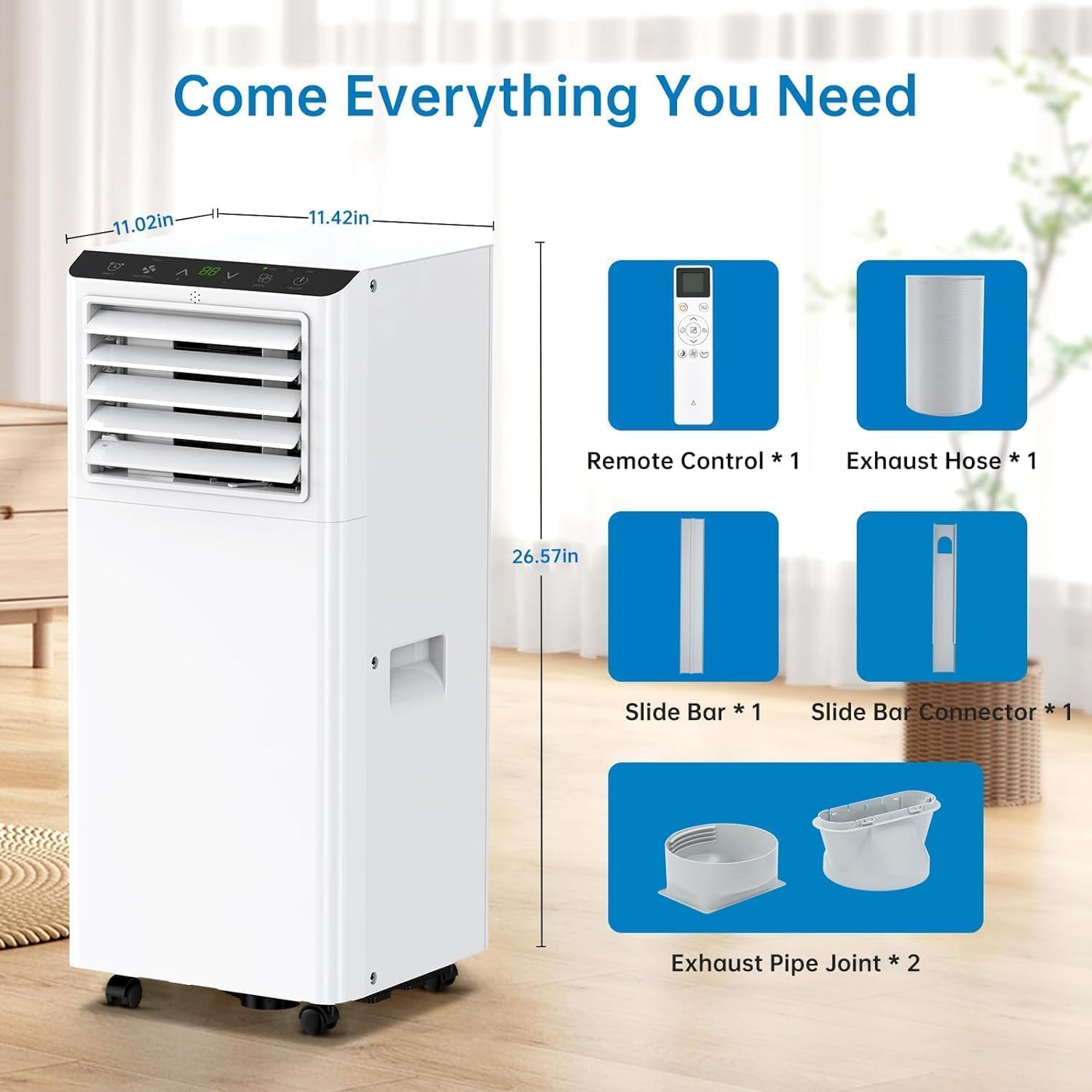
Image: All components included with the GarveeTech Portable Air Conditioner.
2.2 Key Features
- 8000 BTU Cooling Capacity: Efficiently cools rooms up to 450 sq.ft.
- 3-in-1 Functionality: Offers Cooling, Dehumidifier, and Fan modes.
- Quiet Operation: Operates at a low noise level of 52 dB, with a quieter Sleep Mode at 48 dB.
- Remote and Touch Control: Convenient operation via included remote control or integrated touch panel.
- Easy-Wash Removable Filter: Simple maintenance for optimal performance.
- Auto-Evaporation Technology: Automatically atomizes condensed water, reducing the need for manual drainage in cooling mode.
- Compact Design: Product Dimensions: 11.3"D x 11.7"W x 27.4"H.

Image: Touch control panel and remote control for easy operation.

Image: Visual representation of Cool, Dry, and Fan operating modes.
3. Setup & Installation
3.1 Unit Placement
Place the portable air conditioner on a flat, stable surface in the room you wish to cool. Ensure there is at least 20 cm (8 inches) of space around the unit for proper airflow.

Image: Proper placement of the portable air conditioner in a room.
3.2 Window Kit Installation
The included window kit is designed for easy installation in most standard sliding windows.
- Connect one end of the exhaust hose to one of the exhaust pipe joints.
- Connect the other exhaust pipe joint to the window kit adapter.
- Attach the exhaust pipe joint with the hose to the exhaust air outlet on the back of the air conditioner unit.
- Extend the adjustable window kit (slide bar and connector) to fit your window opening. Secure it in place by tightening the nuts.
- Install the window kit into the window frame, ensuring a tight seal to prevent air leakage.
- Insert the window kit adapter (with the exhaust hose attached) into the opening of the window kit.
4. Operation
4.1 Control Panel
The control panel on top of the unit allows direct access to all functions:
- Power Button: Turns the unit ON/OFF.
- Mode Button: Cycles through Cool, Dehumidify, and Fan modes.
- Temperature Up/Down Buttons: Adjusts the desired temperature in Cool mode.
- Fan Speed Button: Selects between Low and High fan speeds.
- Timer Button: Sets the auto-on or auto-off timer.
4.2 Remote Control
The remote control provides convenient operation from a distance. It duplicates all functions available on the control panel.
4.3 Operating Modes
- Cool Mode: Provides powerful cooling to lower room temperature. Set desired temperature between 61°F and 88°F.
- Dehumidify Mode (DRY): Reduces humidity in the air, removing up to 45 pints per day. The fan operates at a low speed.
- Fan Mode: Circulates air without cooling. Choose between Low and High fan speeds.
4.4 Sleep Mode
Activate Sleep Mode for quiet operation and energy saving during nighttime. In this mode, the set temperature will gradually increase by 1°F after the first hour and another 1°F after the second hour, maintaining a comfortable sleeping environment while reducing energy consumption.

Image: Quiet cooling and sleep mode for undisturbed rest.
5. Maintenance
5.1 Air Filter Cleaning
Regular cleaning of the air filter is essential for efficient operation. It is recommended to clean the filter every 14 days.
- Unplug the air conditioner from the power outlet.
- Locate the air filter panel, usually on the back or side of the unit.
- Remove the filter by gently pulling it out.
- Wash the filter under running water (warm, not hot) or use a vacuum cleaner to remove dust.
- Allow the filter to air dry completely before reinserting it into the unit. Do not expose to direct sunlight.
- Reinstall the dry filter and plug in the unit.
5.2 Unit Storage
When storing the unit for an extended period:
- Drain any accumulated water from the unit.
- Clean the air filter.
- Unplug the power cord and wrap it neatly.
- Store the unit in a cool, dry place, away from direct sunlight and extreme temperatures.
6. Troubleshooting
Refer to the table below for common issues and their solutions.
| Problem | Possible Cause | Solution |
|---|---|---|
| Unit does not turn on | No power supply Power cord not plugged in Circuit breaker tripped | Check power outlet Ensure cord is securely plugged in Reset circuit breaker |
| Unit does not cool effectively | Air filter is dirty Room size too large Windows/doors open Exhaust hose not properly installed | Clean air filter Ensure unit is suitable for room size (up to 450 sq.ft.) Close all windows and doors Check exhaust hose connection and window kit seal |
| Water leakage | Unit not on a level surface Drain plug not properly sealed | Place unit on a flat, level surface Ensure drain plug is securely closed |
| Noisy operation | Unit not on a level surface Obstruction in fan | Ensure unit is on a stable, level surface Check for and remove any obstructions |
7. Specifications
| Feature | Specification |
|---|---|
| Brand | GarveeTech |
| Model Name | TAC-05CPD/SL5 |
| Cooling Power | 8000 BTU |
| Coverage Area | Up to 450 sq.ft. |
| Functions | Cooling, Dehumidifier, Fan |
| Dehumidification Capacity | 45 pints/day |
| Noise Level | 52 Decibels (Normal), 48 Decibels (Sleep Mode) |
| Product Dimensions (D x W x H) | 11.3" x 11.7" x 27.4" |
| Item Weight | 46 Pounds |
| Voltage | 115V |
| Wattage | 699W |
| Refrigerant | R-32 |
| Control Method | Remote Control, Touch Control |
| Included Components | Portable Air Conditioner, Remote Control, Window Kits, Drain Pipe |
8. Warranty & Support
GarveeTech provides a 1-year manufacturer's warranty covering shipping damage, parts failure under normal use, and any other functional issues. For assistance or replacement, please contact our customer service team.
For customer support, please refer to the contact information provided with your purchase documentation or visit the official GarveeTech website.
