
1. Safety Information
Please read all safety instructions carefully before operating the Alpicool C12P portable refrigerator/freezer. Failure to follow these instructions may result in electric shock, fire, or serious injury.
- Ensure the power supply voltage matches the specifications of the appliance.
- Do not operate the appliance if the power cord is damaged. Contact customer support for replacement.
- Keep the appliance away from heat sources and direct sunlight.
- Do not block ventilation openings. Ensure adequate airflow around the unit.
- Avoid placing the appliance in areas where it may be exposed to water or excessive moisture.
- Do not use electrical appliances inside the refrigerator/freezer unless they are recommended by the manufacturer.
- Always disconnect the power supply before cleaning or performing maintenance.
- This appliance is not intended for use by persons (including children) with reduced physical, sensory or mental capabilities, or lack of experience and knowledge, unless they have been given supervision or instruction concerning use of the appliance by a person responsible for their safety.
2. Setup and Installation
Follow these steps to set up your Alpicool C12P portable refrigerator/freezer for first use.
- Unpacking: Carefully remove the appliance from its packaging. Retain the packaging for future transport or storage.
- Placement: Place the refrigerator/freezer on a stable, level surface. Ensure there is sufficient space around the unit for proper ventilation. The shock-proof design allows for use on uneven terrain and inclines up to 45 degrees.
- Power Connection:
- DC Power (12V/24V): Connect the DC cable to the appliance and then to your vehicle's 12V or 24V power outlet (cigarette lighter socket).
- AC Power (100-240V): Use the provided AC adapter and cable. Connect the AC adapter to the appliance, then plug the AC cable into a standard wall outlet.
- Solar Power (12-42V): The unit supports solar power input (12-42V). Connect your solar panel system to the DC input port.
- Initial Cleaning: Before first use, wipe the interior and exterior surfaces with a damp cloth.
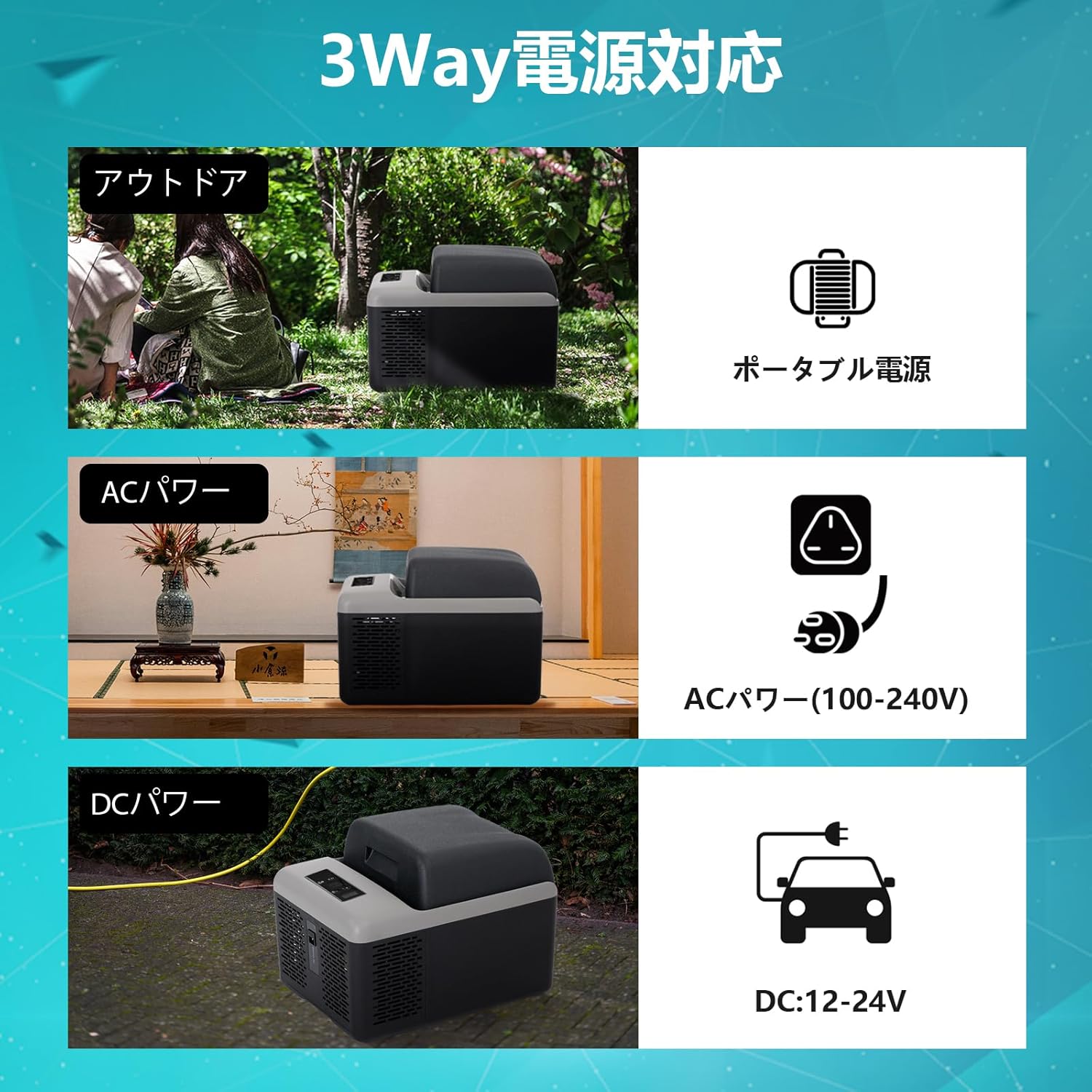
Image: The Alpicool C12P portable refrigerator/freezer demonstrating its versatile 3-way power compatibility, including outdoor portable power, AC power (100-240V), and DC power (12-24V) for vehicles.

Image: The Alpicool C12P unit positioned securely in a car trunk, highlighting its compact dimensions and robust design capable of functioning reliably even when tilted up to 45 degrees, suitable for travel and various vehicle types.
3. Operating Instructions
Learn how to operate your Alpicool C12P for optimal cooling and freezing performance.
3.1 Control Panel Operation

Image: A detailed view of the Alpicool C12P's touch control panel, indicating buttons for power ON/OFF, settings, and temperature adjustment (increase/decrease). Also shown are the ventilation covers, door latch, and door hinge system.
- Power ON/OFF: Press the power button to turn the unit on or off. The digital display will illuminate.
- Temperature Adjustment: Use the '+' and '-' buttons to set your desired temperature. The temperature range is from -20°C to 20°C. The unit features a temperature memory function, retaining your last setting.
- Cooling Modes: Press the 'Settings' button to cycle through cooling modes. The Alpicool C12P offers:
- MAX Mode (Rapid Cooling): For quick temperature reduction, utilizing up to 60W of power.
- ECO Mode (Energy Saving): For efficient power consumption, typically around 33W-45W, suitable for prolonged use.
- Battery Protection: The unit includes a 3-stage battery protection system to prevent excessive vehicle battery drain. This setting can usually be adjusted via the control panel or the mobile app. Refer to the detailed app instructions for specific adjustments.
3.2 Bluetooth App Control
The Alpicool C12P can be remotely controlled via a smartphone app (Bluetooth 5.0 compatible, up to 10m range).
- Download App: Search for "CAR FRIDGE FREEZER" in Google Play Store (for Android) or App Store (for iOS) and install the application.
- Enable Bluetooth: Turn on Bluetooth on your smartphone.
- Pairing: Open the app and click 'Search' to find your Alpicool C12P. Press the setting button on the refrigerator to initiate pairing.
- Remote Operation: Once paired, you can monitor temperature, adjust settings, and switch cooling modes directly from your smartphone.

Image: A smartphone screen showing the Alpicool mobile application, which allows users to remotely control the refrigerator's temperature and settings via Bluetooth, enhancing convenience.
3.3 Capacity and Usage Tips
The 12-liter capacity of the C12P is designed for convenience and portability.
- The interior can typically hold approximately 12 standard 355ml cans or 9 standard 500ml bottles.
- For optimal cooling, pre-chill items before placing them in the refrigerator/freezer.
- Ensure the lid is securely closed to maintain internal temperature and energy efficiency. The door is removable for easy cleaning and access.
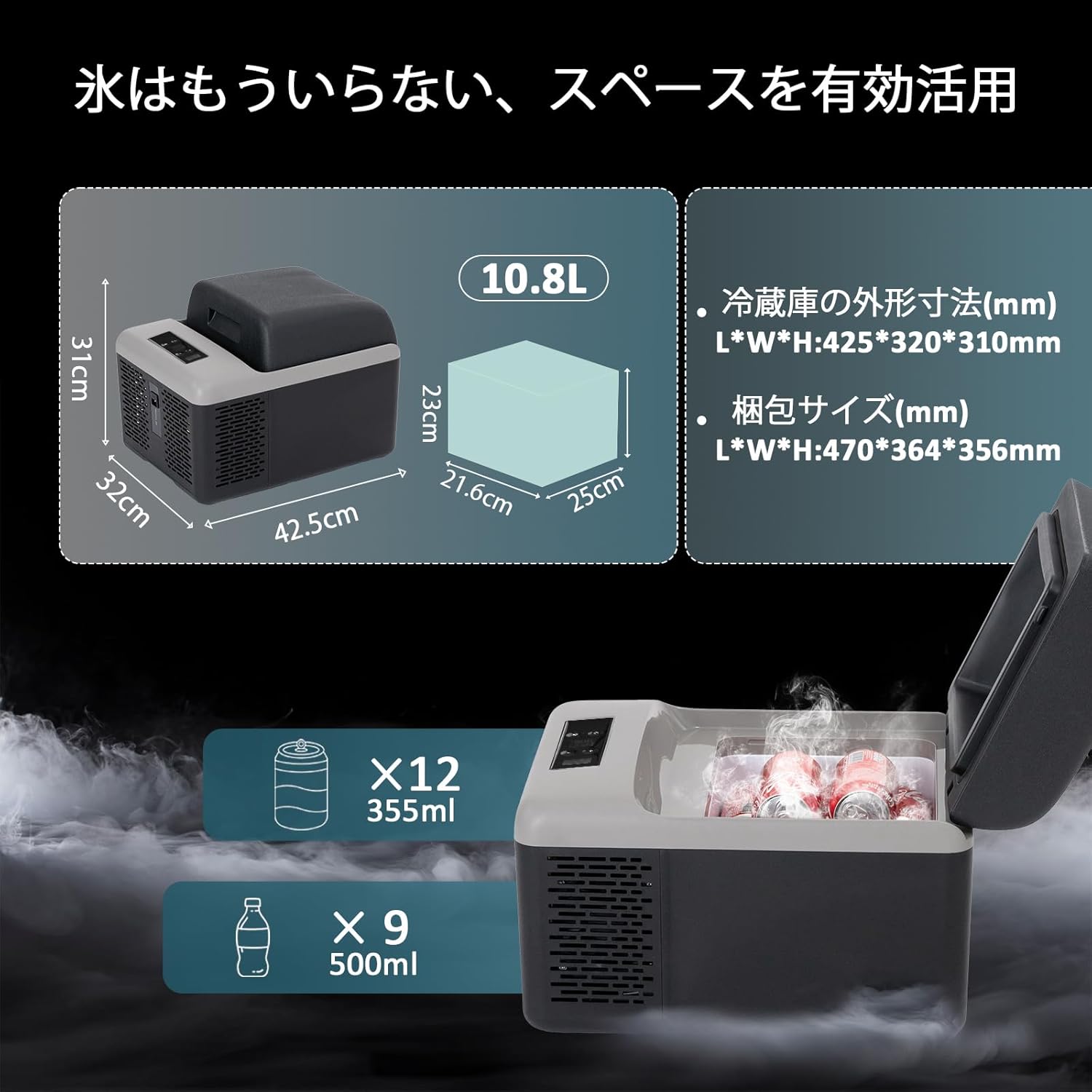
Image: A visual representation of the Alpicool C12P's external dimensions (42.5cm L x 32cm W x 31cm H) and internal capacity, illustrating how it can accommodate approximately 12 x 355ml cans or 9 x 500ml bottles.
4. Maintenance
Regular maintenance ensures the longevity and efficient operation of your Alpicool C12P.
- Cleaning:
- Disconnect the power before cleaning.
- Wipe the interior and exterior with a soft cloth dampened with mild detergent and water.
- Do not use abrasive cleaners or harsh chemicals.
- Ensure the unit is completely dry before reconnecting power.
- Defrosting: The unit features an automatic defrost function. If ice buildup occurs, turn off the unit and allow the ice to melt naturally. Drain any water and wipe dry.
- Ventilation: Regularly check that the ventilation openings are clear of dust and debris to ensure proper airflow and prevent overheating.
- Storage: If storing the unit for an extended period, ensure it is clean and dry. Store with the lid slightly ajar to prevent odors and mold growth.
5. Troubleshooting
Refer to this section for common issues and their solutions. If the problem persists, contact customer support.
| Problem | Possible Cause | Solution |
|---|---|---|
| Unit does not turn on | No power supply; Damaged power cord; Blown fuse in vehicle. | Check power connection; Replace power cord if damaged; Check vehicle fuse. |
| Insufficient cooling | Lid not closed properly; Blocked ventilation; Temperature setting too high; Ambient temperature too high. | Ensure lid is sealed; Clear vents; Lower temperature setting; Move to a cooler environment. |
| Excessive noise | Unit not level; Fan obstruction. | Place on a level surface; Check for obstructions around the fan. (Normal operating noise is below 45dB). |
| Error code on display | Specific internal issue. | Note the error code and contact customer support for assistance. |
6. Specifications
Detailed technical specifications for the Alpicool C12P portable refrigerator/freezer.
| Feature | Specification |
|---|---|
| Model | C12P |
| Capacity | 12 Liters |
| Cooling Range | -20°C to 20°C (-4°F to 68°F) |
| Rated Power (MAX Mode) | 60W |
| Rated Power (ECO Mode) | 33W - 45W (approx.) |
| Power Input | DC 12V/24V, AC 100-240V, Solar 12-42V |
| Noise Level | Below 45dB |
| Dimensions (L x W x H) | 42.5 cm x 32 cm x 31 cm (16.7 in x 12.6 in x 12.2 in) |
| Weight | 6.4 kg (14.1 lbs) |
| Defrost Function | Automatic |
| Battery Protection | 3-stage system |
| Connectivity | Bluetooth 5.0 (App Control) |
| Accessories Included | AC Adapter, AC Cable, DC Cable, User Manual |

Image: A comprehensive table outlining the specifications of the Alpicool C12P, confirming its model, 12L capacity, cooling range, power options, physical dimensions, and weight.
7. Warranty and Support
Alpicool is committed to providing high-quality products and excellent customer service.
- Warranty: Your Alpicool C12P portable refrigerator/freezer comes with a 1-year free repair service from the date of purchase. This warranty covers manufacturing defects and malfunctions under normal use.
- Customer Support: A specialized support team is available 24/7 to assist you with any technical issues, usage questions, or warranty claims. Please refer to the contact information provided with your purchase or on the official Alpicool website for support.


