
1. Introduction
This manual provides comprehensive instructions for the Generic Replacement Remote Control, model HS-8908J-04. This remote is designed to be compatible with Sinotec Smart TV models, specifically the HS-8908J-04 series. It covers essential information regarding setup, operation, maintenance, and troubleshooting to ensure optimal performance and a seamless user experience.
2. Product Overview
The Generic Replacement Remote Control is an infrared (IR) device engineered for direct compatibility with Sinotec Smart TVs, model HS-8908J-04. It features an ergonomic design for comfortable handling and includes all necessary functions for navigating your television, including dedicated buttons for popular streaming services.
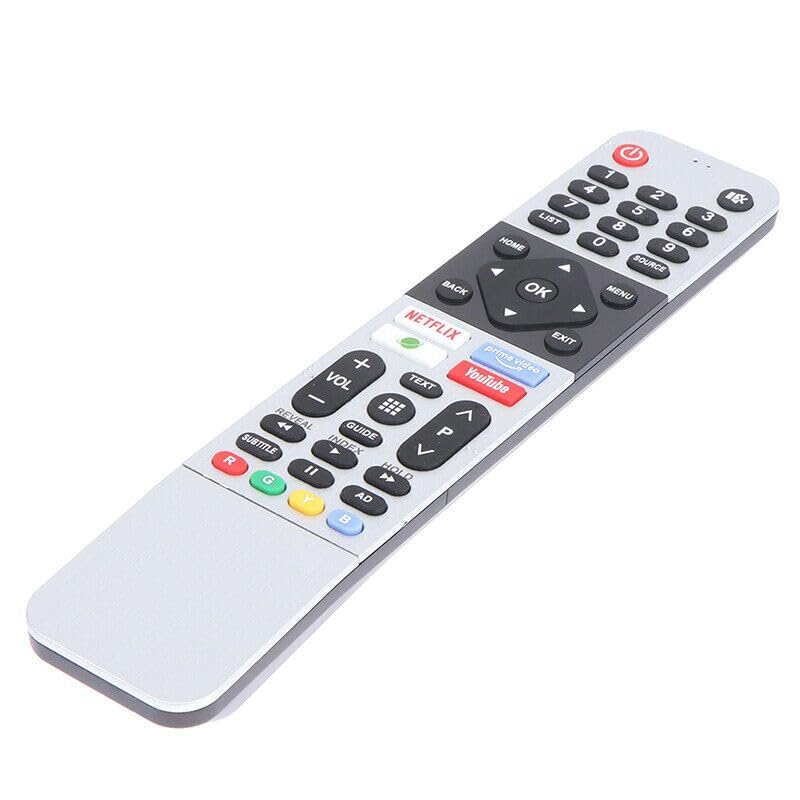
Figure 1: Front view of the remote control, displaying power, number, navigation, volume, channel, and streaming service buttons.

Figure 2: Side view of the remote control, highlighting its ergonomic design.
3. Setup
This replacement remote control is designed for immediate use with compatible Sinotec Smart TVs. No complex programming or pairing is required.
- Insert Batteries: Open the battery compartment cover on the back of the remote control. Insert two (2) AAA batteries, ensuring correct polarity (+ and -).
- Close Compartment: Replace the battery compartment cover securely.
- Ready for Use: The remote control is now ready to operate your Sinotec Smart TV HS-8908J-04. Point the remote directly at the TV's infrared receiver.
4. Operating Instructions
The remote control provides full functionality for your Sinotec Smart TV. Below are common button functions:
- Power Button (●): Turns the TV on or off.
- Number Keys (0-9): Directly select channels.
- LIST: Access a list of channels or inputs.
- SOURCE: Change the input source (HDMI, AV, etc.).
- HOME: Returns to the TV's main Smart Hub or home screen.
- MENU: Opens the TV's main menu for settings and options.
- Navigation Buttons (▲ ◀ OK ▶ ▼): Navigate through menus and select items. OK confirms selections.
- BACK: Returns to the previous screen or menu.
- EXIT: Closes the current menu or application.
- NETFLIX / PRIME VIDEO / YouTube: Dedicated buttons for quick access to these streaming applications.
- VOL +/-: Adjusts the volume level.
- CH P ▲ / ▼: Changes the TV channel up or down.
- TEXT: Accesses teletext services (if available).
- GUIDE: Displays the electronic program guide (EPG).
- Media Control Buttons (◀◀ / ▶▶ / ▮▮): Control playback of media (rewind, fast forward, play/pause).
- SUBTITLE: Toggles subtitles on or off.
- Color Buttons (R, G, Y, B): Used for specific functions within menus or applications, as indicated on-screen.
5. Maintenance
Proper care ensures the longevity and reliable operation of your remote control.
- Cleaning: Wipe the remote control with a soft, dry cloth. For stubborn dirt, lightly dampen the cloth with water or a mild cleaning solution, then wipe dry immediately. Avoid abrasive cleaners or solvents.
- Battery Replacement: Replace batteries when the remote's response becomes sluggish or stops working. Always replace both batteries simultaneously with new AAA batteries. Do not mix old and new batteries, or different types of batteries.
- Storage: If the remote will not be used for an extended period, remove the batteries to prevent leakage and potential damage. Store in a cool, dry place away from direct sunlight.
- Avoid Damage: Do not drop the remote control or expose it to extreme temperatures, humidity, or liquids.
6. Troubleshooting
If you encounter issues with your remote control, refer to the following common solutions:
| Problem | Possible Cause | Solution |
|---|---|---|
| Remote not responding. | Dead or incorrectly inserted batteries. Obstruction between remote and TV. Remote too far from TV. | Replace batteries with new AAA batteries, ensuring correct polarity. Remove any obstructions. Ensure you are within effective range and pointing directly at the TV's IR sensor. |
| Buttons are sluggish or unresponsive. | Low battery power. Dirt or debris under buttons. | Replace batteries. Gently clean around buttons with a soft, dry cloth. |
| Specific functions (e.g., Netflix button) not working. | TV is not a Smart TV or the application is not installed/updated. Temporary software glitch. | Ensure your Sinotec TV is a Smart TV and the application is installed and up-to-date. Try restarting the TV. |
| Remote works intermittently. | Weak batteries. Interference from other electronic devices. | Replace batteries. Move away from other devices that might cause IR interference. |
7. Specifications
| Model Name | HS-8908J-04 |
| Brand | Generic |
| Connectivity Technology | Infrared (IR) |
| Compatible Devices | Sinotec Smart TV HS-8908J-04 |
| Max. Number of Supported Devices | 1 |
| Color | Black |
| Item Weight | 60 Grams |
| Special Feature | Ergonomic Design |
8. Warranty and Support
This product comes with a 6-month warranty from the date of purchase. This warranty covers manufacturing defects under normal use. It does not cover damage caused by misuse, accidents, unauthorized modifications, or improper battery installation.
For warranty claims or technical support, please contact the retailer or the manufacturer, Generic, through their official support channels. Please retain your proof of purchase for warranty validation.