
1. Introduction
The ENONEO G22 Smart Key Box is a robust and secure solution for key storage, designed for outdoor use. It features a durable zinc-aluminum alloy construction with an IP65 waterproof rating, ensuring protection against weather and tampering. This key box integrates with the TTLock app, offering advanced management capabilities including multiple unlocking methods and real-time access control.
2. Safety Information
Caution: Install the product on a stable, flat surface. Avoid placing your hands or fingers near the edges while installing or using the product.
3. Package Contents
Ensure all items are present in the package:
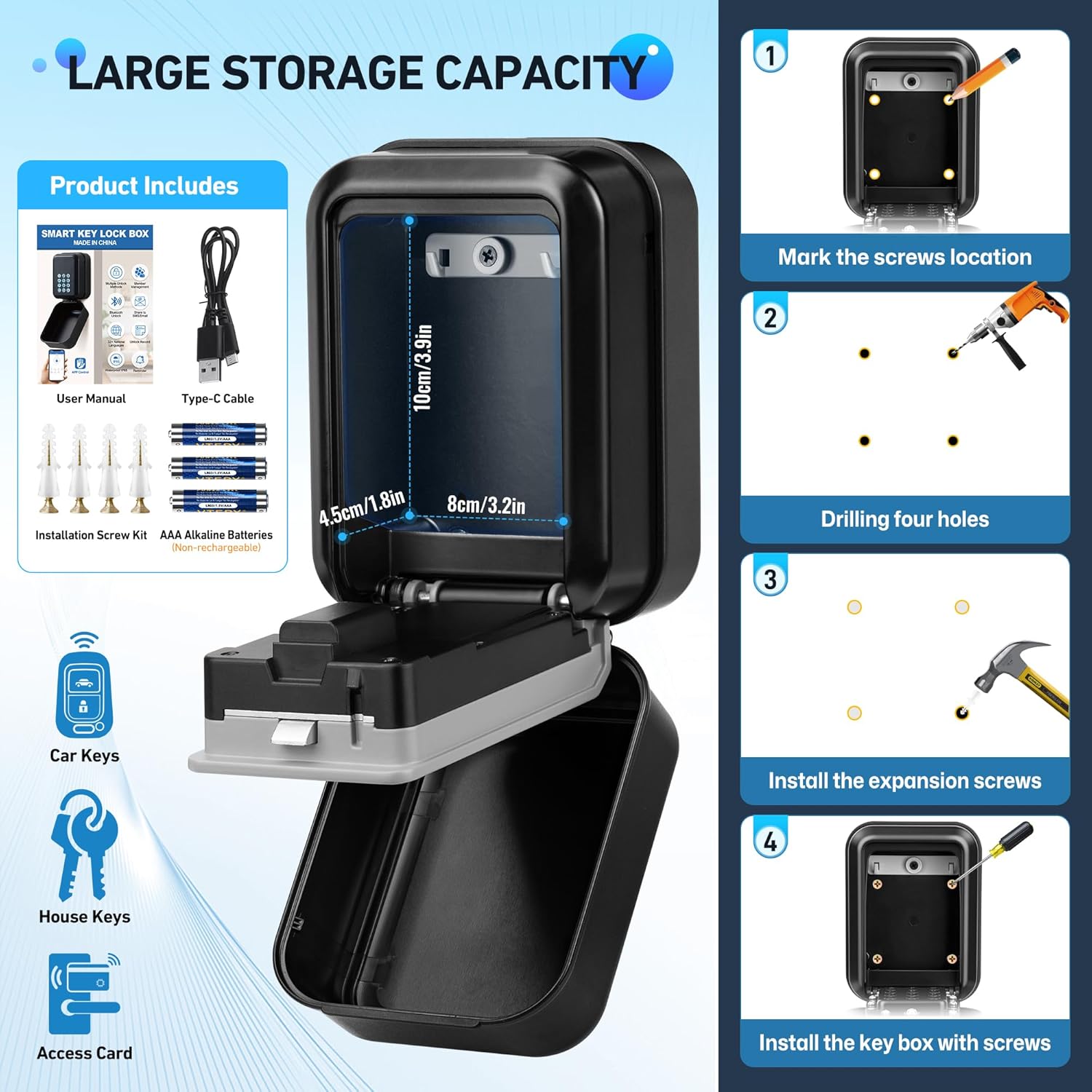
- ENONEO G22 Smart Key Box with illuminated keypad
- User Manual
- Type-C Charging Cable
- Screw Set for installation
- 3 x AAA Batteries (non-rechargeable)
4. Product Overview
The ENONEO G22 Smart Key Box is constructed from a high-strength zinc-aluminum alloy with an ABS protective cover, providing IP65 waterproofing and corrosion resistance. It features an illuminated keypad for easy code entry. The interior includes hooks for organizing keys and offers ample space for multiple keys, car keys, and access cards. An emergency Type-C port is available for power in case of battery depletion.


5. Setup
5.1 Battery Installation
- Open the key box.
- Locate the battery compartment.
- Insert 3 AAA batteries, ensuring correct polarity.
- Close the battery compartment.
5.2 Wall Mounting
- Choose a stable, flat surface for installation.
- Mark the screw locations on the surface using the key box as a template.
- Drill four holes at the marked positions.
- Insert the provided expansion screws into the drilled holes.
- Align the key box with the screws and mount it securely using the provided screws.
6. Operating Instructions
6.1 TTLock App Setup
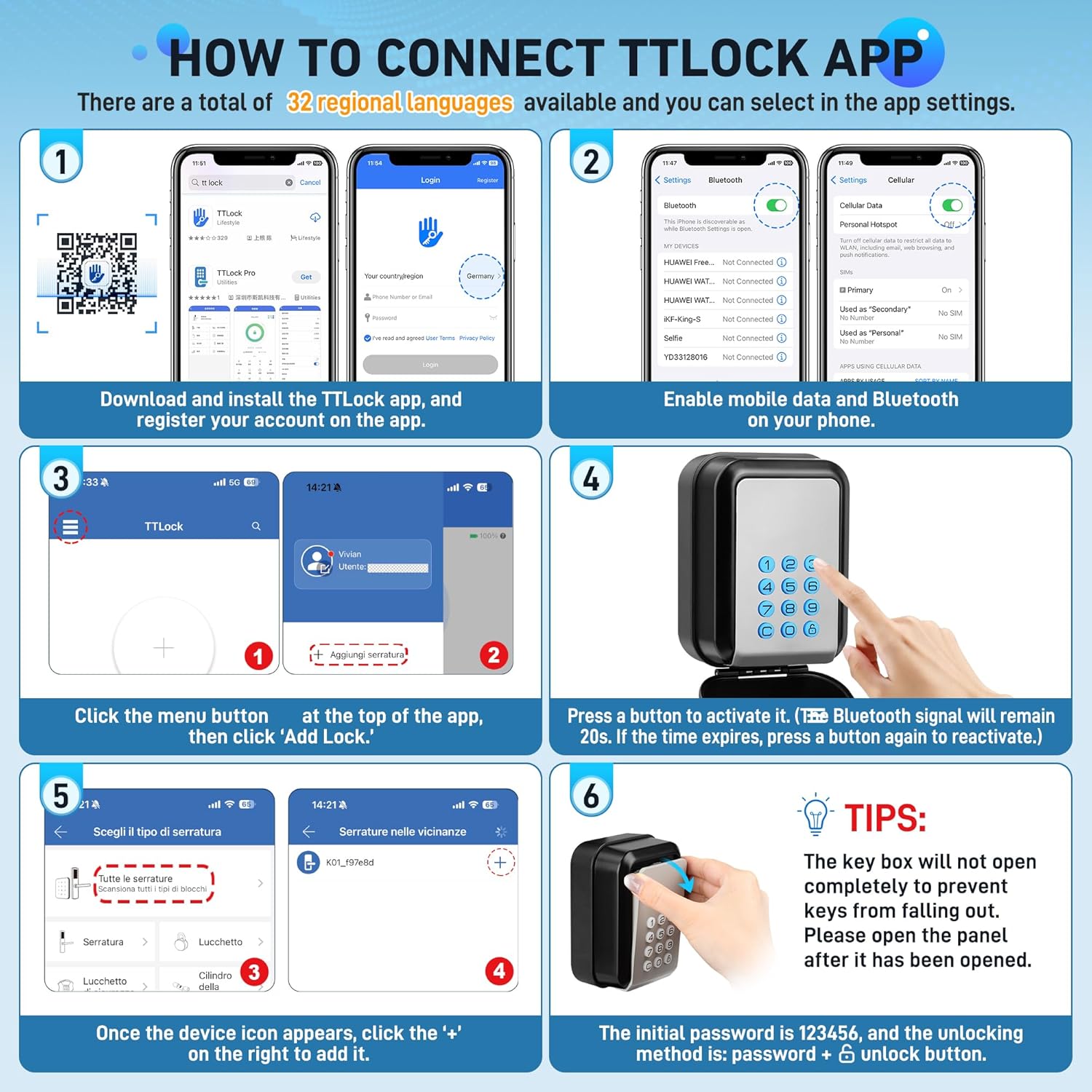
- Download and install the TTLock app from your device's app store.
- Register an account within the app.
- Ensure Bluetooth and mobile data are enabled on your smartphone.
- Open the TTLock app, click the menu button (usually three horizontal lines) at the top, then select 'Add Lock'.
- Press any button on the key box keypad to activate its Bluetooth signal. The signal will remain active for 20 seconds.
- Once the key box device icon appears in the app, click the '+' symbol next to it to pair and add the lock.
6.2 Unlocking Methods
- Manual Passcode Entry: Enter the correct password on the keypad, then press the unlock button.
- Bluetooth Unlock: Within approximately 4 meters, you can unlock the key box directly via the Bluetooth function in the TTLock app.
- Virtual Key or Password: For various users (e.g., employees, visitors, family, friends), you can flexibly set temporary, one-time, permanent, or repeatable passwords through the TTLock app.

6.3 Key Management with TTLock App
The TTLock app provides comprehensive administrative rights:
- Set access rights and specific timeframes for key box access.
- Assign access passwords or virtual keys to other users via email.
- Receive immediate notifications and records of lock openings.
- Monitor the status of the door lock and battery level at any time and from anywhere.
- All operations can be performed through the app, and the number of authorized users is unlimited.

7. Maintenance
7.1 Battery Replacement
When the TTLock app displays a low battery warning, replace the 3 AAA batteries promptly. If batteries are completely depleted, the key box can be temporarily powered via the emergency USB-C port to gain access and replace the batteries.
8. Troubleshooting
- Key Box Not Opening Completely: If the key box does not open fully after unlocking (designed to prevent keys from falling out), gently open the panel further manually.
- Initial Password: The default initial password is 123456. The unlocking method is: enter password, then press the unlock button.
- Low Battery: Refer to the Maintenance section for instructions on replacing batteries or using the emergency USB-C power.
- Bluetooth Connection Issues: Ensure Bluetooth is enabled on your phone and the key box is activated (by pressing a button on the keypad) and within range (approx. 4 meters).
9. Specifications
| Brand | ENONEO |
| Model Number | G22 |
| Color | Grey |
| Product Dimensions | 5 x 8 x 10 cm |
| Weight | 510 g |
| Material | Zinc-Aluminum Alloy, ABS |
| Waterproof Rating | IP65 |
| Mounting Type | Wall Mount |
| Special Features | TTLock App Control, Bluetooth Unlock, Multiple Passcode Types, Real-time Records, Battery Level Monitoring, Emergency USB-C Power |
10. Warranty and Support
For warranty information, technical support, or any product-related inquiries, please refer to the product packaging or contact ENONEO customer service directly. Contact details can typically be found on the manufacturer's website or the product's purchase platform.