
1. Product Overview
The Dell 16 Laptop DC16250 is a compact 16-inch laptop designed for productivity and entertainment. It features a 16:10 FHD+ Touch Display, an Intel Core 5 120U Processor, 16GB DDR5 RAM, and a 512GB SSD. This laptop runs on Windows 11 Home and includes Intel Graphics.
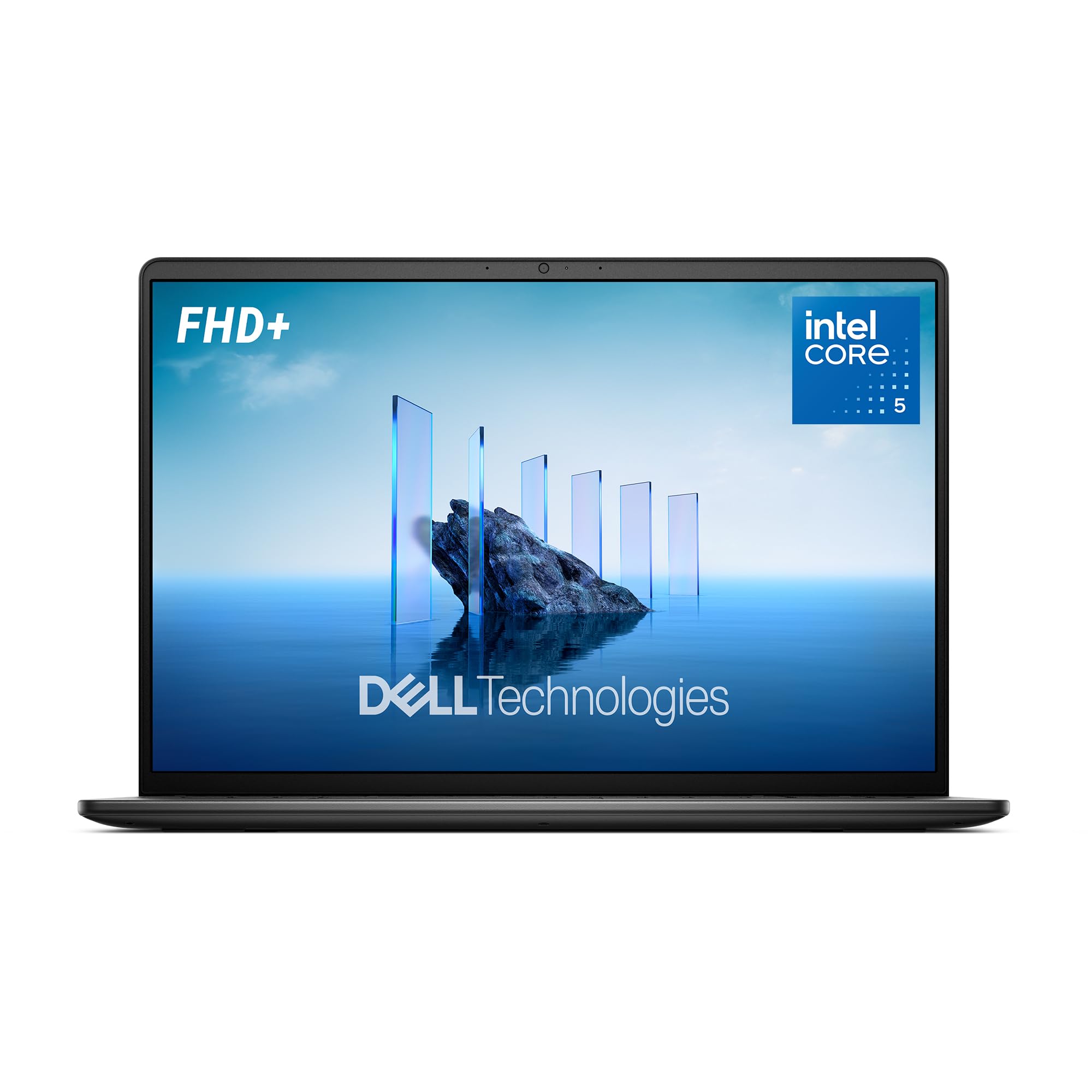
Image 1: The Dell 16 Laptop DC16250, showcasing its sleek design and 16-inch display.
Key Features:
- Edge-to-edge Clarity: 16-inch FHD+ Touch Display with a 16:10 aspect ratio for an immersive viewing experience.
- All-day Comfort: Dell ComfortView Plus technology reduces harmful blue light emissions.
- Efficient Performance: Powered by Intel Core 5-120U processor and Intel Graphics for productivity and entertainment.
- Enhanced Virtual Connection: HD camera with wide dynamic range and temporal noise reduction for clear video calls.
- Adaptive Thermals: Automatically adjusts power and thermals for efficient operation based on surface detection.
- Windows 11 Home: Modern operating system with multitasking tools and the Windows Copilot Key for AI assistance.
- Sustainable Design: Constructed with post-consumer recycled plastics.
2. Setup Guide
2.1 Unboxing and Initial Inspection
Carefully remove the laptop and all accessories from the packaging. Verify that all components listed in the 'What's in the Box' section are present and undamaged.
- Dell 16 Laptop DC16250
- 65 Watt AC Adapter
- Power Cord
- Documentation
2.2 Powering On and Initial Configuration
- Connect the 65 Watt AC Adapter to the laptop's power jack and then to a power outlet.
- Open the laptop lid. The system may power on automatically. If not, press the power button located on the keyboard.
- Follow the on-screen instructions to complete the initial Windows 11 setup, including language selection, network connection, and user account creation.
- Register your product with Dell for warranty and support services.
3. Operating Instructions
3.1 Display and Visuals
The 16.0-inch FHD+ Touch Display offers a resolution of 1920x1200 pixels with a 16:10 aspect ratio. This provides more vertical screen space, ideal for documents and multitasking. The touchscreen functionality allows for intuitive interaction with Windows 11.

Image 2: The Dell 16 Laptop showcasing its expansive edge-to-edge display for clear visuals.
Dell ComfortView Plus: This feature is integrated to reduce harmful blue light emissions, ensuring eye comfort during extended use without compromising color accuracy.

Image 3: A user comfortably viewing the Dell 16 Laptop, highlighting the ComfortView Plus feature for reduced eye strain.
3.2 Performance and Multitasking
Equipped with an Intel Core 5 120U Processor and 16GB DDR5 RAM, the laptop delivers smooth performance for everyday tasks, business applications, and entertainment. The 512GB SSD ensures fast boot times and quick application loading.

Image 4: An overhead view of the Dell 16 Laptop, illustrating its core specifications: Intel Core 5 120U Processor, 512GB M.2 PCIe NVMe SSD, 16GB DDR5 RAM, and Intel Graphics.
3.3 Connectivity
The laptop offers various connectivity options:
- USB Ports: Includes USB Type-C with Power Delivery 3.2 (10Gbps) & DisplayPort 1.4, and two USB 3.2 Gen 1 Type-A ports.
- HDMI: One HDMI 1.4 port for external display connections.
- Audio: Universal Audio Jack for headphones and speakers.
- Wireless: Wi-Fi 6 (802.11ax) and Bluetooth 5.3 for high-speed wireless connections.
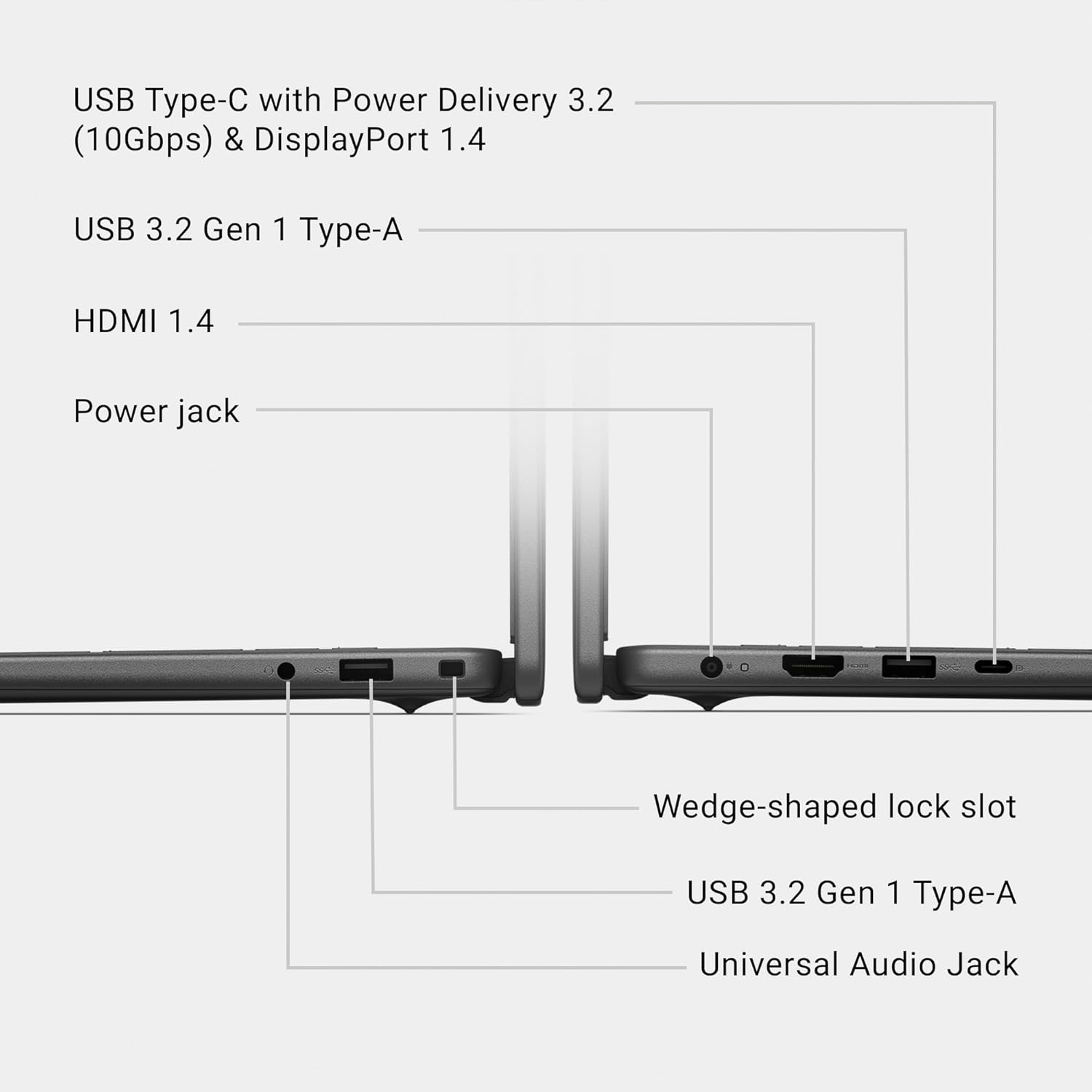
Image 5: Detailed view of the Dell 16 Laptop's ports, including USB Type-C, USB Type-A, HDMI, and Universal Audio Jack.
3.4 Webcam and Audio
The integrated HD camera features wide dynamic range and temporal noise reduction, ensuring clear and sharp images during video conferences, regardless of lighting conditions. The laptop is equipped with two tuned speakers for audio output.

Image 6: The Dell 16 Laptop showing a video call in progress, highlighting its HD camera capabilities for virtual connections.
3.5 Keyboard and Touchpad
The laptop features a standard, full-size backlit keyboard with a QWERTY layout and a number pad for comfortable typing. The touchpad is responsive and supports multi-touch gestures.
3.6 Windows 11 and Copilot Key
Windows 11 Home provides a modern interface and powerful multitasking tools. The dedicated Windows Copilot Key offers instant access to an AI assistant for quick answers and solutions.

Image 7: The Dell 16 Laptop displaying the Windows Copilot interface, accessible via the dedicated Copilot Key.
3.7 Adaptive Thermals
The laptop incorporates adaptive thermal technology that senses when it's on a stable surface. It then adjusts its power and thermal settings to operate more efficiently, preventing overheating and maintaining optimal performance.
4. Maintenance
4.1 Cleaning the Laptop
- Use a soft, lint-free cloth to clean the screen. For stubborn smudges, lightly dampen the cloth with water or a screen cleaner.
- Wipe the keyboard and touchpad with a soft, dry cloth. Use compressed air to remove debris from between keys.
- Ensure all vents are clear of dust and obstructions to maintain proper airflow and cooling.
4.2 Software Updates
Regularly check for and install Windows updates and Dell driver updates to ensure optimal performance, security, and compatibility. Access Windows Update through the Settings menu.
4.3 Battery Care
To prolong battery life, avoid extreme temperatures and fully discharging the battery frequently. For long-term storage, charge the battery to about 50% and store the laptop in a cool, dry place.
5. Troubleshooting
5.1 Power Issues
- Laptop not turning on: Ensure the AC adapter is securely connected to both the laptop and a working power outlet. Check the power indicator light.
- Battery not charging: Verify the AC adapter is functioning correctly. Try a different outlet. If the issue persists, contact Dell support.
5.2 Display Problems
- No display: Connect an external monitor to check if the issue is with the laptop's screen. Restart the laptop.
- Flickering or distorted screen: Update display drivers. Adjust display resolution and refresh rate in Windows settings.
5.3 Connectivity Issues
- Wi-Fi not connecting: Ensure Wi-Fi is enabled. Restart your router and modem. Check network settings in Windows.
- Bluetooth device not pairing: Ensure Bluetooth is enabled on both devices. Make sure devices are in pairing mode and within range.
5.4 General Performance
- Slow performance: Close unnecessary applications. Check for malware. Ensure sufficient free space on the SSD.
- System freezing: Restart the laptop. Check for conflicting software or driver issues.
6. Specifications
| Feature | Description |
|---|---|
| Brand | Dell |
| Model Name | Dell 16 DC16250 Laptop |
| Screen Size | 16 Inches |
| Display Resolution Maximum | 1920x1200 Pixels (FHD+) |
| Touch Screen Type | Capacitive |
| CPU Model | Intel Core 5 120U |
| RAM Memory Installed Size | 16 GB DDR5 (5200 MHz) |
| Hard Disk Size | 512 GB SSD |
| Graphics Coprocessor | Intel Graphics (Integrated) |
| Operating System | Windows 11 Home |
| Wireless Technology | Bluetooth 5.3, Wi-Fi 6 (802.11ax) |
| Total USB Ports | 3 (1x USB Type-C, 2x USB 3.2 Gen 1 Type-A) |
| HDMI Ports | 1 |
| Webcam Capability | Yes (HD Camera) |
| Keyboard Description | Standard, Backlit, QWERTY with Numpad |
| Item Weight | 4.15 Pounds |
| Item Dimensions L x W x Thickness | 9.82"L x 14.05"W x 0.75"Th |
7. Warranty and Support
The Dell 16 Laptop DC16250 comes with a 1-Year Basic Onsite Service after remote diagnosis with Hardware-Only Support. This service provides support when and where you need it, with Dell technicians coming to your location if an issue covered by the Limited Hardware Warranty cannot be resolved remotely.

Image 8: Information regarding Dell's 1-Year Onsite Service after remote diagnosis.
Additional Support:
- Access to Dell hardware support.
- PC repairs made easy – at home, work, or school.
- SupportAssist, your personal Dell IT team inside your PC.

Image 9: Details on the comprehensive onsite support provided by Dell Technologies.
Official Product Video:
Video 1: An official product video from Dell Marketing USA, LP, showcasing the Dell 16 Laptop. This video provides a visual overview of the laptop's features and design.


